Luminoguru

Top 10 Benefits of Outsourcing Web Development for Your Business

Most businesses that struggle with web development are not struggling because the technology is too hard. They are struggling because they are trying to solve a talent problem with a hiring strategy that simply does not scale fast enough.

Recruiting a senior developer takes three to four months on a good day. Salaries have gone up. Good people have options. And by the time someone is onboarded and productive, the market window you were trying to hit has either closed or your competitor got there first.

That is the real problem outsourcing solves. Not just cost – speed, access, and the ability to build without letting recruitment become the thing that holds the business back.

Global IT outsourcing is heading toward $1.22 trillion by 2030. The businesses driving that number are not cutting corners. They are making a deliberate strategic choice to build faster, with better talent, and with less internal overhead. This guide breaks down exactly why that choice makes sense, and what the benefits look like in practice.

What Is Web Development Outsourcing?

Before getting into the benefits, let us be clear on what this actually means – because “outsourcing” gets used loosely and that creates confusion.

Web development outsourcing means partnering with an external team to design, build, and maintain your website or web application. Instead of hiring and managing internal staff, you bring in specialists who are accountable for delivery. You keep ownership of the product direction and business decisions. They handle the technical execution.

Depending on the scope, this typically includes frontend development using frameworks like React or Vue, backend development using Node.js or Python, full-stack web application builds, e-commerce platforms, SaaS products, custom web applications, and ongoing QA and maintenance after launch.

The key distinction that matters: outsourcing is not the same as hiring a freelancer for a one-off task. A proper outsourcing engagement means a team that is accountable for outcomes, not just hours.

3 Reasons Businesses Are Outsourcing Web Development Right Now

The shift toward outsourcing is accelerating for specific, practical reasons. These three are the ones that come up consistently.

The Talent Market Is Genuinely Difficult

The demand for skilled web developers continues to outpace supply in most markets. When qualified developers have multiple offers on the table and salaries reflect that competition, hiring locally becomes a slow, expensive process that does not always end in the right hire.

Outsourcing removes that constraint. Instead of competing in a local talent market, you access a global pool of vetted specialists and put together the exact team your project needs.

In-House Development Costs More Than Most Budgets Assume

A developer’s salary is the visible line item. The real cost includes employer payroll contributions, benefits, equipment, software licences, management time, and the overhead of maintaining a team through periods where workload varies.

A developer on a $100,000 salary typically costs 1.3 to 1.5 times that figure in total employment cost. Over a full year, that adds up faster than most initial budgets account for. Outsourcing converts most of that fixed overhead into a variable cost that scales with your actual project needs.

Speed to Market Has Become a Real Competitive Factor

In most markets, the business that ships first gains an advantage that is genuinely hard to close later. Every month spent in recruitment is a month a competitor is iterating on their product.

Outsourcing compresses that timeline significantly. A capable external team can go from briefing to active development within days of a contract being signed, compared to months of hiring, onboarding, and ramp-up time for an internal hire.

The Top 10 Benefits of Outsourcing Web Development

1. Real Cost Savings Without Cutting Quality

The cost difference between building in-house and outsourcing is not marginal. Developer hourly rates vary significantly by region:

Region Typical Hourly Rate
North America $100 – $250 per hour
Western Europe $80 – $200 per hour
Eastern Europe $30 – $70 per hour
Latin America $35 – $75 per hour
India and Southeast Asia $25 – $60 per hour

Businesses that work with offshore or nearshore development partners consistently save 30 to 60 percent compared to building the same product with an equivalent in-house team. On a $150,000 project, that is a difference of $45,000 to $90,000 – real money that can go toward product development, marketing, or the next phase of the business.

The important distinction: lower cost does not mean lower quality. Established development partners maintain quality through structured processes, dedicated QA, and code review practices that many internal teams do not have in place.

Our software development services are built around delivering enterprise-quality work at rates that make sense for businesses at every stage, without compromising on what gets shipped.

2. Access to Global Talent That Your Local Market Cannot Match

Your local hiring market is a subset of the global talent pool. For most businesses, it is a fairly small subset when you are looking for specific technical skills.

Niche capabilities like AI-integrated web applications, real-time data architectures, complex API ecosystems, or specialized compliance requirements are not evenly distributed across geographies. When you hire locally, you work with whoever happens to be available in your city. When you outsource, you work with the specific specialist your project actually needs.

A business building a healthcare web application that requires both compliance expertise and a specific technical stack may simply not find that combination within reasonable distance. An established outsourcing partner with cross-industry experience can assemble the right team regardless of geography.

This matters for the quality of the final product. A team that has built similar systems across multiple industries brings pattern recognition and problem-solving experience that a team encountering the domain for the first time cannot match.

Our mobile app development services reflect this – we bring experience from projects across healthcare, logistics, e-commerce, fintech, and more to every engagement we take on.

3. Faster Launch Without Compromising the Build

Recruiting and onboarding an in-house developer takes a minimum of two to four months. That is before the first line of code is written and before the new hire has enough context to be fully productive.

An outsourced team can be briefed on requirements and actively building within days of project kickoff. For businesses with time-sensitive launches – a product tied to a market window, a platform needed before a specific event, or a system that supports a contract already signed – that two to four month difference is not a minor convenience. It is often the difference between hitting the target and missing it entirely.

4. Scale Up or Down Based on What the Project Actually Needs

Development workloads are not linear. A launch phase needs a larger team. A maintenance phase after launch needs a smaller one. Feature sprints need specific specialists who may not be needed between those sprints.

An in-house team is sized for an average, which means you are either overstaffed during quiet periods or understaffed during busy ones. Both are expensive in different ways.

Outsourcing lets you adjust the team to match what the project actually needs at each phase. Add specialists for a complex build. Scale back to a smaller maintenance team after launch. Bring in specific expertise for a new feature without hiring someone full-time for a six-week need.

That flexibility compounds in value over the life of a product, particularly for businesses where development priorities shift quarter to quarter.

5. Proven Delivery Frameworks From Day One

An experienced software development partner brings more than just engineers. They bring the operational infrastructure around development that most internal teams spend months building.

That includes sprint management, code review processes, QA protocols, security frameworks, deployment pipelines, and documentation practices. All of it is already functioning and tested. You plug into a system that has been refined across dozens or hundreds of projects rather than building it from scratch alongside the product itself.

A team that has shipped fifty e-commerce platforms has already encountered and solved the architectural edge cases that a first-time build will face. That accumulated experience reduces risk, shortens timelines, and lifts the ceiling on quality from the first sprint of the project.

6. Your Internal Team Focuses on What Actually Grows the Business

Leadership attention is a finite resource. Every hour spent managing technical decisions, reviewing code, or coordinating a development team is an hour not spent on strategy, customer relationships, sales, or the decisions that drive revenue.

Outsourcing creates a clean separation. Technical execution is handled by a team that is accountable for delivery. Your internal team focuses on the business priorities that compound over time. That separation consistently produces better outcomes in both directions – the product benefits from dedicated technical focus, and the business benefits from dedicated leadership focus.

7. Development That Does Not Stop When Your Office Does

Time zone differences are often framed as a coordination challenge. Managed properly, they function as a delivery advantage.

A business in the UK or US working with a development team in India or Eastern Europe regularly starts the workday with completed work ready for review. Bugs reported in the evening are resolved by morning. Features progressed overnight are ready for feedback at the start of the business day.

For products with uptime requirements or user-facing systems that need fast issue resolution, 24-hour coverage from a distributed team is a meaningful operational advantage over a single-shift internal team.

8. Risk Is Shared and Governed, Not Just Absorbed

Every development project carries risk. What changes when you outsource to an established partner is how that risk is managed and distributed.

A reputable outsourcing partner brings dedicated QA and testing coverage, version control practices, data protection agreements, and structured escalation processes. These come as part of the standard engagement, not as optional add-ons.

They have already navigated the integration failures, security gaps, and scope management challenges that tend to derail first-time builds. Your project benefits from that experience without having to generate it internally. The contract structure also provides a level of accountability and recourse that informal internal arrangements often lack.

9. No Single-Point-of-Failure Dependency on Specific Hires

In-house development creates a specific vulnerability: when a key developer leaves, the project stops while the hiring process starts over. A mid-project departure can set a timeline back by months and add significant unplanned cost.

Outsourcing removes that exposure. The vendor manages their own staffing, handles replacements without disrupting the project timeline, and maintains delivery continuity regardless of what happens on their side. From your perspective, the engagement continues smoothly.

This continuity benefit is particularly significant for businesses on fixed timelines – a compliance deadline, a product launch date, or a contractual commitment that cannot slip because of an internal staffing change.

10. A Technical Perspective That Improves the Product

Internal teams develop habits. They default to familiar patterns, established tools, and approaches that worked on previous projects. That consistency has value. It also creates blind spots.

An outsourcing partner who has worked across multiple industries and tech stacks brings a broader frame of reference. They have seen what works in contexts your team has not encountered. They have encountered the failure modes that are not obvious until you have seen them happen.

That breadth shows up in better architectural decisions at the start of the project, fewer costly pivots mid-build, and solutions that hold up better as the product scales. Our UI/UX design services and cloud application development reflect this cross-industry perspective – built from experience across projects where we have already solved the problems that would otherwise slow down a first-time build.

Types of Web Development Outsourcing

Understanding the different structures helps you choose the right model for your project and budget.

By Geography

Model What It Means Typical Rate Range
Onshore Same country as your business $90 – $250 per hour
Nearshore Nearby region, similar time zone $30 – $75 per hour
Offshore Distant country, different time zone $18 – $65 per hour

Onshore offers the easiest communication and full time zone alignment. Offshore offers the most significant cost savings. Nearshore sits in the middle on both counts. The right choice depends on how much real-time collaboration the project requires and how much the cost difference matters relative to your budget.

By Engagement Model

Dedicated team: A full team works exclusively on your product. They operate as an extension of your business. Best for long-term development where consistency across the codebase and product knowledge accumulation matters.

Staff augmentation: Individual specialists join your existing internal team to fill specific skill gaps or add capacity during a busy period. Best for short-term needs or when you want to maintain internal ownership while accessing external expertise.

Project-based (full-cycle): The outsourcing partner owns the project end-to-end – from discovery and design through to development, testing, deployment, and post-launch support. Best for businesses with a clear product vision but limited internal capacity to manage technical execution.

Outsourcing vs. In-House: An Honest Comparison

Both approaches can work. They are not equal in every situation. Here is how they compare across the factors that actually matter:

Factor Outsourcing In-House
Cost 30 to 60% lower in most cases High fixed overhead including salary, benefits, and equipment
Time to Start Team ready within days 2 to 4 months to recruit and onboard
Scalability Scale up or down based on project phase Slow and expensive to adjust team size
Talent Access Global pool of vetted specialists Limited to local market availability
Risk Shared with vendor, backed by contract Your business absorbs all project risk
Quality Assurance Structured QA built into the engagement Requires internal QA setup and investment
Speed to Market Faster launch, no recruitment delays Slower delivery due to hiring timelines
Continuity Vendor manages staffing and backfills Dependent on individual hires staying put

The clearest case for outsourcing: time-sensitive projects, niche technical requirements, variable workloads, or situations where recruitment timelines are genuinely a constraint on what the business can build.

The clearest case for in-house: highly sensitive proprietary systems where external access is not acceptable, products that require deep, continuous knowledge accumulation over years, or situations where the development team needs to be tightly integrated with day-to-day business operations.

Most businesses end up with a hybrid – a small internal team that maintains product ownership and direction, combined with an outsourcing partner that handles execution and provides specialist capability on demand.

How Much Does Outsourcing Web Development Cost?

Cost depends on three variables: the scope of the project, the geographic model, and the engagement structure.

Pricing Models

Fixed price: Scope and cost are agreed upfront. Best for projects with well-defined requirements that are unlikely to change significantly during the build. Provides cost certainty but less flexibility if requirements evolve.

Time and materials: You pay for actual hours worked. Best for projects where requirements are likely to evolve or where the scope is not fully defined at the start. More flexible, less cost certainty.

Dedicated team retainer: A monthly fee for an exclusive team. Best for long-term product development where consistency and accumulated knowledge matter more than project-by-project flexibility.

Typical Project Cost Ranges

A simple informational website with standard content management capability typically costs between $8,000 and $20,000. A custom web application with specific business logic and integrations typically runs between $20,000 and $50,000. A SaaS platform or enterprise-grade web system with complex infrastructure and multi-user capabilities typically costs between $50,000 and $150,000 or more depending on scope.

One practical note: budget a contingency of 15 to 20 percent above your base estimate. Scope adjustments happen on almost every project. A buffer keeps the engagement moving smoothly rather than creating friction every time a requirement evolves.

What to Look for in a Web Development Outsourcing Partner

Choosing the right partner matters as much as deciding to outsource. These are the criteria that actually predict a good outcome:

Relevant project experience. Portfolio examples from projects similar to yours in scope, industry, or technical complexity. Generic capability claims matter less than specific evidence of doing work like yours.

Transparent communication. A partner who asks hard questions at the start and tells you when something is not realistic is more valuable than one who agrees to everything. Communication quality during the sales process is a reliable preview of communication quality during the project.

Structured QA built into delivery. Testing should be part of the standard engagement, not an optional extra. Ask specifically how QA is handled and who is accountable for it.

Clear post-launch support. An app or web platform needs ongoing attention after launch. Platform updates, security patches, and feature development based on real user feedback all require continued engineering support. Confirm the support model before signing.

Honest pricing. A detailed, itemized quote that breaks down what is included gives you something to compare meaningfully. A low total number without clear scope is a risk, not a deal.

Final Thoughts

Outsourcing web development is not a shortcut and it is not a compromise. Done properly, it is a deliberate engineering strategy that gives businesses access to better talent, faster delivery, and more flexibility than most internal hiring models can provide.

The businesses that get the most out of it share a few things in common. They define what they need clearly before approaching a partner. They treat the relationship as a long-term engagement rather than a transactional handoff. And they stay involved in the product direction while letting the development team focus on the technical execution.

The businesses that struggle with outsourcing usually under-invest in the definition phase, choose based on cost alone without evaluating quality and fit, or treat the external team as separate from the product rather than as an extension of it.

At Luminoguru, we work with businesses that want a development partner who is accountable for what gets shipped, not just what gets built. From initial discovery through to post-launch support, we bring the technical depth and delivery discipline that turns a good product idea into something real.

If you are exploring whether outsourcing web development makes sense for your next project, we are ready to have that conversation.

Frequently Asked Questions

What are the main benefits of outsourcing web development?
The core benefits are cost savings of 30 to 60 percent compared to equivalent in-house teams, access to specialist talent that local hiring markets cannot reliably supply, faster time to market, the ability to scale the team up or down based on project phase, built-in quality assurance, and the ability to keep your internal team focused on business growth rather than technical execution.

Is outsourcing web development safe for my business data and IP?
Yes, when the right safeguards are in place. Any serious outsourcing engagement should be backed by a signed NDA before any project details are shared, a contract that clearly assigns IP ownership to you as the client, and data handling practices that meet the standards relevant to your industry and region. Ask specifically about these protections during your evaluation of any partner.

What is the difference between offshore, nearshore, and onshore outsourcing?
Offshore means working with a team in a distant country, typically in a significantly different time zone. It offers the most cost savings and requires the most deliberate communication planning. Nearshore means working with a team in a nearby region with time zone overlap. Onshore means working with a team in your own country. It is the most expensive but the easiest to coordinate.

How do I choose the right outsourcing partner for web development?
Start with portfolio review – look for projects similar to yours in scope and industry. Read verified reviews on independent platforms rather than relying only on testimonials on the company’s own website. Evaluate how they communicate during the sales process as a preview of how they will communicate during delivery. Ask how they handle scope changes, technical blockers, and post-launch support before committing.

How long does a typical outsourced web development project take?
A simple informational website can take four to eight weeks. A custom web application with specific business logic typically takes three to six months. An enterprise SaaS platform can take six to twelve months or more. Timeline accuracy depends heavily on how clearly requirements are defined before development begins.

What is the difference between outsourcing and staff augmentation? Outsourcing means delegating an entire project to an external team who own delivery accountability. Staff augmentation means adding individual specialists to your existing team who you manage directly. Both access external talent. The key difference is who owns accountability for the outcome.

How much should I budget for outsourcing web development?
A simple website typically starts from $8,000. A custom web application usually runs between $20,000 and $50,000. A SaaS or enterprise platform can cost $50,000 to $150,000 or more depending on scope. Always add a 15 to 20 percent contingency to your base estimate to account for scope refinements during the project.

Best Mobile App Development Companies in Abu Dhabi

Finding the right mobile app development company in Abu Dhabi is not as simple as running a quick search and picking the first name that comes up. The stakes are too high for that. A poorly chosen development partner means missed deadlines, blown budgets, apps that need to be rebuilt from scratch, and months of lost time that you cannot get back.

Abu Dhabi’s technology sector has grown significantly over the past few years. The emirate is investing heavily in digital infrastructure, smart government services, and private sector innovation as part of its broader economic diversification strategy. That means more businesses than ever are looking for reliable development partners — and more companies than ever are claiming to be one.

This guide cuts through the noise. We have put together a list of the best mobile app development companies in Abu Dhabi based on what actually matters: technical capability, industry experience, delivery track record, and the ability to build products that work in the real world, not just in a presentation.

What to Look for Before Hiring a Mobile App Development Company

Before getting into the list, it is worth being clear about what actually separates a good development company from one that sounds impressive until the project goes sideways.

A portfolio of real, shipped products. Any company can show concept designs and mockup screens. What matters is apps that are live, used by real people, and working as intended. Ask to see actual products, not just visual designs.

Relevant industry experience. Building a healthcare app requires a different understanding than building a logistics platform or an e-commerce tool. A company with experience in your specific industry will make better decisions at every stage of the build.

Clear communication and honest timelines. The development companies that consistently deliver on time are the ones that ask hard questions at the start, document requirements properly, and tell you when something is not realistic rather than agreeing to everything and then missing deadlines.

Technical breadth that matches your needs. Cross-platform frameworks like React Native and Flutter are excellent for most projects. Native iOS and Android development makes sense for specific use cases. A good development partner will recommend the right approach for your product, not the one that is easiest for them to bill.

Post-launch support. An app is not a one-time delivery. Platform updates, security patches, user feedback, and new features all require ongoing engineering attention after launch. Make sure any company you consider has a clear post-launch support model.

With those criteria in mind, here are the best mobile app development companies in Abu Dhabi worth considering.

1. Luminoguru – Top Mobile App Development Company in Abu Dhabi

When it comes to building mobile applications that genuinely deliver business results, Luminoguru stands out as one of the strongest choices for businesses in Abu Dhabi and across the UAE.

Luminoguru brings together deep technical expertise and real-world delivery experience across a wide range of industries including healthcare, e-commerce, logistics, real estate, food delivery, and fintech. What separates them from many development companies is that they approach every project as a business problem first and a technology problem second. The result is apps that are built to perform, designed to be used, and structured to scale as the business grows.

Their service offering covers the full development lifecycle. From initial product discovery and UI/UX design through to mobile app development, software development, QA and testing, and post-launch maintenance, businesses get a single accountable partner rather than having to coordinate multiple vendors across different parts of the project.

For businesses that want to incorporate artificial intelligence into their products, Luminoguru’s AI development services and generative AI development services make them one of the few companies in the region that can genuinely deliver on the AI capabilities that are increasingly defining competitive mobile products.

They also offer MVP development for startups and businesses that want to validate their product idea with real users before committing to the full development budget. This approach consistently saves businesses from the expensive mistake of building a fully featured product before understanding what users actually want.

Their cloud application development services ensure the backend infrastructure powering any mobile app is built for performance, reliability, and the ability to scale without requiring expensive rebuilds later.

Key strengths:

  • Full-cycle mobile app development across iOS, Android, and cross-platform
  • Strong AI and generative AI integration capabilities
  • Proven delivery across healthcare, logistics, e-commerce, real estate, and more
  • MVP-first approach that reduces risk and validates before full investment
  • Transparent communication and honest project timelines
  • Post-launch support and continuous improvement

Best suited for: Startups, SMEs, and enterprise businesses in Abu Dhabi and across the UAE looking for a reliable, technically strong development partner with a track record of shipping real products.

Website: luminoguru.com

2. Appinventiv

Appinventiv is a well-established mobile app development company with a presence across the UAE and a significant global client base. They have worked with both enterprise clients and growth-stage startups across industries including fintech, healthcare, retail, and on-demand services.

Their development team covers iOS, Android, and cross-platform development, and they have built a reputation for technically complex projects that require significant backend engineering alongside the client-facing mobile experience. Their portfolio includes products that have gone through significant scale, which is a useful indicator of their ability to build systems that hold up under real usage.

For businesses in Abu Dhabi looking at larger, enterprise-grade projects, Appinventiv is worth evaluating alongside other established companies on this list.

3. Techugo

Techugo has built a presence in the UAE market with a focus on mobile app development for both consumer and enterprise clients. They cover iOS and Android development and have delivered projects across retail, healthcare, education, and on-demand service verticals.

Their team handles end-to-end development from design through to deployment and maintenance, and they have built a reasonable portfolio of products for clients in the Gulf region. For businesses in Abu Dhabi looking for a development partner with regional market familiarity, Techugo is a name that appears consistently in this space.

4. Hyperlink InfoSystem

Hyperlink InfoSystem is one of the larger mobile app development companies operating in the UAE market with a broad portfolio across multiple industries. They have worked with clients across retail, healthcare, logistics, and enterprise software and have teams capable of handling projects at various scales.

Their strength is breadth – they cover mobile, web, IoT, AI, and blockchain development under one roof. For businesses with complex, multi-platform product requirements, that breadth can be valuable. For more focused mobile projects, evaluating whether their specialization matches your specific needs is worth the additional due diligence.

5. Octal IT Solution

Octal IT Solution has established a presence in the UAE and broader Gulf market with mobile app development services across iOS, Android, and cross-platform frameworks. They have worked with clients in real estate, e-commerce, logistics, and healthcare and bring a combination of technical development and design capability to their projects.

Their approach to project delivery follows a structured methodology with defined milestones and regular client communication. For businesses in Abu Dhabi that want a development partner with experience in the Gulf market specifically, Octal IT Solution is worth including in an evaluation.

6. ToXSL Technologies

ToXSL Technologies offers mobile app development services with a focus on custom solutions for SME and enterprise clients. They work across iOS, Android, and web development and have delivered projects in education, healthcare, logistics, and retail.

Their team works with both cross-platform and native development approaches and can handle projects from initial concept through to post-launch maintenance. For businesses in Abu Dhabi looking at mid-scale mobile projects with defined requirements, ToXSL is a company worth evaluating.

7. Brainvire Infotech

Brainvire Infotech brings enterprise-focused development capability to the UAE market with experience across mobile, web, e-commerce, and cloud infrastructure. They have worked with businesses in retail, manufacturing, healthcare, and financial services and have built a portfolio that spans custom mobile applications through to large-scale digital transformation projects.

For businesses in Abu Dhabi with complex existing systems that need to be connected to new mobile products, Brainvire’s integration experience is a genuine strength. Their track record with e-commerce platform development is also worth noting for businesses in retail and consumer goods.

8. Zealous System

Zealous System offers mobile and web application development with a portfolio spanning healthcare, education, e-commerce, and on-demand services. They work with both startup clients and established businesses and cover iOS, Android, and cross-platform development alongside backend and API development.

Their design and development teams work together through the project lifecycle, which tends to produce better integration between the visual experience and the underlying technical architecture than companies that treat design and development as completely separate engagements.

How to Choose the Right Company for Your Project

With a list of strong options available, the decision comes down to matching the right company to your specific project. Here is a practical framework for making that call.

Start with your project requirements, not the company’s marketing. Write down what you actually need – the platform, the core features, the timeline, the budget range, and any specific technical requirements like AI integration, IoT connectivity, or enterprise system integration. Use that as your filter before approaching anyone.

Request relevant portfolio examples. Ask each company on your shortlist to share examples of projects similar to yours – same industry, similar feature complexity, similar scale. A company with three relevant examples tells you more than one with fifty unrelated ones.

Talk to their previous clients. Any serious development company should be willing to connect you with clients from previous projects. A 15-minute conversation with someone who has already worked with them is worth more than any number of testimonials on a website.

Evaluate their discovery process. Before any code is written, a good development company should conduct a proper discovery phase – understanding your business goals, mapping the user experience, documenting technical requirements, and identifying risks. How thorough they are in this phase is a strong predictor of how well the project will be managed overall.

Get multiple detailed quotes. The lowest quote is rarely the best value. A detailed quote that breaks down exactly what is included – design, development, testing, integration, deployment, post-launch support – gives you something to compare meaningfully. A vague quote with a low total number is a red flag, not a good deal.

Assess communication quality from the first conversation. The quality of communication you experience during the sales process is a reliable preview of the communication you will experience during the project. Companies that are responsive, clear, and honest when they are trying to win your business tend to behave the same way when they are delivering it.

Why Abu Dhabi Businesses Are Investing in Mobile App Development

The business case for mobile app investment in Abu Dhabi is straightforward. Consumer behavior in the UAE skews heavily toward mobile – smartphone penetration is among the highest in the world, and users across all demographics conduct a significant share of their daily activities through mobile applications.

For businesses in retail, hospitality, logistics, healthcare, real estate, and government services, the gap between having a strong mobile presence and not having one is increasingly visible in customer acquisition, retention, and revenue. The businesses that invested in quality mobile products early are seeing the compounding benefit of that investment. The ones that delayed are now playing catch-up in a market where users have high expectations set by the best products available globally.

The Abu Dhabi government’s continued investment in smart city infrastructure and digital services also creates a strong enabling environment for mobile products – reliable connectivity, a tech-forward regulatory environment, and a population that is genuinely comfortable using digital services for everything from banking to healthcare to government transactions.

Final Thoughts

The right mobile app development company for your business is not necessarily the largest, the most recognized, or the cheapest. It is the one whose technical capabilities match your project requirements, whose experience is relevant to your industry, and whose way of working aligns with how you need to collaborate.

For most businesses in Abu Dhabi, Luminoguru offers the combination of technical depth, industry experience, and honest delivery that makes them the strongest starting point for a development conversation. Their track record across diverse industries and their genuine capability in AI and emerging technologies make them well positioned for the kind of products that will define competitive businesses in the UAE over the next few years.

Whatever company you ultimately choose, invest time in the evaluation process. The decisions made in the first few weeks of a development engagement – how requirements are defined, how timelines are set, how progress is communicated – have a disproportionate impact on the outcome of the entire project.

Frequently Asked Questions

How much does mobile app development cost in Abu Dhabi?
The cost depends significantly on the complexity of the app, the platforms it needs to support, and the features required. A focused MVP with core functionality typically starts from $20,000 to $50,000. A full-featured application with custom design, backend infrastructure, and integrations usually ranges from $50,000 to $150,000 or more. Getting a detailed, itemized quote from your development partner is the only way to get an accurate number for your specific project.

How long does it take to build a mobile app?
A well-scoped MVP typically takes 3 to 4 months from requirements to launch. A more comprehensive application with multiple integrations and advanced features usually takes 5 to 9 months. Timeline accuracy depends heavily on how well the requirements are defined before development begins.

Should I choose native or cross-platform development?
Cross-platform frameworks like React Native or Flutter are the right choice for most projects – they deliver strong performance at a lower cost than building separate native apps for iOS and Android. Native development makes more sense when the app needs deep access to device hardware or has performance requirements that exceed what cross-platform frameworks can handle.

What industries do mobile app development companies in Abu Dhabi specialize in?
The strongest companies in the Abu Dhabi market have experience across healthcare, real estate, logistics, e-commerce, food delivery, fintech, hospitality, and government services. When evaluating a development partner, prioritize experience in your specific industry over general claims of broad capability.

How important is post-launch support when choosing a development company?
It is critical. An app requires ongoing maintenance after launch – platform updates, security patches, bug fixes, and new features based on user feedback. A development company that treats launch as the end of the engagement is not the right long-term partner. Make sure the support model and its associated costs are agreed upon before the project begins.

Can Abu Dhabi development companies work with international clients and remote teams?
Yes. Most established development companies in Abu Dhabi work with clients across the GCC, wider Middle East, Europe, and beyond. Structured project management, regular video calls, and clear documentation make geography a manageable factor rather than a barrier.

How to Build a Professional Networking App Like LinkedIn

The professional networking market is one of the fastest-growing segments in tech right now. The market sits at over $65 billion today and is on track to cross $200 billion within five years, growing at more than 25% annually. That is not a niche opportunity. That is a structural shift in how professionals connect, find work, and build careers.

LinkedIn sits at the center of that shift with over a billion users, 65 million job seekers active every week, and more than 87% of recruiters using it to source candidates. Those numbers are genuinely impressive.

But here is the thing. Scale does not automatically mean satisfaction. And the fact that so many founders and enterprise leaders are asking how to build something better than LinkedIn tells you everything you need to know about the gaps that still exist.

The real answer is not to clone LinkedIn. It is to build something sharper, more focused, and more useful for a specific group of people that LinkedIn keeps letting down. That is exactly what this guide covers. The business case, the development process, the real costs, and the strategies that actually make money once you launch.

Whether you are a startup founder testing an idea or an enterprise leader who wants to build a focused talent network, this guide breaks down everything you need to know.

3 Reasons to Invest in Building a Professional Networking App

If you are going to pitch this to investors, a co-founder, or even yourself, you need a solid answer to one question: why now? The timing is not just good. It is genuinely compelling.

1. The Market Is Large and Still Growing Fast

The numbers are impressive, but they only tell one part of the story. The real driver is a permanent shift in how work happens. Remote work normalized working with people across different cities and countries. The freelance economy kept growing. Talent became truly global.

This means a professional networking platform no longer needs to be local to be useful, and it does not need to serve every industry to find a viable audience. Niche platforms built for specific professional communities consistently see higher engagement than general platforms because users share a common professional context. They are not scrolling past noise from people in unrelated industries. Every connection and every piece of content is relevant to their actual work.

2. LinkedIn Has Clear and Exploitable Gaps

Despite its scale, LinkedIn genuinely frustrates a significant share of its own users. Here is what that looks like in practice:

Recruiters scroll through piles of unqualified applications with no efficient way to filter candidates who actually match the role. Job seekers spend time in a feed that feels more like a highlight reel than a useful professional resource. Niche professionals like doctors, engineers, architects, and lawyers find the platform so broad that it stops being useful for their specific needs. Freelancers and small business owners struggle to build credibility without a well-known employer name behind them.

Every one of those frustrations is a real product opportunity. A professional networking app built around a specific industry, geography, or use case does not need to reach a billion users to be viable. It just needs to be the right tool for the right people.

3. AI Has Fundamentally Changed What Is Now Possible

Not long ago, building features like smart candidate matching, automated job recommendations, or real-time content personalization required a massive engineering team and a budget to match. That is simply not the case anymore.

AI development services have brought those capabilities within reach for focused, lean product teams. A modern networking app can now deliver smarter job matching based on actual skills, personalized feeds that improve with use, automated candidate screening that saves recruiters hours, and connection suggestions that feel genuinely relevant. For founders willing to invest in the right development partner, the competitive gap between what a new platform can offer and what LinkedIn offers has closed faster than most people realize.

How to Build an App Like LinkedIn: Step-by-Step Process

Building a professional networking app is a multi-phase project. Here is how experienced product teams approach it properly.

Step 1: Define Your Niche and Value Proposition

The biggest mistake founders make is trying to build “LinkedIn, but better.” That is not a value proposition. It is a comparison, and a vague one at that.

Instead, start with a sharper question: who is LinkedIn consistently letting down, and what would those people actually pay for if someone built a platform specifically for them?

Strong niches worth considering include vertical professional communities in healthcare, law, engineering, or creative industries; geographic markets where LinkedIn has low penetration or poor localization; enterprise-specific talent networks for large organizations that want a private, controlled professional community; and freelance or gig-focused communities that need more than a job board to manage their professional lives.

The answer to this question determines every feature decision, every cost estimate, and every revenue conversation that follows. Document it before anything else moves forward.

Step 2: Map Core Features and Prioritize Your MVP

Not every LinkedIn feature needs to be in version one. Resist that urge. An MVP development that focuses on the single most critical user need will reach the market faster and generate real feedback that shapes every decision after it.

Before listing features, ask three questions. What is the one thing the platform does that nobody else does for this specific audience? Which features are truly essential versus nice-to-have? And what can be built in a later phase once real demand is validated?

The goal is not to build everything. It is to build the right things first, learn quickly from real users, and then build more from a position of evidence rather than assumption.

Step 3: Choose a Technology Stack That Can Scale

The tech stack determines scalability, performance, and long-term maintenance cost. For a professional networking platform, experienced teams typically work with Node.js, Python, or Java for backend API development; React Native or Flutter for cross-platform iOS and Android mobile apps; React.js or Next.js for web; PostgreSQL for structured data with Elasticsearch for fast, filtered search; Redis for caching feeds and search results; and AWS, Google Cloud, or Azure for cloud infrastructure that scales during demand spikes.

The stack itself is well understood. The execution – sequencing the build correctly, integrating third-party tools without overcomplicating the architecture, handling edge cases before they become production problems – is where the real skill lives.

Step 4: Design for the User Experience First

Professional platforms live or die by onboarding. If users cannot build a compelling profile in under five minutes, they will not come back.

The right sequence is UX research before design, design before development, and real user testing before launch. Good UI/UX design at this stage means onboarding that feels effortless, a feed that surfaces relevant content from day one, search that returns useful results rather than just popular ones, and a visual language that feels credible and professional. Skipping any part of this process saves time in the short term and costs significantly more in the long term.

Step 5: Build, Test, and Iterate

Agile development in two-week sprints with regular demos keeps the build aligned with what actually matters as the project evolves. The backend covers user authentication, profile management, connection logic, feed generation, messaging, job listing management, and the admin tools needed to operate the platform.

The mobile app development side covers the interfaces users interact with every day – profile creation, feed browsing, job searching, messaging, and notifications. Both sides run in parallel, and both require the same level of engineering discipline.

When it comes to QA, there is no cutting corners. For a platform handling real professional data, thorough software testing services must cover functional testing across all core user flows, load testing to catch performance issues before they reach production, and security testing to protect user data and build trust from day one. Skip any of those and you will pay for it later – in user trust, not just engineering time.

Step 6: Launch, Measure, and Optimize

Launch is the beginning, not the end. Once the platform is live, track key engagement metrics every week. Collect qualitative feedback through in-app prompts. Ship meaningful improvements on a regular schedule. Double down on what is working and cut what is not.

The platforms that win long term are the ones that iterate fastest based on what real users actually do, not what they say they will do during research.

What Features Must Be Included in a Professional Networking App?

Feature decisions directly affect development cost and timeline, so being precise about what belongs in version one versus a later phase matters.

Core Features – The Non-Negotiables

Without these, the platform is not a professional networking app.

Feature What It Covers
User profiles Photo, headline, work history, education, skills, and professional bio
Connection or follow system Send, accept, and manage professional connections
Activity feed Posts, shares, comments, and likes from connections
Messaging Direct messaging between connected users with real-time delivery
Job listings Post and apply for jobs within the platform
Search and filters Find people, companies, and jobs by keyword, location, or industry
Notifications Real-time alerts for connection requests, messages, and activity
Authentication Email login, social sign-in via Google or Apple, two-factor authentication

Advanced Features – Phase Two and Beyond

Once the core platform is validated and growing, these features deepen engagement and open new revenue streams.

Feature What It Adds
AI-powered job matching Recommends relevant listings based on profile and behavior
Skill endorsements and recommendations Connections vouch for specific skills or write detailed recommendations
Company pages Business profiles with followers, job posts, and updates
Analytics dashboard Profile views, post reach, and application tracking for users and recruiters
Premium subscription tier Advanced search, expanded messaging, and enhanced visibility tools
Video introductions Short profile videos that add personality alongside credentials
Groups and communities Industry-specific spaces for discussion and peer networking

Optional Features for Niche Platforms

Depending on the specific audience, useful additions include event listings and RSVPs, resume builder and export tools, integrated learning or course content, and API connections to applicant tracking systems used by enterprise recruiters.

How Much Does It Cost to Build an App Like LinkedIn?

The cost to develop a professional networking platform varies significantly based on feature scope, platform choice, and team location. Here are realistic benchmarks:

Platform Type Cost in USD Timeline
Basic MVP – core networking and job board $30,000 – $60,000 3 to 4 months
Mid-Tier – AI matching, messaging, analytics $60,000 – $120,000 4 to 6 months
Full-Featured Enterprise Platform $120,000 – $200,000+ 6 to 9 months

These figures reflect what businesses can realistically expect to pay when working with an experienced development team. The range is wide because the scope can vary enormously – a focused MVP for one niche audience is a very different product from a full enterprise platform with AI, video, and compliance tooling.

What Factors Drive the Development Cost?

Understanding what moves the cost helps make smarter investment decisions at each phase.

Platform scope is the first major variable. Building for iOS only costs less than building for iOS, Android, and web simultaneously. Using React Native or Flutter for cross-platform development typically reduces mobile development cost by 30 to 40 percent compared to building separate native apps.

Feature complexity is the second. Real-time messaging adds $10,000 to $25,000 to a project. AI-powered recommendation systems add $20,000 to $50,000. Video calling integration adds $15,000 to $30,000. Each advanced feature carries its own infrastructure and engineering cost.

AI and machine learning features add 25 to 40 percent to base development costs on average, but the user value they deliver is disproportionately higher. Smart matching, content personalization, and automated screening are what turn a directory into a tool people actually rely on.

Third-party integrations including payment gateways, email delivery, and analytics platforms each add integration time. Budget $5,000 to $15,000 for these depending on quantity and complexity.

Security and compliance requirements are real line items. GDPR compliance for EU users adds $10,000 to $40,000 depending on scope. Enterprise security requirements add further cost but are non-negotiable for B2B adoption.

Team location can change the total budget by a factor of two or more. Development rates range from $25 to $50 per hour in South and Southeast Asia to $100 to $200 per hour in North America for comparable skill levels. Experience level matters more than rate – a team that gets it right the first time will almost always cost less than a cheaper team that creates technical debt.

Ongoing maintenance after launch should be budgeted at 15 to 20 percent of the initial development cost per year, covering bug fixes, security patches, platform updates, and iterative feature development.

How to Reduce the Cost Without Cutting What Matters

Start with a proper MVP. A focused MVP that covers only the features needed to validate the core value proposition costs 60 to 70 percent less than a full-featured platform and reaches real users dramatically faster. Real feedback from real users is the most valuable input any product team can have.

Use cross-platform frameworks. React Native and Flutter allow a single development team to build for both iOS and Android without maintaining two separate codebases. The performance tradeoff is minimal for most professional networking use cases.

Use existing tools for standard functions. Messaging infrastructure, payment processing, email delivery, and push notifications all have mature third-party solutions. Building these from scratch costs far more than integrating a proven service.

Define requirements in detail before development begins. Vague requirements lead to scope creep, which is one of the primary drivers of budget overruns on software projects. A detailed product specification document before engaging a development team saves significantly more than it costs.

Phase the feature roadmap. Build the MVP, launch it, generate early revenue or investment from the results, and fund subsequent phases from there rather than building everything upfront on pure capital.

How to Make Money From a Professional Networking App

Most successful platforms combine two or three of these revenue streams rather than depending on just one.

Premium subscriptions offer free access to core features and charge monthly or annual fees for advanced tools. The key is ensuring the premium tier solves real problems users care enough about to pay for, not just gating features they expect for free.

Recruiter and talent solutions are typically the highest-margin revenue stream for any platform with a meaningful professional user base. Companies pay for access to the user database, advanced candidate search filters, and direct outreach tools. This B2B stream is what drives most of LinkedIn’s actual profit.

Job posting fees charge employers per listing or as a monthly package. Pricing typically ranges from $50 to $500 per job post depending on visibility options and the platform’s audience size and quality.

Advertising through sponsored content, banner placements, or targeted messages to relevant users works best once the platform has a substantial and well-defined audience that advertisers want to reach.

Learning and courses built into or integrated with the platform monetize the platform’s relationship with users who want to build skills relevant to their professional community.

Affiliate partnerships with resume services, certification programmes, or HR software providers generate commission when users convert through the platform. Low operational overhead makes this a useful supplementary stream.

Industries With the Strongest Opportunity for Niche Platforms

Going head-to-head with LinkedIn on its own turf is a very difficult battle. Carving out a specific vertical is far more winnable. These industries have real, underserved professional networking needs right now.

Healthcare and clinical professionals deal with licensing, credentialing, locum work availability, and continuing education requirements that a general platform does not address. A verified, credential-aware platform built for this community would serve needs LinkedIn actively ignores.

Legal and compliance professionals work in a relationship-driven industry with specific confidentiality norms. A platform that respects those norms while supporting business development and peer knowledge sharing would fill a real gap.

Architecture, engineering, and construction professionals work on project-based engagements that require portfolio presentation, project collaboration tools, and RFP management that do not exist in any meaningful form on LinkedIn.

Creative industries including design, photography, film, and music need portfolio-forward profiles, project-based networking, and client relationship tools that LinkedIn was never designed to support.

Construction and skilled trades represent a massive, growing workforce that is almost entirely underserved by existing professional networking infrastructure, with limited localization, credential verification, or project-based work tools.

In any of these niches, a platform that genuinely serves the community does not need millions of users to be a viable, profitable business.

Challenges to Know Before You Start

Network effects work against you at the beginning. A professional networking platform is only as valuable as the people on it. Getting the first thousand active users is harder than getting the next ten thousand. The launch strategy needs as much planning as the product itself – community seeding, partnerships with industry associations, and targeted outreach to specific professional communities are all part of the plan, not afterthoughts.

Feed quality degrades without active engineering. As the user base grows and content volume increases, keeping the feed relevant requires continuous attention. A feed full of promotional posts and off-topic content is one of the fastest ways to lose daily active users.

Spam and fake profiles are a real operational problem. Every professional networking platform deals with this. Building verification tools, moderation workflows, and reporting mechanisms into the product from the start is far cheaper than adding them after spam becomes a user complaint.

Retention is harder than acquisition. Getting people to sign up is a marketing challenge. Getting them to come back every week is a product challenge. The features that drive long-term retention – a feed that improves, connections that are genuinely valuable, job matches that are actually relevant – need the same development priority as the features that drive sign-ups.

Final Thoughts

The professional networking market is growing faster than almost any other software category, and the window to establish a meaningful platform in an underserved vertical is genuinely open right now.

The platforms that succeed and the ones that do not usually come down to one thing: execution. Picking the right features for the right audience, building on an architecture that can actually scale, and being willing to iterate fast when real users give real feedback. That is what turns a good idea into a platform people keep coming back to.

To build an app like LinkedIn, you need a development team that understands both the product side and the business side – not just engineers who can write code, but people who have built platforms like this before and know where the expensive mistakes happen.

At Luminoguru, we help businesses design and build professional networking platforms from research to launch. If you are ready to start, or still working through what the right product looks like for your audience, we are ready to work through it with you.

Frequently Asked Questions

What is the minimum budget to build a professional networking app like LinkedIn? A functional MVP with core networking, job listings, and messaging typically requires a minimum of $30,000 to $60,000. Budgets below that range tend to result in significant feature compromises or technical debt that costs more to fix later. The exact figure depends on team location and experience, platform choice between iOS only or cross-platform, and feature scope and complexity.

How long does it take to build an app like LinkedIn?
A focused MVP takes 3 to 4 months from requirements to launch. A full-featured platform with AI matching, analytics, and enterprise integrations typically takes 6 to 9 months. Both timelines assume a well-scoped project, an experienced team, and efficient feedback cycles. Most delays come from scope changes mid-project or requirements that were not fully defined at the start.

Should I build a cross-platform app or separate native iOS and Android apps?
For most professional networking platforms, cross-platform development using React Native or Flutter is the right starting point. It delivers strong performance at 60 to 70 percent of the cost of building two separate native apps. Native development makes more sense when the app relies heavily on device-specific hardware features or when performance requirements go beyond what cross-platform frameworks can handle.

How do AI features improve a networking app?
AI-powered features create a noticeably better experience than rule-based systems in several specific ways: smarter job matching based on actual skills and behavior rather than keywords, personalized feeds that improve the more users engage, automated screening that saves recruiters significant time, and connection suggestions that feel genuinely relevant. Platforms with AI-driven personalization consistently see higher user retention than those without it. The key is that AI delivers the most value when built into the product architecture from day one, not added as an afterthought.

Can I launch in a specific industry vertical rather than build a general platform?
Yes, and for most founders this is genuinely the smarter approach. Competing with LinkedIn across every industry and every geography is extremely difficult. Building the best professional networking platform for a specific community is far more achievable and often more profitable at scale.

What is the difference between an MVP and a full professional networking platform?
An MVP includes only the features needed to test the core value proposition with real users – typically profiles, connections, job listings, and basic messaging. A full platform builds on that with AI matching, analytics, video, premium subscriptions, company pages, and enterprise integrations. The right approach is always to launch lean, learn from what real users actually care about, and then invest in the features that genuinely move retention and revenue.

What is the biggest mistake founders make when building a professional networking app?
Trying to compete with LinkedIn on every front simultaneously. The platforms that succeed in this space go narrow first – one specific audience, one clear value proposition, one focused MVP – and expand from a position of proven value rather than assumed demand.

How Much Does It Cost to Build a Wearable Fitness App in the UAE?

Building a wearable fitness app in the UAE costs between AED 150,000 and AED 900,000 – and can go higher for enterprise-grade platforms with AI coaching, multi-device support, and healthcare integrations. The timeline runs from 4 months for a focused MVP to 12 months for a full-scale connected health platform. And the projects that go over budget almost never fail because of the technology. They fail because of poor planning, underestimated device integrations, and compliance requirements nobody thought about until the last month of development.

The market timing is strong. The UAE’s digital health ecosystem is growing faster than most regions in the world. High smartphone penetration, a government actively investing in healthcare innovation through Vision 2030 and related initiatives, and a population already comfortable using wearable devices – Apple Watch, Garmin, Samsung, Huawei – all point to the same conclusion. Businesses that build the right wearable fitness product now are entering a market before it reaches saturation, not after.

But the real question is not whether to build a wearable fitness app in the UAE. The question is how to build one that users actually keep using after the first two weeks – and how to plan a budget that reflects what it genuinely costs to do that well.

This guide covers the real numbers, what drives them, the features that matter, the revenue models that work in the UAE market, and the mistakes that quietly kill these projects before they deliver their potential.

Why the UAE Is One of the Best Markets for Wearable Fitness Apps Right Now

Before getting into costs, it helps to understand what makes the UAE specifically worth paying attention to for this category of product.

The UAE has one of the highest smartphone penetration rates in the world, and its population skews younger and more tech-forward than many comparable markets. Fitness culture is visible and growing – Dubai Fitness Challenge, which runs annually across the emirate, consistently draws millions of participants. Gyms, wellness studios, and health-focused brands are expanding across Dubai, Abu Dhabi, Sharjah, and beyond.

On the healthcare side, the UAE is investing seriously in connected health infrastructure. Dubai’s NABIDH platform has linked thousands of healthcare facilities into a unified medical record network. Abu Dhabi’s Malaffi system has accumulated billions of clinical records. These aren’t just government projects – they signal a broader shift toward connected, data-driven healthcare that wearable fitness apps fit naturally into.

For businesses, this creates several distinct opportunities. Consumer fitness apps targeting the UAE’s health-conscious urban population. Corporate wellness platforms serving Dubai’s large employer base. Insurance-linked reward programmes that connect activity tracking with coverage benefits. And clinical or rehabilitation tools that use wearable data to support care between appointments.

The right entry point depends entirely on the audience you’re trying to serve and the revenue model you’re building around.

What Does It Actually Cost to Build a Wearable Fitness App in the UAE?

The honest answer is: it depends on what you are actually building.

A wearable fitness app can mean a simple step tracker that syncs with Apple Health and shows a weekly summary. It can also mean an enterprise platform that integrates with ten wearable brands, provides AI-powered coaching in Arabic and English, generates anonymised wellness reports for HR teams, and connects with hospital systems for post-surgery rehabilitation. These are not remotely the same product.

Here is how the investment typically breaks down across different levels of platform complexity:

Platform Type Approximate Cost (AED) Approximate Cost (USD) Timeline
Core MVP 150,000 – 260,000 40,000 – 70,000 4 – 6 months
Mid-Level Platform 260,000 – 550,000 70,000 – 150,000 6 – 9 months
Enterprise / AI Platform 550,000 – 900,000+ 150,000 – 250,000+ 9 – 12 months

The core MVP covers essential activity tracking, workout monitoring, user accounts, basic analytics, and integrations with Apple Health or Google Fit. It is enough to validate whether the product concept works before committing to a larger build.

The mid-level platform adds multi-device support, mobile app development across iOS and Android with native wearable connections, a proper admin dashboard, multiple payment methods, and basic personalisation.

The enterprise platform is where AI coaching, predictive health analytics, corporate wellness dashboards, bilingual voice interfaces, and healthcare integrations come in. By this stage, the product is no longer just a fitness app – it is a connected health platform.

What Drives the Cost Up or Down?

Two questions determine almost every software estimate: how much work needs to be done, and who is doing that work. Everything else flows from there. Here is what has the biggest impact on wearable fitness app development costs in the UAE specifically.

Device and Platform Integrations

This is where most budgets underestimate the true effort.

Connecting with Apple Health or Google Fit is relatively straightforward. Connecting with Apple Watch, Garmin Connect, Fitbit, Samsung Health, and Huawei Health simultaneously is a very different engineering challenge. Each platform has its own SDKs, permissions model, data formats, and update cycles. Keeping activity data consistent across all of them – and handling the inevitable edge cases when a device syncs late, returns incomplete data, or behaves differently across firmware versions – takes real engineering time.

In the UAE, supporting multiple brands matters because the wearable market is not dominated by a single ecosystem the way it might be in some other markets. If your target audience includes iPhone users, Android users, and users of dedicated fitness devices, you need to plan integrations accordingly.

AI Features and Data Intelligence

Adding AI development to a fitness app is no longer unusual. What changes the budget is how sophisticated the AI needs to be.

A basic recommendation engine that suggests a rest day based on yesterday’s step count is a small addition. An AI engine that studies sleep trends, heart-rate variability, workout history, and recovery metrics over weeks before generating personalised coaching plans – and does this in a way that is explainable, accurate, and safe – is a significantly larger engineering effort. It requires data pipelines, cloud infrastructure, model training and evaluation, and ongoing monitoring to catch degradation over time.

UAE-Specific Compliance and Data Protection

Wearable fitness apps collect some of the most sensitive personal data a user can share: health metrics, sleep patterns, location, biometric information. The UAE Personal Data Protection Law (PDPL) sets clear obligations for how this data must be handled, stored, and shared. Compliance needs to be designed into the architecture from the beginning, not retrofitted after the product is built.

For businesses targeting healthcare providers, insurance partners, or corporate wellness clients, additional compliance layers – consent management, audit logging, role-based data access – add to the build cost but are non-negotiable for enterprise adoption.

Bilingual Design for the UAE Market

The UAE market requires genuine bilingual support, not a translation afterthought.

English and Arabic interfaces need to be designed together. Arabic uses right-to-left text direction, which affects navigation layouts, chart labels, notification text, and onboarding flows. Voice features need to support Arabic pronunciation across different regional accents. Date formats, cultural fitness considerations like Ramadan training adjustments, and outdoor workout guidance adapted for UAE summer heat all add layers of localisation that are specific to this market.

This is not a checkbox item – it is a product decision that affects whether the app feels native to UAE users or feels like an imported product with an Arabic translation layer bolted on.

Development Team Location

This is one of the largest single variables in a software budget. Senior engineers in North America or Western Europe bill between $110 and $250 per hour. Teams in Eastern Europe and Latin America typically run $45 to $80 per hour. Teams in India and South Asia range from $25 to $60 per hour for comparable skill levels.

For an identical feature scope, team location alone can change the total build cost by a factor of two or more. This is why two quotes for the same project can look completely different even when both are legitimate.

Development Phases and What Each One Covers

Understanding where the budget goes by phase helps set realistic expectations and make smarter decisions about sequencing the build.

Discovery and planning (2–4 weeks, AED 18,000–37,000). Defining the product, mapping the user flows, identifying compliance requirements, and documenting the technical architecture. This phase is cheap relative to development but disproportionately valuable – the decisions made here determine the quality of everything that follows.

UI/UX design (3–6 weeks, AED 25,000–75,000). Building the interface that users will actually interact with. For a fitness app used several times a day, design quality directly affects retention. A well-designed dashboard that shows users what they need at a glance is genuinely different from a screen full of data that nobody understands. Good UI/UX design at this stage costs far less than redesigning after launch.

Mobile and backend development (4–8 months, AED 147,000–440,000). The core build. Frontend mobile apps, backend services, database architecture, API development, admin dashboards, and the logic that ties everything together.

Wearable integrations (1–3 months, AED 55,000–147,000). Connecting the app to device platforms. This phase often takes longer than expected because each integration requires testing across real devices and firmware versions, not just against API documentation.

AI features and analytics (2–4 months, AED 73,000–220,000). If the roadmap includes AI coaching, predictive wellness insights, or smart notifications, this phase builds and validates those capabilities. The IoT app development and AI layers often overlap here – sensor data from wearables needs to flow correctly before AI can do anything useful with it.

Testing and quality assurance (1–2 months, AED 30,000–92,000). Proper QA and testing for a wearable app is more demanding than a standard mobile app because of the device compatibility matrix. Every feature needs to be tested across the supported wearables, operating system versions, and network conditions.

Security, compliance, and launch (throughout, AED 37,000–110,000). Encryption, authentication, consent flows, PDPL compliance documentation, and the operational work of actually deploying the product to production.

Ongoing maintenance (monthly, AED 7,000–45,000). Device platforms update their SDKs. Health APIs change permissions. Security vulnerabilities need patching. New wearable brands become relevant as the user base grows. This is not optional – it is the cost of keeping a live product working.

The Hidden Costs Most Businesses Miss

The first estimate rarely matches the final budget. Not because someone got the numbers wrong, but because several real costs are consistently underestimated or missed entirely.

Cloud infrastructure and AI usage. Every health metric, workout record, and AI recommendation passing through your platform runs on cloud infrastructure. As usage grows, so do storage, compute, and AI processing costs. For a consumer platform with hundreds of thousands of users, these running costs become a significant part of the operating budget that needs to be planned from day one.

Third-party service fees. Maps, payment processing, push notifications, AI APIs, identity verification – these rarely appear in development estimates because they are per-use fees that begin at launch, not during the build. Individually small, together they compound into a meaningful monthly line item.

Enterprise feature requests. The consumer product launches well. Then the first corporate client arrives with requirements for role-based permissions, SSO integration, employee participation reports, and anonymised HR dashboards. None of these features are in the original scope, but all of them are legitimate requirements for B2B adoption. Building them as an afterthought is more expensive than planning for them from the start.

Performance at scale. An app that performs well with 500 users can struggle with 50,000. Wearable data platforms receive constant syncs from active users throughout the day. Planning for scale in the architecture upfront is cheaper than rebuilding after rapid growth makes performance problems impossible to ignore.

10 Features That Separate Serious Wearable Fitness Platforms From the Rest

Basic step tracking is table stakes. Users already have that built into their phones and watches. Here is what actually drives retention and revenue in the UAE market.

Multi-device wearable sync that works reliably across Apple Watch, Garmin, Samsung, Fitbit, and Huawei without the user needing to manually manage connections.

Real-time health monitoring that captures heart rate, sleep stages, recovery metrics, and activity data and presents it as something useful rather than a raw number.

AI-powered personalised coaching that adjusts recommendations based on the individual’s actual patterns rather than generic fitness advice. This is where generative AI development services make a genuine difference – the quality of the AI layer determines whether the coaching feels useful or feels like noise.

Bilingual interface and voice support in both Arabic and English, designed for right-to-left layouts rather than retrofitted after the fact.

Goal setting and progress tracking that gives users something to move toward, not just data about where they have been.

Smart notifications that are triggered by behaviour rather than time – a reminder that responds to the user’s actual patterns rather than a blanket 9 am push that everyone ignores.

Corporate wellness dashboards with aggregated, anonymised reporting for HR teams and clearly scoped individual privacy controls. This feature is what enables B2B revenue beyond individual subscriptions.

Reward and challenge engine for running team-based challenges, partner reward schemes, and corporate fitness programmes. This is what keeps engagement high beyond the first few weeks.

Admin dashboard with content management, user support tools, subscription management, and analytics. The consumer side of the product gets all the design attention, but the admin side gets all the day-to-day use.

Subscription and payment management supporting multiple payment methods and currencies across the UAE and wider GCC markets.

How Wearable Fitness Apps Make Money in the UAE

The UAE market offers several viable revenue paths, and the most successful platforms typically combine more than one.

Consumer subscriptions are the most familiar model. Free tier for basic tracking, paid tier for AI coaching, advanced analytics, premium content, and Arabic voice coaching. The key is making the paid tier solve a problem that users genuinely care about rather than gating features arbitrarily.

Corporate wellness contracts are often the most valuable revenue stream for UAE-focused platforms. Dubai’s mandatory employer health insurance structure means corporate HR teams already budget for employee health programmes. A platform that provides activity challenges, participation reporting, and wellness tools for employees can be sold as an annual per-employee contract to large employers across Dubai, Abu Dhabi, and the broader UAE.

Insurance partnerships connect activity data with coverage incentives. This requires careful compliance planning and partnership development, but the UAE insurance market – with dozens of providers and mandatory coverage frameworks – offers real commercial opportunities for platforms that can demonstrate genuine health outcomes.

White-label licensing to gym chains, fitness studios, and healthcare providers that want their own branded platform without building from scratch. Revenue comes from setup fees and monthly platform licensing.

Premium digital coaching where qualified fitness professionals or nutritionists use the platform to deliver structured programmes to individual clients, with the platform taking a percentage or charging a monthly tool fee.

Remote care programmes for hospitals and rehabilitation centres that use wearable data to monitor patient progress between appointments. This is a higher-complexity revenue stream because it involves clinical workflows and NABIDH/Malaffi integration considerations, but it also commands premium pricing.

How to Build a Wearable Fitness App in the UAE: Step by Step

Step 1: Define the Business Model First, Not the Feature List

The product vision usually starts with features. The business case needs to start with the revenue model.

Who is paying for this product – individual consumers, employers, insurers, healthcare providers, or some combination? That answer determines the architecture, the compliance requirements, the integrations, and the features that actually matter versus the ones that sound interesting but don’t serve a paying customer.

Step 2: Audit Your Data Strategy Before the Build Begins

Health data is only valuable when it is clean, consistent, and trustworthy. Define early what data you will collect, where it will be stored, who can access it, and how users will give and withdraw consent. UAE PDPL compliance, healthcare integration requirements if applicable, and enterprise data-sharing agreements all need to be designed into the data architecture before development starts.

Changing the data structure after the product is built is far more expensive than getting it right at the beginning.

Step 3: Choose Wearable Integrations Based on Your First Audience

Rather than supporting every device from day one, identify the two or three wearable platforms that your target users actually own and build those integrations properly. Additional devices can be added in subsequent phases once the core platform is validated.

Step 4: Design Bilingual From the Start

Design English and Arabic interfaces together, not one then the other. Right-to-left layouts, Arabic typography at fitness-appropriate reading sizes, and culturally relevant content – Ramadan training guidance, heat-aware outdoor recommendations, prayer-time scheduling for workout reminders – are all part of building a product that feels native to the UAE market rather than imported.

Step 5: Build the Core Product and Integrations

Mobile app development, backend services, wearable connections, payment integration, and admin tooling all happen in parallel during this phase. The wearable integration layer needs real-device testing throughout, not just at the end.

If AI coaching is on the roadmap, the data pipeline that feeds the AI needs to be built correctly during this phase. An AI layer sitting on top of poorly structured health data will not produce reliable recommendations regardless of how sophisticated the model is.

Step 6: Test Against Real UAE Usage Scenarios

Before launch, run the app with a pilot group that reflects your actual target audience. Test device syncing across the wearable brands you support. Test Arabic interfaces with UAE users across different demographics. Test how the app behaves during a UAE summer – outdoor workout recommendations, hydration reminders, heat-adjusted coaching.

The edge cases that matter in the UAE are different from those that matter in a London or San Francisco launch market. Test accordingly.

Step 7: Launch Focused, Measure Honestly, Then Expand

Start with one employer, one gym network, or one geographic area rather than a simultaneous national launch. Measure the metrics that actually matter – device connection rates, weekly active users, workout completion, subscription conversion – not just downloads.

Let real usage data drive the second phase of development rather than building the next set of features based on what seemed like a good idea during planning.

Challenges to Know Before You Start

Inconsistent wearable data is the most common technical problem. Different devices calculate calories, steps, and sleep stages differently. The backend must normalise this data before presenting it to users, or the app will appear inaccurate even when it is working correctly.

The wellness-to-medical boundary. An AI-generated insight about heart rate or blood oxygen can sound like a medical recommendation to the user even when it is not intended as one. Every health insight needs to be carefully framed as fitness guidance, not clinical advice, unless the product has gone through the appropriate regulatory process.

Corporate adoption requires different features than consumer adoption. An enterprise client’s compliance team, IT department, and HR leadership all have requirements that individual users do not. Building for both audiences from day one means thinking about role-based access, SSO, audit trails, and anonymised reporting from the very beginning.

Low engagement after launch is the most common failure mode. Downloads are easy relative to sustained daily use. Most users who connect a wearable in week one will stop opening the app by week three unless the product genuinely improves their experience or gives them something worth coming back for. Features like challenges, goal progress, and personalised AI coaching are what drive long-term retention, not the initial onboarding flow.

Final Thoughts

A wearable fitness app built properly for the UAE market is not just a consumer product. It is an infrastructure business opportunity that connects fitness, corporate wellness, insurance, and increasingly healthcare into one platform.

The cost is real – AED 150,000 for a focused MVP up to AED 900,000 and beyond for an enterprise platform – and so is the return when the product is built around a clear business model, integrated with the right devices, designed for the actual UAE market, and maintained properly after launch.

The businesses that succeed share the same pattern. They define their first paying customer before they define their first feature. They build compliance into the architecture rather than treating it as an afterthought. They invest in bilingual design rather than translation. And they measure retention, not downloads, as the signal that the product is actually working.

At Luminoguru, we help businesses design and build wearable fitness platforms that work in production – not just impressive demos. If you’re thinking through what this would look like for your specific market and business model, we’re ready to work through it with you.

Frequently Asked Questions

How much does wearable fitness app development cost in the UAE?
A core MVP with essential tracking and basic wearable integrations costs between AED 150,000 and AED 260,000. A full enterprise platform with AI coaching, multi-device support, corporate dashboards, and healthcare integrations can reach AED 900,000 or more. The biggest cost drivers are integration depth, AI complexity, and UAE-specific compliance requirements.

How long does it take to build a wearable fitness app?
A focused MVP takes 4 to 6 months. A mid-level platform with multi-device support and a proper admin dashboard takes 6 to 9 months. An enterprise-grade platform with AI features, bilingual design, and corporate wellness tools typically takes 9 to 12 months.

Does the app need to support Arabic? For the UAE market, yes – and not just as a translation. Arabic requires right-to-left interface design, culturally relevant content, and voice features that support Arabic across different regional accents. Building bilingual support from the start is significantly less expensive than adding it after launch.

What wearable devices should the app support?
Focus first on the devices your target audience already owns. In the UAE, Apple Watch, Samsung Galaxy Watch, Garmin, Fitbit, and Huawei Watch all have meaningful market presence. Supporting all of them from day one increases development cost substantially – a phased integration approach starting with the two or three highest-priority platforms is often the smarter budget decision.

What is the biggest mistake businesses make when building wearable fitness apps?
Trying to build for every audience simultaneously. Consumer users, corporate wellness buyers, insurance partners, and healthcare providers all have different requirements, compliance obligations, and feature priorities. Starting focused – one audience, one clear revenue model – and expanding from there is consistently the approach that succeeds.

What ongoing costs should we plan for after launch?
Plan for AED 7,000 to AED 45,000 per month depending on platform scale. This covers cloud infrastructure, AI model usage, wearable SDK updates when device manufacturers release new firmware, security patches, and feature development based on user feedback. These costs need to be in the business case from day one, not discovered six months after launch.

How to Build a Travel Platform Like Expedia : Cost, Features & Guide

Building a travel platform like Expedia costs between $30,000 and $200,000 depending on features, integrations, and the markets you want to serve. The timeline runs from 3 months for a focused MVP Development to 9 months for a full-scale platform. And the projects that fail almost never fail because of the technology — they fail because of poor API planning, skipped compliance steps, and trying to build everything at once before proving the core product works.

The market is not going anywhere. The global online travel industry crossed $761 billion in 2026 and is on a trajectory toward $1.4 trillion. Mobile now accounts for 63% of all online travel bookings. And here is the part that gets overlooked: Expedia and Booking Holdings together control roughly 60% of the US and European OTA market. That leaves 40% that nobody owns yet — and an entire Asia-Pacific region where the online travel infrastructure still has massive gaps.

So the opportunity is real. Whether you capture it comes down entirely to how you build, in what order, and whether you get the right decisions right the first time.

This guide covers everything: the market, the steps, the features, the real costs, how to make money, and what actually goes wrong. Let’s start building.

The Travel Platform Market in 2026: What the Numbers Actually Mean

Before deciding what to build, you need to understand what kind of market you are walking into.

The online travel market is enormous, growing, and still surprisingly fragmented outside the top two players. The Asia-Pacific region alone accounts for 38% of global OTA market share and is the fastest-growing region on the planet for travel tech. Saudi Arabia is pouring close to $110 billion into tourism infrastructure through Vision 2030. Africa is seeing rapid mobile internet growth that is outpacing local booking infrastructure.

What this means practically is that building a platform that competes head-to-head with Expedia on their home turf is a hard road. Building one that serves a specific niche, a specific region, or a specific traveler type that the giants underserve — that is where new platforms actually win.

Understanding which opportunity you are going after determines every decision that follows.

7 Steps to Build a Travel Platform Like Expedia

Step 1: Decide What You Are Actually Building

The first mistake most people make is jumping into features before deciding on the model. There are three fundamentally different types of travel platform, and each one has a different architecture, different revenue model, and different compliance obligations.

An Online Travel Agency (OTA) like Expedia owns the full booking experience. The user searches, compares, books, and pays on your platform. You earn commissions from the suppliers — airlines, hotels, car rental companies. This is the most complex model to build and operate, but also the one with the deepest revenue potential.

A metasearch engine like Skyscanner aggregates prices from multiple OTAs and airlines and sends users to those platforms to complete the booking. You earn affiliate commissions per click or per completed booking. It is technically simpler because you do not own the transaction, but you need significant traffic to make the economics work.

A niche booking platform focuses on one vertical or one audience: adventure travel, corporate travel, last-minute luxury, family trips. This is often the smartest entry point for new players because you can win a specific segment without competing on breadth against platforms that have been building for two decades.

Get this decision made in writing before anything else moves forward.

Step 2: Choose a Tech Stack That Can Handle the Load

Travel platforms have a specific, demanding technical profile: real-time inventory queries across thousands of suppliers, high concurrent search traffic during booking seasons, multi-currency payment processing, and strict uptime requirements because a booking failure at checkout is a real revenue loss, not just a poor user experience.

Here is a stack that handles those demands at scale:

Layer Technology Why It Works
Frontend (Web) React.js / Next.js Fast rendering for filter-heavy search result pages
Mobile App Development React Native / Flutter Single codebase for iOS and Android, cutting mobile costs by 30–40%
Backend Node.js Built for handling many simultaneous requests without slowing down
Database PostgreSQL + MongoDB Structured data for bookings and transactions, flexible storage for listings and content
Caching & Search Redis + Elasticsearch Real-time price caching and fast, geospatial, multi-filter search
Cloud App Development AWS or GCP with Docker and Kubernetes Auto-scales during demand spikes, keeps deployments consistent

One important note: the technology itself is well understood and widely available. The execution — sequencing the build correctly, integrating APIs without blowing the budget, handling edge cases before they hit production — is where the real complexity lives.

Step 3: Design for Trust, Not Just Aesthetics

Travel is a high-trust purchase. Someone is handing over real money for a hotel room, a flight, or an entire trip they cannot physically inspect first. Your UI/UX Design has to earn that trust before they reach the checkout button.

That means transparent pricing with no surprise fees appearing at the last step. Clear cancellation policies shown before the user commits. Verified reviews displayed prominently. A checkout flow with the minimum possible number of steps between “I want to book this” and “booking confirmed.”

Design mobile-first from day one. Most travel sessions start on a phone, even when some bookings finish on a desktop later. If the mobile experience is an afterthought, you lose people before they ever reach the point of considering a purchase.

Step 4: Build the Core Product

This is where the plan turns into working Software Development. Backend and frontend development happen in parallel, and both sides are doing substantial work.

The backend handles the heavy lifting: the search and booking engines, real-time inventory synchronization with supplier feeds, third-party API orchestration for flights and hotels, user authentication, admin dashboards, and payment processing logic.

The frontend handles the experience: responsive search and filter interfaces, the booking and checkout flow, itinerary management, account dashboards, review displays, and notification handling.

This phase is also where the most significant API integration work happens — and where most budgets underestimate what they are getting into. Connecting to a Global Distribution System for flight content or to hotel supplier APIs for accommodation inventory is not a straightforward plug-and-play process. These integrations require careful engineering, ongoing maintenance, and often carry per-query or per-booking fees on top of the initial build cost.

Step 5: Integrate Payments Properly From the Start

Payment infrastructure is not something you want to retrofit after launch. Multi-currency, multi-method payment support needs to be designed in from the beginning because changing it later is significantly more expensive and disruptive than building it correctly the first time.

Stripe, PayPal, Adyen, and Braintree are the established standards in this space. Build for multiple payment methods — cards, digital wallets, bank transfers — and multiple currencies from day one, especially if you plan to serve travelers across different regions.

PCI DSS compliance is mandatory for any platform that handles card payment data. This is not optional, and it needs to be built into the architecture rather than treated as a checkbox at the end.

Step 6: Handle Legal Compliance Before Launch

Travel platforms sit on a significant amount of sensitive personal data: passport details, payment information, travel itineraries. The compliance obligations are real, and building them in early is far less expensive than dealing with them after a breach or a regulatory notice.

GDPR applies if you serve users in the EU or collect data from EU residents. CCPA applies in California. PCI DSS applies to payment handling anywhere. Local licensing and consumer protection regulations vary by market — some require specific registrations or disclosures that differ from your home jurisdiction.

The rule here is simple: budget for compliance from the start, not as a phase-two project.

Step 7: Test Thoroughly, Then Launch Carefully

Travel booking platforms break in specific, expensive ways: double bookings when two users confirm the same inventory simultaneously, timezone mismatches that flip departure and arrival dates, currency rounding errors that create pricing discrepancies, and session timeouts mid-checkout that lose a completed transaction.

Run unit testing, integration testing, and end-to-end user journey testing across devices and browsers before launch, a proper QA & Testing process is what catches the expensive edge cases before real customers do. Budget real time for QA, not a few days, but weeks. The edge cases in travel booking are plentiful and the consequences of missing them in production are visible to real customers in real time.

After launch, plan for ongoing maintenance. Supplier APIs get updated without notice. Security patches need to be applied promptly. New features need to be added as the market evolves. A travel platform is not a project with a launch date and a finish line — it is a product that needs continuous engineering attention.

10 Features Every Serious Travel Platform Needs

The stack and the process get you to launch. What keeps travelers on your platform instead of a competitor’s is what they actually interact with. Here are the ten features that consistently separate serious travel platforms from the ones that fade quickly.

Advanced Search and Filters. Multi-parameter search across dates, price ranges, locations, star ratings, property types, and amenities. This is the foundation that everything else depends on. If the search is slow or imprecise, users leave before they ever reach the booking step.

All-in-One Booking Engine. Flights, hotels, car rentals, and activities in a single unified flow rather than separate tools for each. Bundled booking is what drove Expedia’s early growth and remains one of the strongest retention features on any OTA.

Real-Time Inventory Sync. Constant synchronization with supplier feeds so availability and pricing shown to users is accurate at the moment they see it. This is technically the hardest problem on this list and the one that causes the most user-facing failures when it is done poorly.

Dynamic Pricing and Deals. Real-time, personalized promotions based on browsing behavior, booking history, and live demand signals. This is where bundled packages, last-minute deals, and loyalty-member pricing live.

Smart Itinerary Planner. A unified view of a traveler’s entire trip — flights, accommodation, car rental, activities — in one timeline rather than a collection of scattered confirmation emails. This is an increasingly expected feature, not a differentiator.

Customer Dashboard. A single place for booking history, saved searches, upcoming trips, loyalty points, and account management. Reducing friction for returning users directly improves repeat booking rates.

Verified Reviews and Ratings. Not just collected reviews — verified ones, linked to confirmed bookings. Travelers consistently cite reviews as one of the primary factors in choosing where to stay. Unverified reviews erode trust quickly once users notice they are not genuine.

Secure Multi-Payment Support. Multiple payment methods and currencies backed by PCI DSS-compliant processing. Users in different regions have different payment preferences and trust levels with different methods. Forcing everyone through a single option loses conversions in secondary markets.

AI Travel Assistant. Conversational, AI-powered trip planning and recommendation support that goes beyond static search results. This is moving from a differentiator to an expectation as travelers see AI capabilities on every other platform they use. Businesses leveraging professional AI development for this feature see significantly higher session lengths and booking intent compared to platforms without it.

Fare and Price Alerts. Notifications that tell users when a price drops on a saved search or itinerary. It is one of the most effective re-engagement tools on any travel platform because it brings users back at exactly the moment they are most likely to convert.

How Much Does It Cost to Build a Travel Platform Like Expedia?

Here are the numbers, broken down by build complexity:

Platform Type Approximate Cost What You Get
MVP $30,000 – $60,000 Core search, single-vertical booking (flights or hotels, not both), basic payment gateway, web or one mobile platform
Mid-Level $60,000 – $120,000 Multi-vertical booking, web plus mobile apps, multiple payment methods, basic AI recommendations
Full-Scale Platform $120,000 – $200,000+ Real-time inventory sync across verticals, AI travel assistant, loyalty program, multi-region compliance, advanced analytics

What Actually Drives the Cost

Feature complexity. Real-time inventory sync, AI personalization, and multi-currency payment routing each add meaningful engineering hours. These are not line items you can compress by cutting corners — they take the time they take to build properly.

API integration depth. Connecting to GDS providers for flight content and hotel supplier APIs for accommodation inventory is where a significant share of budget and timeline goes. These integrations also carry ongoing per-query fees that need to be in your operating cost model from day one.

Development team location. Offshore rates in India and South Asia run roughly $25 to $60 per hour. Eastern Europe and Latin America run around $45 to $80 per hour. North America and Western Europe run $110 to $250 per hour for senior engineers. Where your team is located can change your total build cost by a factor of two or more for the same scope of work.

AI and personalization. Machine-learning recommendation engines and predictive pricing tools add cost and timeline. They also create a genuine differentiation from generic clone-script competitors who are not investing in this layer.

Phased launch vs. simultaneous multi-platform. Launching web-first before building native mobile apps typically saves 10 to 15% of total project cost compared to building everything simultaneously. For an MVP, this is often the right call.

How to Make Money With a Travel Platform

A well-built platform still needs a clear revenue model. Most successful travel platforms combine several of these rather than relying on just one.

Supplier commissions are the foundation of the OTA model. Every completed booking made through your platform earns a percentage fee from the hotel, airline, or rental company. This is Expedia’s primary revenue stream and the most scalable model for a platform with significant booking volume.

Display advertising becomes viable once you have meaningful daily traffic. Travel-adjacent businesses — luggage brands, travel insurance providers, currency exchange services — will pay to place their products in front of an audience that is actively planning a trip.

Affiliate programs generate commissions when your users click through to partner platforms and complete bookings there. Lower margin than direct commissions, but a useful supplementary stream with minimal operational overhead.

Brand partnerships and co-branded promotional campaigns with complementary travel and lifestyle brands create a steady, relationship-driven revenue stream that is less dependent on booking volume.

Loyalty programs deserve special mention even though they are a cost center, not a revenue line. Repeat customers are dramatically cheaper to retain than new ones are to acquire in a market where Expedia and Booking Holdings spend billions on paid acquisition. A loyalty program that brings travelers back directly — rather than through a paid search click — meaningfully improves unit economics over time.

Which Markets Have the Most Opportunity Right Now?

Where you launch matters almost as much as what you build. Five markets stand out in 2026.

Saudi Arabia is one of the fastest-moving opportunities in travel right now. The Vision 2030 program has committed close to $110 billion to tourism infrastructure, and international visitor numbers are climbing sharply. The local booking technology infrastructure has not kept pace with the growth, which creates a real window for new platforms.

Asia-Pacific as a region accounts for 38% of global OTA market share and is growing faster than any other region. The diversity of markets within it — from mature markets like Australia and Japan to rapidly growing ones like Vietnam and Indonesia — means there is opportunity at multiple price points and sophistication levels.

North America is the largest single online travel market by total revenue and has the highest average spend per booking of anywhere in the world. It is also the most competitive. A niche or vertical-specific approach has a better entry path here than a broad OTA competing directly with Expedia on their home ground.

Europe is a high-value market with strong consumer spending on travel, but GDPR compliance is non-negotiable and adds engineering overhead for any platform entering the market. Western Europe skews heavily toward iOS, which should shape platform-priority decisions.

South Africa and Sub-Saharan Africa offer a different kind of opportunity: rising mobile internet penetration, growing middle-class travel demand, and relatively underdeveloped local booking infrastructure. Development costs are lower here as well, which can make it an attractive market to build and prove a product before scaling elsewhere.

Platforms Worth Studying Before You Build

You do not have to model yourself exactly on Expedia. Four other platforms represent different viable approaches, each with real strengths worth understanding.

Skyscanner built an enormous audience on a flight metasearch model without processing any bookings directly. Its “Everywhere” feature — which shows the cheapest destinations you can fly to from your city — turned a search tool into a trip inspiration platform. If a search-first model appeals more than owning the full transaction, Skyscanner is the right one to study.

Hopper differentiated entirely on AI-powered pricing intelligence. It tells users whether to book now or wait, and offers a Price Freeze feature to lock in a fare before it rises. It is a useful model if your differentiator is going to be predictive analytics rather than inventory breadth.

Wego built a strong metasearch presence specifically in the Asia-Pacific and Middle East markets by going deep in regions where the global giants were not paying enough attention. Regional focus can beat global breadth in the right markets.

MakeMyTrip won India by bundling not just flights and hotels but trains, buses, holiday packages, and currency exchange — building the most complete travel platform for a specific market rather than a generalist platform for everyone.

Final Thoughts

Building a travel platform that competes with Expedia on every front, in every market, from day one is the wrong goal. It is expensive, slow, and the incumbents have network effects and supplier relationships built over two decades.

Building a travel platform that solves a specific problem better than Expedia does for a specific audience or market is a very realistic and achievable goal in 2026. The 40% of the OTA market that no one owns yet, the Asia-Pacific region growing faster than existing infrastructure can serve, the niche traveler segments the giants ignore — these are all real opportunities.

The businesses that succeed follow the same pattern: they define their specific angle clearly before building anything, they sequence the build in order of what validates the business fastest, and they treat compliance and integration as architecture decisions rather than afterthoughts.

At Luminoguru, we build travel platforms and digital booking products for businesses that want to go from idea to live product without the expensive missteps. If you are figuring out what your platform needs to look like, we are ready to work through it with you.

Frequently Asked Questions

How much does it cost to build a travel platform like Expedia?
Costs typically range from $30,000 for a lean MVP with core search and booking to $200,000 or more for a full-featured platform with real-time inventory sync, AI recommendations, and multi-region compliance. Feature scope and the development team’s location are the two biggest cost drivers.

How long does it take to build a travel booking platform?
A focused MVP can realistically launch in 3 to 4 months. A full-featured, multi-vertical platform with deep third-party integrations typically takes 8 to 9 months depending on team size and integration complexity.

What APIs do travel platforms use?
Most travel platforms connect to Global Distribution Systems like Amadeus, Sabre, or Travelport for flight content, and to hotel supplier APIs for accommodation inventory. Payment processing typically runs through Stripe, PayPal, Adyen, or Braintree.

What is the difference between an OTA and a metasearch engine?
An OTA like Expedia owns the full booking experience — the user searches, books, and pays on the platform. A metasearch engine like Skyscanner aggregates prices from multiple sources and sends users elsewhere to complete the booking. The OTA model is more complex to build but has higher revenue per transaction.

How do travel platforms make money?
Through a combination of supplier commissions on completed bookings, display advertising sold to travel-adjacent brands, affiliate referral fees, brand partnerships, and loyalty programs that improve repeat booking rates. Most platforms combine several of these rather than relying on just one.

Do I need to build for mobile and web simultaneously?
Not necessarily. Launching web-first and adding native mobile apps in a second phase typically saves 10 to 15% of total build cost and lets you validate the core product before committing the full mobile development budget.

What is the biggest technical challenge in building a travel platform?
Real-time inventory synchronization across multiple supplier feeds is consistently the hardest problem — making sure that what you show a user as available and priced is actually accurate at the moment they try to book it. Getting this wrong creates double bookings, pricing discrepancies, and failed transactions that damage user trust fast.

AI Sales Agent Development: A Complete Guide to Building Smarter Sales Solutions

Building an AI sales agent that actually works in production costs anywhere from $40,000 to $400,000 — and can go well beyond that. The timeline runs 8 to 24 weeks. And the projects that fail? They almost never fail because of the AI model. They fail because of dirty CRM data, missing guardrails, and compliance issues nobody thought about until it was too late.

The market has made its decision. McKinsey’s 2025 State of AI report found that AI adoption in sales and marketing has jumped faster than any other business function. Gartner projects that agentic AI will put $234 billion of enterprise software spend at risk by 2030 — roughly 20% of all SaaS spending — as automated agents start doing work that used to require humans sitting inside tools.

So the question on your desk is not whether an AI sales agent belongs in your revenue stack. The question is how to build one that actually books qualified meetings and moves pipeline — instead of one that sounds impressive in a demo and quietly gets abandoned six months after launch.

At Luminoguru, we have spent years building AI systems for businesses where getting it wrong is expensive. This guide covers the architecture, the build steps, the real costs, the compliance landmines, and the mistakes that kill these projects before they ever reach their potential. No padding. Just the playbook.

What an AI Sales Agent Actually Is — and Why It’s Not a Chatbot

Most people hear “AI sales agent” and picture a chatbot with a fancier name. The distinction matters more than it sounds.

A chatbot is reactive. It waits for a human to start a conversation, answers the question, and stops. It does nothing unless triggered.

An AI sales agent is autonomous. It monitors your systems, notices what needs to happen — a new lead that just filled out a form, a deal that’s gone quiet for 12 days, a renewal coming up in 60 days — and takes action without waiting to be told. It researches the prospect, writes the email, sends it, books the meeting, and logs everything in your CRM. All of it. Without a human in the loop for every step.

That shift from reactive to autonomous is what creates the business value. Not the technology itself — the autonomy.

In day-to-day sales operations, AI agents cluster around five areas: outbound prospecting and research, inbound lead qualification and response, meeting scheduling and follow-up, CRM data capture and hygiene, and deal risk monitoring. Each one of those represents hours per week per rep that currently go to work that doesn’t require a skilled human to do it.

The Real Numbers Behind Why This Is Happening Now

Before getting into how to build one, it’s worth understanding why the pace of adoption has accelerated so sharply.

The average B2B sales rep spends less than 35% of their working week actually selling. The rest goes to admin, research, data entry, scheduling, and follow-up management — tasks that are time-consuming, repetitive, and don’t benefit from human judgment. AI agents eliminate most of that overhead.

Speed to lead is the other driver. Studies across industries consistently show that responding to an inbound lead within five minutes increases conversion rates dramatically compared to responding within an hour. An AI agent responds in seconds, at any time of day, without anyone paying overtime. For businesses with meaningful inbound volume, this alone often justifies the entire build cost.

Add it up across a team of 20 reps, each saving 5 to 8 hours a week, and you have 100 to 160 hours per week redirected toward actual revenue-generating activity. That compounds fast.

What Your AI Sales Agent Architecture Needs to Look Like

Every AI sales agent that holds up in production — not just in a demo — is built from five layers. Skip any one of them and you will meet it again during an incident review.

The data layer is where everything starts. Your CRM records, enrichment data, email and call history, and a vector database that makes all of it retrievable by the agent in real time. This layer determines whether your agent sounds like it knows the account or sounds like it just met the prospect for the first time on every interaction.

The model layer is the AI itself — one or more large language models that handle reasoning and response generation, plus smaller specialized models for tasks like lead scoring and classification. The important architectural decision here is to build so the model is swappable, not locked in. Providers reprice and deprecate models regularly.

The orchestration layer is the logic that breaks goals into steps, manages memory across interactions, and coordinates multiple agents working together — a research agent feeding context to an outreach agent, overseen by a supervisor agent that enforces rules. This is where the actual intelligence of the system lives.

The action layer is the set of authenticated connectors that let the agent do real work — send email, update CRM records, book calendar slots. These need to be scoped with least-privilege access. Write permissions to activity fields, never to deal amounts or pricing.

The trust layer is guardrails, human approval checkpoints for high-stakes actions, audit logs, and evaluation systems. This is the first thing your legal team, security team, and any enterprise customer will ask about. Build it first, not last.

How to Build an AI Sales Agent: Step by Step

Step 1: Pick One Workflow and Tie It to One Number

Every successful AI sales agent implementation starts narrow. Not a platform, not a full automation suite — one workflow connected to one measurable KPI.

Inbound response time. Meetings booked per rep per week. Pipeline created from outbound sequences. Pick one. Define what success looks like before writing a single line of code. The teams that scale AI across their sales operation almost always started with a single, focused use case that proved the value clearly enough to justify expanding.

Step 2: Audit Your Data Before You Touch the Technology

This is the step that gets skipped most often and causes the most damage later.

An AI agent cannot reason about accounts it cannot see, and it cannot give accurate answers from inaccurate data. Before the build begins, audit your CRM for duplicate records, missing fields, outdated contacts, and ownership errors. Map where enrichment tools fill the gaps. Two weeks spent here saves two months of debugging and low-quality outputs after launch.

If your CRM data is in poor shape, fix it first. Not in parallel with the build. Before.

Step 3: Design the Workflow on Paper First

Before any code, diagram the full process. What triggers the agent to act? What does it do first? At what decision point does it escalate to a human? What is it explicitly never allowed to do — quote custom pricing, make commitments about timelines, send outreach to opted-out contacts?

Paper is cheap. Production rollbacks after something goes wrong with a live prospect are not.

Step 4: Build and Connect the Core Components

A working AI sales agent has seven components operating together: a reasoning model, an orchestration and planning layer, short and long-term memory, a knowledge and retrieval system grounded in your approved content, a tool and action layer with scoped permissions, a guardrail and policy engine, and an observability stack that traces every action.

The knowledge and retrieval system deserves particular attention. This is the component that stops your agent from inventing information — a discount it’s not authorized to offer, a feature that doesn’t exist, a timeline that wasn’t agreed. Every response the agent generates should be grounded in content you have explicitly approved. Retrieval-augmented generation (RAG) is the standard approach here, and getting it right is what separates a trustworthy production system from a liability.

This is precisely where proper Generative AI Development Services determine the ceiling on what the system can do reliably — not just in controlled conditions, but under the full variety of real-world conversations.

Step 5: Integrate With Least-Privilege Access

Connect to your CRM, email, and calendar using scoped API tokens. The agent gets read access broadly — so it can understand context — and write access narrowly, limited to activity fields, notes, and task creation. Deal values, pricing fields, and opportunity stages stay human-controlled until performance history earns the expansion.

Log every action the agent takes with a reason code. When a compliance or audit question comes up later — and it will — the answer should be a filtered query, not a forensic investigation.

Step 6: Evaluate Against Real Scenarios Before Launch

Build an evaluation set of 200 to 500 test cases drawn from actual sales situations your team faces. Not the clean, cooperative ones — the messy, ambiguous, adversarial ones. What happens when someone asks for a price the agent isn’t allowed to give? What if a prospect is hostile? What if the request is designed to get the agent to say something it shouldn’t?

Red-team it before it touches a real prospect. Every edge case you find in testing is one less incident in production.

Step 7: Launch Behind Human Approval, Then Earn Autonomy

Start the live deployment with human approval required on every action that matters — every email sent, every meeting booked. Watch the override rate. As it drops and stays low, relax the checkpoints gradually. Autonomy is earned through demonstrated performance, not assumed at launch.

How Much Does It Actually Cost?

Here is an honest breakdown, because scope is what drives everything and vague ranges do not help you build a business case.

Build Tier What You Get Approximate Cost
Focused pilot One workflow, one channel, human approval on key actions $40,000 – $90,000
Production-ready agent RAG grounding, CRM integration, guardrails, dashboards $90,000 – $250,000
Enterprise multi-agent system Multiple coordinated agents, voice, SSO, compliance tooling $250,000 – $400,000+

The variables that move cost significantly: integration depth is the biggest one — two clean modern APIs versus nine legacy systems can double a budget. Data readiness adds 15 to 25% in cleanup effort when the CRM is in poor shape before the build starts. Compliance requirements in regulated industries add audit trail engineering, consent logic, and legal review cycles. Voice adds telephony infrastructure, latency engineering, and consent workflows on top of everything else.

Running costs are the line item that consistently gets left out of initial business cases. A production deployment costs between $2,000 and $15,000 per month once live — covering the AI model API, data enrichment services, hosting, and monitoring. This needs to be in the ROI calculation from day one.

The ROI math, when the build is scoped correctly: if the agent recovers 6 hours per rep per week across a 20-person team, the system pays for itself well within the first year.

Build vs. Buy: The Honest Decision Framework

Off-the-shelf AI sales tools exist. Some of them are genuinely useful. The decision comes down to three factors: how standard your sales process is, how sensitive your data is, and whether you want to compound an advantage or rent a commodity.

Buying makes sense when you want to validate quickly, your workflows are standard, and speed to market matters more than differentiation. A SaaS tool is a legitimate way to prove that this category of automation moves your KPIs before committing to a custom build.

Building makes sense when your process has specific workflows that generic tools cannot replicate, when your data cannot live on a vendor’s cloud, or when you have validated the use case and want to build on your own data and systems rather than paying per seat indefinitely for a tool your competitors also have access to.

The hybrid path works well in practice — off-the-shelf for standard sequencing, custom-built for the workflows where proprietary data creates a genuine edge.

Compliance: The Part That Kills Projects Late

Compliance issues that surface late in a project are expensive. Here is what to know before you start.

If your agent makes calls or sends text messages, TCPA requirements in the US require prior express written consent. The FCC confirmed in 2024 that AI-generated voices fall under TCPA restrictions, which means any AI calling workflow without proper consent capture is a legal exposure, not a gray area.

For businesses operating in or selling into the EU, the EU AI Act transparency obligations took effect in August 2026. Users must be informed they are interacting with an AI system. Fines reach €35 million or 7% of global annual turnover.

Email outreach must comply with CAN-SPAM in the US and GDPR requirements in the EU — accurate headers, physical address, opt-outs honored promptly, and a lawful basis for contacting EU prospects.

Build these requirements into the architecture from the start. Consent capture is not a phase-two feature. Disclosure logic is not a nice-to-have. The businesses that treat compliance as a day-one design constraint spend far less on it than the ones who retrofit it after launch.

What Kills These Projects Before They Deliver

Gartner projects that over 40% of agentic AI projects will be canceled before the end of 2027. The reasons are consistent, and none of them are technical.

CRM data that was never clean. The agent inherits whatever quality of data it has access to. Bad data in, bad results out — reliably and at scale.

No defined KPI at the start. Without a specific metric to measure against, there is no way to know if the project is working. Vague success criteria lead to vague results and canceled budgets.

Reps who were never involved. An AI system that gets imposed on a sales team without their input gets quietly ignored. The teams with the highest adoption rates co-designed the workflows with their reps from the beginning.

Compliance discovered at launch. When legal reviews outbound scripts for the first time the week before go-live, launch gets delayed and the project loses momentum.

Model drift after launch. Quality that degrades gradually over months goes unnoticed until it becomes a real problem. Weekly evaluation against a fixed benchmark set catches this early.

Where AI Sales Agents Deliver Return First

Not every use case pays back at the same speed. These four consistently come first.

Inbound speed to lead gives the fastest, most measurable return. Respond in seconds rather than hours, at any time of day, and conversion rates improve directly and traceably.

Outbound research and first contact gives reps their time back. When each prospect required 15 to 20 minutes of manual research, reps could only handle so many per day. When the agent does that work in seconds, output scales without adding headcount.

Renewal and expansion outreach protects revenue quietly. An agent watching contract dates and usage signals that starts a conversation 60 days out keeps customers from drifting away without anyone noticing until the cancellation comes in.

CRM hygiene might sound like the least exciting use case, but clean, consistent pipeline data is the foundation that makes forecasting reliable and sales management effective. The compounding value over 12 months is larger than most people estimate.

Final Thoughts

An AI sales agent built properly is not a technology experiment. It is an operational asset that pays for itself by removing work that doesn’t need a skilled human and returning that time to the activities that actually create revenue.

The businesses that get the most from this technology share a few things. They started with one focused problem and one clear success metric. They invested in data quality before they invested in the build. They involved their sales teams from the start. And they treated compliance as architecture, not afterthought.

The ones that failed tried to automate everything at once, skipped the data cleanup, excluded their reps from the design, and discovered legal requirements two weeks before launch.

If you are working out where to start, the answer is almost always the same: identify the one sales task that costs your team the most time every week and costs the least judgment to automate. Build that. Measure it. Then expand from a position of demonstrated value rather than optimism.

Luminoguru builds AI sales systems that work in production — not just in demos. If you want a clear-eyed look at what this would actually take for your specific business and team, we are ready to have that conversation.

Frequently Asked Questions

Will an AI sales agent replace our sales team?
No. It removes the work that does not require human skill — research, admin, follow-up, scheduling — so your reps spend their time on the conversations and relationships that actually close deals. The judgment and trust that win clients still require a person.

How long does it realistically take to build?
A focused pilot with one workflow takes 8 to 12 weeks. A production-ready system with full CRM integration and compliance tooling takes 16 to 24 weeks depending on scope and the complexity of existing systems.

What if our CRM data is not in good shape?
Fix it before you build. An agent working from unreliable data produces unreliable results — consistently and at scale. This is not something that can be corrected after the fact without rebuilding on a better foundation.

Can it integrate with Salesforce, HubSpot, or our existing tools?
Yes. Most production AI sales agents connect with all major CRM platforms and standard sales tools. The complexity depends on how customized your existing setup is and how many systems need to be connected.

Do we need enterprise scale to justify the investment?
Not necessarily. Teams of 10 to 20 reps often see clear ROI from automating high-volume repetitive tasks. The business case depends more on how much time is currently going to automatable work than on raw team size.

What is the single most common reason these projects fail?
Trying to automate everything at once. Every implementation that has scaled successfully started with one workflow, one metric, and a commitment to getting that right before expanding. Without exception.

RegTech Software Development Cost in the UK in 2026?

If you run a bank, lending company, insurance firm, or any financial business in the UK, you already know compliance isn’t optional — and it isn’t cheap either. Between AML checks, KYC verification, FCA reporting, and constantly shifting regulations, keeping up manually is a full-time headache for entire teams.

That’s exactly why more UK financial businesses are turning to RegTech — technology built specifically to handle compliance work automatically, accurately, and without burning out your staff.

But the question everyone eventually asks is simple:
how much does it actually cost to build RegTech software in the UK?

There’s no one-size-fits-all number here, but in this guide, we’ll walk you through realistic cost ranges, what actually drives the price up or down, and how to plan your budget without any nasty surprises later.

What Exactly Is RegTech, in Plain Terms?

Think of RegTech as software that does the compliance paperwork for you — except it’s faster, more accurate, and doesn’t get tired at 6 pm on a Friday.

Instead of your team manually checking customer identities, tracking suspicious transactions, or compiling reports for regulators, a RegTech platform does this automatically in the background. It flags risks, keeps records organized, and makes sure your business stays on the right side of regulations like AML, KYC, GDPR, and FCA requirements.

So, How Much Does It Really Cost?

Let’s not dance around it — here’s a realistic ballpark based on the type of platform you’re building:

What You’re Building Rough Cost Range Typical Timeline
A basic compliance dashboard (MVP) £35,000 – £90,000 3–4 months
AML/KYC automation tool £90,000 – £180,000 4–7 months
Regulatory reporting system £150,000 – £230,000 6–9 months
AI-powered compliance platform £220,000 – £280,000+ 8–12 months
Full enterprise compliance system £280,000 – £380,000+ 12–16 months

These numbers aren’t fixed in stone — think of them as a starting point for budgeting, not a final quote. The actual cost depends heavily on what your business needs, how complex your existing systems are, and how much automation you want built in.

What Actually Drives the Cost Up or Down?

A lot of businesses assume cost is just about “how big” the software is. In reality, it’s more about how complicated the problem underneath is. Here’s what genuinely moves the needle:

How many regulations you need to cover. If you’re only dealing with one straightforward UK regulation, that’s simple. But if your platform needs to handle multiple regulatory frameworks across different regions, the engineering work — and cost — grows fast.

Your existing (old) systems. Most banks and financial firms are still running on legacy software from years ago. Connecting new RegTech tools to these older systems takes extra work, testing, and patience — and that adds to the bill.

How smart you want it to be. Basic rule-based automation is affordable. But if you want the system to actually learn from patterns — spotting fraud, predicting risk, flagging unusual behavior — that requires AI and machine learning, which is a bigger (but often worthwhile) investment.

Real-time vs. batch processing. Do you need the system to catch a suspicious transaction the second it happens, or is it fine to review things overnight? Real-time monitoring needs more robust infrastructure, which costs more to build and run.

Security and data protection. Financial data is sensitive, so encryption, access controls, and compliance with data protection laws aren’t things you can skip. Building these in properly from the start (instead of bolting them on later) adds cost but saves you from bigger headaches down the road.

How many features you actually need. A tool that only checks identities is very different from one that also monitors transactions, generates reports, and scores risk automatically. Each added capability means more development time.

Does Cost Vary by Type of Financial Business?

Yes, quite a bit actually. A digital lending startup and a large retail bank don’t have the same compliance headaches, so their software costs look different too.

  • Retail banks usually need the most robust systems because of high transaction volumes and strict reporting — expect costs on the higher end.
  • FinTech startups can often get away with leaner, more focused platforms early on, keeping costs more manageable.
  • Insurance companies need systems built around claims fraud detection and specific regulatory reporting, which shapes their cost differently.
  • Wealth management firms deal with a lot of individual client risk assessments, adding a different layer of complexity.
  • Payment companies need strong real-time fraud and sanctions screening, which pushes costs up due to the infrastructure involved.

The point is — don’t just look at industry averages. Look at what your specific business actually needs to comply with.

The Costs Nobody Warns You About

Here’s the part most businesses don’t budget for properly: the cost doesn’t stop once the software is built.

  • Regulations keep changing. Every time the FCA updates a rule, your software needs updating too. This isn’t a one-time fix — it’s ongoing.
  • Third-party tools cost money too. Identity verification and sanctions-checking services usually charge per use, so as your business grows, so does this bill.
  • Data storage adds up. Financial records often need to be kept for years, and secure cloud storage for that isn’t free.
  • Security testing is a repeating cost, not a one-off. Penetration testing and audits need to happen regularly, not just before launch.
  • Someone needs to maintain it. Bugs, performance issues, and small improvements need ongoing engineering support.

A smart approach is to plan for these costs from day one instead of being caught off guard a year after launch.

Should You Build, Buy, or Do Both?

This is one of the biggest decisions you’ll make, and it genuinely affects your long-term costs.

Building custom software costs more upfront but gives you complete control — useful if your compliance needs are unique or complex.

Buying an off-the-shelf tool is cheaper initially, but you’re stuck working within its limitations, and it might not fit your systems well.

Going hybrid — using ready-made tools for standard tasks while building custom solutions for your specific needs — is often the smartest middle ground, especially for businesses with older, complicated systems already in place.

There’s no universally “right” answer here. It depends on how unique your compliance challenges really are.

Is It Actually Worth the Investment?

Here’s the honest answer: yes, if done right.

Businesses that automate their compliance processes typically see a real drop in manual work — often somewhere in the range of 30-50% less time spent on repetitive compliance tasks. That’s time your team can spend on things that actually need human judgment, instead of copying data between spreadsheets.

Beyond time savings, automated systems also tend to catch problems faster, reduce the risk of costly compliance mistakes, and make audits far less painful because everything is already organized and traceable.

How to Keep Costs Under Control (Without Cutting Corners)

You don’t need to build everything on day one. Here’s how smart businesses manage their RegTech budgets:

  • Start small. Build a focused MVP development that covers your biggest compliance headache first, rather than building full scope before you’ve even launched.
  • Use existing APIs for standard checks. There’s no need to build identity verification or sanctions screening from scratch — reliable third-party tools already exist.
  • Design it to be flexible. Build your system so new rules can be added without rebuilding everything from scratch every time a regulation changes.
  • Focus on your highest-risk areas first. Not every compliance task carries equal risk — prioritize accordingly.
  • Work with a team that’s done this before. A development partner who already understands financial compliance will save you from expensive trial-and-error.

Common Mistakes That Quietly Increase Costs

  • Skipping proper planning and jumping straight into development
  • Trying to build every feature yourself instead of using proven third-party tools for standard tasks
  • Underestimating how much work it takes to connect with old, outdated systems
  • Not planning for how the system will be audited and maintained long-term

Avoiding these early saves a lot of budget (and stress) later.

Final Thoughts

RegTech software isn’t just another IT project — it’s an investment in keeping your business safe from fines, slow processes, and compliance chaos. The cost genuinely varies depending on your business size, your regulatory obligations, and how much automation you actually need.

The smartest first step isn’t picking a budget number — it’s getting clarity on exactly what problem you’re trying to solve. Once that’s clear, the right cost estimate follows naturally.

At Luminoguru, we help financial businesses build compliance software that actually fits their needs — not an overbuilt system, and not an underpowered one either. If you’re exploring what this could look like for your business, we’re happy to walk through it with you.

Frequently Asked Questions

How much does RegTech software cost to build in the UK?
Costs typically range from around £35,000 for a basic compliance tool to £380,000 or more for a full enterprise-grade platform, depending on features, integrations, and regulatory scope.

How long does it take to build a RegTech platform?
A simple MVP can take 3-4 months, while a full enterprise system with AI capabilities and multiple integrations can take 12-16 months.

Does adding AI to RegTech software increase the cost significantly?
Yes, AI features like fraud detection and risk scoring usually add a meaningful chunk to the budget because of the extra data work, testing, and explainability requirements regulators expect.

Is it cheaper to buy ready-made compliance software instead of building custom?
Buying is cheaper upfront, but it comes with less flexibility. Many businesses find a hybrid approach — using ready-made tools for standard tasks and custom-building for unique needs — offers the best balance.

What’s the biggest hidden cost businesses forget to budget for?
Ongoing costs — regulatory updates, third-party API fees, security audits, and system maintenance — are often underestimated. These can add up to a significant amount over a few years, so it’s worth planning for them from the start.

Chatbots in Insurance: How They Work, Why They Matter, and What They Cost

Picture this. It’s 11 pm on a Sunday. Someone’s car just got hit in a parking lot. They’re stressed, they don’t know if they’re covered, and calling an agent isn’t an option because, well, nobody’s picking up at 11 pm on a Sunday.

This is exactly the moment where an insurance chatbot steps in. No hold music. No “please stay on the line.” Just a quick chat that tells them what’s covered, what documents to upload, and what happens next.

That one small interaction sums up why insurance companies across the world are investing heavily in chatbots. It’s not about looking modern or ticking a “we use AI” box. It’s about being there for customers exactly when they need help the most.

In this blog, we’ll break down what insurance chatbots actually do, why insurers are adopting them so fast, real examples of how they’re being used, what it costs to build one, and the challenges you should know about before starting. No jargon, no fluff — just a clear, honest look at the topic.

Why Insurance Companies Can’t Ignore Chatbots Anymore

Insurance, as an industry, has always had a bit of a reputation problem. Slow claims, long forms, confusing policy language, and support lines that keep you waiting forever. Customers today simply won’t tolerate that anymore.

They’re used to instant replies from every other app on their phone — food delivery, banking, shopping. So when it comes to something as important as their car, health, or home insurance, they expect the same speed and simplicity.

That’s the real reason chatbots have moved from being a “nice-to-have” to a “must-have” for insurers. They let companies answer questions, process claims, and guide customers through policies without making them wait for a human to be available.

And it’s not just about customer support anymore. Insurers are now using chatbots for things like helping new customers pick the right plan, assisting agents with paperwork, and even catching suspicious claims before they turn into bigger problems.

What Chatbots Actually Do for Insurance Companies

Let’s keep this simple. Here’s what a well-built insurance chatbot can genuinely help with:

They’re available all the time. No lunch breaks, no weekends off. Whether someone wants to check their premium at 2 am or file a claim on a public holiday, the chatbot is there.

They speed up claims. Instead of filling out long forms and waiting days for a callback, customers can report an incident, upload photos, and get a claim number in minutes.

They cut down costs. Every question a chatbot answers is one less call for a human agent to handle. Over time, this adds up to serious savings on support staff and call center expenses.

They personalize the experience. A good chatbot doesn’t just answer generic questions — it looks at a customer’s policy, past behavior, and needs to suggest relevant plans or reminders.

They help convert leads into customers. When someone’s browsing an insurance website, a chatbot can answer their doubts on the spot and guide them toward buying a policy instead of letting them leave the site confused.

They free up human agents. With routine questions handled by the bot, agents get more time to focus on complicated claims and customers who genuinely need a human touch.

They keep things consistent. A chatbot won’t have a bad day and give a customer wrong information. Every answer comes from the same approved source, every single time.

They talk to everyone, in their language. Multilingual chatbots mean insurers aren’t limited to serving customers who speak just one language.

They scale without breaking. Whether it’s ten conversations happening at once or ten thousand during a natural disaster, the chatbot handles the load without a dip in quality.

Real Ways Insurance Companies Are Using Chatbots Today

Theory is fine, but let’s look at how this plays out in the real world.

Helping people choose the right policy. Buying insurance can be confusing — too many plans, too many terms nobody understands. A chatbot can ask a few simple questions about a person’s needs and instantly suggest a policy that fits, along with a quote. This turns what used to be a 20-minute phone call into a two-minute chat.

Filing the first claim report. When something goes wrong — an accident, theft, property damage — the first step is reporting it. Chatbots make this painless by asking for the basic details, requesting photos, and creating a claim ticket automatically, so the customer isn’t stuck waiting for someone to pick up the phone.

Tracking claim status. “Where’s my claim?” is one of the most common questions insurance companies get. A chatbot can pull this information instantly instead of making the customer wait for an email or a callback.

Explaining health coverage. Health insurance is famously confusing. Chatbots can help members understand what’s covered, find nearby hospitals in their network, and get answers about pre-approvals without digging through a policy document.

Qualifying sales leads. Not every website visitor is ready to buy. A chatbot can have a natural conversation, figure out what a visitor actually needs, and only pass on the serious, ready-to-buy leads to a sales agent — saving everyone’s time.

How to Actually Build an Insurance Chatbot

If you’re considering building one for your insurance business, here’s a practical roadmap that keeps things grounded.

Start with a clear problem, not a shiny feature. Are you trying to reduce call center volume? Speed up claims? Improve policy sales? Pick a focused goal instead of trying to solve everything at once.

Map out the conversations. Think through the actual questions customers ask — “Am I covered for this?”, “How do I renew?”, “Where’s my claim?” — and design simple, clear conversation flows around them.

Connect it to your existing systems. A chatbot that can’t access your policy database, claims system, or CRM is just a glorified FAQ page. Real value comes from integration with your core insurance software.

Train it on your actual policies. The chatbot needs to learn from your real documents — policy wording, claim procedures, FAQs — so it gives accurate answers instead of generic ones.

Take security seriously from day one. Insurance chatbots deal with sensitive personal and financial data. Encryption, secure logins, and compliance with data protection laws aren’t optional extras — they’re the foundation.

Test it against real scenarios. Before launch, run the chatbot through actual customer situations — messy claims, angry customers, edge cases — not just the happy path.

Launch, then keep improving. Once it’s live, track how well it’s performing, where customers get stuck, and keep feeding it new information as your policies and processes evolve.

What Does It Cost to Build One?

This is usually the first question business owners ask, and fair enough — budgets matter.

The honest answer is: it depends. A simple chatbot that answers FAQs, gives basic quotes, and tracks claim status will cost far less than a full-scale AI assistant that’s deeply integrated with your policy, claims, and CRM systems, handles underwriting support, and includes fraud detection.

Broadly speaking, you’re looking at a wide range — from a modest investment for a basic customer support bot to a significantly larger one for an enterprise-grade AI assistant with advanced capabilities. The final number depends on:

  • How many features and use cases you want covered
  • How many internal systems it needs to connect with
  • Whether you need multilingual support
  • The level of security and regulatory compliance required
  • Ongoing costs like hosting, AI usage, and ongoing maintenance

A good development partner will walk you through where your money is actually going instead of just handing you a flat number.

Challenges to Watch Out For

Building a chatbot isn’t just plugging in an AI model and calling it done. Here are common roadblocks and how to handle them:

Data scattered across old systems. Many insurers still run on legacy software that doesn’t talk to each other easily. The fix is proper integration planning from the start, not an afterthought.

Wrong or outdated answers. If the chatbot’s knowledge base isn’t accurate or current, it’ll give customers wrong information — which is worse than no chatbot at all. Keep the knowledge base updated and let the bot hand off tricky questions to a human.

Privacy concerns. People are (rightly) cautious about sharing personal and financial details with a bot. Strong encryption and transparent data practices help build that trust.

Confusing conversations. If customers can’t figure out what to type or the bot keeps misunderstanding them, they’ll give up fast. Keep the design simple and always offer an easy way to reach a human.

Complex policy language. Insurance is full of technical terms and exceptions. The chatbot needs to explain things in plain language, not just repeat legal jargon back at customers.

Final Thoughts

Chatbots in insurance aren’t about replacing people — they’re about removing the friction that makes insurance feel like a hassle. A customer who gets a fast, clear answer at 11 pm on a Sunday is a customer who trusts your company a little more.

The insurers doing this well aren’t just installing a chatbot and walking away. They’re treating it as an extension of their customer service team — one that’s trained properly, connected to the right systems, and constantly improving.

If you’re exploring how a chatbot could fit into your insurance business, the smartest first step isn’t picking a technology — it’s picking the one problem you want to solve first. Everything else follows from there.

At Luminoguru, we help insurance businesses build chatbots that are actually useful — not just impressive demos. If you’re thinking about where to start, we’re happy to talk it through.

Frequently Asked Questions

Do insurance chatbots actually understand complex questions, or just simple FAQs?
Modern AI-based chatbots can understand natural language and context, not just fixed keywords. That means they can handle fairly complex questions about coverage, claims, and policies — though genuinely tricky cases should still be routed to a human agent.

Will a chatbot replace my customer support team?
No, and that shouldn’t be the goal either. A chatbot handles the repetitive, high-volume questions so your human team can focus on the cases that actually need a person’s judgment and empathy.

How long does it take to build one?
A simple chatbot can be up and running in a few months. A fully integrated, enterprise-level solution with advanced features usually takes closer to a year, depending on complexity.

Is customer data safe with an insurance chatbot?
It should be, provided the chatbot is built with proper encryption, secure access controls, and compliance with relevant data protection regulations. This isn’t something to compromise on.

Can a small or mid-sized insurance agency afford a chatbot?
Yes. You don’t need to start with a massive, feature-packed system. Many agencies start with a focused chatbot that handles FAQs, quotes, and basic claims support, then expand it as they see results.

Why Flutter and React Native Lead Cross-Platform Apps

In today’s mobile-first world, businesses are under constant pressure to deliver high-quality apps faster, across multiple platforms, and within controlled budgets. This demand has made cross-platform app development a strategic priority rather than an optional approach. Among the many tools and technologies available, Flutter and React Native consistently stand out as the leading frameworks powering modern cross-platform apps.

But why exactly do these two frameworks dominate the ecosystem? What makes them preferable over traditional native development or other mobile app frameworks? And how do they compare when evaluated through performance, scalability, development speed, and long-term maintainability?

This blog explores why Flutter and React Native lead cross-platform app development, how they differ, and how businesses can choose the right framework for their mobile strategy.

Understanding Cross-Platform App Development

Cross-platform app development is the process of building a single mobile application that runs on multiple operating systems—primarily Android and iOS—using a shared codebase.

Instead of creating two separate native apps (Swift/Objective-C for iOS and Kotlin/Java for Android), developers write one set of code and deploy it across platforms. This approach significantly reduces development time, cost, and effort while maintaining consistent user experiences.

Flutter vs React Native CTA 1

Key Advantages of Cross-Platform Apps

  • Faster time-to-market
  • Reduced development and maintenance costs
  • Code reusability across platforms
  • Consistent UI and functionality
  • Easier updates and feature rollouts

These advantages explain why cross-platform apps are now widely adopted across industries such as fintech, healthcare, eCommerce, logistics, and SaaS.

Read More: Is Flutter Good for Web Development?

The Rise of Modern Mobile App Frameworks

Earlier cross-platform solutions struggled with performance issues and limited native access. However, modern mobile app frameworks like Flutter and React Native have reshaped this narrative.

Both frameworks are backed by tech giants—Google (Flutter) and Meta (React Native)—ensuring long-term support, rapid innovation, and robust ecosystems. They bridge the gap between performance and productivity, offering near-native experiences without the overhead of native development.

Flutter App Development: A Modern UI-First Approach

What Is Flutter?

Flutter is an open-source UI toolkit developed by Google that enables developers to build natively compiled applications for mobile, web, and desktop from a single codebase. Flutter app development uses the Dart programming language and focuses heavily on UI consistency and performance.

Why Flutter Excels in Cross-Platform App Development

1. Single Codebase with Consistent UI

Flutter renders its own UI components using a high-performance rendering engine. This ensures identical UI behavior across platforms, eliminating inconsistencies caused by platform-specific UI components.

2. Near-Native Performance

Unlike older hybrid solutions, Flutter compiles directly to native ARM code. This removes the JavaScript bridge overhead, delivering smooth animations and high-performance rendering—ideal for graphics-heavy cross-platform apps.

3. Rich Widget Library

Flutter offers a comprehensive set of customizable widgets that follow Material Design (Android) and Cupertino (iOS) guidelines. Developers can easily create visually appealing and responsive interfaces.

4. Hot Reload for Faster Development

Flutter’s hot reload allows developers to instantly see code changes without restarting the app, dramatically improving development speed and productivity.

5. Growing Ecosystem and Community

Flutter’s ecosystem is expanding rapidly, with plugins supporting APIs, sensors, payment gateways, and backend integrations—making Flutter app development suitable for both MVPs and enterprise-grade applications.

React Native App Development: JavaScript-Driven Efficiency

What Is React Native?

React Native is an open-source framework created by Meta that enables developers to build mobile apps using JavaScript and React. It allows code sharing across platforms while rendering UI using native components.

Why React Native Leads Cross-Platform Apps

1. Native Look and Feel

React Native uses platform-specific UI components, ensuring apps feel truly native on both Android and iOS.

2. Massive JavaScript Ecosystem

Since React Native is built on JavaScript, developers gain access to one of the largest developer ecosystems in the world. This accelerates development and simplifies hiring.

3. Code Reusability Across Platforms

A large portion of business logic can be shared across platforms, significantly reducing development effort in cross-platform app development projects.

4. Strong Community Support

React Native benefits from an extensive open-source community, mature libraries, and continuous improvements driven by real-world usage at scale.

5. Faster Iterations for Business Apps

For apps focused on data handling, dashboards, or content-driven experiences, React Native app development offers rapid iteration cycles and flexibility.

Flutter vs React Native

Flutter vs React Native: A Detailed Comparison

Understanding Flutter vs React Native is essential when selecting the right framework for your cross-platform app strategy.

1. Performance

  • Flutter: Compiles directly to native code, offering smoother animations and faster UI rendering.
  • React Native: Relies on a JavaScript bridge, which may introduce slight overhead in complex animations.

Winner: Flutter (performance-critical apps)

2. Development Language

  • Flutter: Dart (easy to learn but less widely used)
  • React Native: JavaScript (extremely popular and widely adopted)

Winner: React Native (developer availability)

3. UI Consistency

  • Flutter: Consistent UI across platforms
  • React Native: Platform-specific UI variations

Winner: Flutter (design consistency)

4. Learning Curve

  • Flutter: Requires learning Dart and Flutter-specific concepts
  • React Native: Easier for teams familiar with React or JavaScript

Winner: React Native

5. Ecosystem Maturity

  • Flutter: Rapidly growing ecosystem
  • React Native: More mature with extensive third-party libraries

Winner: React Native

You May Like to Know: Top 15 Web Development Companies in 2025

Use Cases Where Flutter and React Native Shine

Ideal Use Cases for Flutter App Development

  • Apps with complex UI and animations
  • MVPs requiring fast UI iteration
  • Apps needing identical design across platforms
  • Fintech, healthcare, and IoT dashboards

Ideal Use Cases for React Native App Development

  • Content-driven apps
  • Enterprise business apps
  • Social networking platforms
  • Apps leveraging existing React web codebases

How Cross-Platform Apps Reduce Development Costs

One of the primary reasons businesses adopt Flutter and React Native is cost efficiency.

Cost Benefits of Cross-Platform App Development

  • 30–40% reduction in development costs
  • Lower maintenance overhead
  • Faster feature rollouts
  • Smaller development teams

Instead of maintaining separate native teams, businesses can streamline operations using a unified cross-platform approach.

Scalability and Long-Term Maintenance

Both Flutter and React Native support scalable architectures when implemented correctly.

  • Modular code structures
  • Clean architecture patterns
  • Backend-agnostic integrations
  • Easy CI/CD integration

When paired with modern DevOps practices, these mobile app frameworks support long-term growth without performance degradation.

Security Considerations in Cross-Platform Apps

Security is often a concern in cross-platform app development, but both frameworks offer strong protection when best practices are followed:

  • Secure API communication
  • Encrypted local storage
  • Role-based authentication
  • Secure third-party plugin usage

The framework choice matters less than how securely the app is architected.

The Future of Cross-Platform App Development

The future of cross-platform apps is promising, with Flutter and React Native leading innovation in areas such as:

  • Web and desktop app support
  • AI-powered UI components
  • Improved performance engines
  • Better tooling and testing frameworks

As businesses demand faster innovation cycles, cross-platform app development will continue to replace traditional native-only approaches.

Flutter vs React Native CTA 2

Choosing Between Flutter and React Native

There is no universal “best” framework. The right choice depends on:

  • Project complexity
  • Performance requirements
  • Developer expertise
  • Timeline and budget
  • Long-term scalability goals

Both Flutter app development and React Native app development offer mature, reliable, and future-ready solutions for building scalable cross-platform apps.

Read More: Choosing the Right Mobile Development Platform for Your Business Needs

Conclusion

Flutter and React Native dominate the cross-platform app development landscape because they successfully balance performance, productivity, scalability, and cost efficiency. While Flutter excels in UI consistency and performance, React Native shines in ecosystem maturity and developer accessibility.

As mobile technology evolves, businesses that invest in the right mobile app frameworks will gain a competitive edge by delivering high-quality cross-platform apps faster and more efficiently.

Choosing between Flutter vs React Native isn’t about trends—it’s about aligning technology with business goals.

FAQs

1. Why is cross-platform app development ideal for modern businesses?

Cross-platform app development allows businesses to build Android and iOS apps using a single codebase, reducing costs, speeding up launches, and ensuring consistent user experiences across platforms without compromising performance or scalability.

2. Which is better for cross-platform apps: Flutter or React Native?

Both Flutter and React Native are powerful mobile app frameworks. Flutter offers superior UI performance and consistency, while React Native excels in ecosystem maturity and JavaScript flexibility. The best choice depends on app complexity and business goals.

3. How does Flutter app development improve time-to-market?

Flutter app development uses a single codebase, rich UI widgets, and hot reload features, enabling faster development cycles, quick iterations, and efficient testing—making it ideal for startups and enterprises aiming for rapid app launches.

4. Why do enterprises prefer React Native app development?

React Native app development allows enterprises to reuse JavaScript and React expertise, integrate with existing systems, and build scalable cross-platform apps with near-native performance and long-term maintainability.

5. Are cross-platform apps scalable for future growth?

Yes, modern cross-platform apps built with Flutter or React Native support modular architectures, cloud integrations, and CI/CD pipelines, ensuring scalability, performance optimization, and easy feature expansion as business needs evolve.

6. How do mobile app frameworks reduce development costs?

Mobile app frameworks like Flutter and React Native reduce development costs by sharing code across platforms, minimizing maintenance efforts, lowering team size requirements, and accelerating updates—making cross-platform app development highly cost-efficient.

Top UX Design Trends Shaping the Future of Modern App Interfaces

User Experience (UX) is evolving faster than ever. Today’s users expect apps that load quickly, respond instantly, adapt intelligently, and feel almost “alive.” With rising competition across industries, the only apps that stand out are those built with future-ready UX design trends at their core.

In 2025 and beyond, companies are shifting from traditional user interface design to smart, intuitive, intelligent, and experience-driven digital products. This blog dives deep into the top UX design trends shaping the future of modern app interfaces, enriched with advanced insights, examples, and practical explanations.

Top UX Design Trends CTA1

AI-Powered UX: The Revolution Behind Smart Interfaces

Artificial intelligence is rewriting the rules of UX design. Modern apps no longer react to user input—they predict, adapt, and automate user journeys.

How AI Enhances UX in Real-Time

AI delivers dynamic and personalized experiences by:

  • Predicting user intent using machine learning

  • Recommending content based on behavior

  • Adapting UI layouts automatically

  • Optimizing workflows for efficiency

  • Understanding emotional patterns using sentiment analysis

Real-World Examples

  • Netflix uses AI to personalize thumbnails and content placement.

  • Spotify recommends playlists based on mood and listening history.

  • Banking apps use AI to predict expenses and provide insights.

Deep Benefit

AI transforms static interfaces into living, learning ecosystems that evolve over time.

Modern App Interface Design: Minimalism with Meaning

Minimalism today is more than just empty space—it’s about clarity, purpose, and eliminating friction.

Core Principles of Advanced Minimalism

  • Essentialism: Only keep what users actually need.

  • Functional Typography: Large, bold text that guides attention naturally.

  • Visual Priority: Color and contrast used strategically, not decoratively.

  • Smart Spacing: Whitespace improving readability and stress-free scanning.

  • Meaningful Simplification: Simplifying processes, not just visuals.

Examples

  • Google’s Material Design uses layered minimalism for clarity.

  • Apple UI relies on whitespace and typography to create a premium feel.

Why It Works

Modern minimalism improves cognitive load, meaning users think less and complete tasks faster.

Read More: Build vs Buy Software: Pros, Cons, and Business Use Cases

Micro-Interactions: Making Apps Feel Alive

Micro-interactions are tiny design moments that enhance emotional engagement.

Where Micro-Interactions Create Impact

  • Button reactions (press, hover, ripple effects)

  • Loading animations (fun, informative, or subtle)

  • Swipe transitions creating smoother navigation

  • Haptic feedback for confirmation

  • Dynamic error messages guiding users instantly

Advanced Micro-Interaction Patterns

  • Emotion-based animations responding to user actions

  • Context-aware hints appearing only when needed

  • Progress indicators that evolve with behavior

  • Personalized micro-animations based on usage patterns

Why They Matter

Micro-interactions turn basic tasks into delightful experiences, increasing satisfaction and retention.

Gesture-Based Navigation: Moving Beyond Buttons

Traditional tap-based navigation is now replaced by fluid gesture-driven interactions.

Modern Gesture Trends Dominating Apps

  • Swipe gestures to navigate, delete, or take quick actions

  • Long-press gestures revealing hidden options

  • Drag-and-drop for organizing items

  • Pinch gestures for zooming or triggering advanced modes

  • Edge-swipes for multi-level navigation menus

Why Gestures Improve UX

  • They reduce space occupied by buttons.

  • They create smoother, more natural workflows.

  • They mimic real-world physical movement—making digital interaction intuitive.

Examples

  • Instagram’s swipe actions for stories

  • iOS gesture navigation replacing home button

  • Notion’s drag-and-drop block system
How Modern UX Trends
How Modern UX Trends Work

Immersive UI: Where Experience Becomes Interaction

Immersive UI combines depth, motion, and visual layering to create interfaces users can “feel.”

Components of Immersive UI

  • Interactive 3D graphics

  • Soft motion transitions

  • Depth-based layers creating a sense of space

  • Parallax effects based on user movement

  • AR-assisted elements blending virtual + physical environments

Industry Applications

  • Retail uses AR try-ons.

  • Real estate apps offer 3D walk-throughs.

  • Gaming uses responsive motion UIs.

Why Immersive UI Works

It builds emotional engagement and makes experiences memorable.

UX for Wearable Devices: Designing for Micro-Moments

Wearables require designers to rethink traditional interaction patterns.

Key Wearable UX Strategies

  • Glanceable information: Users expect instantly digestible data.

  • Hands-free interactions: Voice, gesture, or auto-activation.

  • Contextual notifications: Highly personalized alerts.

  • Minimal-input workflows: Tiny tasks that take seconds, not minutes.

Examples

  • Apple Watch uses haptics for alerting without visual overload.

  • Fitbit uses micro animations to motivate fitness actions.

Deeper Insight

Wearable UX focuses on “micro-moments”—the small but crucial interactions people perform repeatedly each day.

Accessibility in UX: Inclusive Design Becomes Mandatory

Accessibility ensures apps are usable by everyone, regardless of ability.

Advancing Accessibility Standards

  • Voice navigation for hands-free interaction

  • High-contrast and large-text modes

  • Color-blind safe color palettes

  • Accessible form fields with clear labels

  • Keyboard-only accessibility

  • Screen reader compatibility with semantic structure

Why Accessibility Is Crucial

  • Expands audience reach dramatically

  • Improves SEO ranking

  • Aligns with global regulations (ADA, WCAG)

  • Builds brand trust and credibility

You May Also Like: How Much Does an App Development Cost in 2025?

Dark Mode UI: Elegance Meets Performance

Dark mode continues to grow due to its aesthetic, functional, and ergonomic benefits.

Modern Enhancements in Dark Mode Design

  • Adaptive dark mode: Automatically changing based on ambient light.

  • Soft color palettes: Avoid pure black, use deep gray for readability.

  • Glow effects: Make key elements stand out in darkness.

  • Depth layering: Helps maintain visual hierarchy.

Why Users Prefer It

  • Less eye strain

  • Premium and modern appearance

  • Saves battery on OLED screens

Personalization in App Design: Crafting Tailored Journeys

Users expect experiences designed just for them. Modern apps use AI and analytics to personalize:

Types of Personalization

  • Predictive content: recommender systems

  • Adaptive UI: layout changes to match user behavior

  • Theme personalization: users choose the color palette

  • Smart notifications: relevant alerts based on context

  • Customized onboarding: guides tuned to prior usage

Impact on UX

Personalization boosts:

  • Engagement

  • Conversion

  • Retention

  • Trust

Voice-First UX Patterns: Beyond Screens

Voice-first experiences are expanding with the rise of Alexa, Siri, and Google Assistant.

Advanced Use Cases

  • Voice search integrated inside apps

  • Voice-assisted navigation for actions like booking, ordering, or controlling settings

  • Hybrid voice + touch UIs combining efficiency with control

  • Real-time voice feedback (e.g., reading notifications aloud)

Industries Benefiting Most

  • Healthcare (hands-free interaction)

  • Logistics (quick updates)

  • Travel (voice itineraries)

  • Smart homes (voice-controlled UI)

Voice-first UX increases accessibility and reduces friction.

Responsive App Design: Adapting Seamlessly Across Devices

Modern users shift between multiple devices daily. Responsive UX ensures the experience remains consistent.

Advanced Responsive UI Features

  • Fluid components: Elements resize gracefully.

  • User journey continuity: Start action on one device, complete on another.

  • Auto-layout systems: Dynamic grid changes based on screen shape.

  • Adaptive typography: Text adjusts for readability.

  • Platform-inspired micro interactions: Apps feel native on every OS.

Result

More accessibility, smoother usability, and lower abandonment rates.

Latest UI Design Patterns Influencing Modern Apps

These emerging UI patterns are shaping next-generation interfaces:

Trending UI Patterns

• Neumorphism 2.0

Soft shadows, subtle highlights—modernized for better accessibility.

• Glassmorphism

Frosted glass, transparency, and blurred layers for a premium look.

• Claymorphism

Soft 3D elements resembling clay—friendly and modern.

• Bento UI

Borrowed from Japanese bento boxes: clean, modular, data-packed layouts.

• Floating Navigation Bars

Helping mobile users access features faster, with less scrolling.

Why These Patterns Matter

They improve:

  • Visual hierarchy

  • Interaction depth

  • Aesthetic appeal

  • User engagement

Read More: How Much Does It Cost to Build a Fantasy Sports App?

User-Centered Design Approach: The Foundation of Modern UX

User-centered design means building around the user, not the product.

Deep Dive into UCD Process

  1. User behavior analysis

  2. Empathy mapping to understand pain points

  3. Wireframe testing before development

  4. Iterative prototyping

  5. Usability testing with real users

  6. Continuous improvement based on analytics

Why This Approach Works

It reduces design flaws, speeds development cycles, and creates products users truly want.

Future-Ready App Interface Design: What’s Coming Next?

The next phase of UX will be powered by intelligence, emotion, and autonomy.

Future UX Trends Emerging Fast

  • Emotion-detecting UI responding to mood

  • AI copilots guiding app usage

  • Zero UI where screens fade away and systems respond automatically

  • Sensory experiences using sound + touch + voice

  • Hyper-personalized interfaces fully adaptive per user

  • Predictive design systems anticipating needs before users express them

The future of UX lies in seamlessness, intelligence, and automation.

Improving Mobile App UX with New Trends

Mobile UX continues to dominate because mobile remains the world’s primary device.

Advanced Mobile UX Enhancements

  • Instant gestures for quick actions

  • Fast-loading UI frameworks like Flutter & Jetpack Compose

  • One-hand usability improvements

  • Adaptive touch zones for different hand sizes

  • Smart form autofill eliminating tedious input

  • Context-aware suggestions based on location/time

Result

Better retention, higher conversion, smoother usability—across all industries.

Top UX Design Trends CTA2

Final Thoughts: Build Future-Ready App Experiences with LuminoGuru

As UX design rapidly transforms, forward-thinking businesses must embrace the latest trends to stay ahead. From AI-powered UX to immersive UI, accessibility-first design, gestures, personalization, and future-ready dynamic interfaces—the world of mobile UX is evolving into something more intelligent and more human.

At LuminoGuru, we specialize in building modern, engaging, and scalable apps powered by the latest UX innovations. Our team ensures your product not only meets current industry trends—but leads them.

If you’re planning to develop a next-gen mobile app or upgrade an existing one, LuminoGuru can help you design experiences that are intuitive, immersive, and built for the future.

FAQs

1. Why are UX design trends important for modern mobile apps?

UX trends ensure your app stays competitive, intuitive, and user-friendly. They help increase engagement and retention. LuminoGuru uses cutting-edge UX practices to build future-ready apps.

  1. How do micro-interactions improve app performance and user satisfaction?

Micro-interactions add delight, guide user actions, and create smooth experiences. At LuminoGuru, we craft polished interactions that make apps feel fast and intelligent.

  1. What makes minimalistic UI a preferred choice in modern app design?

Minimalistic UI reduces cognitive load and boosts usability. LuminoGuru’s design experts create clean, modern, and immersive interfaces tailored to business goals.

  1. How does personalization affect app engagement?

Personalization creates meaningful interactions and drives repeated usage. LuminoGuru integrates AI-powered personalization into apps to deliver richer user experiences.

  1. Why should businesses adopt accessibility-first UX design?

Accessibility expands your user base and improves app usability for all. LuminoGuru follows global accessibility standards to ensure every app is inclusive and compliant.

  1. How can LuminoGuru help me implement the latest UX design trends?

From UX research to pixel-perfect UI, LuminoGuru builds modern, scalable mobile apps using the latest design trends and technologies. Get in touch to elevate your product.

Chatbots in Insurance: How They Work, Why They Matter, and What They Cost

Picture this. It’s 11 pm on a Sunday. Someone’s car just got hit in a parking lot. They’re stressed, they don’t know if they’re covered, and calling an agent isn’t an option because, well, nobody’s picking up at 11 pm on a Sunday.

This is exactly the moment where an insurance chatbot steps in. No hold music. No “please stay on the line.” Just a quick chat that tells them what’s covered, what documents to upload, and what happens next.

That one small interaction sums up why insurance companies across the world are investing heavily in chatbots. It’s not about looking modern or ticking a “we use AI” box. It’s about being there for customers exactly when they need help the most.

In this blog, we’ll break down what insurance chatbots actually do, why insurers are adopting them so fast, real examples of how they’re being used, what it costs to build one, and the challenges you should know about before starting. No jargon, no fluff — just a clear, honest look at the topic.

Why Insurance Companies Can’t Ignore Chatbots Anymore

Insurance, as an industry, has always had a bit of a reputation problem. Slow claims, long forms, confusing policy language, and support lines that keep you waiting forever. Customers today simply won’t tolerate that anymore.

They’re used to instant replies from every other app on their phone — food delivery, banking, shopping. So when it comes to something as important as their car, health, or home insurance, they expect the same speed and simplicity.

That’s the real reason chatbots have moved from being a “nice-to-have” to a “must-have” for insurers. They let companies answer questions, process claims, and guide customers through policies without making them wait for a human to be available.

And it’s not just about customer support anymore. Insurers are now using chatbots for things like helping new customers pick the right plan, assisting agents with paperwork, and even catching suspicious claims before they turn into bigger problems.

What Chatbots Actually Do for Insurance Companies

Let’s keep this simple. Here’s what a well-built insurance chatbot can genuinely help with:

They’re available all the time. No lunch breaks, no weekends off. Whether someone wants to check their premium at 2 am or file a claim on a public holiday, the chatbot is there.

They speed up claims. Instead of filling out long forms and waiting days for a callback, customers can report an incident, upload photos, and get a claim number in minutes.

They cut down costs. Every question a chatbot answers is one less call for a human agent to handle. Over time, this adds up to serious savings on support staff and call center expenses.

They personalize the experience. A good chatbot doesn’t just answer generic questions — it looks at a customer’s policy, past behavior, and needs to suggest relevant plans or reminders.

They help convert leads into customers. When someone’s browsing an insurance website, a chatbot can answer their doubts on the spot and guide them toward buying a policy instead of letting them leave the site confused.

They free up human agents. With routine questions handled by the bot, agents get more time to focus on complicated claims and customers who genuinely need a human touch.

They keep things consistent. A chatbot won’t have a bad day and give a customer wrong information. Every answer comes from the same approved source, every single time.

They talk to everyone, in their language. Multilingual chatbots mean insurers aren’t limited to serving customers who speak just one language.

They scale without breaking. Whether it’s ten conversations happening at once or ten thousand during a natural disaster, the chatbot handles the load without a dip in quality.

Real Ways Insurance Companies Are Using Chatbots Today

Theory is fine, but let’s look at how this plays out in the real world.

Helping people choose the right policy. Buying insurance can be confusing — too many plans, too many terms nobody understands. A chatbot can ask a few simple questions about a person’s needs and instantly suggest a policy that fits, along with a quote. This turns what used to be a 20-minute phone call into a two-minute chat.

Filing the first claim report. When something goes wrong — an accident, theft, property damage — the first step is reporting it. Chatbots make this painless by asking for the basic details, requesting photos, and creating a claim ticket automatically, so the customer isn’t stuck waiting for someone to pick up the phone.

Tracking claim status. “Where’s my claim?” is one of the most common questions insurance companies get. A chatbot can pull this information instantly instead of making the customer wait for an email or a callback.

Explaining health coverage. Health insurance is famously confusing. Chatbots can help members understand what’s covered, find nearby hospitals in their network, and get answers about pre-approvals without digging through a policy document.

Qualifying sales leads. Not every website visitor is ready to buy. A chatbot can have a natural conversation, figure out what a visitor actually needs, and only pass on the serious, ready-to-buy leads to a sales agent — saving everyone’s time.

How to Actually Build an Insurance Chatbot

If you’re considering building one for your insurance business, here’s a practical roadmap that keeps things grounded.

Start with a clear problem, not a shiny feature. Are you trying to reduce call center volume? Speed up claims? Improve policy sales? Pick a focused goal instead of trying to solve everything at once.

Map out the conversations. Think through the actual questions customers ask — “Am I covered for this?”, “How do I renew?”, “Where’s my claim?” — and design simple, clear conversation flows around them.

Connect it to your existing systems. A chatbot that can’t access your policy database, claims system, or CRM is just a glorified FAQ page. Real value comes from integration with your core insurance software.

Train it on your actual policies. The chatbot needs to learn from your real documents — policy wording, claim procedures, FAQs — so it gives accurate answers instead of generic ones.

Take security seriously from day one. Insurance chatbots deal with sensitive personal and financial data. Encryption, secure logins, and compliance with data protection laws aren’t optional extras — they’re the foundation.

Test it against real scenarios. Before launch, run the chatbot through actual customer situations — messy claims, angry customers, edge cases — not just the happy path.

Launch, then keep improving. Once it’s live, track how well it’s performing, where customers get stuck, and keep feeding it new information as your policies and processes evolve.

What Does It Cost to Build One?

This is usually the first question business owners ask, and fair enough — budgets matter.

The honest answer is: it depends. A simple chatbot that answers FAQs, gives basic quotes, and tracks claim status will cost far less than a full-scale AI assistant that’s deeply integrated with your policy, claims, and CRM systems, handles underwriting support, and includes fraud detection.

Broadly speaking, you’re looking at a wide range — from a modest investment for a basic customer support bot to a significantly larger one for an enterprise-grade AI assistant with advanced capabilities. The final number depends on:

  • How many features and use cases you want covered
  • How many internal systems it needs to connect with
  • Whether you need multilingual support
  • The level of security and regulatory compliance required
  • Ongoing costs like hosting, AI usage, and ongoing maintenance

A good development partner will walk you through where your money is actually going instead of just handing you a flat number.

Challenges to Watch Out For

Building a chatbot isn’t just plugging in an AI model and calling it done. Here are common roadblocks and how to handle them:

Data scattered across old systems. Many insurers still run on legacy software that doesn’t talk to each other easily. The fix is proper integration planning from the start, not an afterthought.

Wrong or outdated answers. If the chatbot’s knowledge base isn’t accurate or current, it’ll give customers wrong information — which is worse than no chatbot at all. Keep the knowledge base updated and let the bot hand off tricky questions to a human.

Privacy concerns. People are (rightly) cautious about sharing personal and financial details with a bot. Strong encryption and transparent data practices help build that trust.

Confusing conversations. If customers can’t figure out what to type or the bot keeps misunderstanding them, they’ll give up fast. Keep the design simple and always offer an easy way to reach a human.

Complex policy language. Insurance is full of technical terms and exceptions. The chatbot needs to explain things in plain language, not just repeat legal jargon back at customers.

Final Thoughts

Chatbots in insurance aren’t about replacing people — they’re about removing the friction that makes insurance feel like a hassle. A customer who gets a fast, clear answer at 11 pm on a Sunday is a customer who trusts your company a little more.

The insurers doing this well aren’t just installing a chatbot and walking away. They’re treating it as an extension of their customer service team — one that’s trained properly, connected to the right systems, and constantly improving.

If you’re exploring how a chatbot could fit into your insurance business, the smartest first step isn’t picking a technology — it’s picking the one problem you want to solve first. Everything else follows from there.

At Luminoguru, we help insurance businesses build chatbots that are actually useful — not just impressive demos. If you’re thinking about where to start, we’re happy to talk it through.

Frequently Asked Questions

Do insurance chatbots actually understand complex questions, or just simple FAQs?
Modern AI-based chatbots can understand natural language and context, not just fixed keywords. That means they can handle fairly complex questions about coverage, claims, and policies — though genuinely tricky cases should still be routed to a human agent.

Will a chatbot replace my customer support team?
No, and that shouldn’t be the goal either. A chatbot handles the repetitive, high-volume questions so your human team can focus on the cases that actually need a person’s judgment and empathy.

How long does it take to build one?
A simple chatbot can be up and running in a few months. A fully integrated, enterprise-level solution with advanced features usually takes closer to a year, depending on complexity.

Is customer data safe with an insurance chatbot?
It should be, provided the chatbot is built with proper encryption, secure access controls, and compliance with relevant data protection regulations. This isn’t something to compromise on.

Can a small or mid-sized insurance agency afford a chatbot?
Yes. You don’t need to start with a massive, feature-packed system. Many agencies start with a focused chatbot that handles FAQs, quotes, and basic claims support, then expand it as they see results.

This is the pagiantion div

AI Sales Agent Development: A Complete Guide to Building Smarter Sales Solutions

Building an AI sales agent that actually works in production costs anywhere from $40,000 to $400,000 — and can go well beyond that. The timeline runs 8 to 24 weeks. And the projects that fail? They almost never fail because of the AI model. They fail because of dirty CRM data, missing guardrails, and compliance issues nobody thought about until it was too late.

The market has made its decision. McKinsey’s 2025 State of AI report found that AI adoption in sales and marketing has jumped faster than any other business function. Gartner projects that agentic AI will put $234 billion of enterprise software spend at risk by 2030 — roughly 20% of all SaaS spending — as automated agents start doing work that used to require humans sitting inside tools.

So the question on your desk is not whether an AI sales agent belongs in your revenue stack. The question is how to build one that actually books qualified meetings and moves pipeline — instead of one that sounds impressive in a demo and quietly gets abandoned six months after launch.

At Luminoguru, we have spent years building AI systems for businesses where getting it wrong is expensive. This guide covers the architecture, the build steps, the real costs, the compliance landmines, and the mistakes that kill these projects before they ever reach their potential. No padding. Just the playbook.

What an AI Sales Agent Actually Is — and Why It’s Not a Chatbot

Most people hear “AI sales agent” and picture a chatbot with a fancier name. The distinction matters more than it sounds.

A chatbot is reactive. It waits for a human to start a conversation, answers the question, and stops. It does nothing unless triggered.

An AI sales agent is autonomous. It monitors your systems, notices what needs to happen — a new lead that just filled out a form, a deal that’s gone quiet for 12 days, a renewal coming up in 60 days — and takes action without waiting to be told. It researches the prospect, writes the email, sends it, books the meeting, and logs everything in your CRM. All of it. Without a human in the loop for every step.

That shift from reactive to autonomous is what creates the business value. Not the technology itself — the autonomy.

In day-to-day sales operations, AI agents cluster around five areas: outbound prospecting and research, inbound lead qualification and response, meeting scheduling and follow-up, CRM data capture and hygiene, and deal risk monitoring. Each one of those represents hours per week per rep that currently go to work that doesn’t require a skilled human to do it.

The Real Numbers Behind Why This Is Happening Now

Before getting into how to build one, it’s worth understanding why the pace of adoption has accelerated so sharply.

The average B2B sales rep spends less than 35% of their working week actually selling. The rest goes to admin, research, data entry, scheduling, and follow-up management — tasks that are time-consuming, repetitive, and don’t benefit from human judgment. AI agents eliminate most of that overhead.

Speed to lead is the other driver. Studies across industries consistently show that responding to an inbound lead within five minutes increases conversion rates dramatically compared to responding within an hour. An AI agent responds in seconds, at any time of day, without anyone paying overtime. For businesses with meaningful inbound volume, this alone often justifies the entire build cost.

Add it up across a team of 20 reps, each saving 5 to 8 hours a week, and you have 100 to 160 hours per week redirected toward actual revenue-generating activity. That compounds fast.

What Your AI Sales Agent Architecture Needs to Look Like

Every AI sales agent that holds up in production — not just in a demo — is built from five layers. Skip any one of them and you will meet it again during an incident review.

The data layer is where everything starts. Your CRM records, enrichment data, email and call history, and a vector database that makes all of it retrievable by the agent in real time. This layer determines whether your agent sounds like it knows the account or sounds like it just met the prospect for the first time on every interaction.

The model layer is the AI itself — one or more large language models that handle reasoning and response generation, plus smaller specialized models for tasks like lead scoring and classification. The important architectural decision here is to build so the model is swappable, not locked in. Providers reprice and deprecate models regularly.

The orchestration layer is the logic that breaks goals into steps, manages memory across interactions, and coordinates multiple agents working together — a research agent feeding context to an outreach agent, overseen by a supervisor agent that enforces rules. This is where the actual intelligence of the system lives.

The action layer is the set of authenticated connectors that let the agent do real work — send email, update CRM records, book calendar slots. These need to be scoped with least-privilege access. Write permissions to activity fields, never to deal amounts or pricing.

The trust layer is guardrails, human approval checkpoints for high-stakes actions, audit logs, and evaluation systems. This is the first thing your legal team, security team, and any enterprise customer will ask about. Build it first, not last.

How to Build an AI Sales Agent: Step by Step

Step 1: Pick One Workflow and Tie It to One Number

Every successful AI sales agent implementation starts narrow. Not a platform, not a full automation suite — one workflow connected to one measurable KPI.

Inbound response time. Meetings booked per rep per week. Pipeline created from outbound sequences. Pick one. Define what success looks like before writing a single line of code. The teams that scale AI across their sales operation almost always started with a single, focused use case that proved the value clearly enough to justify expanding.

Step 2: Audit Your Data Before You Touch the Technology

This is the step that gets skipped most often and causes the most damage later.

An AI agent cannot reason about accounts it cannot see, and it cannot give accurate answers from inaccurate data. Before the build begins, audit your CRM for duplicate records, missing fields, outdated contacts, and ownership errors. Map where enrichment tools fill the gaps. Two weeks spent here saves two months of debugging and low-quality outputs after launch.

If your CRM data is in poor shape, fix it first. Not in parallel with the build. Before.

Step 3: Design the Workflow on Paper First

Before any code, diagram the full process. What triggers the agent to act? What does it do first? At what decision point does it escalate to a human? What is it explicitly never allowed to do — quote custom pricing, make commitments about timelines, send outreach to opted-out contacts?

Paper is cheap. Production rollbacks after something goes wrong with a live prospect are not.

Step 4: Build and Connect the Core Components

A working AI sales agent has seven components operating together: a reasoning model, an orchestration and planning layer, short and long-term memory, a knowledge and retrieval system grounded in your approved content, a tool and action layer with scoped permissions, a guardrail and policy engine, and an observability stack that traces every action.

The knowledge and retrieval system deserves particular attention. This is the component that stops your agent from inventing information — a discount it’s not authorized to offer, a feature that doesn’t exist, a timeline that wasn’t agreed. Every response the agent generates should be grounded in content you have explicitly approved. Retrieval-augmented generation (RAG) is the standard approach here, and getting it right is what separates a trustworthy production system from a liability.

This is precisely where proper Generative AI Development Services determine the ceiling on what the system can do reliably — not just in controlled conditions, but under the full variety of real-world conversations.

Step 5: Integrate With Least-Privilege Access

Connect to your CRM, email, and calendar using scoped API tokens. The agent gets read access broadly — so it can understand context — and write access narrowly, limited to activity fields, notes, and task creation. Deal values, pricing fields, and opportunity stages stay human-controlled until performance history earns the expansion.

Log every action the agent takes with a reason code. When a compliance or audit question comes up later — and it will — the answer should be a filtered query, not a forensic investigation.

Step 6: Evaluate Against Real Scenarios Before Launch

Build an evaluation set of 200 to 500 test cases drawn from actual sales situations your team faces. Not the clean, cooperative ones — the messy, ambiguous, adversarial ones. What happens when someone asks for a price the agent isn’t allowed to give? What if a prospect is hostile? What if the request is designed to get the agent to say something it shouldn’t?

Red-team it before it touches a real prospect. Every edge case you find in testing is one less incident in production.

Step 7: Launch Behind Human Approval, Then Earn Autonomy

Start the live deployment with human approval required on every action that matters — every email sent, every meeting booked. Watch the override rate. As it drops and stays low, relax the checkpoints gradually. Autonomy is earned through demonstrated performance, not assumed at launch.

How Much Does It Actually Cost?

Here is an honest breakdown, because scope is what drives everything and vague ranges do not help you build a business case.

Build Tier What You Get Approximate Cost
Focused pilot One workflow, one channel, human approval on key actions $40,000 – $90,000
Production-ready agent RAG grounding, CRM integration, guardrails, dashboards $90,000 – $250,000
Enterprise multi-agent system Multiple coordinated agents, voice, SSO, compliance tooling $250,000 – $400,000+

The variables that move cost significantly: integration depth is the biggest one — two clean modern APIs versus nine legacy systems can double a budget. Data readiness adds 15 to 25% in cleanup effort when the CRM is in poor shape before the build starts. Compliance requirements in regulated industries add audit trail engineering, consent logic, and legal review cycles. Voice adds telephony infrastructure, latency engineering, and consent workflows on top of everything else.

Running costs are the line item that consistently gets left out of initial business cases. A production deployment costs between $2,000 and $15,000 per month once live — covering the AI model API, data enrichment services, hosting, and monitoring. This needs to be in the ROI calculation from day one.

The ROI math, when the build is scoped correctly: if the agent recovers 6 hours per rep per week across a 20-person team, the system pays for itself well within the first year.

Build vs. Buy: The Honest Decision Framework

Off-the-shelf AI sales tools exist. Some of them are genuinely useful. The decision comes down to three factors: how standard your sales process is, how sensitive your data is, and whether you want to compound an advantage or rent a commodity.

Buying makes sense when you want to validate quickly, your workflows are standard, and speed to market matters more than differentiation. A SaaS tool is a legitimate way to prove that this category of automation moves your KPIs before committing to a custom build.

Building makes sense when your process has specific workflows that generic tools cannot replicate, when your data cannot live on a vendor’s cloud, or when you have validated the use case and want to build on your own data and systems rather than paying per seat indefinitely for a tool your competitors also have access to.

The hybrid path works well in practice — off-the-shelf for standard sequencing, custom-built for the workflows where proprietary data creates a genuine edge.

Compliance: The Part That Kills Projects Late

Compliance issues that surface late in a project are expensive. Here is what to know before you start.

If your agent makes calls or sends text messages, TCPA requirements in the US require prior express written consent. The FCC confirmed in 2024 that AI-generated voices fall under TCPA restrictions, which means any AI calling workflow without proper consent capture is a legal exposure, not a gray area.

For businesses operating in or selling into the EU, the EU AI Act transparency obligations took effect in August 2026. Users must be informed they are interacting with an AI system. Fines reach €35 million or 7% of global annual turnover.

Email outreach must comply with CAN-SPAM in the US and GDPR requirements in the EU — accurate headers, physical address, opt-outs honored promptly, and a lawful basis for contacting EU prospects.

Build these requirements into the architecture from the start. Consent capture is not a phase-two feature. Disclosure logic is not a nice-to-have. The businesses that treat compliance as a day-one design constraint spend far less on it than the ones who retrofit it after launch.

What Kills These Projects Before They Deliver

Gartner projects that over 40% of agentic AI projects will be canceled before the end of 2027. The reasons are consistent, and none of them are technical.

CRM data that was never clean. The agent inherits whatever quality of data it has access to. Bad data in, bad results out — reliably and at scale.

No defined KPI at the start. Without a specific metric to measure against, there is no way to know if the project is working. Vague success criteria lead to vague results and canceled budgets.

Reps who were never involved. An AI system that gets imposed on a sales team without their input gets quietly ignored. The teams with the highest adoption rates co-designed the workflows with their reps from the beginning.

Compliance discovered at launch. When legal reviews outbound scripts for the first time the week before go-live, launch gets delayed and the project loses momentum.

Model drift after launch. Quality that degrades gradually over months goes unnoticed until it becomes a real problem. Weekly evaluation against a fixed benchmark set catches this early.

Where AI Sales Agents Deliver Return First

Not every use case pays back at the same speed. These four consistently come first.

Inbound speed to lead gives the fastest, most measurable return. Respond in seconds rather than hours, at any time of day, and conversion rates improve directly and traceably.

Outbound research and first contact gives reps their time back. When each prospect required 15 to 20 minutes of manual research, reps could only handle so many per day. When the agent does that work in seconds, output scales without adding headcount.

Renewal and expansion outreach protects revenue quietly. An agent watching contract dates and usage signals that starts a conversation 60 days out keeps customers from drifting away without anyone noticing until the cancellation comes in.

CRM hygiene might sound like the least exciting use case, but clean, consistent pipeline data is the foundation that makes forecasting reliable and sales management effective. The compounding value over 12 months is larger than most people estimate.

Final Thoughts

An AI sales agent built properly is not a technology experiment. It is an operational asset that pays for itself by removing work that doesn’t need a skilled human and returning that time to the activities that actually create revenue.

The businesses that get the most from this technology share a few things. They started with one focused problem and one clear success metric. They invested in data quality before they invested in the build. They involved their sales teams from the start. And they treated compliance as architecture, not afterthought.

The ones that failed tried to automate everything at once, skipped the data cleanup, excluded their reps from the design, and discovered legal requirements two weeks before launch.

If you are working out where to start, the answer is almost always the same: identify the one sales task that costs your team the most time every week and costs the least judgment to automate. Build that. Measure it. Then expand from a position of demonstrated value rather than optimism.

Luminoguru builds AI sales systems that work in production — not just in demos. If you want a clear-eyed look at what this would actually take for your specific business and team, we are ready to have that conversation.

Frequently Asked Questions

Will an AI sales agent replace our sales team?
No. It removes the work that does not require human skill — research, admin, follow-up, scheduling — so your reps spend their time on the conversations and relationships that actually close deals. The judgment and trust that win clients still require a person.

How long does it realistically take to build?
A focused pilot with one workflow takes 8 to 12 weeks. A production-ready system with full CRM integration and compliance tooling takes 16 to 24 weeks depending on scope and the complexity of existing systems.

What if our CRM data is not in good shape?
Fix it before you build. An agent working from unreliable data produces unreliable results — consistently and at scale. This is not something that can be corrected after the fact without rebuilding on a better foundation.

Can it integrate with Salesforce, HubSpot, or our existing tools?
Yes. Most production AI sales agents connect with all major CRM platforms and standard sales tools. The complexity depends on how customized your existing setup is and how many systems need to be connected.

Do we need enterprise scale to justify the investment?
Not necessarily. Teams of 10 to 20 reps often see clear ROI from automating high-volume repetitive tasks. The business case depends more on how much time is currently going to automatable work than on raw team size.

What is the single most common reason these projects fail?
Trying to automate everything at once. Every implementation that has scaled successfully started with one workflow, one metric, and a commitment to getting that right before expanding. Without exception.

AI-First Business Strategies: Knowing What, When, and How to Start

In today’s digital era, businesses face unprecedented pressure to innovate, streamline operations, and deliver highly personalized customer experiences. Legacy systems, while functional, often become bottlenecks that restrict growth and slow decision-making. The solution? Adopting an AI-first strategy, which prioritizes Artificial Intelligence (AI) at the core of every business function.

An AI-first approach is not just about automation—it’s about redefining business operations, decision-making processes, and customer engagement. Organizations that embrace AI-first strategies can uncover insights from vast data sets, predict market trends, optimize resources, and create competitive advantages that traditional systems cannot deliver.

This comprehensive guide explains why businesses need an AI-first approach, how to identify when to adopt it, and the steps to successfully implement AI across your organization.

AI-First Business-Strategies-CTA-1

Read More: Cost to Develop an App Like ChatGPT: Key Factors Explained

Why Adopt an AI-First Strategy Instead of Incremental Upgrades?

Many organizations attempt to modernize their IT infrastructure through incremental upgrades, adding new features to existing systems. While this approach can temporarily improve functionality, it often fails to meet the demands of AI integration. Traditional legacy systems are not AI-ready; they lack scalable data frameworks, machine learning capabilities, and flexible architectures required for modern intelligent applications.

An AI-first strategy offers several advantages:

  • AI-Native Architecture: Platforms built with AI in mind allow seamless integration of machine learning, natural language processing, and predictive analytics. 
  • Scalable Data Infrastructure: Modern AI systems handle large volumes of structured and unstructured data efficiently, supporting real-time analytics. 
  • Operational Agility: AI-first systems adapt to evolving business requirements without requiring major overhauls. 
  • Innovation Enablement: Organizations can experiment with AI-driven products, services, and processes, fostering continuous innovation.

Example: Companies like Amazon and Netflix have embraced AI-first strategies to drive personalization, automate processes, and anticipate customer needs. These organizations illustrate that AI-first transformation is not a luxury but a necessity for modern enterprises.

10 Signs Your Business Needs an AI-First Strategy Now

10 Signs Your Business Needs an AI-First Strategy Now

Even if your current systems function, certain indicators reveal that your business is ready for AI adoption:

1. Processes Are Slow and Inefficient

Manual or semi-automated workflows limit scalability and responsiveness. AI-first systems optimize operations through automation, predictive analytics, and real-time monitoring, ensuring faster delivery and reduced downtime.

Example: Logistics companies leveraging AI-driven route optimization can cut delivery times, reduce fuel costs, and improve customer satisfaction.

2. Difficulty Integrating AI Solutions

Traditional systems are often rigid, making it challenging to integrate modern AI tools. AI-first architectures enable plug-and-play AI modules, ensuring smooth integration with minimal disruption.

3. High Maintenance Costs

Legacy systems require constant attention, draining financial and human resources. AI-driven platforms automate system monitoring, predict failures, and reduce ongoing maintenance needs.

4. Lack of Real-Time Decision-Making

Data delays hinder timely decision-making. AI-first systems provide real-time insights, enabling predictive and proactive business strategies.

Example: Banks using AI fraud detection can flag suspicious transactions instantly, preventing losses rather than reacting post-event.

5. Inconsistent Customer Experiences

AI-first systems deliver personalized, consistent customer experiences across channels, boosting engagement and retention.

6. Data Silos and Poor Accessibility

Legacy systems often store data in fragmented silos. AI-first solutions unify datasets, enabling comprehensive analytics, cross-department collaboration, and better strategic planning.

7. Slow Innovation Cycles

AI accelerates experimentation by simulating outcomes and automating routine processes. Companies can launch new products faster and adapt to market changes with agility.

Example: AI-driven healthcare companies use predictive modeling to simulate drug interactions, shortening R&D cycles.

8. Reactive Compliance and Risk Management

Traditional approaches monitor compliance after the fact. AI-first systems enable continuous risk assessment and regulatory adherence, minimizing penalties and ensuring proactive governance.

9. Rising Operational Costs

AI-first strategies optimize resource allocation, reduce manual errors, and streamline workflows, ultimately reducing operational expenses.

10. Competitors Are Adopting AI Faster

Businesses that delay AI adoption risk losing market share. AI-first organizations innovate rapidly, improve efficiency, and gain customer loyalty, creating a competitive edge.

You May Also Like: Custom Blockchain App Development Services: Build Secure & Up-to-Date Apps

What to Do When You See These Signs

Recognizing the need for AI is the first step. The next is implementing a structured strategy:

1. Define Clear AI Objectives

Identify what you want to achieve: efficiency, customer satisfaction, new revenue streams, or innovation. Align AI goals with broader business objectives to ensure measurable impact.

2. Assess Data Readiness

High-quality data is the foundation of AI. Evaluate your datasets for accuracy, completeness, and relevance. This may require data cleansing, migration, and normalization.

3. Build or Acquire AI Expertise

Develop in-house teams or collaborate with AI specialists. Key roles include data scientists, machine learning engineers, and AI solution architects.

4. Implement Pilot Projects

Start small with high-impact pilot projects to test AI integration, evaluate performance, and refine models before a full-scale rollout.

Example: Retailers might implement AI-powered demand forecasting for one product category before scaling it across all inventory.

5. Monitor and Iterate

AI systems improve over time. Continuous monitoring, performance analysis, and model updates ensure sustained effectiveness and accuracy.

6. Foster a Culture of Innovation

Encourage teams to embrace AI tools, experiment with new ideas, and adopt data-driven decision-making to drive enterprise-wide AI adoption.

Real-World Examples of AI-First Transformation

Amazon

Amazon uses AI across its operations—from predictive demand planning and inventory management to personalized recommendations. Its AI-first approach ensures operational efficiency, improved customer experiences, and significant revenue growth.

Netflix

Netflix relies heavily on AI for content recommendations, demand forecasting, and production planning. AI helps maintain high engagement levels, reduces churn, and guides content investment decisions.

Tesla

Tesla integrates AI in autonomous driving, energy management, and vehicle diagnostics. AI-first strategies allow Tesla to innovate faster than traditional automakers, shaping the future of transportation.

Challenges in Implementing an AI-First Strategy

While AI-first strategies offer tremendous benefits, organizations face several challenges:

  1. Employee Resistance: Fear of job loss or disruption may hinder adoption. Solution: Provide training, transparency, and highlight AI as an enabler. 
  2. Data Privacy and Security: AI systems handle sensitive information. Solution: Implement robust data governance and comply with regulations like GDPR. 
  3. Integration Complexity: Merging AI with existing systems can be technically challenging. Solution: Phased implementation and hybrid integration approaches help manage complexity. 
  4. High Initial Costs: AI adoption requires investment in technology, talent, and training. Solution: Pilot projects and ROI-focused strategies mitigate financial risk.

Best Practices for AI-First Transformation

  1. Audit Current Systems: Identify gaps in infrastructure, processes, and data quality. 
  2. Develop a Phased Roadmap: Plan AI adoption in stages with clear KPIs and milestones. 
  3. Invest in Employee Training: Build AI literacy and encourage cross-functional collaboration. 
  4. Select the Right Tools: Choose AI platforms that align with business needs and scalability requirements. 
  5. Measure ROI: Track metrics such as operational efficiency, customer satisfaction, and cost savings.

AI-First Business Strategies CTA-2

Also Read: The Future of AI in Stock Trading: Opportunities, Risks, and Market Predictions

How AI-First Businesses Gain a Competitive Advantage

  • Operational Efficiency: Automation reduces manual workloads and speeds up processes. 
  • Enhanced Customer Experiences: AI enables hyper-personalization, improving engagement and retention. 
  • Data-Driven Insights: Predictive analytics guide strategic decisions in real time. 
  • Scalability: AI-first systems adapt easily to business growth. 
  • Innovation Leadership: Continuous experimentation fosters new products, services, and business models.

Conclusion

Adopting an AI-first strategy is no longer optional—it’s a critical requirement for businesses seeking long-term growth, innovation, and competitive advantage. By recognizing signs of legacy system limitations, defining objectives, ensuring data readiness, and following a structured AI implementation roadmap, organizations can transform operations, enhance customer experiences, and innovate continuously.

The journey to becoming an AI-first enterprise requires careful planning, investment, and cultural change—but the payoff is substantial: smarter operations, faster decisions, and sustainable growth in a rapidly evolving digital landscape.

FAQs

  1. What is an AI-first strategy?

    An AI-first strategy integrates AI into every business function to improve efficiency, decision-making, and customer experiences.

  2. How can I identify if my business needs AI-first transformation?

    Signs include slow processes, rising operational costs, inconsistent customer experiences, data silos, and lagging competitors.

  3. Where should I start implementing AI?

    Begin with pilot projects, assess data readiness, define objectives, and build or acquire AI expertise.

  4. What challenges may arise during AI adoption?

    Common challenges include employee resistance, integration complexity, data privacy concerns, and upfront investment costs.

  5. How does an AI-first strategy provide a competitive advantage?

    AI-first strategies optimize operations, enhance customer experiences, enable faster decisions, and foster continuous innovation.

Cost to Develop an App Like ChatGPT: Key Factors Explained

Since its introduction in November 2022, ChatGPT has truly reshaped the technological landscape. OpenAI’s natural language processing (NLP) chatbot has redefined how we interact with machines, showcasing just how transformative artificial intelligence can be. Whether it’s acing university exams, composing keynote addresses, supporting marketers, or assisting developers in coding and debugging, this AI phenomenon is leaving its mark across industries and sectors.

Microsoft’s recent investments in ChatGPT (their third since 2019) have even led Google to raise alarms about its potential to disrupt the search market. Companies worldwide are now racing to leverage this game-changing technology to enhance their operations.

At LuminoGuru, we too were captivated by ChatGPT’s remarkable impact on the tech ecosystem.

In this article, we’ll share expert insights on how to build an AI chatbot similar to ChatGPT, including the cost to develop an app like ChatGPT. We’ll also walk you through the key business and technical steps involved in creating such a solution. But first, let’s break down what ChatGPT is and why it has generated so much excitement.

What is ChatGPT and Why the Buzz?

At its core, ChatGPT is a chatbot—but it’s so much more than just a virtual assistant. Created by OpenAI, it’s built on the ‘Generative Pre-trained Transformer 3’ (GPT-3) framework, a state-of-the-art language generation model.

In simple terms, ChatGPT utilizes deep learning to generate text based on the input it receives. This enables it to conduct human-like conversations, providing coherent and consistent responses across a broad range of topics.

For years, AI-powered chatbots lacked the ability to hold truly natural conversations. However, with advancements in transfer learning (more on this shortly) and the ability to process massive datasets, these limitations have been overcome—hence the widespread excitement.

ChatGPT-style chatbot

Read More: Artificial Intelligence in Transportation: Benefits, Use Cases & Challenges

ChatGPT’s Evolution: From GPT-3 to GPT-4 and Beyond

OpenAI has spent years refining its GPT models, with GPT-4 being the latest release. Let’s look at the major milestones in this journey, including GPT-3, GPT-4, and the groundbreaking Code Interpreter plugin.

GPT-3: A Breakthrough in Conversational AI

Initially designed for causal language modeling, GPT-3’s predecessors focused on predicting the next token in a text sequence. GPT-3, however, catapulted into the spotlight by demonstrating unparalleled capabilities in generating human-like text with exceptional fluency and depth. Within just five days of its launch on November 30, 2022, it had over a million users—a number that soared to 10 million within 40 days.

GPT-4: Elevating AI Conversations

Riding on GPT-3’s success, OpenAI introduced GPT-4 on March 14, 2023. Available via API and as part of ChatGPT Plus, GPT-4 brought even greater sophistication, offering better contextual understanding and more accurate responses. Its advanced reasoning skills solidified ChatGPT’s position as one of the most capable language models ever created.

The Code Interpreter Plugin: A Quantum Leap

In July 2023, OpenAI launched the Code Interpreter plugin (exclusive to ChatGPT Plus), redefining what AI can do. This plugin enables users to generate charts, edit HTML, visualize data, write and debug code, and perform complex calculations—essentially acting as a personal data analyst.

From GPT-3 to GPT-4 and the Code Interpreter plugin, ChatGPT’s evolution has been nothing short of revolutionary. OpenAI has ambitious plans to continue expanding its features in 2025, including video and voice interactions, virtual assistants, e-commerce integrations, and social media tools.

How Much Does It Cost to Build a ChatGPT-like App?

Several factors influence the cost to develop an app like ChatGPT. These include the model’s complexity, the intended use case, the size and quality of the dataset, and the computational resources required. For perspective, ChatGPT itself was trained on a colossal 570GB of text data.

Sourcing such a dataset can be costly, especially if it involves proprietary or annotated data. Cloud infrastructure expenses (using providers like AWS, Google Cloud, or Azure) also contribute significantly to the overall cost. Data annotation alone can range from a few cents to several dollars per annotation, and cloud costs can range from hundreds to thousands of dollars monthly based on usage.

All considered, developing a ChatGPT-like chatbot can cost between $500,000 and several million dollars, with timelines stretching from a few months to over a year, depending on complexity.

Also read: The Future of AI in Stock Trading: Opportunities, Risks, and Market Predictions

ChatGPT revenue

How to Control ChatGPT App Development Costs?

While building an AI-powered chatbot is complex and resource-intensive, strategic decisions can help manage costs effectively and maximize ROI. Below are smart strategies to streamline spending without compromising on quality:

1. Partner with the Right Development Team

Choosing an experienced development partner (like LuminoGuru) is crucial for navigating the intricacies of AI and ML. A skilled team brings deep technical knowledge, enabling:

  • Optimal architecture design to handle large data sets and ensure model efficiency.
  • Proactive issue resolution, preventing delays that increase costs.
  • Faster development cycles, reducing time-to-market.
  • Access to pre-built tools and frameworks, cutting down redundant development efforts.

Moreover, an experienced partner ensures compliance with data privacy laws and ethical AI standards, which can avoid costly legal complications down the line.

2. Start with an MVP (Minimum Viable Product)

Instead of launching a full-scale, feature-rich chatbot right away, adopt an MVP approach:

  • Define core functionalities that address the most essential user needs, such as basic question answering, intent recognition, and simple dialogues.
  • Gather user feedback during early stages to identify which features add value and which can be postponed or excluded.
  • Iteratively improve the product, using insights from real-world usage to prioritize development efforts.

This approach ensures that you allocate resources efficiently while building a scalable product foundation. It also reduces the risk of investing heavily in features users might not need.

3. Leverage Cloud Infrastructure

Cloud platforms like AWS, Google Cloud, or Microsoft Azure provide scalable and flexible resources that are ideal for AI applications. Key advantages include:

  • Pay-as-you-go pricing models reduce upfront capital expenses.
  • Auto-scaling capabilities to handle spikes in demand, ensuring high availability.
  • Access to AI-specific services like machine learning models, data analytics tools, and security services that simplify development.
  • Reduced infrastructure management overhead, allowing your team to focus on product features instead of server maintenance.

Cloud adoption also helps future-proof your chatbot by enabling seamless integration with other cloud-native tools and services.

Key Steps forBuild an AI Chatbot

Key Steps for Business Leaders to Build an AI Chatbot

A clear roadmap is essential for executives and decision-makers aiming to build a ChatGPT-like solution. Here’s a structured approach to ensure your project’s success:

Define Business Objectives

Start by clearly outlining your chatbot’s purpose:

  • Target audience: Who will use the chatbot? (e.g., customers, employees, support teams)
  • Primary goals: Will it handle customer support, automate workflows, or provide personalized recommendations?
  • Essential features: Should it support multiple languages, integrate with CRMs, or handle payments?
  • Budget considerations: Establish a realistic budget considering development, cloud costs, and ongoing maintenance.

Conduct Market Research

Understanding the competitive landscape helps you position your chatbot effectively:

  • Analyze competitors: Identify existing chatbot solutions and assess their strengths and weaknesses.
  • Assess market trends: Stay updated on the latest advancements in generative AI, NLP, and user expectations.
  • Identify gaps: Uncover underserved areas where your chatbot can provide unique value.

This research ensures your chatbot is not only innovative but also relevant to your target market.

Choose the Right Tech Partner

Selecting a development partner with proven expertise in AI/ML is critical:

  • Look for teams with a robust portfolio of successful AI projects.
  • Evaluate their technical skills, especially in NLP, deep learning, and chatbot frameworks.
  • Assess their ability to provide end-to-end support, from ideation to deployment and ongoing maintenance.

Build an MVP

Develop an initial version of the chatbot with core functionalities:

  • Basic conversation handling, using pre-trained models.
  • Limited data integration, focusing on key data sources.
  • User-friendly interfaces for smooth interactions.

Collect feedback to refine your chatbot and prioritize additional features based on real-world needs.

Test and Refine

Testing is vital to ensure reliability and user satisfaction:

  • Unit testing: Verify each component functions correctly.
  • User testing: Engage a select group of users to test the chatbot’s performance and gather feedback.
  • Performance tuning: Optimize the chatbot’s response time, accuracy, and natural language understanding.

Launch and Monitor

After thorough testing and refinement:

  • Deploy the chatbot on your chosen platforms (web, mobile, messaging apps).
  • Monitor performance metrics such as user engagement, response accuracy, and error rates.
  • Iterate based on user feedback and performance insights to continuously improve functionality and user experience.

You may like to know: AI Words: How Artificial Intelligence is Redefining Language and Development

specialists in AI ML

Technical Process of Building a ChatGPT-like Bot

The technical blueprint for developing a sophisticated AI chatbot involves multiple stages:

Data Collection

Data is the fuel for AI models:

  • Gather a diverse dataset encompassing conversational text, FAQs, articles, and domain-specific content.
  • Utilize open-source resources like Stanford’s GloVe for pre-trained word embeddings, which capture semantic relationships between words.
  • Ensure data quality and balance to avoid bias and enhance model robustness.

Model Training and Fine-tuning

The AI model is trained using machine learning techniques:

  • Transfer learning enables you to adapt a pre-trained model (such as GPT) to your specific use case, reducing the need for training from scratch.
  • Fine-tuning adjusts model parameters based on your dataset, enhancing its understanding of context and improving response quality.
  • Hyperparameter tuning optimizes learning rates, batch sizes, and other parameters for peak performance.

App Development

The chatbot needs an intuitive interface and seamless model integration:

  • Develop a front-end interface (web or mobile app) that facilitates smooth user interactions.
  • Integrate APIs to connect the interface with the backend AI model, enabling real-time responses.
  • Ensure scalability and reliability by leveraging robust architecture and continuous monitoring tools.

Integration and Testing

Comprehensive testing ensures the chatbot meets performance and user satisfaction criteria:

  • Functional testing validates the chatbot’s capabilities.
  • Security testing ensures data privacy and protection.
  • Load testing assesses the chatbot’s ability to handle high traffic.
  • User acceptance testing (UAT) gathers real-world feedback for final adjustments.

LuminoGuru: Your Partner in AI/ML Development

At LuminoGuru, we specialize in AI/ML development, helping clients harness data to achieve scalability and agility. Our team of data scientists and engineers has a proven track record of delivering innovative solutions across various industries.

As artificial intelligence and machine learning continue to reshape the business and technology landscape, partnering with experts in generative AI consulting becomes essential. Leverage our expertise to develop a ChatGPT-like chatbot tailored to your business needs.

Connect with us to discuss your generative AI chatbot requirements today.

FAQs

Q1: How long does it take to develop a ChatGPT-like app?
A: Development timelines vary based on complexity but typically range from 6 to 12 months.

Q2: Can I integrate ChatGPT into my existing app?
A: Yes, ChatGPT can be integrated into existing applications using APIs, enhancing their conversational capabilities.

Q3: What industries can benefit from ChatGPT-like chatbots?
A: Industries such as healthcare, finance, education, and customer service can leverage chatbots for improved user engagement and efficiency.

Q4: Is it necessary to have a large dataset to train a chatbot?
A: While large datasets improve performance, pre-trained models like GPT-3 can be fine-tuned with smaller, domain-specific datasets.

Q5: How do I ensure data privacy with AI chatbots?
A: Implement robust security protocols, comply with data protection regulations, and regularly audit the chatbot’s data handling practices.

Artificial Intelligence in Transportation: Benefits, Use Cases & Challenges

The transportation sector is undergoing a massive transformation with the adoption of Artificial Intelligence in Transportation. From autonomous vehicles navigating complex environments to smart traffic management systems reducing congestion, AI is reshaping how we move people and goods across cities and continents. As technology advances, AI and transportation are becoming more interconnected, enabling systems to be safer, smarter, and more efficient. The role of AI in logistics and supply chain is also vital in ensuring timely and cost-effective deliveries.

In this blog, we will explore how AI in transportation is revolutionizing mobility, its current applications, key benefits, challenges, and what the future holds for this exciting field.

Importance of Artificial Intelligence in Transportation

Transportation systems are the backbone of modern society. However, rising urbanization, growing populations, and increased vehicle numbers have led to challenges like traffic congestion, road accidents, inefficient logistics, and environmental concerns. Artificial intelligence and transportation offer innovative solutions to manage these complexities.

AI offers powerful tools to tackle these problems by enabling:

  • Predictive analytics for traffic and vehicle maintenance
  • Real-time decision-making in autonomous vehicles
  • Optimization of logistics and supply chains
  • Improved commuter experiences through personalized services

By automating processes and making intelligent predictions, AI for shipping and AI transportation can make transportation systems more efficient, safe, and sustainable.

AI-in-logistics-and-supply-chains

Read More: The Future of AI in Stock Trading: Opportunities, Risks, and Market Predictions

10 Use Cases of Artificial Intelligence in Transportation

Artificial intelligence in the transportation sector is revolutionizing the way businesses and governments manage and improve mobility. From streamlining traffic management to enhancing vehicle safety, the diverse applications of AI in transportation are transforming the industry. The increasing adoption of this cutting-edge technology is proving to be a game changer.

Let’s take a closer look at the top 10 ways AI is reshaping the transportation industry and driving innovation.

Predictive Maintenance

AI plays a key role in shifting from reactive to proactive vehicle and infrastructure maintenance. By leveraging both historical and real-time data, AI systems can predict potential failures and notify teams ahead of time. This allows for timely maintenance, reducing the risk of unexpected breakdowns and costly repairs. By enabling predictive maintenance, AI not only ensures smoother operations but also lowers costs and enhances safety across fleets and transport systems.

AI-Driven Customer Interaction

Customer service is being revolutionized by AI-powered chatbots that handle common queries and assist customers through processes such as booking, vehicle selection, and providing relevant information. These systems use natural language processing (NLP) to understand and respond to customer needs in real time. By automating these tasks, AI allows human agents to focus on more complex customer issues, improving efficiency and satisfaction.

Driverless Vehicles

One of the most transformative uses of Artificial Intelligence in transportation is autonomous vehicles. AI enables these vehicles to navigate without human input by processing data from sensors and cameras. Though still in developmental stages in many regions, autonomous vehicles are already operational in cities like Tokyo, offering a glimpse of the future of self-driving transportation. As technology improves, these AI-powered vehicles will become increasingly common, potentially changing the entire landscape of personal and commercial transportation.

AI for Fraud Detection in Insurance

Fraud is a significant challenge in the automotive insurance industry, with billions of dollars lost to false claims every year. AI helps to combat this issue by analyzing large datasets to identify irregularities and flag potential fraud. This AI-driven approach enables insurers to prevent fraudulent claims before they occur, improving both the accuracy of claims processing and the integrity of the insurance system.

Analyzing Driver Behavior

AI plays a critical role in monitoring and analyzing driver behavior, enhancing safety and operational efficiency. By tracking various driving patterns, such as speeding, braking habits, and fuel efficiency, AI-powered systems can offer insights into driver behavior. This data not only helps to improve safety on the roads but also informs better insurance pricing and fleet management, contributing to reduced risk and optimized performance.

AI-in-Transportation

Forecasting Flight Delays

Flight delays are a major inconvenience in the aviation industry, often caused by weather, technical issues, or air traffic congestion. AI assists in forecasting delays by analyzing historical data and real-time conditions, such as weather reports and maintenance logs. This predictive capability allows airlines to update passengers promptly, giving them a better experience by reducing wait times and enabling better planning.

AI for Traffic Optimization

Traffic congestion is a daily challenge in cities worldwide, but AI offers solutions to optimize traffic flow. By analyzing data from GPS devices, cameras, and sensors, AI can manage traffic signals in real time, adjust routes, and reduce congestion. Not only does this improve overall traffic efficiency, but it also provides commuters with updates on the best routes, helping them avoid delays and get to their destinations faster.

AI-Powered Fleet Tracking

AI-based vehicle tracking systems provide real-time insights into fleet performance, allowing companies to monitor vehicle locations, condition, and operational status. By integrating predictive analytics with GPS data and sensor information, businesses can optimize routes, track fuel usage, and plan maintenance schedules. This leads to enhanced fleet efficiency, cost savings, and improved service delivery.

AI-Powered Fleet Tracking

Smarter Inventory Control

AI is helping companies manage their inventory more efficiently by predicting demand, optimizing stock levels, and automating restocking processes. Through AI-powered robots and machine learning algorithms, businesses can ensure they have the right inventory at the right time, reducing the risk of stockouts or excess inventory. AI also helps companies better understand customer needs and market trends, improving supply chain operations.

Advanced Driver Assistance and Safety Features

AI technologies are transforming vehicle safety with advanced driver assistance systems (ADAS). These systems leverage AI to detect hazards, alert drivers, and even take corrective actions in certain cases, like steering or braking. By analyzing data from cameras, radar, and sensors, AI-powered systems improve driver safety and reduce the likelihood of accidents, making the roads safer for everyone.

By integrating AI across multiple facets of the transportation industry, companies are able to drive efficiency, enhance safety, and deliver better services to their customers. The future of transportation is undoubtedly AI-powered, and as these technologies evolve, the industry will continue to experience profound change.

Real-World Examples of Artificial Intelligence in Transportation

Artificial Intelligence is playing a crucial role in transforming the transportation sector, making vehicles more advanced, autonomous, and efficient. Big corporations and innovative startups alike are increasingly incorporating AI in transportation to streamline operations, improve safety, and enhance the overall user experience. Below are some prominent examples of AI in the transportation industry:

BMW

BMW is another industry leader utilizing AI in transportation, with over 400 AI applications integrated into its operations. The company’s latest vehicle models are equipped with AI-powered virtual assistants that adapt to a driver’s preferences, offering personalized experiences. These AI systems improve safety by predicting and responding to driver behavior, enhancing overall convenience and security on the road.

Tesla

Tesla continues to push the boundaries of AI in transportation, utilizing advanced AI technologies to enable self-driving features in its range of vehicles. Tesla’s AI systems not only enable autonomous driving but also monitor drivers for signs of fatigue or distraction. This AI-driven approach helps prevent accidents and enhances road safety by detecting potential risks early.

AI-in-the-Transportation-Sector

Audi

Audi has embraced AI and computer vision in its production processes to enhance vehicle quality control. By using AI, Audi can detect even the smallest imperfections in vehicle sheet metal during production. This allows the company to eliminate defective parts early in the manufacturing process, ensuring that only the highest quality vehicles reach consumers.

Waymo

Waymo, once known as the Google self-driving car project, has become a leader in autonomous driving technologies. The company harnesses AI to power its fleet of self-driving vehicles, including delivery vans, taxis, and tractor-trailers. With AI at its core, Waymo is revolutionizing the way goods and people are transported, setting the standard for autonomous mobility in the industry.

These examples illustrate the ongoing impact of AI in transportation, with companies leveraging the power of AI to create safer, more efficient, and smarter vehicles. As AI continues to evolve, its applications in the transportation industry will only expand, driving innovation and reshaping the way we move.

Also Read: AI Words: How Artificial Intelligence is Redefining Language and Development

Key Benefits of AI in Transportation

AI in the transportation sector is revolutionizing the way companies and individuals approach mobility. By integrating AI with other advanced technologies like IoT, machine learning, cloud computing, big data analytics, and 5G, the transportation industry is achieving new levels of efficiency, safety, and sustainability. AI enhances how vehicles communicate with each other and surrounding systems, making transportation smarter, safer, and more eco-friendly. Let’s explore the top benefits of AI in transportation:

Enhanced Safety Features

AI significantly boosts safety across the transportation industry by leveraging real-time data and predictive analytics. By monitoring traffic flow and identifying hazardous conditions, AI alerts drivers to potential dangers, thus minimizing the risk of accidents. Advanced driver-assistance systems (ADAS), such as lane-keeping assistance and collision avoidance warnings, provide vital support, helping drivers navigate challenging situations. Over time, AI systems continue to learn and improve from past incidents, making the roads safer for everyone and potentially saving lives.

Promoting Sustainability

AI is playing a key role in driving sustainability within transportation by optimizing routes and cutting down fuel consumption. Smart AI algorithms assess real-time traffic patterns to suggest the most efficient paths, helping to reduce emissions and conserve energy. Additionally, AI is instrumental in integrating electric and autonomous vehicles into the broader transportation ecosystem, reducing the overall environmental impact. Through improved resource management and eco-friendly driving practices, AI is shaping a greener and more sustainable future for transportation.

Quicker Emergency Response

In emergencies, AI can significantly reduce response times. By automatically notifying emergency services during accidents or incidents, AI helps streamline the dispatching process. This quick response can be critical in saving lives and minimizing injuries. AI systems can also provide emergency responders with vital information, such as the precise location and the severity of the situation, allowing them to allocate resources more efficiently and respond appropriately.

Personalized Driving Experience

AI also enhances the in-vehicle experience by offering personalized recommendations based on a driver’s preferences. From adjusting the infotainment system to suggesting optimal routes, AI customizes the driving experience to make journeys more enjoyable. Over time, AI learns from the driver’s behavior, predicting future preferences and providing a more intuitive and convenient experience for every ride.

Intelligent Traffic Flow Management

AI helps alleviate the problem of traffic congestion by optimizing traffic flow. Through data analysis of traffic conditions and intelligent signal timing, AI reduces congestion and shortens travel times. Real-time traffic data also enables AI to suggest alternative routes, allowing drivers to avoid delays and improve the overall efficiency of their travels. This ensures smoother, more predictable journeys for everyone on the road.

Improved Vehicle Connectivity

AI fosters better connectivity between vehicles and surrounding infrastructure, allowing for a more coordinated and efficient transportation system. Vehicles equipped with AI can share data in real-time about traffic conditions, road closures, and hazards, helping drivers make well-informed decisions. This interconnectivity ensures safer roads, reduces delays, and enhances overall network efficiency.

Lower Carbon Emissions

By optimizing fuel consumption and promoting efficient driving behaviors, AI is helping to reduce the carbon footprint of the transportation sector. AI systems can analyze traffic and vehicle performance data to reduce fuel usage, thereby minimizing emissions and improving air quality. Additionally, the integration of electric and hybrid vehicles into AI-enabled transportation systems further supports the reduction of carbon emissions, contributing to cleaner, greener urban environments.

These benefits highlight the transformative power of AI in the transportation industry, driving both operational efficiency and sustainability. As AI continues to evolve, its applications will further revolutionize how transportation systems operate, providing smarter, safer, and more eco-friendly solutions for the future.

integrating-AI-into-vehicles

Challenges and Limitations of AI in Transportation

Despite its immense potential, integrating AI into transportation also brings several challenges:

1. High Implementation Costs

Developing and deploying AI-powered transportation solutions involves significant initial investments in hardware, software, and skilled personnel.

2. Data Privacy and Security

AI relies on vast amounts of data to function effectively. Protecting sensitive user data and ensuring cybersecurity remain critical concerns.

3. Regulatory and Legal Hurdles

The lack of standardized regulations for autonomous vehicles and AI-based traffic systems poses a major barrier to widespread adoption. Clear policies and legal frameworks are needed to foster growth.

4. Ethical Concerns

In autonomous driving, ethical dilemmas (such as decision-making in unavoidable accident scenarios) are still under debate, requiring carefully designed ethical AI systems.

5. Dependence on High-Quality Data

AI systems require large amounts of high-quality, real-time data to perform accurately. Inconsistent or insufficient data can lead to unreliable outcomes.

Future of AI in Transportation

As AI in transportation continues to advance, we can expect even more transformative changes. The future might witness:

  • Fully autonomous public transport systems operating seamlessly without human drivers
  • Smart cities where traffic lights, parking systems, and public transport are interconnected and AI-optimized
  • AI-powered drones used for last-mile deliveries and emergency services
  • Sustainable AI solutions helping cities achieve their climate goals
  • Personalized travel experiences, where AI suggests modes of travel based on weather, personal preferences, and schedules

Advancements in 5G connectivity, IoT integration, and machine learning algorithms will further enhance AI’s capabilities, making transportation systems even more intelligent and adaptive.

Our Experience in AI Development Services

AI is transforming the transportation and logistics sectors by enabling smarter, more efficient operations. From autonomous vehicles to predictive maintenance, AI is revolutionizing how companies optimize their supply chains, reduce costs, and improve service delivery. At LuminoGuru, we specialize in providing AI-driven solutions for transportation. Our team has extensive experience in developing scalable AI for logistics, autonomous vehicle technologies, predictive maintenance, real-time traffic optimization, and supply chain management.

As trusted AI solutions providers, we help businesses leverage the power of AI to optimize their transportation operations. By working closely with companies in the logistics and transportation sectors, we develop tailored AI models that address specific business challenges. From predictive analytics for AI-powered shipping to smart traffic flow management, our solutions ensure that businesses stay competitive in an increasingly automated world.

You may like to know: Generative AI for Business Applications: Revolutionizing Industries

Final Thoughts

The future of Artificial Intelligence in Transportation holds immense potential. As technology advances, AI for transportation will continue to drive innovation, creating safer, more efficient, and greener transportation systems. The integration of AI in logistics and supply chains will further streamline operations, while advancements in autonomous driving will redefine the way we travel.

At LuminoGuru, we specialize in AI development services, helping businesses leverage the latest AI technologies to enhance transportation operations. AI has already started revolutionizing the transportation sector, but as challenges are addressed, we can expect a fully connected, AI-powered transportation ecosystem in the near future.

FAQs About AI in Transportation

How is AI improving traffic management?

AI enhances traffic management by analyzing real-time traffic data from sensors and cameras. It predicts congestion patterns, dynamically adjusts signal timings, and suggests alternative routes, leading to smoother traffic flow and reduced commute times in busy urban areas.

What role does AI play in autonomous vehicles?

AI powers autonomous vehicles through machine learning, computer vision, and real-time decision-making. It helps self-driving cars detect obstacles, interpret traffic signs, predict pedestrian behavior, and navigate complex environments safely, reducing human error and accident risks.

Can AI help reduce transportation emissions?

Yes, AI optimizes traffic flows, reduces idle times, improves vehicle efficiency, and supports electric fleet management. These improvements collectively lower fuel consumption and emissions, helping cities achieve sustainability goals and combat climate change.

How does predictive maintenance in transportation work?

Predictive maintenance uses AI algorithms to monitor vehicle sensors and detect early signs of mechanical issues. It alerts operators before breakdowns occur, minimizing downtime, cutting repair costs, and extending the life of transportation assets.

What are the challenges of using AI in transportation?

Challenges include high implementation costs, data privacy concerns, regulatory hurdles, ethical dilemmas in decision-making, and potential system failures. Ensuring AI systems are safe, fair, and reliable remains a major focus for transportation stakeholders.

What is the potential of Generative AI in transport?

Generative AI holds tremendous promise in transforming the transportation sector. It enhances planning, design, and operational efficiency by optimizing routes and simulating traffic patterns. This technology also plays a crucial role in developing advanced algorithms for autonomous vehicles, improving safety and performance.

Furthermore, by analyzing vast data sets, generative AI provides valuable predictive insights, making maintenance and logistics more efficient while reducing costs. As it continues to evolve, generative AI is set to redefine how we address transportation challenges, making our systems smarter, safer, and more streamlined.

The Future of AI in Stock Trading: Opportunities, Risks, and Market Predictions

The role of AI in stock trading has evolved dramatically over the past decade. From simple algorithmic trading to advanced machine learning models, artificial intelligence is reshaping the financial markets. AI-driven trading systems analyze vast amounts of data, recognize patterns, and execute trades faster than any human trader. This transformation presents both exciting opportunities and potential risks. In this blog, we’ll explore how AI is impacting stock trading, its benefits, challenges, and future predictions.

Opportunities of AI in Stock Trading

1. Enhanced Decision-Making with AI Trading Tools

One of the biggest advantages of AI in stock trading is its ability to make data-driven decisions. AI-powered systems analyze historical data, news trends, and real-time market changes to execute trades with precision. Advanced AI trading tools can spot opportunities that human traders might miss, leading to more profitable trades.

2. AI Futures Trading Bot for Automated Trading

Traders are increasingly relying on AI-driven futures trading bots to automate stock market operations. These bots execute buy/sell orders based on predefined strategies, reducing human errors and emotional trading decisions. Some of the best AI stock trading bot free options provide accessible trading automation for beginners.

3. Predictive Analytics for Market Trends

AI models can analyze large sets of financial data to predict future market trends. This capability allows investors to make informed decisions about how to purchase AI stocks based on market movements. AI’s predictive power is especially beneficial for forex traders looking for the best AI for forex trading to gain an edge in the volatile currency market.

4. High-Frequency Trading (HFT) and Speed Advantage

With AI, stock trading has entered an era of high-frequency trading, where thousands of trades can be executed in milliseconds. AI algorithms use real-time market data to optimize trading strategies, making transactions faster and more efficient than traditional methods.

5. Reduced Trading Costs

AI-driven trading systems can significantly lower transaction costs. Automated bots minimize manual labor and reduce errors, leading to cost-effective stock trading strategies.


Read More: AI Words: How Artificial Intelligence is Redefining Language and Development

Risks of AI in Stock Trading

1. Market Manipulation and Ethical Concerns

AI can be used for market manipulation, raising ethical concerns. Some AI-powered hedge funds deploy trading strategies that exploit market inefficiencies, potentially leading to unfair advantages and regulatory scrutiny.

2. Over-Reliance on AI Trading Systems

While AI improves accuracy, it is not foolproof. Over-reliance on AI trading systems can result in significant financial losses, especially if the AI misinterprets market trends. It’s crucial for traders to balance AI-generated insights with human judgment.

3. Lack of Transparency in AI Algorithms

Most AI-driven trading systems operate as “black boxes,” meaning traders may not fully understand how decisions are made. This lack of transparency can lead to trust issues and potential risks if an AI model behaves unpredictably.

4. Cybersecurity Threats

Since AI trading systems rely on vast amounts of data, they are vulnerable to cyber threats. Hackers can manipulate AI algorithms to disrupt financial markets, posing a significant risk to investors and institutions.

5. Regulatory Challenges

Regulating AI in stock trading remains a challenge for governments worldwide. As AI continues to influence financial markets, regulatory bodies will need to implement policies to ensure fair trading practices and prevent market abuse.

Market Predictions: How Will AI Impact the Stock Market?

1. Increased Adoption of AI in Investment Strategies

As AI technology continues to advance, more hedge funds, financial institutions, and retail investors will integrate AI into their trading strategies. The use of AI in artificial intelligence stock trading will become mainstream.

2. Rise of AI-Powered Retail Trading Platforms

AI is no longer limited to institutional investors. Retail trading platforms will increasingly incorporate AI-driven insights, making advanced trading strategies accessible to everyday investors.

3. AI-Powered Personalized Investment Advice

AI will revolutionize financial advisory services by offering personalized investment strategies based on individual risk tolerance, financial goals, and market conditions.

4. Greater Regulation and Compliance Measures

Governments will introduce stricter regulations to oversee AI-driven trading activities. Compliance measures will ensure transparency and prevent market manipulation.

5. Evolution of AI Stock Trading Bots

AI stock trading bots will become more sophisticated, integrating deep learning and NLP (Natural Language Processing) to interpret news, social media trends, and economic indicators for better decision-making.

Conclusion

The future of AI in stock trading is promising, with immense opportunities for traders and investors. AI-powered trading tools enhance decision-making, automate transactions, and reduce trading costs. However, risks such as cybersecurity threats, market manipulation, and regulatory challenges cannot be ignored. As AI continues to evolve, traders must stay informed and leverage AI responsibly for long-term success.

For businesses looking to integrate AI into financial solutions, partnering with an AI development company can provide tailored trading tools and insights for maximizing profitability.

AI Words: How Artificial Intelligence is Redefining Language and Development

Artificial Intelligence (AI) has transformed the way we interact with language and technology. From chatbots to automated content generation, AI is reshaping how businesses and individuals communicate. In this blog, we will explore how AI is revolutionizing language processing and software development.

The Role of AI in Language Processing

AI-powered tools like Natural Language Processing (NLP) have enabled machines to understand, interpret, and generate human language with remarkable accuracy. Applications such as virtual assistants, speech recognition, and real-time translation have become part of our daily lives. AI words are no longer just predefined commands; they now include context-aware communication, making conversations more seamless and natural.

AI Development Services Transforming Businesses

Ai development services are playing a crucial role in streamlining business operations. Companies are leveraging AI-powered automation to optimize workflows, improve customer interactions, and enhance decision-making processes. From AI chatbots handling customer support to predictive analytics improving marketing strategies, AI development is reshaping industries.

Read More: Generative AI for Business Applications: Revolutionizing Industries

AI in Content Generation

One of the most impactful uses of AI in language is content generation. AI tools like GPT models can write articles, create marketing copies, and even generate poetry. Businesses use AI-driven content creation for blogs, social media posts, and product descriptions, saving time while ensuring quality and engagement.

Ethical Considerations in AI Language Models

While AI offers numerous benefits, ethical concerns regarding bias and misinformation persist. AI-generated content must be monitored to ensure fairness, accuracy, and compliance with ethical guidelines. Developers must focus on responsible AI deployment to maintain transparency and trustworthiness.

The Future of AI and Language

As AI continues to evolve, we can expect even more sophisticated language models capable of producing near-human text with better accuracy and adaptability. With ongoing advancements, AI words will further bridge the gap between human communication and technology.


FAQs

1. What is AI in language processing?

AI in language processing refers to the use of technologies like NLP and machine learning to understand, analyze, and generate human language efficiently.

2. How do AI development services benefit businesses?

AI development services help businesses automate tasks, improve efficiency, and enhance customer interactions through AI-driven solutions.

3. Can AI completely replace human writers?

While AI can generate high-quality content, human creativity and emotional intelligence are still essential for crafting engaging and nuanced content.

4. What are the ethical concerns in AI-generated language?

Ethical concerns include bias, misinformation, and lack of transparency. Developers must ensure responsible AI usage to maintain credibility.

5. What is the future of AI in language development?

The future of AI in language development includes more advanced models with improved contextual understanding, making communication more natural and efficient.

Generative AI for Business Applications: Revolutionizing Industries

In recent years, Generative AI has become a transformative force across industries, offering innovative solutions that help businesses optimize operations, enhance creativity, and improve decision-making. This technology has the potential to revolutionize how companies in sectors like finance, healthcare, marketing, and manufacturing operate, driving both efficiency and innovation.

In this blog, we will explore how Generative AI is being used in various business applications and why it’s becoming an essential tool for modern enterprises.

What is Generative AI?

Generative AI refers to advanced machine learning models that are designed to generate new content or data by analyzing existing patterns. Unlike traditional AI systems that typically rely on historical data to predict outcomes, Generative AI creates entirely new content such as text, images, music, and even software code. This technology is powered by techniques such as Generative Adversarial Networks (GANs) and Variational Autoencoders (VAEs).

By understanding the data’s structure, these models can create outputs that closely resemble real-world data, making them valuable in multiple business areas.

Read More: How Many Marketers Use AI for Content Generation?

Applications of Generative AI for Business

Content Creation and Marketing

One of the most significant impacts of Generative AI is in content creation. Businesses can now automate the generation of high-quality written content, such as blog posts, product descriptions, and social media captions. AI tools are capable of understanding customer preferences and creating personalized marketing materials that engage the audience effectively.

For example, generative models can also creating visual content for ads campaigns, reducing the time and effort for manual production. By streamlining content creation, businesses can focus more on strategy and creativity.

Product Design and Innovation

Generative AI is also transforming the design process. Designers and engineers are using AI to generate new product prototypes based on specific parameters, such as size, shape, and functionality. AI can quickly analyze large datasets of existing designs to suggest new, innovative solutions.

For instance, in industries like automotive and fashion. Generative AI can propose new designs for vehicles or clothing, enabling rapid prototyping and reducing development costs. The technology also supports creating more efficient and optimized designs that may improve product performance.

Customer Service and Personalization

AI-driven customer service applications are becoming increasingly advanced, with generative models capable of providing highly personalized interactions. Chatbots and virtual assistants powered by Generative AI can understand customer queries and respond in a natural, contextually appropriate manner. This improves customer satisfaction and reduces response time.

Moreover, Generative AI can enhance personalization efforts by recommending products, services, or content based on individual customer behaviors and preferences. For example, e-commerce businesses use AI to tailor product suggestions based on customers’ browsing history or past purchases, leading to a better shopping experience.

Data Analysis and Decision-Making

In today’s data-driven world, organizations generate vast amounts of data every day. Generative AI helps businesses derive valuable insights from this data, aiding in more informed decision-making. AI models can analyze historical data to simulate different business scenarios and predict potential outcomes.

For example, financial institutions use Generative AI to model economic conditions, assess credit risks, and forecast market trends. In healthcare, AI is helping to analyze patient data to simulate potential treatment outcomes and assist with medical research.

Supply Chain Optimization

AI-driven tools are also revolutionizing supply chain management. By analyzing historical data and predicting demand, Generative AI helps businesses optimize inventory levels, reduce waste, and improve logistical operations. These AI systems can simulate various supply chain scenarios, offering optimized solutions that improve efficiency.

For example, businesses can use AI to forecast potential disruptions, such as delays in transportation or shortages in supply, and take proactive measures to mitigate these risks. This ensures smooth and reliable operations.

The Future of Generative AI in Business

Looking ahead, Generative AI holds immense promise for businesses. As the technology evolves, experts expect it to become even more advanced, which will enable greater innovation. In the future, we might witness people using Generative AI in more complex fields such as drug discovery, autonomous vehicles, and space exploration.

In addition to advancing AI capabilities, businesses will need to invest in the right infrastructure and talent to take full advantage of these technologies. For businesses looking to implement Generative AI into their processes, finding an experienced Generative AI development partner to guide them through implementation will be crucial.

Challenges and Considerations

While Generative AI is very helpful for businesses, it also comes with some challenges. One big issue is data privacy and ethical concerns, as AI uses large datasets that might include sensitive information. Another challenge is making sure the AI-generated content is high-quality to maintain brand standards.

The best way to solve these problems is by following ethical AI practices and focusing on authentic branding. Want to learn how authentic branding and innovative strategies can help solve business challenges? Read more on DesignRush for expert tips.

Conclusion

The use of Generative AI for business applications is reshaping how companies operate, offering significant opportunities for efficiency and innovation. From content creation and product design to supply chain management and customer service, Generative AI is revolutionizing various sectors. As businesses continue to adopt AI, the demand for AI development solutions will grow, helping companies build custom AI solutions tailored to their needs.


What is ERP Chat AI: Exploring the Role of Artificial Intelligence in ERP Systems

Enterprise Resource Planning (ERP) systems have transformed how organizations handle resources, streamline processes, and manage operations. ERP Chat AI brings artificial intelligence to ERP systems, enhancing communication, efficiency, and customer experience. In this article, we’ll explore what ERP Chat AI is, how it works, and its significant role in modern business practices.

What is ERP Chat AI?

ERP Chat AI integrates AI-powered chat capabilities within ERP systems. These advanced AI tools provide real-time assistance, automate responses, and improve interactions between employees, customers, and the ERP system itself. ERP Chat AI combines natural language processing (NLP) and machine learning to create AI chatbots that facilitate tasks like customer inquiries, internal communications, inventory management, data retrieval, and more.

Key Benefits of ERP Chat AI in Business

1. Enhanced Communication and Collaboration

  • ERP Chat AI simplifies interactions within a business by enabling real-time communication between employees, customers, and ERP systems. Employees can interact with the ERP system using natural language, making it easier to retrieve information, place orders, or generate reports without extensive training.

2. Automation of Routine Tasks

  • ERP Chat AI automates repetitive tasks, such as order processing, data entry, and customer inquiries, reducing manual workloads and freeing employees to focus on more strategic activities. This automation boosts efficiency and reduces the likelihood of human errors.

3. Improved Customer Service

  • AI-powered ERP chatbots provide 24/7 support, answering common customer questions, handling order status updates, and guiding users through product selection. These bots enhance the customer experience by providing immediate responses, increasing customer satisfaction.

4. Real-Time Data and Analytics

  • ERP Chat AI offers insights through real-time analytics and data tracking. With access to real-time data, businesses can make informed decisions, monitor key performance indicators, and respond swiftly to changes in market conditions or customer behavior.

5. Scalability and Adaptability

  • ERP Chat AI solutions are scalable and can be adapted to meet the needs of businesses of all sizes. As companies grow, the AI chat functions within the ERP can adjust to accommodate increased customer queries, employee interactions, and data processing.

Also Read: How Many Marketers Use AI for Content Generation?

How ERP Chat AI Works

ERP Chat AI combines machine learning, NLP, and deep learning to interpret, process, and respond to user inputs. Here’s how it functions in an ERP system:

  1. Natural Language Processing (NLP): NLP enables the AI chatbot to understand and interpret user queries in natural language. This allows employees or customers to communicate directly with the ERP system without specialized commands.
  2. Machine Learning: Machine learning enables the chatbot to learn and improve over time. The more interactions the AI chatbot processes, the better it becomes at handling complex queries and understanding user intent.
  3. Deep Learning Algorithms: Deep learning techniques help ERP Chat AI manage large volumes of data and detect patterns. This is especially useful for analyzing historical data, identifying trends, and making predictive recommendations.

Applications of ERP Chat AI Across Industries

ERP Chat AI has diverse applications, benefiting industries such as manufacturing, retail, healthcare, and logistics. Below are some key areas where it can make a significant difference:

1. Manufacturing

  • In manufacturing, ERP Chat AI can streamline production processes by providing real-time data on inventory, order status, and supply chain management. AI chatbots can assist managers in tracking stock levels, scheduling maintenance, and predicting future production needs.

2. Retail

  • For the retail sector, ERP Chat AI improves customer support, helps with order tracking, and offers personalized product recommendations based on customer history and preferences. This AI-driven interaction enhances the customer shopping experience, fostering customer loyalty.

3. Healthcare

  • Healthcare facilities use ERP Chat AI to manage patient inquiries, schedule appointments, and access patient records. AI chatbots streamline administrative tasks, ensuring healthcare professionals focus more on patient care rather than administrative duties.

4. Logistics and Supply Chain

  • In logistics, ERP Chat AI can track shipments, manage inventory, and provide real-time updates to clients and employees. This ensures transparency and improves efficiency, reducing bottlenecks in supply chain operations.

The Role of AI Chatbots Online in ERP Chat AI

AI chatbots online act as the interface between users and ERP systems, allowing organizations to leverage AI capabilities within their existing systems. These online chatbots facilitate real-time interaction, process large amounts of data, and enhance user experience by offering personalized assistance. AI chatbots bring value to ERP Chat AI by:

  1. Delivering Instant Responses: Customers and employees can obtain instant responses to inquiries, improving response times and satisfaction levels.
  2. Learning from Interactions: With machine learning, chatbots continuously learn from user interactions, improving accuracy and relevancy in responses over time.
  3. Streamlining Workflows: By handling repetitive queries and routine processes, AI chatbots streamline workflows, enabling teams to focus on complex, value-driven tasks.
  4. Offering 24/7 Support: AI chatbots provide around-the-clock support, which is especially beneficial for customer service, ensuring uninterrupted service availability.

Generative AI Development Services in ERP Chat AI

Integrating generative AI development services within ERP Chat AI enables the creation of highly adaptive, intelligent chatbots that can handle complex inquiries, provide detailed insights, and enhance predictive capabilities. Generative AI in ERP Chat AI enhances content creation, sentiment analysis, and conversational capabilities, allowing AI chatbots to understand and respond more accurately to a broader range of inputs.

Potential Challenges and Considerations

While ERP Chat AI offers substantial benefits, companies may face challenges in adoption and implementation:

  1. Data Privacy and Security: Ensuring data security is crucial as ERP Chat AI deals with sensitive business information. Companies need robust data protection protocols.
  2. Initial Costs: The initial investment for integrating ERP Chat AI can be high. However, the long-term ROI often justifies the investment.
  3. Training and Customization: ERP Chat AI may require customization and training to align with a company’s specific processes. Tailoring the system to a company’s unique workflows can optimize performance.

FAQs About ERP Chat AI

Q1. What is ERP Chat AI?

  • ERP Chat AI is an integration of artificial intelligence chat capabilities within ERP systems. It enables real-time interaction, automation of routine tasks, and improves communication and decision-making within businesses.

Q2. How does ERP Chat AI improve customer service?

  • ERP Chat AI enhances customer service by providing 24/7 support through AI chatbots, which can respond instantly to customer inquiries, process orders, and provide product recommendations, leading to a better customer experience.

Q3. Is ERP Chat AI suitable for small businesses?

  • Yes, ERP Chat AI is scalable and adaptable for businesses of all sizes. It can be tailored to fit a small business’s unique needs, providing them with tools to improve communication and efficiency.

Q4. How does AI chatbot technology integrate with ERP systems?

  • AI chatbot technology integrates with ERP systems by using APIs and machine learning algorithms that allow chatbots to interact with the ERP’s database, retrieve information, and process commands based on user input.

Q5. What role does generative AI play in ERP Chat AI?

  • Generative AI plays a role in enhancing ERP Chat AI by improving the chatbot’s ability to generate relevant responses, predict user needs, and adapt to complex queries, ultimately providing a more seamless and intuitive experience.

Conclusion

ERP Chat AI represents a significant advancement in ERP technology, bridging the gap between users and ERP systems with AI-powered chat capabilities. By enhancing communication, automating tasks, and enabling real-time data analysis, ERP Chat AI empowers businesses to work smarter and respond more effectively to customer and operational needs. With the continuous evolution of AI technology, the potential of ERP Chat AI will only continue to grow, offering more possibilities for business innovation and efficiency.

How Many Marketers Use AI for Content Generation?

Artificial Intelligence (AI) has become an indispensable tool in various industries, and marketing is no exception. The rise of AI content generation for marketing has revolutionized how businesses create, optimize, and deliver content to their audience. Marketers are increasingly adopting Generative AI for marketing to streamline content creation, reduce manual effort, and enhance personalization.

In this blog, we will explore the growing adoption of AI in content generation, discuss its impact on marketing strategies, and answer the question: how many marketers use AI for content generation?

The Current Landscape of AI in Content Generation

According to a recent study, over 43% of marketers are already leveraging AI tools for content generation. This number has significantly grown in recent years as more advanced Generative AI development services become available. These tools can create high-quality content at scale, allowing marketers to focus on strategy and creativity rather than spending hours on manual writing and editing.

Why Are Marketers Using AI for Content Generation?

  1. Efficiency and Speed One of the primary reasons for the rapid adoption of AI content generation for marketing is efficiency. AI-powered tools can produce large volumes of content in a fraction of the time it would take a human. Whether it’s generating blog posts, social media updates, or product descriptions, AI significantly reduces the time spent on content creation.
  2. Personalization Modern marketing strategies rely heavily on personalized content to engage audiences. Generative AI for marketing can analyze customer data and generate personalized content tailored to individual preferences. This results in higher engagement rates and more effective campaigns.
  3. Cost-Effectiveness Hiring a full content creation team can be expensive, especially for smaller businesses. AI-powered content generation tools provide a cost-effective alternative, allowing companies to produce high-quality content without breaking the bank. This makes Generative AI development an attractive option for marketers working within tight budgets.
  4. Improved SEO AI tools are not just for generating content; they can also optimize it for search engines. By analyzing keywords, search trends, and competitor content, AI can create SEO-friendly articles that rank higher in search results. This capability ensures that businesses using Generative AI for marketing stay competitive in an increasingly digital world.

Read More: How AI is Being Used in Sports Analytics Today?

The Role of Generative AI in Marketing

Generative AI is transforming the way marketers approach content. With the ability to generate human-like text, images, and even videos, Generative AI are creating new possibilities for marketing strategies.

  1. Content Creation at Scale Generative AI allows marketers to produce large amounts of content without sacrificing quality. For example, AI-powered tools like GPT-4 can generate entire blog posts, emails, or product descriptions in seconds, giving marketers more time to focus on other critical tasks.
  2. Automated Social Media Marketing AI is also revolutionizing social media marketing by creating personalized posts, captions, and responses. Marketers can use AI tools to schedule and post content across various platforms, ensuring consistent engagement with their audience.
  3. AI-Driven Ad Copy Creating compelling ad copy is a critical part of any marketing campaign. Generative AI can analyze past ad performance, customer behavior, and market trends to create effective and persuasive ad copy that resonates with target audiences.
  4. Data-Driven Insights AI not only generates content but also helps marketers analyze and optimize it. AI tools can evaluate how content is performing in real-time and provide suggestions for improvement. This data-driven approach ensures that marketing strategies are constantly evolving and improving.

How Many Marketers Use AI for Content Generation?

While 60% of marketers are currently using AI for content creation, the trend is expected to grow. Industry experts predict that by 2025, over 80% of marketing professionals will be using AI to assist with various aspects of content generation and optimization. This shift is driven by the need for more efficient, personalized, and data-driven marketing strategies.

The Future of AI in Content Marketing

The future of AI content generation for marketing looks promising. As AI technology continues to evolve, marketers will have access to more sophisticated tools that can generate highly personalized, contextually relevant content at scale. Here are a few trends that will shape the future of AI in content marketing:

  1. More Advanced Generative Models AI models like GPT-4 and beyond will become even more advanced, allowing marketers to create content that is indistinguishable from human-written text. These models will be able to understand nuances in tone, style, and audience preferences, resulting in more effective marketing campaigns.
  2. Increased Adoption Across Industries As AI tools become more accessible, businesses across all industries will start adopting AI for content generation. From e-commerce to healthcare, Generative AI development caompany will play a crucial role in shaping marketing strategies.
  3. AI and Creativity While AI is excellent at generating data-driven content, human creativity will always be essential in marketing. The future of AI in content marketing will be a collaboration between humans and machines, where AI handles repetitive tasks, and humans focus on creative strategy.

FAQs

1. What is AI content generation for marketing?
AI content generation refers to the use of artificial intelligence to create marketing content such as blog posts, social media updates, ad copy, and more. AI tools can analyze data and generate human-like text that resonates with the target audience.

2. How many marketers use AI for content generation?
Currently, over 60% of marketers are using AI for content generation. This number is expected to rise to 80% by 2025 as more businesses adopt AI tools to enhance their marketing strategies.

3. What are the benefits of using AI for content creation?
The main benefits of using AI for content creation include increased efficiency, personalized content, cost savings, and improved SEO. AI tools can produce large volumes of content quickly while optimizing it for search engines.

4. How does Generative AI work in marketing?
Generative AI uses machine learning algorithms to analyze data and generate human-like text, images, and videos. In marketing, Generative AI can be used to create personalized content, optimize ad copy, and automate social media posts.

5. What is the future of AI in content marketing?
The future of AI in content marketing will involve more advanced AI models that can generate highly personalized content at scale. Marketers will increasingly rely on AI to handle repetitive tasks while focusing on creative strategy and audience engagement.

Conclusion

AI has already made a significant impact on the marketing industry, with over 60% of marketers using AI for content generation. As more businesses recognize the value of Generative AI development services, the adoption of AI tools will continue to rise. By embracing AI, marketers can create more efficient, personalized, and data-driven content strategies that drive results in a competitive digital landscape.

How AI is Being Used in Sports Analytics Today?

The world of sports is evolving rapidly, with new technologies continuously shaping how games are played, managed, and experienced. One of the most transformative innovations in recent years has been artificial intelligence (AI). The introduction of AI in sports analytics has revolutionized how teams analyze player performance, manage injuries, develop strategies, and engage fans. The question many are asking is, how is AI being used in sports analytics today?

In this blog, we’ll explore the key ways AI is changing the sports landscape, delve into the role of AI development services, and provide answers to five frequently asked questions on this topic.

1. Optimizing Player Performance

One of the primary uses of AI in sports today is in player performance analysis. Coaches and trainers now rely on AI-powered systems to gather, analyze, and interpret vast amounts of data related to an athlete’s movements, stamina, and overall performance.

AI tools equipped with machine learning and computer vision track various metrics such as running speed, acceleration, jump height, and even biomechanical movements. This data provides real-time feedback on how athletes can improve their technique. For example, in basketball, AI-driven cameras and wearables monitor players’ movements during games and training sessions, offering insights that help optimize form and reduce fatigue.

Using such tools, athletes receive personalized training regimes that are far more effective than traditional methods, ensuring their peak performance on the field while minimizing the risk of overtraining. This real-time data collection has become vital in team sports such as soccer, basketball, and American football, where player performance directly impacts team success.

2. Predictive Analytics for Strategy Development

Another game-changing aspect of AI in sports analytics is predictive modeling. Coaches and teams rely on AI-powered predictive analytics to develop strategies based on historical data and real-time game performance. By analyzing player statistics, team formations, opponent behavior, and even external factors like weather conditions, AI algorithms can predict game outcomes and player performances.

For instance, AI can identify the likelihood of a specific player succeeding in a particular position under certain conditions. Teams use this insight to fine-tune their lineups and create effective game plans. In soccer, AI tools help coaches decide when to make substitutions based on player fatigue levels and how opponents react to different strategies.

By utilizing this AI in sports approach, teams gain a tactical advantage over opponents, making decisions based on data and trends rather than gut instincts alone. AI’s ability to predict future outcomes, such as goals, player performances, or even the chance of injury, is helping coaches and managers make more accurate and informed decisions.

3. Injury Prevention and Recovery Management

Injuries are a major concern for athletes and teams alike. A player’s season or career can be derailed by injuries, leading to lost opportunities and financial loss for both players and teams. Fortunately, AI is being used to prevent injuries before they occur.

With AI-powered wearables and tracking systems, teams can monitor an athlete’s physical condition in real-time, analyzing factors such as muscle strain, joint stress, and cardiovascular health. Machine learning algorithms process this data and identify early signs of potential injuries, such as repetitive stress or overexertion. By recognizing these risks early on, coaches can adjust training schedules to give players rest or modify their routines to avoid injury.

For example, the use of AI in sports allows soccer players to monitor their workload over time. If AI algorithms detect a rising risk of injury, trainers can intervene before a player sustains a serious setback. This capability is particularly crucial in fast-paced sports like football, basketball, and tennis, where athletes are frequently subjected to intense physical demands.

[Read About: Offshore Software Development : A Comprehensive Guide]

4. AI-Driven Recruitment and Scouting

Another area where AI has made significant strides is in recruitment and scouting. Identifying talent used to be a labor-intensive process that relied on scouting reports, video analysis, and subjective opinions. Today, AI has drastically streamlined this process by analyzing massive datasets that can include statistics from players across the globe.

Through AI-powered systems, scouts can evaluate potential recruits by comparing their stats with historical data from similar players. This allows teams to identify high-potential players who may not stand out in traditional metrics but could be key assets in specific strategies or formations.

For example, in professional baseball, AI is used to assess players’ skills in areas like batting speed, swing trajectory, and reaction time. Scouting departments can then use this data to make more accurate decisions on which players to recruit and how to best utilize their strengths. AI not only speeds up the recruitment process but also helps uncover hidden talents that may otherwise go unnoticed.

5. Enhancing Fan Engagement and Experience

While AI is incredibly useful on the field, it also plays a critical role off it by enhancing the fan experience. Sports organizations are increasingly using AI development services to personalize content for fans, making their experiences more engaging and interactive.

AI analyzes fan data, including their viewing habits, social media activity, and purchasing behaviors, to provide personalized content. For example, AI-powered platforms deliver real-time stats during live games, such as the probability of a team winning based on current conditions or the performance of key players. This level of detailed insight creates a more immersive experience for fans, whether they’re at the stadium or watching from home.

In addition, AI-driven chatbots can engage with fans by answering questions, providing real-time updates, and even predicting game outcomes. Some teams have taken this a step further by using AI to track fan sentiment on social media, helping marketing teams tailor promotions, tickets, and merchandise to their preferences. With the help of AI in sports, organizations are finding new ways to keep fans involved and entertained.

FAQs on AI in Sports Analytics


1. How is AI being used in sports analytics today?

AI is used in sports analytics to enhance player performance, predict game outcomes, prevent injuries, streamline recruitment, and personalize fan experiences. Machine learning and data analytics allow teams to make better-informed decisions in real-time, providing a competitive edge.

2. How does AI help prevent injuries in sports?

AI systems analyze data from wearables and track physiological and biomechanical metrics. By detecting signs of fatigue or potential overuse, AI can alert coaches and trainers to modify an athlete’s training routine, preventing injuries before they occur.

3. How does AI impact player recruitment and scouting?

AI allows scouting departments to evaluate potential recruits by analyzing vast amounts of performance data from players worldwide. AI tools assess stats such as running speed, reaction time, and decision-making under pressure to help teams find the best talent more efficiently.

4. Can AI really predict game outcomes?

Yes, AI models can analyze data from previous games, team formations, and even real-time conditions like weather or player fatigue to predict game outcomes. While no prediction is guaranteed, AI helps teams develop more informed strategies based on patterns in the data.

5. How is AI improving fan engagement in sports?

AI enhances fan engagement by providing real-time insights, personalized content, and interactive experiences such as chatbots. AI-driven platforms analyze fan data to deliver tailored content, improving fan interaction and satisfaction.

Conclusion

The integration of AI in sports analytics is revolutionizing how athletes train, teams strategize, and fans engage with the game. From performance optimization and injury prevention to recruitment and fan engagement, AI is providing deeper insights that are reshaping the future of sports.

As AI development services continue to grow, we can expect even more sophisticated tools that enhance every aspect of sports, from scouting young talent to making the fan experience more interactive. The potential for AI in sports is boundless, making it an exciting frontier that will continue to evolve in the years to come.

This is the pagiantion div

How to Create a Crypto Wallet App​ Like Metamask?

In the decentralized world of cryptocurrencies, self-custody is everything. That’s why crypto wallet apps like MetaMask have become the go-to tools for Web3 users. With the growth of DeFi, NFTs, and smart contract-based ecosystems, secure and user-friendly wallets are in higher demand than ever.

So if you’re wondering how to create a crypto wallet app like MetaMask, you’re in the right place. Whether you’re a startup founder, blockchain product manager, or an enterprise looking to enter the crypto wallet space, this guide will walk you through:

  • The types of crypto wallets (hot vs. cold)
  • Essential features inspired by MetaMask
  • Technologies and frameworks to use
  • Blockchain integration methods
  • Wallet development cost estimates
  • Key compliance and security concerns
  • Additional value-added components like swaps, analytics, and gas optimization

Build a Crypto Wallet CTA1

Understanding What MetaMask Is

Before you dive into building your own crypto wallet app like MetaMask, it’s crucial to understand what MetaMask is, what makes it so popular, and why users across the world trust it for managing their digital assets.

MetaMask is a non-custodial cryptocurrency wallet that allows users to store, send, and receive digital currencies while maintaining full control over their private keys. “Non-custodial” means MetaMask does not store your keys or assets — the user is solely responsible for safeguarding their wallet. This type of architecture appeals to users who prioritize privacy, security, and independence.

Initially launched in 2016 as a browser extension for Chrome and Firefox, MetaMask was designed to enable seamless access to the Ethereum blockchain. Over the years, it has evolved into a full-fledged digital wallet for cryptocurrency, supporting multi-chain compatibility and offering a host of features that go beyond basic wallet functions.

Today, MetaMask supports leading blockchain networks like:

  • Ethereum Mainnet
  • Binance Smart Chain (BSC)
  • Polygon (Matic)
  • Avalanche
  • Plus any custom chain wallets added via RPC

This flexibility makes it a go-to tool for users engaging with DeFi platforms, NFT marketplaces, DAO tools, and various Web3 applications.

✅ Why Do Over 30 Million Users Choose MetaMask?

As of 2025, MetaMask boasts over 30 million active users, making it one of the most widely adopted crypto wallets globally. It acts as a bridge between browsers and the blockchain, allowing users to interact directly with decentralized applications (dApps) from within their browser or mobile device.

Here are the core reasons for its popularity:

  1. Seed Phrase-Based Wallet Creation

When a new wallet is created in MetaMask, the user is given a 12-word seed phrase (also called a recovery phrase). This acts as the master key to restore or back up the wallet. Because MetaMask is non-custodial, the responsibility of storing this phrase securely lies with the user.

  1. Multi-Network Support

MetaMask is not limited to Ethereum. Users can manually add custom RPC networks to access alternative chains like BNB Smart Chain, Avalanche, and even private crypto wallets or testnets for development purposes. This makes MetaMask extremely flexible for users who participate in multi-chain ecosystems or use different platforms.

  1. MetaMask Swap

One standout feature is MetaMask Swap, which allows users to swap tokens directly within the app without needing to connect to third-party decentralized exchanges (DEXs). It aggregates quotes from multiple DEXs to offer the best price and minimal slippage. This simplifies crypto trading for users who don’t want to navigate complex DeFi protocols.

  1. Web3 Login & dApp Interaction

MetaMask functions as a Web3 gateway, enabling users to log into dApps using their wallet rather than usernames and passwords. This wallet-as-login mechanism is becoming a standard in the decentralized internet and makes interactions with apps like OpenSea, Uniswap, and Aave smooth and secure.

  1. Cold Wallet Integrations

MetaMask supports cold storage crypto devices such as Ledger Nano X and Trezor, which let users sign transactions without exposing their private keys online. This added layer of security is especially useful for long-term holders and those managing significant crypto funds.

  1. Cross-Device Availability

MetaMask can be used across browsers and mobile devices, including Android and iOS. Users can sync their wallet using QR codes and access their tokens, NFTs, and transaction history anytime, anywhere. The mobile app also supports wallet analysis crypto tools, making it easier to track portfolio value and on-chain activity.

Read More: Build vs Buy Software: Pros, Cons, and Business Use Cases

Types of Cryptocurrency Wallets: Cold vs. Hot vs. Smart Wallets

Before development, decide what type of wallet you want to create:

1. Hot Wallet (like MetaMask)

These are connected to the internet and allow real-time transactions. They’re easy to use but slightly more vulnerable to online threats.

2. Cold Wallet

Cold wallets store crypto assets offline — like hardware wallets or paper wallets. These are more secure and typically used for large-value storage. (Think: Trezor, Ledger)
If you’re wondering what is a cold wallet crypto, it’s essentially the safest way to store crypto — but not ideal for frequent trades.

3. Smart Wallets

These are programmable wallets that use smart contracts for better security and features like recovery, social login, and transaction batching. Think of Argent or Safe (formerly Gnosis Safe).

Knowing your audience and their goals (trading, staking, HODLing, NFTs) will help determine which wallet type you should build.

Essential Features Your Wallet Must Have

Essential Features Your Wallet Must Have

When planning how to create a crypto wallet app, think about what users expect from a product like MetaMask. Here’s a list of core features you should include:

1. User Onboarding & Wallet Setup

  • Seed phrase generation & backup
  • Password-protected login
  • Biometric or PIN access (for mobile)
  • Option to import existing wallets

2. Blockchain Integration

  • Ethereum, BNB Chain, Polygon, Arbitrum
  • Custom RPC support for EVM-compatible chains
  • Optional integration with blockchain.com wallet or private blockchain nodes

3. Token Management

  • Auto token detection
  • Manual addition of custom tokens
  • NFT support (ERC-721, ERC-1155)

4. In-App Swaps

  • Like MetaMask Swap, allow token exchanges via DEX aggregators
  • Ensure support for stablecoins, wrapped tokens, and gas optimization
  • Display polygon gas fees or Ethereum gas costs before approval

5. Transaction History & Wallet Analysis

  • Real-time transaction tracking
  • Pending, confirmed, and failed status
  • “Running wallet” analytics like wallet balance graphs and token-wise activity logs

6. Security Features

  • End-to-end encryption using crypto-js
  • Local key storage only (no server-side storage)
  • Option to link cold wallets
  • Suspicious transaction detection

7. Additional Utilities

  • Push notifications for transaction status
  • Browser extension and mobile sync
  • QR code payments and wallet connect support

Technology Stack to Build a MetaMask-Like App

To build a crypto wallet like MetaMask, you need a robust tech stack that combines frontend excellence, blockchain connectivity, and bulletproof security.

Frontend:

  • React.js or Next.js (web app)
  • React Native / Flutter (for mobile)
  • Tailwind CSS or Material UI for styling

Backend:

  • Optional, depending on feature scope (non-custodial wallets don’t need a backend to manage private keys)
  • Use Node.js with Express for supporting services (notifications, analytics)

Blockchain Tools:

  • web3.js or ethers.js
  • Infura, Alchemy, or QuickNode for RPC endpoints
  • crypto-js for encryption/decryption
  • WalletConnect, Web3Modal, or custom wallet SDKs

Security Libraries:

  • bcrypt or argon2 for password hashing
  • crypto-js for encryption
  • 2FA integration (if required)

Development Steps: From Idea to App Store

Let’s now go through how to create a crypto wallet app, step-by-step:

Step 1: Market & Compliance Research

Understand your user base, jurisdictions, and regulations. Do you need KYC? Is the wallet available in restricted regions? Figure this out early.

Step 2: Define Scope & Features

Create a detailed product roadmap. Will you support multiple chains or start with Ethereum? Will there be MetaMask Swap-like features?

Step 3: Design UI/UX

Design clean, intuitive onboarding, wallet dashboards, and swap interfaces. Security prompts and clarity are key.

Step 4: Start Development

Use agile sprints to develop modules like:

  • Wallet setup
  • Transaction interface
  • Token management
  • dApp browser

Step 5: QA & Audits

Run thorough testing — especially on:

  • Transaction signing logic
  • Gas fee estimation
  • Swap integrations
  • Smart contract interactions

You May Also Like: How Much Does an App Development Cost in 2025?

Step 6: Launch & Monitor

Submit to Play Store/App Store. Set up crash analytics, usage monitoring, and a clear “how to contact blockchain support” option within the app.

How Much Does Crypto Wallet Development Cost?

The crypto wallet development cost depends on the wallet type, features, team size, and tech integrations.

Component Estimated Cost (USD)
MVP Wallet App (Single Chain) $35,000 – $50,000
Multi-Chain Wallet $60,000 – $100,000
With Swap, NFTs, Analytics $120,000+
Smart Contract Audits $5,000 – $15,000
Ongoing Maintenance (monthly) $2,000 – $8,000

If you’re hiring freelancers, the average hourly consulting rate for blockchain devs ranges from $60–$150/hr depending on experience.

Monetization Strategies for Crypto Wallets

Wallets don’t just help users — they can also become profitable products. Here’s how MetaMask and others make money:

  • Swap fees (MetaMask Swap charges ~0.875%)
  • Partnership revenue with DeFi protocols
  • Analytics subscriptions
  • Premium features (cold wallet syncing, watch-only mode)

You can also partner with NFT marketplaces, DEXs, or staking providers for commission-based models.

Real-World Challenges in Wallet Development

While the idea sounds exciting, wallet development brings its own challenges:

  • Security: Wallets are hot targets. Even a small flaw can lead to fund loss.
  • User Error Prevention: Seed phrase handling, gas fees, wrong transactions — users make mistakes. Your UX needs to prevent them.
  • Chain Updates: Constant EVM upgrades and gas logic changes require you to keep updating. (Many users search for “update MetaMask” for this reason.)
  • Regulations: Crypto regulations differ across regions. You may need compliance experts for global operations.

Build a Crypto Wallet CTA2

Bonus Features That Add Value in 2025

To differentiate your wallet from the competition, consider implementing:

  • Target wallet app features (allowing custom tagging of recipient wallets)
  • Custom chain wallets: Let users define chains beyond just EVM-compatible ones
  • Cold storage crypto integration: Offer easy sync with Trezor or Ledger
  • Crypto cold wallets recommendations for large fund holders
  • Smart contract interaction analysis
  • Real-time wallet analysis crypto dashboards

Final Thoughts: Should You Build a MetaMask-Like Wallet?

Creating a crypto wallet app like MetaMask in 2025 is not only possible — it can be a profitable and powerful product if done right. The demand for self-custodial, user-controlled, private crypto wallets is only growing, especially as Web3 adoption rises globally.

To succeed:

  • Focus on security and UI/UX above all
  • Use proven tools like crypto-js, ethers.js, and cold wallet integration
  • Keep your app lean and update frequently
  • Educate your users on what is MetaMask, what is a cold wallet, and other crypto basics

Whether you’re building for Ethereum, Polygon, or launching your own chain wallet crypto tool, a well-crafted wallet can become a user’s go-to digital vault.

FAQs

Q1: What is MetaMask used for?

MetaMask is a crypto wallet used to interact with Ethereum-compatible blockchains. It allows token management, swaps, and dApp access.

Q2: What is a cold wallet?

A cold wallet stores crypto offline to protect against hacks. It includes hardware wallets and paper wallets.

Q3: How much does it cost to build a crypto wallet app?

Costs range from $25,000 for a basic wallet to over $200,000 for feature-rich solutions, depending on scope and team rates.

Q4: What is crypto-js?

Crypto-js is a JavaScript library used to encrypt sensitive data like private keys and seed phrases.

Q5: Can a wallet support multiple chains?

Yes, a well-architected wallet can support Ethereum, BNB Chain, Polygon, and even custom EVM chains via configuration.

Custom Blockchain App Development Services: Build Secure & Up-to-Date Apps

In today’s rapidly evolving digital economy, businesses are increasingly looking to decentralized technologies to enhance security, transparency, and scalability. One of the most transformative innovations in this space is the rise of custom blockchain app development services—a critical enabler for building decentralized, transparent, and secure applications across industries. to enable businesses to build decentralized, secure, and transparent applications. The rise of blockchain technology marks a foundational shift in how we handle data, execute transactions, and build trust across industries. Whether you’re launching a new decentralized finance (DeFi) platform, a supply chain monitoring solution, or a next-generation identity management system, blockchain apps offer unmatched advantages in terms of security, scalability, and automation.

This comprehensive guide delves into everything you need to know about blockchain app development—from the core services offered to key platforms, benefits, challenges, and real-world examples. Whether you’re a startup, SME, or enterprise, understanding the blockchain development landscape will help you make smarter, future-proof tech decisions.

What is Blockchain App Development?

Blockchain app development is the process of designing, building, and deploying decentralized applications (dApps) that operate on a blockchain network. Unlike traditional apps that rely on centralized servers, dApps run on distributed networks where data is immutable and verified by consensus mechanisms.

The backbone of these apps lies in smart contracts—pieces of self-executing code that automatically enforce business rules and execute transactions without needing third-party intervention. These contracts live on the blockchain, making them transparent, traceable, and irreversible.

Blockchain apps span multiple domains—from cryptocurrency wallets and NFT platforms to DeFi solutions and enterprise data-sharing ecosystems. Developers must navigate complex environments involving consensus algorithms, network security, cryptography, and compliance frameworks to bring these applications to life.

Key Services Offered in Blockchain App Development

Blockchain development companies typically offer a broad range of services tailored to business needs. Below is an overview of core offerings:

Service Description
Smart Contract Development Develop secure, automated scripts for transactions, agreements, and business logic
dApp Development Build decentralized applications on Ethereum, Solana, Binance Smart Chain, and more
UI/UX Design for dApps Design user-centric interfaces that simplify interaction with complex blockchain backends
Private Blockchain Development Set up permissioned blockchain networks for internal enterprise use cases
Token Development Create fungible and non-fungible tokens (ERC-20, ERC-721, ERC-1155) for utilities, governance, and ownership
Blockchain Consulting Offer strategic advice, architecture design, and feasibility analysis
MVP & POC Development Build Minimum Viable Products (MVPs) and Proof of Concepts (PoCs) to test business ideas
Blockchain Integration Connect blockchain systems with existing databases, APIs, and third-party platforms
Maintenance and Upgrades Continuous support for bug fixing, performance optimization, and feature enhancements

Cost-Breakdown-for-Your-Blockchain-App

Why Invest in Blockchain App Development?

Enhanced Security

Blockchain leverages cryptographic algorithms and decentralized consensus models, making it exceptionally secure against tampering and unauthorized access. Every transaction is recorded immutably across all nodes in the network.

Transparency and Trust

Every transaction is verifiable and recorded on a shared ledger. This ensures that stakeholders, users, and regulators can access trustworthy and unalterable information.

Cost Reduction

Blockchain eliminates intermediaries and manual verification processes. Smart contracts execute operations instantly, reducing administrative costs and error rates.

Automation Through Smart Contracts

From royalty payments to insurance claims, smart contracts automate and enforce rules without manual intervention, ensuring precision, speed, and accountability.

Scalability with Layer 2 Solutions

Scalability has long been a challenge in blockchain. Modern Layer 2 scaling solutions like Optimistic Rollups and zk-Rollups improve throughput while reducing gas costs and congestion.

Innovation and Differentiation

By embracing blockchain, companies can stand out in competitive markets with cutting-edge features like traceable transactions, decentralized identity, and tokenized assets.

Read More: Role of Information Technology in Supply Chain Management

Industries Benefiting from Blockchain App Development

Blockchain has evolved from a cryptocurrency ledger into a multi-purpose platform for innovation across various sectors:

Healthcare

  • Secure storage of patient records
  • Privacy-preserving data sharing between providers
  • Drug authenticity and supply chain traceability
  • Automated insurance claim processing

Supply Chain and Logistics

  • Real-time product tracking
  • Vendor management and payments via smart contracts
  • Tamper-proof documentation (e.g., invoices, delivery receipts)

Real Estate

  • Tokenization of property ownership
  • Transparent property title management
  • Automated contract execution for sales and rentals
  • International real estate investment via fractional tokens

Finance & Banking

  • Decentralized lending and borrowing platforms
  • Peer-to-peer payments with stablecoins
  • Tokenized securities and derivatives
  • Automated compliance and KYC/AML tracking

Media & Entertainment

  • NFTs for digital art, music, and virtual goods
  • Royalty tracking for creators
  • Fan engagement platforms with token-based rewards

Government & Public Sector

  • Blockchain-based voting systems
  • Digital ID and birth certificate issuance
  • Transparent welfare fund disbursement

Internet of Things (IoT)

  • Secure machine-to-machine payments
  • Automated service triggers via smart contracts
  • Tamper-proof device logs and telemetry

Blockchain App Development Cost Breakdown

The cost of developing a blockchain application can vary significantly depending on complexity, features, platform choice, and geographic location of the development team.

Cost Factor Details
App Complexity Complex workflows, multi-chain support, and integrations increase development time and cost
Blockchain Platform Development on Ethereum may cost more due to gas optimization; platforms like Solana or Polygon offer cost-effective alternatives
Design Requirements Highly customized UI/UX increases cost compared to template-based designs
Smart Contract Development Requires specialized skills and security auditing, which adds to the cost
Testing and Deployment Rigorous testing, especially on mainnet, adds costs for simulation environments and DevOps setup
Post-Launch Support Ongoing maintenance, upgrades, and tech support are often billed monthly

💡 Estimated Range: $30,000 to $200,000+ depending on the scale and functionality of the project.

Common Challenges in Blockchain App Development

Developing blockchain applications may offer groundbreaking benefits, but it’s not without significant technical, regulatory, and user-centric challenges. These roadblocks can affect development timelines, budgets, adoption rates, and long-term success. Below are some of the most common issues development teams face when building blockchain-powered solutions, presented with detailed insights and practical tips for resolution:

Scalability Limitations

Scalability is one of the foremost technical barriers in blockchain development. Here’s what makes it challenging:

  • Limited transactions per second (TPS): Legacy platforms like Ethereum struggle to handle a high volume of transactions.
  • Network congestion: In peak times, the blockchain can become slow, and gas fees spike.
  • User drop-off: Slow processing leads to poor user experience, especially in DeFi and gaming dApps.

Solutions:

  • Adopt Layer 2 technologies like Optimistic Rollups and zk-Rollups.
  • Use high-performance blockchains like Solana or Avalanche.
  • Implement sidechains or sharding techniques to distribute the load.

Regulatory Uncertainty

Blockchain operates in a dynamic and often undefined regulatory environment:

  • Varied global regulations: Some countries ban or heavily regulate crypto; others promote it.
  • Compliance complexity: Apps involving assets, identity, or data must meet KYC, AML, and GDPR requirements.
  • Legal risk: Unclear regulations could lead to project shutdowns or fines.

Solutions:

  • Work closely with legal experts across jurisdictions.
  • Build compliance into the app architecture (e.g., integrated KYC modules).
  • Stay updated on evolving global policies and adapt proactively.

Developer Talent Gap

Finding qualified blockchain developers is a major roadblock:

  • Specialized skill set required: Blockchain involves knowledge of cryptographic protocols, smart contract languages, and consensus mechanisms.
  • Limited availability: Proficient developers in Solidity, Rust, or Go are scarce and in high demand.
  • Higher costs: Due to scarcity, salaries and project costs go up.

Solutions:

  • Partner with experienced blockchain development agencies.
  • Invest in internal developer training and upskilling.
  • Use open-source SDKs and blockchain frameworks to reduce development time.

User Experience Hurdles

The complexity of interacting with blockchain often hinders adoption:

  • Technical barriers: Users struggle with wallets, gas fees, private key management, and on-chain transactions.
  • Onboarding challenges: Poor UI/UX discourages non-technical users.
  • Lack of guidance: Many apps offer little in terms of support or education.

Solutions:

  • Simplify interfaces with clean, Web2-style UI.
  • Use wallet-as-a-service platforms like Web3Auth or Magic.
  • Offer step-by-step tutorials, tooltips, and responsive support.

Integration Complexity

Blockchain apps rarely exist in a silo and need to integrate with other systems:

  • Legacy system incompatibility: CRMs, ERPs, and traditional databases may not support blockchain data structures.
  • Security challenges: Secure API connections are crucial for data integrity.
  • Real-time data sync: Ensuring consistent data across platforms can be difficult.

Solutions:

  • Develop modular, microservice-based architecture for interoperability.
  • Leverage middleware platforms and standardized APIs (REST, GraphQL).
  • Use blockchain oracles and bridges for cross-platform data access.

🔍 Pro Tip: Addressing these challenges from the outset with strategic planning, skilled developers, legal support, and a user-centric mindset ensures a smoother path to successful blockchain app deployment.

Blockchain-App-Costs

Popular Blockchain Platforms for App Development

Platform Best Suited For
Ethereum Smart contracts, NFTs, DeFi apps
Solana High-throughput, real-time apps, gaming
Binance Smart Chain Low-cost DeFi and token platforms
Hyperledger Fabric Enterprise-grade private blockchain networks
Polygon Layer 2 scaling for Ethereum dApps
Avalanche Finance and asset issuance platforms
Tezos Formal smart contracts with upgradable features

Each platform comes with trade-offs regarding transaction speed, cost, consensus mechanism, and developer tooling.

Importance of UI/UX in Blockchain App Development

UI/UX design plays a critical role in ensuring the usability of blockchain apps. Since users interact with concepts like wallets, gas fees, and private keys, your design must bridge the gap between blockchain complexity and user comfort.

Key UX Strategies:

  • Simple onboarding flows with wallet options (MetaMask, Trust Wallet, Ledger)
  • Clear indicators for transaction confirmations and network status
  • Feedback messages for gas fees and smart contract execution
  • Step-by-step flows for non-technical users

Modern tools like Figma, Adobe XD, and Framer are used to prototype flows and test usability before coding begins.

Building an MVP for Blockchain Apps

Launching with an MVP allows companies to test blockchain solutions without committing full budgets.

MVP Must-Haves:

  • Core smart contract functionality (token transfers, staking, etc.)
  • Wallet integration (e.g., MetaMask, WalletConnect)
  • Clean and minimal UI
  • Testnet deployment (e.g., Rinkeby, Goerli)
  • Analytics to gather user behavior data

Benefits of MVP Approach:

  • Reduces time-to-market
  • Attracts investors and beta testers
  • Allows for iterative feature development

You May Like To Know: Artificial Intelligence in Transportation: Benefits, Use Cases & Challenges

Real-World Use Cases

Walmart – Supply Chain Management

Uses blockchain to trace food from farm to shelf, increasing transparency and recall efficiency.

Uniswap – Decentralized Exchange (DEX)

One of the first DeFi platforms, it allows peer-to-peer token trading without an intermediary, using smart contracts.

Propy – Real Estate Transactions

Enables seamless property sales using smart contracts and tokenized ownership to eliminate paperwork.

Everledger – Anti-Counterfeiting

Tracks the provenance of diamonds, fine wine, and luxury items to prove authenticity.

Axie Infinity – Blockchain Gaming

A play-to-earn platform using NFTs for in-game assets, enabling players to earn real income.

Choosing the Right Blockchain Development Partner

Selecting the right development partner can define the success of your blockchain initiative. Here’s what to consider:

  • Experience & Case Studies: Look for proven work in your industry or use case.
  • Technical Expertise: Developers should be fluent in Solidity, Rust, smart contract security, and dApp architecture.
  • Consultation & Strategy: Choose a firm that guides you through tech choices, MVP scope, and long-term planning.
  • Security Focus: Ensure audits, compliance, and secure coding practices are part of the workflow.
  • Agile Methodology: Regular sprints and progress updates help ensure faster, adaptive development.

Final Thoughts

Blockchain app development is not just a tech trend—it’s a transformational force for digital business. Whether you’re innovating in finance, supply chains, or customer loyalty programs, blockchain offers speed, transparency, and trust at scale.

Choosing the right development partner and launching with a strategic MVP can help mitigate risks while unlocking the full potential of decentralized technology.

In 2025 and beyond, custom app development services will be key for companies looking to gain a competitive edge in Web3 ecosystems.

Ready to transform your idea into a decentralized solution? Let’s build the next breakthrough app—secure, scalable, and future-ready!

FAQ’s

  1. What are blockchain app development services?
    Blockchain app development services involve designing decentralized applications using blockchain technology, including smart contracts, token creation, dApp interfaces, and secure network integrations for various industries.
  2. How much does it cost to develop a blockchain app?
    The cost typically ranges from $30,000 to $200,000+, depending on app complexity, blockchain platform, smart contract features, and post-launch support requirements.
  3. Which industries benefit most from blockchain app development?
    Industries like healthcare, finance, real estate, supply chain, and entertainment gain transparency, automation, and security through blockchain-based solutions.
  4. Why choose custom blockchain development over off-the-shelf solutions?
    Custom blockchain apps are tailored to unique business goals, offering better scalability, security, and flexibility than generic solutions.
  5. What platforms are best for blockchain app development?
    Popular platforms include Ethereum, Solana, Binance Smart Chain, Hyperledger Fabric, and Polygon—each offering unique strengths in cost, speed, and scalability.
  6. What challenges are common in blockchain development?
    Major challenges include scalability, regulatory uncertainty, complex integrations, limited developer talent, and ensuring a smooth user experience.
This is the pagiantion div

Building a Scalable Fintech App: A Deep-Dive Case Study

In today’s rapidly evolving digital economy, fintech is no longer just a buzzword—it’s a catalyst for innovation across banking, payments, lending, and personal finance. As financial services shift from traditional to digital-first models, the demand for high-performing, secure, and scalable fintech applications has surged. Startups and enterprises alike are racing to launch intuitive platforms that deliver real-time services, regulatory compliance, and seamless customer experiences.

However, building a fintech app that not only meets current market needs but also scales efficiently with user growth and changing compliance demands is no easy feat. It requires a sophisticated approach—one that balances robust architecture, airtight security, and flexible infrastructure with a deep understanding of user behavior and finance-specific workflows.

At LuminoGuru, we specialize in helping fintech startups and enterprises build scalable, regulation-ready apps from concept to post-launch optimization. In this case study-inspired blog, we’ll walk you through how scalable fintech app development works, the core challenges it addresses, and the results you can expect when you partner with the right development company.

Build a Scalable Fintech App CTA1

Why Scalability is Non-Negotiable in Fintech App Development

In the fast-moving world of financial technology, scalability isn’t just a technical preference—it’s a fundamental requirement. Fintech apps operate in environments where real-time processing, high-volume transactions, and rapid growth are the norm. From a startup gaining traction overnight to an established enterprise expanding into new markets, the ability of an app to scale efficiently determines its longevity and user trust.

Scalability ensures that your app performs consistently even under pressure—be it during high-demand trading hours, festive transaction spikes, or onboarding waves after a viral marketing campaign. A fintech app that isn’t built to scale risks system downtime, security vulnerabilities, slow response times, and worst of all, a loss of user confidence.

At LuminoGuru, we approach fintech app development with a “scale-first” mindset. Our engineering teams build elastic architectures that allow your platform to seamlessly handle exponential user growth and dynamic feature expansion. Whether you’re developing:

  • A digital wallet that must sync across millions of devices
  • A neobanking app offering 24/7 access to user accounts
  • An investment platform executing thousands of trades per second
  • Or a financial education app with personalized learning journeys

We ensure that your backend systems, cloud infrastructure, and APIs are optimized for scale.

This means integrating microservices architecture, using cloud-native solutions like AWS or Azure, implementing containerization for easy deployment, and conducting load testing to simulate high-traffic scenarios before launch. Our DevOps practices further ensure that scaling isn’t a reactive fix—but a proactive part of your app’s lifecycle.

In a space where milliseconds can affect millions, building scalable fintech applications is no longer a competitive advantage—it’s a survival strategy.

Read More: Build vs Buy Software: Pros, Cons, and Business Use Cases

Key Challenges Faced in Fintech App Development

Fintech apps, especially in emerging markets, come with a unique set of challenges:

1. Multi-User Design Complexity

We had to design a platform that balances user permissions for both children and parents. Kids could request money, set goals, and track spending. Parents needed to monitor and control fund transfers in real-time. Creating a scalable permissions model was critical.

2. Regulatory Compliance & Data Security

Since the app processed financial data and transactions for minors, it had to comply with PCI DSS, GDPR, and local banking regulations. This meant secure data storage, end-to-end encryption, and strong access controls.

3. Third-Party Integrations

The app needed seamless integration with a local banking partner for issuing prepaid cards, KYC/AML services for onboarding, and educational content libraries.

4. Handling Spikes in Usage

Targeting institutions like schools and education boards meant the app had to manage large concurrent users, especially during mass onboarding periods or financial education campaigns.

Strategy for Scalable Fintech Architecture

LuminoGuru’s Strategy: Scalable Fintech Architecture

At LuminoGuru, our approach to building fintech apps is grounded in flexibility, resilience, and growth readiness. Scalability isn’t something we retrofit—it’s architected from day one. Here’s how we structured the fintech app architecture to support massive growth, rapid integration, and seamless performance:

  • API-First Development: The Foundation for Extensibility

We adopted an API-first approach to ensure every function within the app could be accessed, reused, and extended by other platforms and interfaces. From user onboarding and transaction processing to wallet management, fund transfers, and compliance checks, each functionality was exposed via secured RESTful APIs.

This architecture enabled:

    • Rapid integration with third-party services such as KYC/AML providers, payment gateways, and analytics tools.
    • Cross-platform deployment, allowing expansion into web apps, smartwatches, IoT banking kiosks, and partner fintech platforms.
    • Easier test automation, as APIs could be tested independently of the UI.
  • Microservices & Containerization: Resilience at Scale

To prevent bottlenecks and ensure independent scalability, we implemented a microservices-based architecture, with each core module (like transaction engine, alerts, user management, and fraud detection) functioning as an autonomous service.

These services were:

  • Containerized using Docker, enabling consistent deployment across dev, test, and production.
  • Orchestrated with Kubernetes, allowing for autoscaling, failover handling, and service discovery across cloud environments.
  • Designed for stateless execution, with state managed in external databases or caches for high availability.

This modularity allowed us to isolate and scale critical components—like the transaction engine—during peak usage without affecting the rest of the system.

  • Cloud-Native Infrastructure: Performance Meets Cost Efficiency

We chose AWS as the hosting platform to leverage a suite of cloud-native capabilities:

  • Auto-scaling groups were configured to adjust compute resources dynamically.
  • Elastic Load Balancers (ELB) ensured traffic was intelligently distributed across healthy containers.
  • Amazon CloudWatch and Prometheus + Grafana were used for real-time monitoring, alerting, and log aggregation.

With this setup, the fintech platform not only remained highly available but also minimized operational costs by scaling down resources during off-peak hours.

  • Modular Admin & Analytics Dashboard: Real-Time Business Intelligence

Behind the scenes, we developed a comprehensive admin and analytics dashboard tailored for internal teams, partner institutions, and compliance officers.

Key features included:

  • User analytics such as daily active users (DAUs), churn rate, and engagement heatmaps.
  • Financial tracking, including total transaction volume, wallet balance distribution, and failed transaction rates.
  • Behavioral insights, helping marketing teams personalize promotions and nudges.
  • Role-based access control (RBAC) to secure sensitive data while giving departments the tools they needed.

This dashboard became a single source of truth for decision-makers and helped institutions like banks and educational partners monitor impact and improve campaign effectiveness.

Security and Compliance: The Non-Negotiables

Given that fintech apps deal with sensitive user and transaction data, LuminoGuru implemented the highest standards of security and compliance:

  • PCI-DSS Certified Payment Gateways
  • OAuth 2.0 & Role-Based Access Control (RBAC)
  • Biometric & OTP Authentication
  • GDPR-Compliant Data Management
  • Audit Trails & Logging

All user interactions were encrypted end-to-end, and we enabled data residency compliance to match regional laws in the Middle East.

You May Like to Know: Advantages and Risks of Cloud Computing

MVP First, Scale Later: The Iterative Fintech Development Model

Rather than launching with a bloated feature set, we followed our proven MVP-first approach:

Phase 1: MVP Development

We launched a minimal version including:

  • Digital wallet
  • Prepaid card issuance
  • Parental controls
  • Financial goal setting for kids

Phase 2: User Feedback & Beta Testing

We released the app in select private schools and collected feedback via in-app surveys and parent interviews.

Phase 3: Iterative Expansion

Based on feedback, we added features like:

  • In-app educational video modules
  • Peer-to-peer money sharing
  • Gamification badges for saving habits
  • Institution-level dashboards

By iterating based on real user feedback, we ensured adoption and stickiness.

Results: Growth, Retention & Pre-Seed Funding

Thanks to our scalable approach, the fintech app achieved remarkable results in just 9 months:

  • 25,000+ active users onboarded within 6 months
  • Real-time transaction handling during school fee campaigns
  • Zero downtime during scale events
  • 40% higher engagement among children aged 10–15
  • Secured $500,000 pre-seed funding from a leading Middle East VC
  • Institutional adoption across 12+ schools and financial literacy programs

Build a Scalable Fintech App CTA2

What Sets LuminoGuru Apart in Fintech App Development

As a leading Mobile App Development Company, LuminoGuru brings a unique blend of technical, strategic, and compliance-focused capabilities that make us a trusted partner for fintech startups.

✅ Domain-Specific Experience

From neobanking to wealth management, we’ve built over 20+ fintech platforms globally.

✅ Custom-Built Taxi, Crypto & Fintech Solutions

Beyond banking, we’re also a trusted taxi app development company, crypto wallet partner, and eCommerce solution provider.

✅ Full Product Lifecycle Support

From idea validation, MVP creation, UI/UX design, backend architecture, QA, and scaling—we’re with you every step.

✅ Flexible Engagement Models

We work on agile sprints, fixed pricing, or dedicated team models to match your budget and timeline.

Final Thoughts: Why Your Fintech App Needs to Be Built for Growth

Building a fintech app today is about more than launching fast. It’s about launching smart—with the architecture, security, and UX that can support tomorrow’s growth.

At LuminoGuru, we don’t just build fintech apps—we engineer digital finance ecosystems ready to scale across regions and demographics.

If you’re planning to build a secure, scalable, and smart fintech app—talk to LuminoGuru.
Our team of domain experts, full-stack engineers, and product strategists is ready to build your next big fintech success story.

FAQs

  1. Why should I choose LuminoGuru for fintech app development?

    LuminoGuru specializes in scalable, secure, and high-performance fintech solutions. Our API-first, microservices-based architecture ensures your app is ready for rapid growth, seamless third-party integration, and long-term success.

  2. What makes LuminoGuru’s fintech apps scalable?

    We leverage cloud-native infrastructure (AWS), containerization (Docker, Kubernetes), and modular services to build apps that grow effortlessly as your user base expands—without performance issues.

  3. Can LuminoGuru help with compliance in fintech applications?

    Absolutely. Our team integrates KYC/AML verification, PCI-DSS protocols, and data encryption from the start, ensuring full compliance with global financial regulations.

  4. Does LuminoGuru provide post-launch support and monitoring?

    Yes, we offer continuous performance monitoring, security updates, and feature enhancements post-launch to ensure your fintech app evolves with user and market needs.

  5. What types of fintech solutions does LuminoGuru develop?

    We build a wide range of fintech applications, including digital wallets, neobanking platforms, lending apps, investment tools, and financial education platforms—each customized for scale and speed.

  6.  How much does it cost to develop a scalable fintech app with LuminoGuru?

    Costs vary depending on features, integrations, and platform complexity. Contact our experts for a personalized quote based on your vision and scalability requirements.

Advantages and Risks of Cloud Computing

Cloud computing has revolutionized the way businesses operate, offering scalable, cost-effective, and flexible solutions for data storage, software deployment, and business operations. However, while cloud computing presents numerous benefits, it also introduces risks that organizations must carefully assess before making a move to the cloud. This blog will delve into the advantages and risks of cloud computing, helping businesses make informed decisions when adopting cloud-based solutions.

Advantages of Cloud Computing

1. Cost Efficiency

One of the most significant advantages of cloud computing is its cost efficiency. Traditional IT infrastructure requires significant capital investment in hardware, maintenance, and operational costs. With cloud computing, businesses can leverage a pay-as-you-go pricing model, allowing them to only pay for the resources they use. Cloud consulting services can help organizations optimize costs and determine the best cloud strategy to meet their needs.

2. Scalability and Flexibility

Cloud computing provides businesses with the ability to scale their operations seamlessly. Whether a company needs to scale up during peak demand or scale down during off-peak periods, cloud infrastructure allows for easy and instant resource allocation. Cloud engineering services ensure that businesses can optimize their cloud resources for maximum efficiency.

3. Enhanced Security and Data Protection

Leading cloud service providers implement robust security measures, including data encryption, identity management, and multi-factor authentication. These security features protect sensitive business data from cyber threats. Additionally, cloud application development services offer secure cloud-based applications with built-in compliance measures.

4. Business Continuity and Disaster Recovery

Cloud computing ensures data redundancy and high availability, reducing the risk of data loss due to hardware failure or cyber-attacks. Cloud providers offer automated backup solutions, ensuring business continuity even in the event of a disaster. Cloud migration service providers assist businesses in transitioning to the cloud while implementing failover strategies for maximum uptime.

5. Accessibility and Remote Work Enablement

With cloud computing, employees can access data and applications from any location with an internet connection. This is especially beneficial in today’s remote work environment, allowing for increased collaboration and productivity. Cloud consulting services help businesses set up secure remote work environments.

6. Improved Performance and Speed

Cloud computing enables businesses to deploy applications faster, reducing time-to-market for new products and services. Cloud infrastructure supports high-speed data transfers, ensuring optimal performance for cloud-based applications.

Risks of Cloud Computing

1. Data Security and Privacy Concerns

Despite the advanced security measures implemented by cloud providers, data security remains a primary concern. Organizations must ensure compliance with data protection regulations and choose reputable cloud migration service providers to mitigate potential security risks.

2. Downtime and Service Outages

Cloud service providers can experience outages, affecting business operations. While most providers offer high uptime guarantees, unplanned downtime can still occur due to technical failures or cyber-attacks. Businesses should implement backup plans and choose reliable cloud engineering services to minimize disruptions.

3. Compliance and Regulatory Challenges

Many industries have strict regulatory requirements regarding data storage and processing. Businesses must ensure that their cloud provider complies with relevant legal and industry-specific regulations. Cloud application development services can help businesses integrate compliance measures into their cloud-based applications.

4. Vendor Lock-in

Migrating data and applications to a specific cloud provider can create dependency on that provider’s ecosystem. If businesses later decide to switch providers, they may face challenges in migrating their infrastructure. Cloud consulting services can help organizations develop a multi-cloud strategy to avoid vendor lock-in.

5. Limited Control and Visibility

When businesses migrate to the cloud, they relinquish some control over their IT infrastructure. Cloud providers manage the underlying hardware and software, which can sometimes limit visibility into system performance. Cloud engineering services can assist in implementing monitoring tools to enhance visibility.

6. Performance Issues and Latency

Although cloud computing offers high-speed operations, latency issues may arise, particularly for applications that require real-time processing. Businesses must select the right cloud infrastructure and optimize configurations to minimize performance bottlenecks.

How to Mitigate Cloud Computing Risks

To fully leverage cloud computing while minimizing risks, businesses should:

✅ Choose the Right Cloud Provider:

Work with trusted cloud migration service providers to ensure secure and reliable cloud transitions.

✅ Implement Strong Security Measures:

Utilize encryption, multi-factor authentication, and access controls to protect sensitive data.

✅ Ensure Regulatory Compliance:

Consult cloud consulting services to ensure compliance with industry regulations.

✅ Develop a Disaster Recovery Plan:

Ensure data backups and failover strategies are in place to maintain business continuity.

✅ Adopt a Hybrid or Multi-Cloud Approach:

Reduce vendor dependency and improve redundancy by using multiple cloud service providers.


FAQs

1. What are the main advantages and risks of cloud computing?

The main advantages of cloud computing include cost savings, scalability, security, business continuity, and accessibility. The risks include security concerns, downtime, compliance challenges, vendor lock-in, and performance issues.

2. How can businesses secure their cloud data?

Businesses can secure their cloud data by using strong encryption, implementing multi-factor authentication, regularly updating security policies, and working with reliable cloud engineering services.

3. What industries benefit the most from cloud computing?

Industries such as healthcare, finance, retail, education, and technology benefit the most from cloud computing due to its scalability, security, and cost-efficiency.

4. How does cloud computing improve business efficiency?

Cloud computing improves business efficiency by enabling faster deployment of applications, supporting remote work, enhancing collaboration, and reducing IT infrastructure costs.

5. What should businesses consider before migrating to the cloud?

Businesses should assess their security requirements, compliance needs, budget, and potential vendor lock-in before migrating to the cloud. Consulting cloud migration service providers can streamline the transition process.


Conclusion

Cloud computing offers significant advantages, including cost savings, scalability, security, and business continuity. However, it also presents risks such as security vulnerabilities, compliance issues, and downtime. Businesses should carefully evaluate cloud computing risks and benefits before adopting cloud solutions. By partnering with cloud consulting services and cloud engineering services, organizations can successfully navigate cloud adoption while mitigating risks. With the right strategies, cloud computing can transform business operations and drive innovation.


Load Balancing: Ensuring Optimal Performance and Reliability

One of the most inevitable modules of IT infrastructure in today’s real world is load balancing. Given this, it can be quite good to consider the fact that websites and applications are going to handle an ever-increasing traffic throughput. Know through this very blog what load balancing is, how it works, what its benefits are, the different types, and best practices to ensure that your applications work seamlessly and efficiently. 

What is Load Balancing?

Load balancing simply generates multiple servers, which either may be experiencing natural traffic or application traffic for any single visitor. This is to make sure that no single server gets too overwhelmed with requests. However, this load balancing maximizes the throughput, reducing response time and guaranteeing reliability and availability.

How Load Balancing Works

A load balancer stands in front of your servers, much like a traffic policeman. It throttles the requests from your clients and insulates all servers that are capable of taking these requests to handle them in a distributed way. As one server falls, it directs the traffic to other online servers, hence attaining performance with high uptimes.

Benefits of Load Balancing

  1. Improved Performance: Some of the benefits associated with load balancing include performance escalation. Servers can still handle requests more quickly, thus providing quicker response time in this way.
  2. High Availability: This therefore ensures that applications never go down in case one or many servers fail.
  3. Scalability: Adding or reducing the number of servers whenever the demand so requires is easy.
  4. Reliability: It reduces the risk of downtime and saturation load
  5. Efficient Resource Utilization: There is an optimum utilization of each server. Hence, under- or overutilization of servers does not take place.

Types of Load Balancing

  1. Hardware Load Balancers: These are physical devices used to distribute traffic across multiple servers. Usually, hardware load balancers are employed in high enterprise-end environments.
  2. Software Load Balancers: Applications running on normal operating systems that could prove more cost-effective and flexible. 
  3. DNS Load Balancing: Using the Domain Name System as a load balancer, returning different IP addresses for a single domain name.
  4. Global Server Load Balancing (GSLB): It directs the traffic across different servers kept at different geographic locations to receive superior global performance and reliability.

Load Balancing Algorithms

  1. Round Robin: Processing requests one by one in series to each particular server in the pool.
  2. Least Connections: This policy directs traffic to the server with the lowest number of active connections at the time.
  3. Least Response Time: The least response time basically measures traffic into a server with the shortest response time.
  4. IP Hash: This approach maps all requests from an application based on the client’s IP address. This simply routes all the requests served by a particular server back to the same server.
  5. Weighted Round Robin: The distribution of client requests is predefined by their weight; thus, equal workloads are not passed to equal servers.

Best Practices for Load Balancing

  1. Monitor and Analyze Traffic: The traffic should be continuously monitored to find out the bottlenecks and configure them accordingly.
  2. Use Health Checks: The health of the server should be reviewed continuously so that traffic goes only to ones that are working flawlessly.
  3. Implement Security Measures: This will also protect the load balancer and servers from known security threats. Security experts can do this.
  4. Plan for Scalability: Your load balancing solution must be designed properly with a growth curve that will allow future capacity.
  5. Optimize Load Balancer Settings: Tuning of settings and algorithms for your workload, performance, etc. requirements.

Common Load Balancing Tools

  1. HAProxy: A fast, ultra-reliable open-source software load balancer.
  2. NGINX: A full-featured web server, which happens to be rather good at load balancing.
  3. AWS Elastic Load Balancing (ELB): This load balancing service from Amazon Web Services automatically distributes incoming application traffic across multiple EC2 instances, scaling on the fly.
  4. F5 BIG-IP: Hardware and software solution of advanced load balancing aimed at application delivery.
  5. Microsoft Azure Load Balancer: This is a fully managed service by Microsoft Azure for load balancing, enabling higher availability and improved network performance.

Conclusion

Another important feature that is significantly important with respect to performance, reliability, and application scalability is load balancing. No single server bears an excessive burden of traffic, ensuring it will not turn into a point of failure. Rather, it is much better at ensuring a good end-user experience. Many businesses are rapidly moving toward equally efficient hardware, software, and cloud-based load-balancing solutions.

What is Cloud Computing: A Comprehensive Guide

In today’s digital era, cloud computing has become essential for businesses of all sizes. But what exactly is cloud computing? In simple terms, cloud computing refers to the delivery of various services over the internet. These services include storage, databases, servers, networking, software, and analytics, all accessible through the cloud. The core idea is to provide scalable and flexible resources, reducing the need for physical hardware and on-premises infrastructure. This article will delve into the fundamentals of cloud computing and explore how it benefits Cloud Application Development Services, Cloud Solution providers, and Cloud App Development Companies.

Understanding Cloud Computing

Cloud computing allows users to access and store data on remote servers, which are managed by cloud service providers. This eliminates the need for businesses to invest in and maintain their own physical IT infrastructure. Cloud computing can be categorized into three primary types: Infrastructure as a Service (IaaS), Platform as a Service (PaaS), and Software as a Service (SaaS).

Infrastructure as a Service (IaaS)

IaaS provides virtualized computing resources over the internet. It includes essential services like storage, networking, and virtualization. Companies can rent these resources on-demand, paying only for what they use. This model is highly scalable and allows businesses to avoid the costs and complexities associated with buying and managing physical servers.

Platform as a Service (PaaS)

Platform as a Service (PaaS) provides a cloud-based development and deployment environment. It includes tools and services that allow developers to build, test, and deploy applications without worrying about the underlying infrastructure. PaaS providers handle all the back-end concerns, such as server management and operating system maintenance, enabling developers to focus solely on coding and innovation.

Software as a Service (SaaS)

SaaS delivers software applications over the internet, on a subscription basis. These applications are hosted and maintained by service providers, making them easily accessible via web browsers. Popular examples of SaaS include email services like Gmail, customer relationship management systems like Salesforce, and collaboration tools like Slack.

Benefits of Cloud Computing

Cloud computing provides various advantages, making it an appealing choice for businesses.

Cost Efficiency

One of the primary benefits of cloud computing is its cost-effectiveness. By leveraging cloud services, businesses can avoid the significant upfront costs associated with purchasing and maintaining physical hardware. Instead, customers pay for the services they use, usually on a subscription or pay-as-you-go basis. This model reduces capital expenditure and lowers the total cost of ownership.

Scalability and Flexibility

Cloud computing provides unmatched scalability and flexibility. Businesses have the flexibility to adjust their resources based on their specific needs, allowing them to easily scale up or down as required. This is particularly advantageous for Cloud App Development Companies that experience fluctuating workloads. The ability to quickly adapt to changing demands ensures optimal performance and resource utilization.

Enhanced Collaboration

Cloud computing enables teams to collaborate seamlessly, regardless of their geographical location. Cloud-based tools and applications enable real-time data sharing and communication, improving productivity and efficiency. Cloud App Development Services can leverage these tools to enhance collaboration between developers, designers, and project managers.

Reliability and Security

Reputable cloud service providers heavily invest in security measures to protect data and applications. They offer robust security features, including encryption, authentication, and regular backups. Additionally, cloud providers ensure high availability and reliability through redundant infrastructure and disaster recovery plans.

Cloud App Development Services

Cloud Development Services play a crucial role in helping businesses leverage the full potential of cloud computing. These services involve designing, building, and deploying applications that run in the cloud. Here’s how Cloud computing can benefit businesses:

Speed and Agility

Cloud-based app development enables faster development cycles. Developers can quickly set up development environments, access powerful computing resources, and deploy applications with ease. This speed and agility are essential for businesses looking to stay competitive in today’s fast-paced market.

Cost Savings

By utilizing Cloud App Development Services, businesses can reduce costs associated with traditional app development. They can avoid expenses related to physical hardware, software licenses, and maintenance. Additionally, cloud services offer a pay-as-you-go pricing model, allowing businesses to manage their budgets more effectively.

Scalability

Cloud apps can seamlessly scale to accommodate growing user bases and increasing workloads. This scalability is particularly important for businesses that experience rapid growth or seasonal fluctuations in demand. Cloud solution ensure that applications remain responsive and reliable, regardless of the scale.

Global Reach

Cloud computing enables businesses to deploy applications globally, reaching customers and users around the world. Cloud App Development Companies can help businesses expand their reach by leveraging the global infrastructure of cloud service providers. This global presence ensures low-latency and high-performance user experiences.

Choosing the Right Cloud Solution

Choosing the appropriate Cloud Solution is essential for fully leveraging the advantages of cloud computing. Businesses should consider factors such as their specific needs, budget, and security requirements. Here are some key considerations:

Cloud Service Models

Understand the different cloud service models (IaaS, PaaS, SaaS) and determine which one aligns best with your business requirements. For instance, if you need full control over your infrastructure, IaaS might be the best fit. If you want to focus on app development without managing the underlying infrastructure, PaaS would be ideal.

Security

Ensure that the Cloud Solution you choose offers robust security features to protect your data and applications. Look for encryption, multi-factor authentication, and compliance with industry standards and regulations.

Cost Structure

Evaluate the cost structure of the cloud services. Compare the pricing models and consider factors like subscription fees, pay-as-you-go options, and potential hidden costs. Choose a Cloud Solution that fits within your budget and offers transparent pricing.

Support and Reliability

Assess the support and reliability of the cloud service provider. Look for providers with a strong track record of uptime and customer support. Reliable support ensures that any issues or concerns are promptly addressed, minimizing downtime and disruptions.

Conclusion

Cloud computing has revolutionized the way businesses operate, offering cost efficiency, scalability, enhanced collaboration, and robust security. Cloud App Development Services and Cloud Solution providers play a pivotal role in helping businesses harness the power of the cloud. By understanding the fundamentals of cloud computing and choosing the right cloud service models, businesses can stay competitive and agile in the ever-evolving digital landscape. Whether you’re a Cloud App Development Company or a business looking to adopt cloud solutions, the benefits of cloud computing are undeniable. Embrace the cloud and unlock new opportunities for growth and innovation.

This is the pagiantion div

Top Cold Crypto Wallets in 2025 – Best Options Compared

As we step further into a digital economy, cryptocurrency adoption continues to soar. While this evolution has brought remarkable innovation and financial opportunity, it has also unleashed an unprecedented wave of cybercrime targeting digital assets. From phishing scams to exchange breaches, crypto investors need more than just good luck to protect their wealth.

Enter the cold crypto wallet—a foundational tool for securing cryptocurrencies offline. In this comprehensive guide, we’ll explore the top cold crypto wallets of 2025, their features, how they work, and how to choose the right one based on your crypto journey.

What Are Cold Crypto Wallets?

Cold wallets are offline storage solutions for digital assets, meaning they are not connected to the internet. Unlike hot wallets (like those found in apps and exchanges), cold wallets are immune to online hacking attempts because they don’t interface with the internet unless deliberately connected for a transaction.

These wallets safeguard your private keys—the cryptographic strings that give you access to your crypto—by isolating them in secure environments.

Examples of Cold Wallets:

  • USB-based hardware devices (Ledger, Trezor)
  • Paper wallets with printed keys
  • Air-gapped devices (with no online connectivity)
  • Audio-encrypted sound wallets
  • Deep cold storage (e.g., vaults and safes)

A Brief History of Crypto Wallets

The evolution of crypto wallets mirrors the growth of the cryptocurrency ecosystem itself:

  • 2009–2013: Bitcoin was the dominant crypto; most users stored coins in software wallets like Bitcoin Core.
  • 2013–2017: Altcoins emerged. Security breaches and exchange hacks pushed developers to innovate hardware-based solutions.
  • 2018–2022: Hardware wallets gained popularity. Cold wallets began supporting multiple coins and dApps.
  • 2023–2025: Institutional adoption increased, regulatory scrutiny grew, and cold wallets evolved with biometric tech, multi-sig support, and mobile integration.

Cold storage has transformed from a niche necessity for whales into a must-have for anyone serious about safeguarding digital assets.

Why Choose a Cold Wallet Over a Hot Wallet?

Here’s a side-by-side comparison to help you understand the distinction:

Feature Cold Wallet Hot Wallet
Internet Connection Offline Online
Vulnerability to Hacks Very Low High
Accessibility Less convenient (but secure) Instant access
Ideal For Long-term holders, institutions Traders, daily users
Recovery Complexity Requires secure backup Easier but riskier
Cost One-time cost Usually free

While hot wallets are great for daily transactions and ease of use, cold wallets are your fortress for wealth preservation.

Types of Cold Wallets (Expanded)

Let’s dive deeper into the core types of cold wallets, their pros, cons, and use cases.

1. Hardware Wallets

These are physical devices designed specifically to store crypto securely.

Best For: Most users — from crypto newbies to institutions.

Advanced Features in 2025:

  • Biometric access (fingerprint, facial recognition)
  • Secure element chips (same as used in passports)
  • Compatibility with DeFi wallets and hardware bridges
  • Mobile app integration via QR or Bluetooth

2. Paper Wallets

A paper wallet is a printed version of your wallet’s public and private keys. Some use QR codes to simplify transactions.

Best For: Ultra-minimalists, cold backup of a hardware wallet.

Security Tip: Only generate paper wallets from verified, offline tools. Never generate one online without disconnecting your internet.

3. Sound Wallets

These obscure methods encrypt your private key into an audio file stored on a vinyl record, CD, or other format.

Best For: Obfuscation and novelty. Not recommended for beginners or daily users.

4. Deep Cold Storage

Institution-grade protection. These methods involve securing private keys in:

  • Bank safety deposit boxes
  • Fireproof safes
  • Underground vaults
  • Faraday cages (protect from EMP attacks)

Used By:

  • Crypto hedge funds
  • Exchanges storing reserve capital
  • Multisig corporate wallets
Read More: AI Words: How Artificial Intelligence is Redefining Language and Development

Top Cold Crypto Wallets in 2025

Let’s look at the best cold wallets dominating the market this year, along with their pros, cons, and who they’re ideal for.

  1. Ledger Nano X

Why It’s a Leader:

  • Bluetooth-enabled, ideal for mobile use
  • Secure Element chip
  • Ledger Live software for portfolio management

Pros:

  • Supports 5,500+ tokens
  • PIN and passphrase protection
  • Long-standing brand reputation

Cons:

  • Requires setup and updates
  • Bluetooth may raise concerns for some users
  1. Trezor Model T

Why It’s Trusted:

  • Open-source firmware
  • Touchscreen interface for easy navigation
  • Developed by SatoshiLabs — a pioneer in crypto security

Pros:

  • Passphrase + PIN combo for enhanced protection
  • Seamless compatibility with DeFi wallets
  • USB-C for faster connection

Cons:

  • Slightly bulkier than Nano X
  • No wireless connectivity
  1. SafePal S1

Why It Stands Out:

  • 100% air-gapped — no USB, Bluetooth, or Wi-Fi
  • QR code communication system

Pros:

  • Low cost
  • Multisig support
  • Built-in self-destruct mechanism

Cons:

  • Small screen
  • Firmware updates require SD card
  1. Ellipal Titan

Why It’s a Powerhouse:

  • Full metal construction for physical durability
  • Completely air-gapped system
  • Works with dApps and DeFi protocols via QR scan

Pros:

  • Tamper-proof design
  • 10,000+ asset support
  • Biometric login (optional)

Cons:

  • Heavier than competitors
  • High price point
  1. Keystone Pro (formerly Cobo Vault)

Why It’s Smart:

  • Secure chip + open-source OS
  • Self-destruct security system
  • 4-inch touchscreen with fingerprint unlock

Pros:

  • Multisig, SegWit, and DeFi support
  • Offline firmware updates via QR
  • Interchangeable battery system

Cons:

  • Steeper learning curve
  • Larger footprint

Additional Emerging Cold Wallets to Watch

🔸 Tangem Wallet: Card-like wallets that require NFC-enabled devices. Ultra-portable and beginner-friendly.

🔸 BitBox02: Swiss-made minimalist hardware wallet with USB-C. Ideal for Bitcoin-only storage.

How to Choose the Right Cold Wallet (In-Depth)

Choosing a wallet involves more than comparing specs. Consider:

 Your Use Case

  • Daily DeFi use? Go for Ledger or Ellipal.
  • Inheritance planning? Paper or deep cold storage.
  • Institutional funds? Consider multisig and deep storage options.

 Security Requirements

  • Look for EAL5+ certified chips
  • Consider biometric authentication
  • Does it support passphrase separation?

 Backup Options

  • Does the wallet offer a secure seed phrase backup method?
  • Can you split backups into multiple shares?

 Community and Support

  • Active app development team?
  • Open-source code?
  • Responsive customer support?

Security Tips for Using Cold Wallets

  1. Write your seed phrase on steel, not paper.
  2. Test recovery: Ensure you can recover your wallet using the seed before storing crypto.
  3. Use passphrases: Add an extra layer beyond your seed.
  4. Avoid camera photos of wallet QR codes or keys.
  5. Update firmware securely: Always download from official sites.

Future Trends in Cold Wallet Technology

Here’s what to expect in the next wave of cold wallet innovation:

  • Biometric-only access: Retinal scans or fingerprint-only login
  • Multi-device multisig: Require 2 out of 3 devices to approve a transaction
  • Decentralized backup solutions: Social recovery via trusted contacts
  • Quantum-resistant encryption: Preparing for post-quantum threats

Final Thoughts

The explosion of Web3, NFTs, and decentralized finance has made self-custody more important than ever. Cold wallets are not just a tool—they’re a necessity in today’s threat landscape. Whether you’re holding $500 or $500,000 in crypto, the right cold wallet can make the difference between safety and loss.

In 2025, with tools like Ledger Nano X, Trezor Model T, and Keystone Pro, crypto investors have powerful tools at their fingertips to take full control of their assets.

Frequently Asked Questions (FAQs)

1. What is the difference between a hot wallet and a cold wallet?

A hot wallet is connected to the internet, making it more vulnerable to hacks. A cold wallet stores your crypto offline, providing enhanced security for long-term holdings.

2. Are cold wallets safe from hackers?

Yes, cold wallets are considered highly secure since they operate offline. As long as the seed phrase is kept safe and the device is not tampered with, cold wallets are virtually hack-proof.

3. Can I store any cryptocurrency in a cold wallet?

Most cold wallets support a wide range of cryptocurrencies, including Bitcoin, Ethereum, and altcoins. However, compatibility varies by wallet, so check supported assets before purchasing.

4. What happens if I lose my cold wallet?

If you’ve backed up your seed phrase properly, you can recover your funds on a new wallet. Without the recovery phrase, lost hardware or paper wallets may result in permanent loss of access.

5. Are cold wallets suitable for beginners?

Yes, many cold wallets like Ledger Nano X and Trezor Model T are user-friendly. They include setup guides and intuitive interfaces that make them accessible even to crypto newcomers.

6. Do cold wallets need to be updated?

Yes, hardware wallets occasionally require firmware updates for security and new features. Updates should only be done via the official manufacturer’s website to avoid malware risks.

This is the pagiantion div

Role of Information Technology in Supply Chain Management

In today’s fast-paced global economy, businesses are constantly seeking ways to optimize their supply chains. Supply Chain Management (SCM) involves coordinating and integrating the flow of goods, information, and finances from raw material suppliers to the end consumer. Information technology (IT) plays a vital role in improving efficiency, transparency, and cost-effectiveness in SCM. With the introduction of advanced technologies such as AI, IoT, and cloud computing, supply chain management has transformed from a simple logistical function to a data-driven, streamlined operation.

1. Enhancing Visibility with Technology

Visibility is one of the critical factors that can make or break a supply chain. Real-time visibility enables businesses to track goods from production to delivery, offering insights into any potential delays or disruptions. Information technology has introduced tools that allow companies to monitor their supply chain at every stage.

Use of Technology to Improve Supply Chain:

  • IoT (Internet of Things): IoT devices provide real-time tracking of shipments, inventory levels, and the condition of goods. This ensures products reach their destination on time and in optimal condition. For example, IoT sensors placed in shipping containers can track temperature and humidity, ensuring products such as perishables are kept within specific parameters.
  • Cloud Computing: Cloud-based systems provide accessible platforms for data sharing between supply chain stakeholders. This transparency allows for collaboration between suppliers, manufacturers, and retailers, reducing the likelihood of miscommunication and errors.

Read More: How to Build a Shopify Store App Using React Native

2. Leveraging Data with Artificial Intelligence

Artificial Intelligence (AI) has revolutionized supply chain management by improving forecasting accuracy, optimizing inventory levels, and reducing operational costs. AI systems analyze vast amounts of data to predict future demand and manage supply accordingly.

AI Development Services in SCM:

  • Demand Forecasting: AI algorithms can analyze historical sales data, current market trends, and external factors like weather conditions or geopolitical events to predict future demand. This enables companies to optimize inventory levels, reducing stockouts or overstock situations.
  • Automated Processes: AI-powered robots and software can handle repetitive tasks such as sorting, packing, or routing deliveries. This automation increases productivity while reducing human error.

3. Improving Communication and Collaboration with Cloud Computing

In a globalized world, companies often have multiple stakeholders located in different regions. Communication and collaboration are essential for ensuring the smooth flow of goods and information across the supply chain. Cloud computing has transformed how businesses manage and share information.

Cloud App Development Services for Supply Chain Efficiency:

  • Unified Platforms: Cloud-based platforms provide a centralized system for tracking inventory, managing orders, and sharing data. This ensures that all supply chain stakeholders, from suppliers to distributors, have access to the same real-time information, improving decision-making.
  • Scalability and Flexibility: Cloud applications can scale with the business, allowing companies to adapt to changes in demand or expand into new markets without the need for significant investments in infrastructure.

4. IoT’s Role in Predictive Maintenance and Asset Management

Predictive maintenance is another area where information technology has transformed supply chain management. With IoT devices, companies can monitor the condition of their equipment and assets in real-time, predicting when maintenance is required before a breakdown occurs.

IoT Development Services for Asset Monitoring:

  • Real-Time Monitoring: Sensors on machines and vehicles can provide real-time data on their condition, alerting maintenance teams when a part needs to be repaired or replaced. This reduces downtime and ensures the smooth operation of the supply chain.
  • Improved Efficiency: By monitoring the health of critical assets, companies can avoid unexpected breakdowns, leading to fewer delays and interruptions in the supply chain.

5. Optimizing Logistics and Transportation with Advanced Technology

The logistics and transportation components of the supply chain are arguably the most complex and costly. With the integration of IT, companies can optimize their transportation routes, reduce fuel costs, and ensure timely deliveries.

Use of Technology to Improve Supply Chain Logistics:

  • AI-Powered Route Optimization: AI systems can analyze traffic data, weather conditions, and delivery schedules to recommend the most efficient transportation routes. This reduces fuel consumption, lowers carbon emissions, and ensures that deliveries are made on time.
  • Fleet Management with IoT: IoT sensors installed in delivery vehicles can monitor fuel usage, driving patterns, and vehicle health. This data allows companies to manage their fleets more efficiently, reducing operational costs and improving the overall performance of the supply chain.

6. Data Security and Risk Management

With the increasing reliance on information technology, data security has become a major concern in supply chain management. Cyberattacks or data breaches can disrupt operations, leading to financial losses and damage to a company’s reputation.

Cloud and AI Solutions for Risk Mitigation:

  • Secure Cloud Platforms: Cloud app development services provide secure platforms for storing and sharing sensitive supply chain data. With the use of encryption and multi-factor authentication, businesses can protect their data from unauthorized access.
  • AI for Risk Assessment: AI systems can analyze potential risks in the supply chain, such as supplier reliability or geopolitical instability, and recommend actions to mitigate these risks. This helps companies avoid disruptions and maintain a smooth flow of goods.

7. Sustainability and Environmental Impact

Sustainability is becoming a top priority for companies and consumers alike. Information technology can help businesses reduce their environmental footprint by optimizing their supply chains for energy efficiency and minimizing waste.

Leveraging Technology for Sustainable Supply Chains:

  • AI for Sustainability: AI development services can help companies analyze their supply chains and identify areas where they can reduce waste, improve energy efficiency, or minimize carbon emissions.
  • IoT for Energy Management: IoT devices can monitor energy usage in warehouses, factories, and transportation fleets. This allows companies to implement energy-saving measures, reducing their environmental impact.

Conclusion

The role of information technology in supply chain management is undeniable. From enhancing visibility and improving communication to optimizing logistics and ensuring sustainability, IT has transformed supply chains into efficient, data-driven systems. As businesses continue to adopt advanced technologies such as AI, IoT, and cloud computing, the future of supply chain management looks promising, with even more innovations on the horizon.


FAQs

Qus 1. How does AI improve supply chain management?
Ans. AI improves supply chain management by optimizing inventory levels, enhancing demand forecasting, and automating repetitive tasks such as sorting and routing.

Qus 2. What is the role of cloud computing in the supply chain?
Ans. Cloud computing provides a unified platform for data sharing and collaboration, improving communication between supply chain stakeholders and ensuring real-time visibility into operations.

Qus 3. How does IoT help in supply chain management?
Ans. IoT devices provide real-time monitoring of shipments, inventory levels, and equipment health, improving efficiency and reducing downtime through predictive maintenance.

Qus 4. What are the security risks in a tech-driven supply chain?
Ans. Tech-driven supply chains are vulnerable to cyberattacks and data breaches. Implementing secure cloud platforms and AI-based risk assessment tools can mitigate these risks.

Qus 5. How can technology help make supply chains more sustainable?
Ans. AI and IoT can help companies reduce waste, improve energy efficiency, and lower carbon emissions, contributing to more sustainable supply chain practices.

Is Digital Transformation the Key to Unlocking Your Small Business Potential?

In today’s rapidly evolving business landscape, small businesses face a constant challenge: staying competitive and relevant. At LuminoGuru, we understand the unique needs of small business owners. That’s why we’re asking the question: Digital transformation for small business – is it the key to unlocking your full potential?

The answer, in a word, is yes. Digital transformation isn’t just a buzzword; it’s a strategic approach that leverages technology to improve every aspect of your business. It’s about streamlining processes, enhancing customer experiences, and gaining valuable insights to make data-driven decisions. But for many small business owners, the concept of digital transformation can seem overwhelming. Where do you even begin?

This article will explore the benefits of digital transformation for small businesses, demystify the process, and offer practical tips to help you get started on your own digital transformation journey.

Why Digital Transformation Matters for Small Businesses

The business world is no longer defined by geography. The internet has connected customers with a vast array of options, and they expect a seamless, digital experience. Here’s how digital transformation for small businesses can help you meet those expectations and thrive:

  • Increased Efficiency: Manual tasks can bog down your team and limit your growth. Digital tools can automate repetitive processes, freeing up valuable time and resources to focus on strategic initiatives.
  • Enhanced Customer Experience: Today’s customers expect convenience and personalization. Digital transformation allows you to create a user-friendly online presence, offer online ordering or booking systems, and leverage data to tailor your marketing efforts for maximum impact.
  • Improved Decision-Making: Data is the new gold. By embracing digital tools, you can collect valuable customer insights, track key performance indicators (KPIs), and gain a deeper understanding of your market. This data empowers you to make informed decisions about everything from product development to marketing strategies.
  • Greater Visibility and Reach: A strong online presence is essential for attracting new customers. Digital transformation helps you establish your brand online, improve search engine ranking, and reach a wider audience through social media marketing and targeted advertising campaigns.
  • Competitive Advantage: In today’s digital age, businesses that fail to adapt risk falling behind.Embracing digital transformation allows you to compete effectively with larger companies and stay ahead of the curve.

Digital transformation for small businesses isn’t just about the latest technology; it’s about embracing a new way of thinking and operating. It’s about putting your customers at the center of everything you do and leveraging technology to create a more efficient, effective, and profitable business.

Getting Started with Digital Transformation for Your Small Business

Now that you understand the benefits, how do you actually get started with digital transformation for your small business? Here are a few practical steps you can take:

  • Identify Your Goals: What do you hope to achieve through digital transformation? Do you want to improve customer service, increase sales, or streamline operations? Clearly defining your goals will help you determine the right tools and strategies to implement.
  • Assess Your Current State: Take a comprehensive look at your existing processes, technology infrastructure, and online presence. Identify areas where you can leverage technology to improve efficiency and effectiveness.
  • Choose the Right Tools: There’s no one-size-fits-all approach to digital transformation for small businesses. Research a variety of tools and platforms that cater to your specific needs and budget. Consider solutions for website development, email marketing, CRM (Customer Relationship Management), accounting software, and social media management.
  • Focus on Security: As you embrace digital tools, prioritize data security. Implement strong passwords, invest in cybersecurity measures, and educate your employees on best practices for data protection.
  • Embrace a Culture of Learning: The digital landscape is constantly evolving.Encourage your team to stay up-to-date on the latest trends and technologies. Consider partnering with a digital transformation consultant who can provide guidance and support throughout the process.

LuminoGuru: Your Partner in Digital Transformation

At LuminoGuru, we understand the challenges and opportunities that small businesses face in the digital age. We offer a variety of tools and resources to help you navigate your digital transformation journey. We can help you establish a strong online presence, connect with your target audience, and achieve your business goals.

Digital transformation for small businesses is no longer a luxury; it’s a necessity. By embracing technology and adopting a digital-first mindset, you can unlock your full potential and thrive in the competitive business landscape. LuminoGuru is here to be your partner every step of the way. Let’s discuss your specific needs and help you chart your course to digital success.

Read More: How Much Does an App Development Cost in 2025?

Why Should You Partner with a Digital Transformation Company?

In today’s fast-paced digital landscape, businesses must continually evolve to remain competitive. Digital transformation is no longer optional; it’s essential. Partnering with a Digital Transformation Company like LuminoGuru can be the catalyst your business needs to navigate this complex journey successfully. But why should you consider such a partnership? This article explores the compelling reasons why collaborating with a digital transformation expert is a smart move for any forward-thinking organization.

Understanding Digital Transformation

Before delving into the benefits of partnering with a digital transformation company, it’s crucial to understand what digital transformation entails. Digital transformation is the process of integrating digital technologies into all areas of a business, fundamentally changing how you operate and deliver value to customers. This transformation encompasses everything from adopting advanced analytics and artificial intelligence to revamping customer experiences and optimizing internal processes.

The Role of a Digital Transformation Company

A digital transformation company, like LuminoGuru, specializes in guiding businesses through this intricate process. These companies offer a wealth of expertise, resources, and tailored strategies to ensure that digital initiatives align with business goals and deliver tangible results. Here’s why partnering with a digital transformation company can be a game-changer for your business:

1. Expertise and Experience

Digital transformation companies bring a wealth of experience and specialized knowledge to the table. At LuminoGuru, our team comprises seasoned professionals who have successfully led transformation projects across various industries. This expertise ensures that your digital initiatives are grounded in best practices and tailored to your specific business needs.

2. Tailored Solutions

Every business is unique, and a one-size-fits-all approach to digital transformation simply won’t work. A digital transformation company takes the time to understand your business, its challenges, and its goals. LuminoGuru offers customized solutions designed to address your specific pain points and leverage your strengths, ensuring a smoother and more effective transformation journey.

3. Access to Cutting-Edge Technology

Staying abreast of the latest technological advancements is crucial in today’s digital age. Digital transformation companies are at the forefront of technological innovation. By partnering with LuminoGuru, you gain access to the latest tools, platforms, and technologies that can propel your business forward. Whether it’s cloud computing, artificial intelligence, or advanced data analytics, we ensure you have the best resources at your disposal.

4. Strategic Planning and Execution

Successful digital transformation requires a strategic approach. A digital transformation company helps you develop a comprehensive strategy that aligns with your business objectives. At LuminoGuru, we work closely with your leadership team to create a roadmap for your transformation journey. This includes setting clear goals, defining key performance indicators, and outlining actionable steps to achieve your vision.

5. Change Management Support

Digital transformation often involves significant changes in processes, technologies, and even company culture. Managing this change effectively is crucial to ensuring a smooth transition. LuminoGuru provides robust change management support, helping your employees adapt to new ways of working and fostering a culture of innovation and continuous improvement.

Read More: Generative AI for Business Applications: Revolutionizing Industries

6. Cost Efficiency

While digital transformation is an investment, partnering with a digital transformation company can help you manage costs more effectively. By leveraging our expertise and resources, LuminoGuru can identify cost-saving opportunities, optimize processes, and avoid costly mistakes. Make sure you get the highest return on your investment.

7. Enhanced Customer Experiences

In today’s competitive market, it is crucial to deliver exceptional customer experiences. A digital transformation company helps you leverage technology to enhance every touchpoint in the customer journey. At LuminoGuru, we focus on creating seamless, personalized experiences that not only meet but exceed customer expectations, driving loyalty and growth.

8. Agility and Innovation

Digital transformation allows businesses to become more agile and responsive to market changes. By partnering with a digital transformation company, you can foster a culture of innovation and agility. LuminoGuru helps you implement agile methodologies and innovative solutions that allow your business to quickly adapt to new opportunities and challenges.

9. Long-Term Success

Digital transformation is not a one-time project; rather, it is an ongoing journey. A digital transformation company provides long-term support to ensure your business continues to evolve and thrive in the digital age. LuminoGuru offers continuous monitoring, support, and optimization to keep your digital initiatives aligned with your business goals and market trends.

Why LuminoGuru?

At LuminoGuru, we pride ourselves on being a leading digital transformation company dedicated to helping businesses navigate their digital journeys with confidence and success. Our approach is holistic, encompassing strategy, technology, and change management to deliver comprehensive transformation solutions.

Our Services

  • Strategic Consulting: We help you define your digital vision and create a roadmap for success.
  • Technology Implementation: From cloud solutions to AI and machine learning, we implement cutting-edge technologies that drive growth.
  • Process Optimization: We streamline your operations to improve efficiency and reduce costs.
  • Customer Experience Enhancement: We design and implement solutions that elevate the customer experience.
  • Change Management: We support your team through the transition, ensuring a smooth and effective transformation.

Our Commitment

Our commitment to excellence and customer success sets us apart. We work collaboratively with your team, providing the expertise and support needed to achieve your digital transformation goals. With LuminoGuru, you get a trusted partner dedicated to your long-term success.

Conclusion

Digital transformation is crucial for business success today. With the help of a professional company like LuminoGuru, businesses can stay ahead in a competitive market by utilizing the latest technology and strategies. Learn more about how innovative strategies, such as ASOS’s new campaign, can help build authentic brands by read more on DesignRush.

This is the pagiantion div

RegTech Software Development Cost in the UK in 2026?

If you run a bank, lending company, insurance firm, or any financial business in the UK, you already know compliance isn’t optional — and it isn’t cheap either. Between AML checks, KYC verification, FCA reporting, and constantly shifting regulations, keeping up manually is a full-time headache for entire teams.

That’s exactly why more UK financial businesses are turning to RegTech — technology built specifically to handle compliance work automatically, accurately, and without burning out your staff.

But the question everyone eventually asks is simple:
how much does it actually cost to build RegTech software in the UK?

There’s no one-size-fits-all number here, but in this guide, we’ll walk you through realistic cost ranges, what actually drives the price up or down, and how to plan your budget without any nasty surprises later.

What Exactly Is RegTech, in Plain Terms?

Think of RegTech as software that does the compliance paperwork for you — except it’s faster, more accurate, and doesn’t get tired at 6 pm on a Friday.

Instead of your team manually checking customer identities, tracking suspicious transactions, or compiling reports for regulators, a RegTech platform does this automatically in the background. It flags risks, keeps records organized, and makes sure your business stays on the right side of regulations like AML, KYC, GDPR, and FCA requirements.

So, How Much Does It Really Cost?

Let’s not dance around it — here’s a realistic ballpark based on the type of platform you’re building:

What You’re Building Rough Cost Range Typical Timeline
A basic compliance dashboard (MVP) £35,000 – £90,000 3–4 months
AML/KYC automation tool £90,000 – £180,000 4–7 months
Regulatory reporting system £150,000 – £230,000 6–9 months
AI-powered compliance platform £220,000 – £280,000+ 8–12 months
Full enterprise compliance system £280,000 – £380,000+ 12–16 months

These numbers aren’t fixed in stone — think of them as a starting point for budgeting, not a final quote. The actual cost depends heavily on what your business needs, how complex your existing systems are, and how much automation you want built in.

What Actually Drives the Cost Up or Down?

A lot of businesses assume cost is just about “how big” the software is. In reality, it’s more about how complicated the problem underneath is. Here’s what genuinely moves the needle:

How many regulations you need to cover. If you’re only dealing with one straightforward UK regulation, that’s simple. But if your platform needs to handle multiple regulatory frameworks across different regions, the engineering work — and cost — grows fast.

Your existing (old) systems. Most banks and financial firms are still running on legacy software from years ago. Connecting new RegTech tools to these older systems takes extra work, testing, and patience — and that adds to the bill.

How smart you want it to be. Basic rule-based automation is affordable. But if you want the system to actually learn from patterns — spotting fraud, predicting risk, flagging unusual behavior — that requires AI and machine learning, which is a bigger (but often worthwhile) investment.

Real-time vs. batch processing. Do you need the system to catch a suspicious transaction the second it happens, or is it fine to review things overnight? Real-time monitoring needs more robust infrastructure, which costs more to build and run.

Security and data protection. Financial data is sensitive, so encryption, access controls, and compliance with data protection laws aren’t things you can skip. Building these in properly from the start (instead of bolting them on later) adds cost but saves you from bigger headaches down the road.

How many features you actually need. A tool that only checks identities is very different from one that also monitors transactions, generates reports, and scores risk automatically. Each added capability means more development time.

Does Cost Vary by Type of Financial Business?

Yes, quite a bit actually. A digital lending startup and a large retail bank don’t have the same compliance headaches, so their software costs look different too.

  • Retail banks usually need the most robust systems because of high transaction volumes and strict reporting — expect costs on the higher end.
  • FinTech startups can often get away with leaner, more focused platforms early on, keeping costs more manageable.
  • Insurance companies need systems built around claims fraud detection and specific regulatory reporting, which shapes their cost differently.
  • Wealth management firms deal with a lot of individual client risk assessments, adding a different layer of complexity.
  • Payment companies need strong real-time fraud and sanctions screening, which pushes costs up due to the infrastructure involved.

The point is — don’t just look at industry averages. Look at what your specific business actually needs to comply with.

The Costs Nobody Warns You About

Here’s the part most businesses don’t budget for properly: the cost doesn’t stop once the software is built.

  • Regulations keep changing. Every time the FCA updates a rule, your software needs updating too. This isn’t a one-time fix — it’s ongoing.
  • Third-party tools cost money too. Identity verification and sanctions-checking services usually charge per use, so as your business grows, so does this bill.
  • Data storage adds up. Financial records often need to be kept for years, and secure cloud storage for that isn’t free.
  • Security testing is a repeating cost, not a one-off. Penetration testing and audits need to happen regularly, not just before launch.
  • Someone needs to maintain it. Bugs, performance issues, and small improvements need ongoing engineering support.

A smart approach is to plan for these costs from day one instead of being caught off guard a year after launch.

Should You Build, Buy, or Do Both?

This is one of the biggest decisions you’ll make, and it genuinely affects your long-term costs.

Building custom software costs more upfront but gives you complete control — useful if your compliance needs are unique or complex.

Buying an off-the-shelf tool is cheaper initially, but you’re stuck working within its limitations, and it might not fit your systems well.

Going hybrid — using ready-made tools for standard tasks while building custom solutions for your specific needs — is often the smartest middle ground, especially for businesses with older, complicated systems already in place.

There’s no universally “right” answer here. It depends on how unique your compliance challenges really are.

Is It Actually Worth the Investment?

Here’s the honest answer: yes, if done right.

Businesses that automate their compliance processes typically see a real drop in manual work — often somewhere in the range of 30-50% less time spent on repetitive compliance tasks. That’s time your team can spend on things that actually need human judgment, instead of copying data between spreadsheets.

Beyond time savings, automated systems also tend to catch problems faster, reduce the risk of costly compliance mistakes, and make audits far less painful because everything is already organized and traceable.

How to Keep Costs Under Control (Without Cutting Corners)

You don’t need to build everything on day one. Here’s how smart businesses manage their RegTech budgets:

  • Start small. Build a focused MVP development that covers your biggest compliance headache first, rather than building full scope before you’ve even launched.
  • Use existing APIs for standard checks. There’s no need to build identity verification or sanctions screening from scratch — reliable third-party tools already exist.
  • Design it to be flexible. Build your system so new rules can be added without rebuilding everything from scratch every time a regulation changes.
  • Focus on your highest-risk areas first. Not every compliance task carries equal risk — prioritize accordingly.
  • Work with a team that’s done this before. A development partner who already understands financial compliance will save you from expensive trial-and-error.

Common Mistakes That Quietly Increase Costs

  • Skipping proper planning and jumping straight into development
  • Trying to build every feature yourself instead of using proven third-party tools for standard tasks
  • Underestimating how much work it takes to connect with old, outdated systems
  • Not planning for how the system will be audited and maintained long-term

Avoiding these early saves a lot of budget (and stress) later.

Final Thoughts

RegTech software isn’t just another IT project — it’s an investment in keeping your business safe from fines, slow processes, and compliance chaos. The cost genuinely varies depending on your business size, your regulatory obligations, and how much automation you actually need.

The smartest first step isn’t picking a budget number — it’s getting clarity on exactly what problem you’re trying to solve. Once that’s clear, the right cost estimate follows naturally.

At Luminoguru, we help financial businesses build compliance software that actually fits their needs — not an overbuilt system, and not an underpowered one either. If you’re exploring what this could look like for your business, we’re happy to walk through it with you.

Frequently Asked Questions

How much does RegTech software cost to build in the UK?
Costs typically range from around £35,000 for a basic compliance tool to £380,000 or more for a full enterprise-grade platform, depending on features, integrations, and regulatory scope.

How long does it take to build a RegTech platform?
A simple MVP can take 3-4 months, while a full enterprise system with AI capabilities and multiple integrations can take 12-16 months.

Does adding AI to RegTech software increase the cost significantly?
Yes, AI features like fraud detection and risk scoring usually add a meaningful chunk to the budget because of the extra data work, testing, and explainability requirements regulators expect.

Is it cheaper to buy ready-made compliance software instead of building custom?
Buying is cheaper upfront, but it comes with less flexibility. Many businesses find a hybrid approach — using ready-made tools for standard tasks and custom-building for unique needs — offers the best balance.

What’s the biggest hidden cost businesses forget to budget for?
Ongoing costs — regulatory updates, third-party API fees, security audits, and system maintenance — are often underestimated. These can add up to a significant amount over a few years, so it’s worth planning for them from the start.

This is the pagiantion div

IoT-Based Patient Monitoring System: Tech, Process & Cost Guide

The Internet of Things (IoT) has revolutionized various sectors, but one of the most impactful integrations is within the healthcare industry. At the forefront of this transformation lies IoT-based Remote Patient Monitoring (RPM) systems. These systems use smart, interconnected devices to monitor patients’ health conditions in real-time, even from the comfort of their homes. With rising chronic diseases, an aging population, and the demand for personalized care, the adoption of RPM systems is growing at an unprecedented rate.

This comprehensive guide explores the technology, development lifecycle, benefits, challenges, real-world applications, and future outlook of IoT-based patient monitoring systems. Whether you’re a healthcare provider, startup, or a Healthcare App Development Company, this blog will provide you with the strategic and technical knowledge needed to deploy RPM solutions successfully.

What is an IoT-Based Remote Patient Monitoring System?

An IoT-based Remote Patient Monitoring System is a digital healthcare solution that leverages smart devices to gather, analyze, and transmit patient health data to healthcare professionals in real time. These devices—often wearable or environment-based—track vital parameters such as:

  • Heart rate
  • Blood pressure
  • Blood glucose levels
  • Oxygen saturation
  • Body temperature
  • Respiratory rate

The collected data is sent via secure networks to cloud-based platforms, which physicians access through web or mobile applications. This transition from reactive to preventive care improves treatment outcomes and reduces unnecessary hospital visits.

Moreover, RPM systems are designed to integrate seamlessly with electronic health records (EHRs) and hospital information systems, enabling a more holistic view of a patient’s medical history and current health status. This integration helps in formulating highly accurate, individualized care plans and facilitates more informed medical decisions.

IoT Patient Monitoring App

Why IoT in Healthcare is Gaining Popularity

The global healthcare sector is undergoing a transformation. Several factors contribute to the rising adoption of IoT-enabled patient monitoring systems:

  1. Rise in Chronic Illnesses
    Patients with long-term conditions like hypertension, diabetes, and asthma benefit immensely from real-time data and early intervention.
  2. Aging Population
    Elderly patients often require ongoing observation. RPM systems offer non-invasive and convenient monitoring, improving elderly care and independence.
  3. Post-COVID Telehealth Acceleration
    The pandemic drastically accelerated the adoption of digital health services. Today, IoT mobile app development has become central to sustaining remote care initiatives.
  4. Rural and Underserved Populations
    For regions with limited medical infrastructure, RPM systems bridge the gap by extending continuous care remotely.
  5. Focus on Value-Based Care
    Healthcare is shifting toward results-oriented models. Remote monitoring supports this by improving patient outcomes while reducing operational costs.
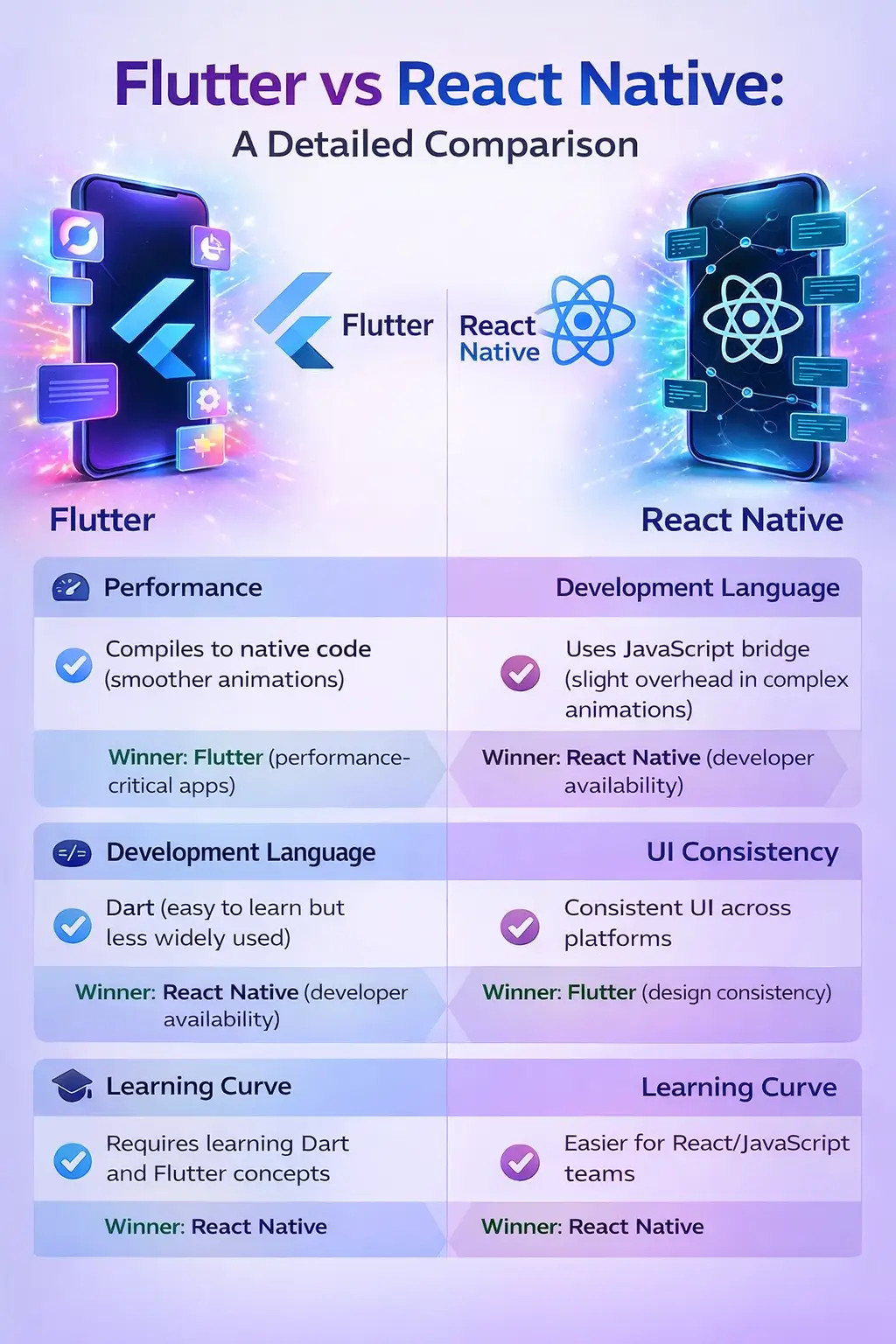
Key Benefits of IoT-Based RPM Systems

  • Continuous health tracking through real-time monitoring allows clinicians to detect early warning signs and intervene proactively, even before symptoms become visible. This capability transforms healthcare from reactive to preventive.
  • Smarter decision-making is enabled when RPM platforms are powered by predictive analytics, offering data-driven insights that empower doctors to make better clinical decisions.
  • Enhanced patient engagement comes from providing patients access to their health data via mobile apps, increasing awareness, and encouraging proactive lifestyle choices.
  • Cost reduction benefits both healthcare providers and patients. Reduced hospital readmissions and fewer in-person visits cut operational and treatment costs.
  • Accessibility beyond borders allows patients in remote or underdeveloped regions to receive quality care without the need for physical hospital infrastructure.

Healthcare organizations looking to deploy these solutions often partner with a Healthcare App Development Company experienced in custom IoT app development.

IoT-Powered-RPM-Platforms-Features

Core Features of IoT-Powered RPM Platforms

A robust RPM system must combine reliable hardware, intelligent software, and secure infrastructure. Here are the essential components:

1. Smart Wearables and Medical Devices

Wearables such as smartwatches, glucose meters, and portable ECG monitors are equipped with sensors that continuously track physiological indicators. These devices collect real-time data and automatically sync it to connected apps or cloud storage. In more advanced setups, implantable devices are used to monitor internal metrics such as cardiac rhythms or glucose levels in diabetic patients.

2. Mobile and Web Applications

Patient and clinician interfaces are crucial for interaction and visibility. These apps offer dashboards that present trends, graphs, and alerts in user-friendly formats. Doctors can schedule virtual consultations, review health history, and modify treatment plans directly within the app. Patients can receive medication reminders, view reports, and communicate with care teams in real time.

3. Cloud-Based Infrastructure

Cloud platforms serve as the backbone of data storage and processing. They facilitate remote access, ensure real-time synchronization across devices, and support the integration of machine learning algorithms. Cloud services also provide redundancy and data backups, minimizing the risk of data loss due to technical failures.

4. Automated Alerts & Notifications

Built-in AI algorithms detect anomalies in vital signs and trigger alerts to caregivers or emergency responders. These real-time notifications enable rapid interventions during critical situations, saving lives and reducing complications. Some systems even allow customizable thresholds based on patient-specific health profiles.

5. Data Visualization Dashboards

Data from multiple sensors and sessions can become overwhelming. Dashboards condense this information into visual charts and summary reports. This makes it easier for clinicians to understand patterns, compare progress over time, and make informed decisions quickly.

6. AI and Predictive Analytics

Artificial intelligence plays a pivotal role in analyzing large volumes of patient data. Machine learning algorithms can predict health deteriorations, assess risks, and recommend personalized interventions. Over time, these insights lead to more accurate diagnoses and more effective, data-backed treatments.

7. Interoperability and Integration

To ensure seamless functionality, RPM platforms should be compatible with hospital information systems (HIS), electronic medical records (EMR), and third-party apps or devices. This interoperability allows for smooth data flow between different medical entities, ensuring continuity of care.

8. Regulatory Compliance and Security

Healthcare data is highly sensitive and must comply with global regulations like HIPAA (US), GDPR (Europe), and others. RPM systems must employ:

  • End-to-end encryption
  • Secure data transmission protocols
  • Role-based access control
  • Consent management
  • Audit logs

Compliance not only protects patients but also enhances trust in digital healthcare solutions.

Use Cases of IoT in Healthcare Monitoring

RPM systems powered by IoT are transforming care delivery across multiple disciplines:

1. Cardiology

Remote monitoring devices detect irregular heart rhythms, monitor pacemaker performance, and track cardiac recovery post-surgery. These insights help in early detection of conditions like atrial fibrillation, tachycardia, and congestive heart failure.

2. Diabetology

IoT-enabled glucose monitors track blood sugar levels continuously. These systems alert patients and doctors to abnormal trends, facilitating insulin management and preventing hypoglycemic events.

3. Pulmonology

Pulse oximeters and spirometers are critical for patients with chronic obstructive pulmonary disease (COPD) or asthma. RPM tracks oxygen saturation levels, breathing rates, and lung function, enabling remote adjustments to treatment.

4. Geriatric Care

Seniors benefit from a combination of fall detectors, wearable ECGs, medication reminders, and location tracking. These tools support aging-in-place by reducing emergency room visits and enabling safe, independent living.

5. Post-Surgical Monitoring

RPM devices track pain levels, wound healing, and mobility post-discharge. This helps surgeons and caregivers identify complications early, reducing readmission rates and optimizing recovery.

6. Mental Health

Wearables can monitor sleep quality, stress levels, and activity patterns. Coupled with teleconsultation apps, these tools support therapies for depression, PTSD, and anxiety disorders by providing real-time behavioral data.

Read More: How to Build an IoT Application for Improving Business Productivity

Step-by-Step Guide to Developing an RPM Solution

Creating a robust and scalable RPM solution requires a structured development lifecycle:

Step 1: Define Use Case and Target Audience

Identify the core medical challenge the app will solve—whether it’s monitoring post-operative recovery, managing diabetes, or elderly care. Define your target audience (age, location, tech-savviness) to tailor the user experience.

Step 2: Conduct Market Research and Feasibility Analysis

Understand market trends, user expectations, regulatory landscape, and competitor products. Conduct SWOT analysis to refine your value proposition and identify technology requirements.

Step 3: Regulatory Compliance Planning

Regulations like HIPAA, GDPR, HL7, and FHIR must be considered from the start. Collaborate with healthcare compliance experts to ensure adherence to standards for data handling, storage, and privacy.

Step 4: Hardware and Device Integration

Choose devices that are certified (FDA, CE) and compatible with your platform. Consider battery life, Bluetooth/Wi-Fi connectivity, and integration options like SDKs and APIs.

Step 5: Design Intuitive UI/UX

Simplicity and accessibility are crucial.  UI/UX Design wireframes that accommodate different user types—clinicians, patients, caregivers—and are mobile-friendly. Include features like large fonts, voice commands, and multilingual support.

Step 6: Build the Backend and Cloud Infrastructure

Develop a scalable backend using technologies like Node.js, Python, or Java. Use cloud services like AWS, Google Cloud, or Microsoft Azure to support secure, real-time data syncing and storage.

Step 7: Develop Mobile and Web Applications

Create native or cross-platform apps for Android, iOS, and web browsers. Use frameworks like React, Flutter, and Swift to build responsive interfaces. Ensure the data flow between sensors and applications is seamless.

Step 8: Integrate AI for Smart Insights

Incorporate AI & ML models to identify trends, predict emergencies, and suggest personalized interventions. Use libraries such as TensorFlow or PyTorch to build and train models.

Step 9: Perform Rigorous Testing

Simulate real-world scenarios to test app performance, battery consumption, security vulnerabilities, and device compatibility. Test for edge cases like poor network connectivity and sensor failures.

Step 10: Deployment and Maintenance

After launch, monitor the system for bugs, user feedback, and device performance. Provide regular updates for OS compatibility, feature improvements, and security patches.

Cost of Developing an IoT-Based RPM System

The cost of building an IoT-based Remote Patient Monitoring system varies depending on the scale, features, technologies used, and level of regulatory compliance. Here’s an in-depth look at the contributing factors:

1. Discovery and Planning

In this phase, healthcare providers and developers collaborate to define requirements, create a roadmap, and align goals. Budgeting, compliance assessment, and technology stack decisions are finalized here. Estimated Cost: $3,000 – $6,000

2. UI/UX Design

This includes wireframes, prototyping, and final interface design for mobile and web apps. The more user personas and interfaces required, the higher the cost. Estimated Cost: $5,000 – $10,000

3. Mobile App Development

Native apps for iOS and Android or a cross-platform app using Flutter or React Native. This stage covers all app logic, API integration, and IoT data syncing. Estimated Cost: $15,000 – $30,000

4. Web Dashboard Development

A centralized admin or doctor dashboard is essential for accessing and visualizing patient data, managing alerts, and generating reports. Estimated Cost: $10,000 – $20,000

5. Cloud Integration

Costs depend on the chosen cloud provider (AWS, Azure, GCP) and services (databases, AI/ML, storage, analytics, etc.). Estimated Cost: $5,000 – $10,000

6. IoT Device Integration

Integrating wearables and medical sensors—especially those with APIs and SDKs—requires time and testing. Includes hardware compatibility checks. Estimated Cost: $8,000 – $15,000

7. Security and Compliance

Meeting regulatory standards (HIPAA, GDPR) adds costs due to data encryption, role-based access, and secure storage mechanisms. Estimated Cost: $7,000 – $12,000

8. AI/ML and Analytics Integration

Advanced insights, predictive analysis, and real-time data trends require dedicated AI model training and data engineering. Estimated Cost: $10,000 – $20,000

9. Testing and Quality Assurance

Covers unit testing, device testing, performance testing, penetration testing, and bug fixing. Estimated Cost: $4,000 – $8,000

10. Maintenance and Updates

Post-launch, the system needs continuous improvement, updates, and support for new OS/device compatibility. Ongoing Monthly Cost: $2,000 – $5,000

Total Estimated Cost Range: $70,000 to $150,000+

Partnering with a specialized Healthcare App Development Company like LuminoGuru can help reduce overall costs and avoid compliance pitfalls.

IoT Patient Monitoring System

Future Trends in RPM and IoT Healthcare

The future of IoT-based RPM solutions is rapidly evolving. Here are key trends that will shape the next generation of healthcare platforms:

1. Edge Computing

With edge computing, data is processed locally on devices instead of being sent to the cloud. This reduces latency and allows for faster decision-making during emergencies.

2. 5G Connectivity

5G networks will revolutionize remote monitoring by enabling faster data transmission, supporting real-time video consultations, and managing higher volumes of connected devices.

3. Blockchain in Healthcare

Blockchain adds transparency and immutability to health records. When integrated with RPM systems, it ensures data integrity, traceability, and patient-controlled access.

4. Voice-Controlled Interfaces

Smart assistants will allow elderly and disabled users to interact with RPM platforms using voice commands—enhancing accessibility.

5. Integration with Digital Therapeutics

Digital therapeutics powered by behavioral science will be paired with RPM platforms to address chronic diseases like obesity, diabetes, and hypertension through lifestyle interventions.

6. Predictive Healthcare Models

Machine learning will increasingly forecast patient health outcomes, flag risks before symptoms appear, and personalize care plans based on real-time data trends.

7. Interoperability Standards

Open standards like HL7 and FHIR are being adopted globally to facilitate interoperability between disparate healthcare systems and RPM platforms.

8. Virtual Reality for Rehab and Monitoring

RPM tools integrated with VR headsets can support remote physical therapy, post-surgery rehabilitation, and cognitive training for mental health conditions.

Conclusion

The integration of IoT into healthcare, especially through Remote Patient Monitoring systems, marks a pivotal shift toward preventive, data-driven, and patient-centric care. These systems bring unmatched benefits: continuous monitoring, cost efficiency, early intervention, and better outcomes for both patients and healthcare providers.

However, their successful implementation requires strategic planning, regulatory awareness, and advanced technology integration. From device selection to cloud infrastructure, each step must be carefully executed to build a secure and scalable solution.

Whether you’re a startup exploring RPM innovation or a hospital system aiming to modernize your patient care model, now is the time to act. By partnering with an experienced Healthcare App Development Company like LuminoGuru, you can ensure regulatory compliance, secure architecture, and a user-friendly interface tailored to your unique needs.
RPM is more than just a digital tool—it’s a catalyst for a healthier, smarter, and more connected future of healthcare.

Frequently Asked Questions (FAQs)

1. What is an IoT-based remote patient monitoring system?

An IoT-based RPM system collects real-time health data using wearable or connected devices and transmits it to healthcare providers. It enables remote diagnosis, intervention, and management of chronic or post-operative conditions.

2. How do IoT devices benefit healthcare monitoring?

IoT devices continuously track vital health parameters, allowing timely detection of abnormalities, reducing hospital visits, and enhancing patient engagement and safety.

3. What is the typical cost of developing an RPM system?

Depending on the features, scale, and compliance needs, the development cost ranges from $70,000 to $150,000+, with ongoing maintenance costs between $2,000 and $5,000 per month.

4. Is patient data secure in IoT-based systems?

Yes, if developed using secure protocols, encryption, and compliance with regulations like HIPAA and GDPR. Trusted developers implement best practices for data privacy and protection.

5. Can these systems be used in rural or underserved areas?

Absolutely. IoT-based RPM systems are particularly effective in providing continuous care to patients in remote or underserved regions lacking traditional medical infrastructure.

6. Who can build a reliable RPM platform?

Companies like LuminoGuru, a leading Healthcare App Development Company, specialize in developing customized, secure, and scalable IoT healthcare solutions for startups, clinics, and enterprises.


How to Build an IoT Application for Improving Business Productivity

The Internet of Things (IoT) is revolutionizing the way businesses operate by enhancing efficiency, reducing costs, and improving decision-making. To build an IoT application that boosts business productivity, organizations must follow a structured approach encompassing hardware selection, connectivity, cloud integration, data analytics, security, and continuous optimization. This blog provides an in-depth guide to IoT application development, explaining the necessary steps, key technologies, and best practices. Whether you are looking for IoT development services or an IoT app development company, this guide will help you understand how IoT technology for business can create transformative solutions.

Understanding the Importance of IoT for Business Productivity

Businesses are increasingly adopting IoT technology to streamline operations, automate tasks, and enhance data-driven decision-making. From manufacturing to healthcare, IoT software development is helping industries achieve higher efficiency and cost savings. Here are some key benefits:

  • Automation & Efficiency: IoT devices automate repetitive tasks, reducing human intervention and minimizing errors.
  • Real-Time Monitoring: IoT sensors provide real-time data, enabling better asset tracking and performance analysis.
  • Predictive Maintenance: IoT-based analytics prevent equipment failures by predicting maintenance needs.
  • Improved Customer Experience: Personalized services and smart interactions enhance customer engagement.
  • Optimized Resource Utilization: Smart energy management reduces waste and lowers operational costs.

By leveraging IoT technology for business, companies can improve workflow efficiency, minimize downtime, and increase profitability.

IoT-Application-Development-Services

Key Components of an IoT Application

To successfully build an IoT application, businesses must understand its core components:

a) IoT Devices & Sensors

IoT devices, such as smart sensors and actuators, collect and transmit data. These devices can measure temperature, humidity, motion, pressure, and other parameters based on the business requirement.

b) Connectivity & Communication Protocols

Choosing the right connectivity method is crucial for IoT app development. Businesses can opt for:

Connectivity Type Range Power Consumption Use Case
Wi-Fi Short High Indoor monitoring
Bluetooth & BLE Short Low Wearable devices
LoRaWAN & Sigfox Long Low Smart agriculture
5G/NB-IoT Long Medium Smart cities, logistics

c) Edge Computing

Edge computing processes data closer to the source rather than relying solely on cloud servers, reducing latency and improving response times.

d) Cloud Platforms

Cloud services such as AWS IoT, Google Cloud IoT, and Microsoft Azure IoT store, analyze, and manage IoT data efficiently.

e) IoT Software & Mobile Applications

IoT software development involves creating platforms and mobile apps that help businesses interact with IoT devices, visualize data, and control operations remotely.

IoT-Applications

Steps to Build an IoT Application for Business Productivity

Step 1: Define Business Objectives and Use Cases

Before starting IoT application development, businesses must identify key challenges and objectives. Common use cases include:

  • Manufacturing: Predictive maintenance to prevent equipment failures.
  • Retail: Smart shelves and inventory management.
  • Logistics: Real-time fleet tracking and route optimization.
  • Healthcare: Remote patient monitoring using wearable devices.
  • Smart Office: Automated energy management and workspace optimization.

Step 2: Choose the Right IoT Devices and Sensors

Selecting appropriate sensors depends on the industry and use case. Businesses should consider factors like power consumption, data accuracy, and connectivity range.

Step 3: Select an IoT Connectivity Solution

Based on the business needs, select an appropriate network protocol to ensure seamless data transmission.

Step 4: Develop IoT Software and Cloud Infrastructure

IoT software development involves:

  • Firmware development for IoT devices.
  • Backend development to store and process data.
  • Cloud integration for scalability and remote access.
  • Frontend & mobile app development to provide an interactive user interface.

Step 5: Implement Security Measures

Security is a critical aspect of IoT development services. Businesses should implement:

  • Data encryption to protect sensitive information.
  • User authentication mechanisms such as OAuth.
  • Regular software updates to prevent vulnerabilities.

Step 6: Deploy and Test the IoT Application

Conduct thorough testing to ensure reliability and performance before full-scale deployment.

Step 7: Monitor, Maintain, and Optimize

Post-deployment, businesses must continuously monitor IoT systems, analyze data, and optimize processes to maximize productivity gains.

Conclusion

The adoption of IoT technology for business is a game-changer in improving productivity and efficiency. By following the right steps to build an IoT application, businesses can streamline operations, enhance customer experiences, and reduce operational costs. Investing in IoT application development not only improves real-time decision-making but also prepares businesses for the future of automation and data-driven insights. Whether you need IoT development services or an IoT app development company, choosing the right technology stack and security measures will ensure long-term success in your IoT journey.

Read More: How Can You Identify the Best App Development Company?

FAQs About IoT Application Development

Q1: How long does it take to develop an IoT application?
A: The timeline depends on project complexity, typically ranging between 3 to 12 months.

Q2: What industries benefit the most from IoT?
A: Manufacturing, healthcare, logistics, retail, and smart buildings benefit significantly from IoT technology.

Q3: How much does IoT app development cost?
A: IoT app development costs range between $10,000 and $500,000, depending on features and hardware.

Q4: What are the security challenges in IoT applications?
A: Data breaches, unsecured networks, device hacking, and lack of encryption are common security challenges in IoT application development.

Q5: What programming languages are used in IoT development?
A: Python, C, C++, Java, and JavaScript are widely used in IoT software development for device programming, cloud integration, and data processing.

Q6: Can IoT applications be integrated with AI?
A: Yes, AI-powered IoT enables predictive analytics, automated decision-making, and smart automation, enhancing business efficiency.

Q7: How do I choose the right IoT app development company?
A: Consider experience, industry expertise, security protocols, scalability, and customer reviews when selecting an IoT app development company.

This is the pagiantion div

Best Mobile App Development Companies in Abu Dhabi

Finding the right mobile app development company in Abu Dhabi is not as simple as running a quick search and picking the first name that comes up. The stakes are too high for that. A poorly chosen development partner means missed deadlines, blown budgets, apps that need to be rebuilt from scratch, and months of lost time that you cannot get back.

Abu Dhabi’s technology sector has grown significantly over the past few years. The emirate is investing heavily in digital infrastructure, smart government services, and private sector innovation as part of its broader economic diversification strategy. That means more businesses than ever are looking for reliable development partners — and more companies than ever are claiming to be one.

This guide cuts through the noise. We have put together a list of the best mobile app development companies in Abu Dhabi based on what actually matters: technical capability, industry experience, delivery track record, and the ability to build products that work in the real world, not just in a presentation.

What to Look for Before Hiring a Mobile App Development Company

Before getting into the list, it is worth being clear about what actually separates a good development company from one that sounds impressive until the project goes sideways.

A portfolio of real, shipped products. Any company can show concept designs and mockup screens. What matters is apps that are live, used by real people, and working as intended. Ask to see actual products, not just visual designs.

Relevant industry experience. Building a healthcare app requires a different understanding than building a logistics platform or an e-commerce tool. A company with experience in your specific industry will make better decisions at every stage of the build.

Clear communication and honest timelines. The development companies that consistently deliver on time are the ones that ask hard questions at the start, document requirements properly, and tell you when something is not realistic rather than agreeing to everything and then missing deadlines.

Technical breadth that matches your needs. Cross-platform frameworks like React Native and Flutter are excellent for most projects. Native iOS and Android development makes sense for specific use cases. A good development partner will recommend the right approach for your product, not the one that is easiest for them to bill.

Post-launch support. An app is not a one-time delivery. Platform updates, security patches, user feedback, and new features all require ongoing engineering attention after launch. Make sure any company you consider has a clear post-launch support model.

With those criteria in mind, here are the best mobile app development companies in Abu Dhabi worth considering.

1. Luminoguru – Top Mobile App Development Company in Abu Dhabi

When it comes to building mobile applications that genuinely deliver business results, Luminoguru stands out as one of the strongest choices for businesses in Abu Dhabi and across the UAE.

Luminoguru brings together deep technical expertise and real-world delivery experience across a wide range of industries including healthcare, e-commerce, logistics, real estate, food delivery, and fintech. What separates them from many development companies is that they approach every project as a business problem first and a technology problem second. The result is apps that are built to perform, designed to be used, and structured to scale as the business grows.

Their service offering covers the full development lifecycle. From initial product discovery and UI/UX design through to mobile app development, software development, QA and testing, and post-launch maintenance, businesses get a single accountable partner rather than having to coordinate multiple vendors across different parts of the project.

For businesses that want to incorporate artificial intelligence into their products, Luminoguru’s AI development services and generative AI development services make them one of the few companies in the region that can genuinely deliver on the AI capabilities that are increasingly defining competitive mobile products.

They also offer MVP development for startups and businesses that want to validate their product idea with real users before committing to the full development budget. This approach consistently saves businesses from the expensive mistake of building a fully featured product before understanding what users actually want.

Their cloud application development services ensure the backend infrastructure powering any mobile app is built for performance, reliability, and the ability to scale without requiring expensive rebuilds later.

Key strengths:

  • Full-cycle mobile app development across iOS, Android, and cross-platform
  • Strong AI and generative AI integration capabilities
  • Proven delivery across healthcare, logistics, e-commerce, real estate, and more
  • MVP-first approach that reduces risk and validates before full investment
  • Transparent communication and honest project timelines
  • Post-launch support and continuous improvement

Best suited for: Startups, SMEs, and enterprise businesses in Abu Dhabi and across the UAE looking for a reliable, technically strong development partner with a track record of shipping real products.

Website: luminoguru.com

2. Appinventiv

Appinventiv is a well-established mobile app development company with a presence across the UAE and a significant global client base. They have worked with both enterprise clients and growth-stage startups across industries including fintech, healthcare, retail, and on-demand services.

Their development team covers iOS, Android, and cross-platform development, and they have built a reputation for technically complex projects that require significant backend engineering alongside the client-facing mobile experience. Their portfolio includes products that have gone through significant scale, which is a useful indicator of their ability to build systems that hold up under real usage.

For businesses in Abu Dhabi looking at larger, enterprise-grade projects, Appinventiv is worth evaluating alongside other established companies on this list.

3. Techugo

Techugo has built a presence in the UAE market with a focus on mobile app development for both consumer and enterprise clients. They cover iOS and Android development and have delivered projects across retail, healthcare, education, and on-demand service verticals.

Their team handles end-to-end development from design through to deployment and maintenance, and they have built a reasonable portfolio of products for clients in the Gulf region. For businesses in Abu Dhabi looking for a development partner with regional market familiarity, Techugo is a name that appears consistently in this space.

4. Hyperlink InfoSystem

Hyperlink InfoSystem is one of the larger mobile app development companies operating in the UAE market with a broad portfolio across multiple industries. They have worked with clients across retail, healthcare, logistics, and enterprise software and have teams capable of handling projects at various scales.

Their strength is breadth – they cover mobile, web, IoT, AI, and blockchain development under one roof. For businesses with complex, multi-platform product requirements, that breadth can be valuable. For more focused mobile projects, evaluating whether their specialization matches your specific needs is worth the additional due diligence.

5. Octal IT Solution

Octal IT Solution has established a presence in the UAE and broader Gulf market with mobile app development services across iOS, Android, and cross-platform frameworks. They have worked with clients in real estate, e-commerce, logistics, and healthcare and bring a combination of technical development and design capability to their projects.

Their approach to project delivery follows a structured methodology with defined milestones and regular client communication. For businesses in Abu Dhabi that want a development partner with experience in the Gulf market specifically, Octal IT Solution is worth including in an evaluation.

6. ToXSL Technologies

ToXSL Technologies offers mobile app development services with a focus on custom solutions for SME and enterprise clients. They work across iOS, Android, and web development and have delivered projects in education, healthcare, logistics, and retail.

Their team works with both cross-platform and native development approaches and can handle projects from initial concept through to post-launch maintenance. For businesses in Abu Dhabi looking at mid-scale mobile projects with defined requirements, ToXSL is a company worth evaluating.

7. Brainvire Infotech

Brainvire Infotech brings enterprise-focused development capability to the UAE market with experience across mobile, web, e-commerce, and cloud infrastructure. They have worked with businesses in retail, manufacturing, healthcare, and financial services and have built a portfolio that spans custom mobile applications through to large-scale digital transformation projects.

For businesses in Abu Dhabi with complex existing systems that need to be connected to new mobile products, Brainvire’s integration experience is a genuine strength. Their track record with e-commerce platform development is also worth noting for businesses in retail and consumer goods.

8. Zealous System

Zealous System offers mobile and web application development with a portfolio spanning healthcare, education, e-commerce, and on-demand services. They work with both startup clients and established businesses and cover iOS, Android, and cross-platform development alongside backend and API development.

Their design and development teams work together through the project lifecycle, which tends to produce better integration between the visual experience and the underlying technical architecture than companies that treat design and development as completely separate engagements.

How to Choose the Right Company for Your Project

With a list of strong options available, the decision comes down to matching the right company to your specific project. Here is a practical framework for making that call.

Start with your project requirements, not the company’s marketing. Write down what you actually need – the platform, the core features, the timeline, the budget range, and any specific technical requirements like AI integration, IoT connectivity, or enterprise system integration. Use that as your filter before approaching anyone.

Request relevant portfolio examples. Ask each company on your shortlist to share examples of projects similar to yours – same industry, similar feature complexity, similar scale. A company with three relevant examples tells you more than one with fifty unrelated ones.

Talk to their previous clients. Any serious development company should be willing to connect you with clients from previous projects. A 15-minute conversation with someone who has already worked with them is worth more than any number of testimonials on a website.

Evaluate their discovery process. Before any code is written, a good development company should conduct a proper discovery phase – understanding your business goals, mapping the user experience, documenting technical requirements, and identifying risks. How thorough they are in this phase is a strong predictor of how well the project will be managed overall.

Get multiple detailed quotes. The lowest quote is rarely the best value. A detailed quote that breaks down exactly what is included – design, development, testing, integration, deployment, post-launch support – gives you something to compare meaningfully. A vague quote with a low total number is a red flag, not a good deal.

Assess communication quality from the first conversation. The quality of communication you experience during the sales process is a reliable preview of the communication you will experience during the project. Companies that are responsive, clear, and honest when they are trying to win your business tend to behave the same way when they are delivering it.

Why Abu Dhabi Businesses Are Investing in Mobile App Development

The business case for mobile app investment in Abu Dhabi is straightforward. Consumer behavior in the UAE skews heavily toward mobile – smartphone penetration is among the highest in the world, and users across all demographics conduct a significant share of their daily activities through mobile applications.

For businesses in retail, hospitality, logistics, healthcare, real estate, and government services, the gap between having a strong mobile presence and not having one is increasingly visible in customer acquisition, retention, and revenue. The businesses that invested in quality mobile products early are seeing the compounding benefit of that investment. The ones that delayed are now playing catch-up in a market where users have high expectations set by the best products available globally.

The Abu Dhabi government’s continued investment in smart city infrastructure and digital services also creates a strong enabling environment for mobile products – reliable connectivity, a tech-forward regulatory environment, and a population that is genuinely comfortable using digital services for everything from banking to healthcare to government transactions.
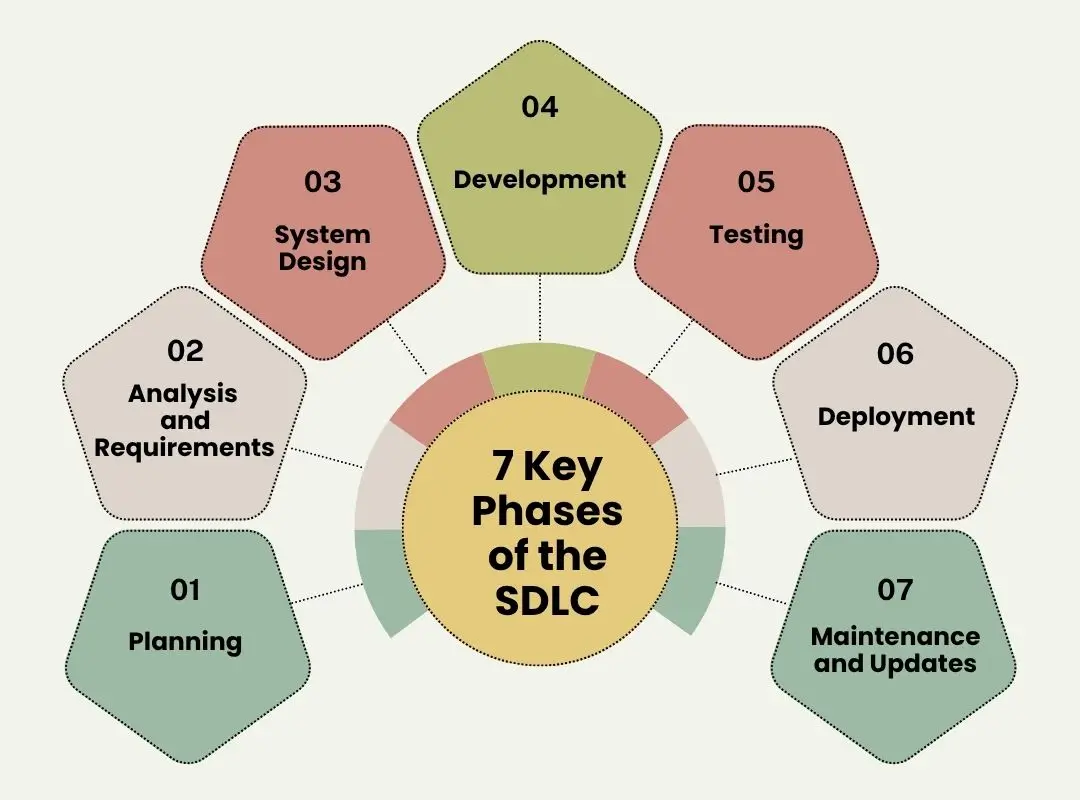
Final Thoughts

The right mobile app development company for your business is not necessarily the largest, the most recognized, or the cheapest. It is the one whose technical capabilities match your project requirements, whose experience is relevant to your industry, and whose way of working aligns with how you need to collaborate.

For most businesses in Abu Dhabi, Luminoguru offers the combination of technical depth, industry experience, and honest delivery that makes them the strongest starting point for a development conversation. Their track record across diverse industries and their genuine capability in AI and emerging technologies make them well positioned for the kind of products that will define competitive businesses in the UAE over the next few years.

Whatever company you ultimately choose, invest time in the evaluation process. The decisions made in the first few weeks of a development engagement – how requirements are defined, how timelines are set, how progress is communicated – have a disproportionate impact on the outcome of the entire project.

Frequently Asked Questions

How much does mobile app development cost in Abu Dhabi?
The cost depends significantly on the complexity of the app, the platforms it needs to support, and the features required. A focused MVP with core functionality typically starts from $20,000 to $50,000. A full-featured application with custom design, backend infrastructure, and integrations usually ranges from $50,000 to $150,000 or more. Getting a detailed, itemized quote from your development partner is the only way to get an accurate number for your specific project.

How long does it take to build a mobile app?
A well-scoped MVP typically takes 3 to 4 months from requirements to launch. A more comprehensive application with multiple integrations and advanced features usually takes 5 to 9 months. Timeline accuracy depends heavily on how well the requirements are defined before development begins.

Should I choose native or cross-platform development?
Cross-platform frameworks like React Native or Flutter are the right choice for most projects – they deliver strong performance at a lower cost than building separate native apps for iOS and Android. Native development makes more sense when the app needs deep access to device hardware or has performance requirements that exceed what cross-platform frameworks can handle.

What industries do mobile app development companies in Abu Dhabi specialize in?
The strongest companies in the Abu Dhabi market have experience across healthcare, real estate, logistics, e-commerce, food delivery, fintech, hospitality, and government services. When evaluating a development partner, prioritize experience in your specific industry over general claims of broad capability.

How important is post-launch support when choosing a development company?
It is critical. An app requires ongoing maintenance after launch – platform updates, security patches, bug fixes, and new features based on user feedback. A development company that treats launch as the end of the engagement is not the right long-term partner. Make sure the support model and its associated costs are agreed upon before the project begins.

Can Abu Dhabi development companies work with international clients and remote teams?
Yes. Most established development companies in Abu Dhabi work with clients across the GCC, wider Middle East, Europe, and beyond. Structured project management, regular video calls, and clear documentation make geography a manageable factor rather than a barrier.

How to Build a Professional Networking App Like LinkedIn

The professional networking market is one of the fastest-growing segments in tech right now. The market sits at over $65 billion today and is on track to cross $200 billion within five years, growing at more than 25% annually. That is not a niche opportunity. That is a structural shift in how professionals connect, find work, and build careers.

LinkedIn sits at the center of that shift with over a billion users, 65 million job seekers active every week, and more than 87% of recruiters using it to source candidates. Those numbers are genuinely impressive.

But here is the thing. Scale does not automatically mean satisfaction. And the fact that so many founders and enterprise leaders are asking how to build something better than LinkedIn tells you everything you need to know about the gaps that still exist.

The real answer is not to clone LinkedIn. It is to build something sharper, more focused, and more useful for a specific group of people that LinkedIn keeps letting down. That is exactly what this guide covers. The business case, the development process, the real costs, and the strategies that actually make money once you launch.

Whether you are a startup founder testing an idea or an enterprise leader who wants to build a focused talent network, this guide breaks down everything you need to know.

3 Reasons to Invest in Building a Professional Networking App

If you are going to pitch this to investors, a co-founder, or even yourself, you need a solid answer to one question: why now? The timing is not just good. It is genuinely compelling.

1. The Market Is Large and Still Growing Fast

The numbers are impressive, but they only tell one part of the story. The real driver is a permanent shift in how work happens. Remote work normalized working with people across different cities and countries. The freelance economy kept growing. Talent became truly global.

This means a professional networking platform no longer needs to be local to be useful, and it does not need to serve every industry to find a viable audience. Niche platforms built for specific professional communities consistently see higher engagement than general platforms because users share a common professional context. They are not scrolling past noise from people in unrelated industries. Every connection and every piece of content is relevant to their actual work.

2. LinkedIn Has Clear and Exploitable Gaps

Despite its scale, LinkedIn genuinely frustrates a significant share of its own users. Here is what that looks like in practice:

Recruiters scroll through piles of unqualified applications with no efficient way to filter candidates who actually match the role. Job seekers spend time in a feed that feels more like a highlight reel than a useful professional resource. Niche professionals like doctors, engineers, architects, and lawyers find the platform so broad that it stops being useful for their specific needs. Freelancers and small business owners struggle to build credibility without a well-known employer name behind them.

Every one of those frustrations is a real product opportunity. A professional networking app built around a specific industry, geography, or use case does not need to reach a billion users to be viable. It just needs to be the right tool for the right people.

3. AI Has Fundamentally Changed What Is Now Possible

Not long ago, building features like smart candidate matching, automated job recommendations, or real-time content personalization required a massive engineering team and a budget to match. That is simply not the case anymore.

AI development services have brought those capabilities within reach for focused, lean product teams. A modern networking app can now deliver smarter job matching based on actual skills, personalized feeds that improve with use, automated candidate screening that saves recruiters hours, and connection suggestions that feel genuinely relevant. For founders willing to invest in the right development partner, the competitive gap between what a new platform can offer and what LinkedIn offers has closed faster than most people realize.

How to Build an App Like LinkedIn: Step-by-Step Process

Building a professional networking app is a multi-phase project. Here is how experienced product teams approach it properly.

Step 1: Define Your Niche and Value Proposition

The biggest mistake founders make is trying to build “LinkedIn, but better.” That is not a value proposition. It is a comparison, and a vague one at that.

Instead, start with a sharper question: who is LinkedIn consistently letting down, and what would those people actually pay for if someone built a platform specifically for them?

Strong niches worth considering include vertical professional communities in healthcare, law, engineering, or creative industries; geographic markets where LinkedIn has low penetration or poor localization; enterprise-specific talent networks for large organizations that want a private, controlled professional community; and freelance or gig-focused communities that need more than a job board to manage their professional lives.

The answer to this question determines every feature decision, every cost estimate, and every revenue conversation that follows. Document it before anything else moves forward.

Step 2: Map Core Features and Prioritize Your MVP

Not every LinkedIn feature needs to be in version one. Resist that urge. An MVP development that focuses on the single most critical user need will reach the market faster and generate real feedback that shapes every decision after it.

Before listing features, ask three questions. What is the one thing the platform does that nobody else does for this specific audience? Which features are truly essential versus nice-to-have? And what can be built in a later phase once real demand is validated?

The goal is not to build everything. It is to build the right things first, learn quickly from real users, and then build more from a position of evidence rather than assumption.

Step 3: Choose a Technology Stack That Can Scale

The tech stack determines scalability, performance, and long-term maintenance cost. For a professional networking platform, experienced teams typically work with Node.js, Python, or Java for backend API development; React Native or Flutter for cross-platform iOS and Android mobile apps; React.js or Next.js for web; PostgreSQL for structured data with Elasticsearch for fast, filtered search; Redis for caching feeds and search results; and AWS, Google Cloud, or Azure for cloud infrastructure that scales during demand spikes.

The stack itself is well understood. The execution – sequencing the build correctly, integrating third-party tools without overcomplicating the architecture, handling edge cases before they become production problems – is where the real skill lives.

Step 4: Design for the User Experience First

Professional platforms live or die by onboarding. If users cannot build a compelling profile in under five minutes, they will not come back.

The right sequence is UX research before design, design before development, and real user testing before launch. Good UI/UX design at this stage means onboarding that feels effortless, a feed that surfaces relevant content from day one, search that returns useful results rather than just popular ones, and a visual language that feels credible and professional. Skipping any part of this process saves time in the short term and costs significantly more in the long term.

Step 5: Build, Test, and Iterate

Agile development in two-week sprints with regular demos keeps the build aligned with what actually matters as the project evolves. The backend covers user authentication, profile management, connection logic, feed generation, messaging, job listing management, and the admin tools needed to operate the platform.

The mobile app development side covers the interfaces users interact with every day – profile creation, feed browsing, job searching, messaging, and notifications. Both sides run in parallel, and both require the same level of engineering discipline.

When it comes to QA, there is no cutting corners. For a platform handling real professional data, thorough software testing services must cover functional testing across all core user flows, load testing to catch performance issues before they reach production, and security testing to protect user data and build trust from day one. Skip any of those and you will pay for it later – in user trust, not just engineering time.

Step 6: Launch, Measure, and Optimize

Launch is the beginning, not the end. Once the platform is live, track key engagement metrics every week. Collect qualitative feedback through in-app prompts. Ship meaningful improvements on a regular schedule. Double down on what is working and cut what is not.

The platforms that win long term are the ones that iterate fastest based on what real users actually do, not what they say they will do during research.

What Features Must Be Included in a Professional Networking App?

Feature decisions directly affect development cost and timeline, so being precise about what belongs in version one versus a later phase matters.

Core Features – The Non-Negotiables

Without these, the platform is not a professional networking app.

Feature What It Covers
User profiles Photo, headline, work history, education, skills, and professional bio
Connection or follow system Send, accept, and manage professional connections
Activity feed Posts, shares, comments, and likes from connections
Messaging Direct messaging between connected users with real-time delivery
Job listings Post and apply for jobs within the platform
Search and filters Find people, companies, and jobs by keyword, location, or industry
Notifications Real-time alerts for connection requests, messages, and activity
Authentication Email login, social sign-in via Google or Apple, two-factor authentication

Advanced Features – Phase Two and Beyond

Once the core platform is validated and growing, these features deepen engagement and open new revenue streams.

Feature What It Adds
AI-powered job matching Recommends relevant listings based on profile and behavior
Skill endorsements and recommendations Connections vouch for specific skills or write detailed recommendations
Company pages Business profiles with followers, job posts, and updates
Analytics dashboard Profile views, post reach, and application tracking for users and recruiters
Premium subscription tier Advanced search, expanded messaging, and enhanced visibility tools
Video introductions Short profile videos that add personality alongside credentials
Groups and communities Industry-specific spaces for discussion and peer networking

Optional Features for Niche Platforms

Depending on the specific audience, useful additions include event listings and RSVPs, resume builder and export tools, integrated learning or course content, and API connections to applicant tracking systems used by enterprise recruiters.

How Much Does It Cost to Build an App Like LinkedIn?

The cost to develop a professional networking platform varies significantly based on feature scope, platform choice, and team location. Here are realistic benchmarks:

Platform Type Cost in USD Timeline
Basic MVP – core networking and job board $30,000 – $60,000 3 to 4 months
Mid-Tier – AI matching, messaging, analytics $60,000 – $120,000 4 to 6 months
Full-Featured Enterprise Platform $120,000 – $200,000+ 6 to 9 months

These figures reflect what businesses can realistically expect to pay when working with an experienced development team. The range is wide because the scope can vary enormously – a focused MVP for one niche audience is a very different product from a full enterprise platform with AI, video, and compliance tooling.

What Factors Drive the Development Cost?

Understanding what moves the cost helps make smarter investment decisions at each phase.

Platform scope is the first major variable. Building for iOS only costs less than building for iOS, Android, and web simultaneously. Using React Native or Flutter for cross-platform development typically reduces mobile development cost by 30 to 40 percent compared to building separate native apps.

Feature complexity is the second. Real-time messaging adds $10,000 to $25,000 to a project. AI-powered recommendation systems add $20,000 to $50,000. Video calling integration adds $15,000 to $30,000. Each advanced feature carries its own infrastructure and engineering cost.

AI and machine learning features add 25 to 40 percent to base development costs on average, but the user value they deliver is disproportionately higher. Smart matching, content personalization, and automated screening are what turn a directory into a tool people actually rely on.

Third-party integrations including payment gateways, email delivery, and analytics platforms each add integration time. Budget $5,000 to $15,000 for these depending on quantity and complexity.

Security and compliance requirements are real line items. GDPR compliance for EU users adds $10,000 to $40,000 depending on scope. Enterprise security requirements add further cost but are non-negotiable for B2B adoption.

Team location can change the total budget by a factor of two or more. Development rates range from $25 to $50 per hour in South and Southeast Asia to $100 to $200 per hour in North America for comparable skill levels. Experience level matters more than rate – a team that gets it right the first time will almost always cost less than a cheaper team that creates technical debt.

Ongoing maintenance after launch should be budgeted at 15 to 20 percent of the initial development cost per year, covering bug fixes, security patches, platform updates, and iterative feature development.

How to Reduce the Cost Without Cutting What Matters

Start with a proper MVP. A focused MVP that covers only the features needed to validate the core value proposition costs 60 to 70 percent less than a full-featured platform and reaches real users dramatically faster. Real feedback from real users is the most valuable input any product team can have.

Use cross-platform frameworks. React Native and Flutter allow a single development team to build for both iOS and Android without maintaining two separate codebases. The performance tradeoff is minimal for most professional networking use cases.

Use existing tools for standard functions. Messaging infrastructure, payment processing, email delivery, and push notifications all have mature third-party solutions. Building these from scratch costs far more than integrating a proven service.

Define requirements in detail before development begins. Vague requirements lead to scope creep, which is one of the primary drivers of budget overruns on software projects. A detailed product specification document before engaging a development team saves significantly more than it costs.

Phase the feature roadmap. Build the MVP, launch it, generate early revenue or investment from the results, and fund subsequent phases from there rather than building everything upfront on pure capital.

How to Make Money From a Professional Networking App

Most successful platforms combine two or three of these revenue streams rather than depending on just one.

Premium subscriptions offer free access to core features and charge monthly or annual fees for advanced tools. The key is ensuring the premium tier solves real problems users care enough about to pay for, not just gating features they expect for free.

Recruiter and talent solutions are typically the highest-margin revenue stream for any platform with a meaningful professional user base. Companies pay for access to the user database, advanced candidate search filters, and direct outreach tools. This B2B stream is what drives most of LinkedIn’s actual profit.

Job posting fees charge employers per listing or as a monthly package. Pricing typically ranges from $50 to $500 per job post depending on visibility options and the platform’s audience size and quality.

Advertising through sponsored content, banner placements, or targeted messages to relevant users works best once the platform has a substantial and well-defined audience that advertisers want to reach.

Learning and courses built into or integrated with the platform monetize the platform’s relationship with users who want to build skills relevant to their professional community.

Affiliate partnerships with resume services, certification programmes, or HR software providers generate commission when users convert through the platform. Low operational overhead makes this a useful supplementary stream.

Industries With the Strongest Opportunity for Niche Platforms

Going head-to-head with LinkedIn on its own turf is a very difficult battle. Carving out a specific vertical is far more winnable. These industries have real, underserved professional networking needs right now.

Healthcare and clinical professionals deal with licensing, credentialing, locum work availability, and continuing education requirements that a general platform does not address. A verified, credential-aware platform built for this community would serve needs LinkedIn actively ignores.
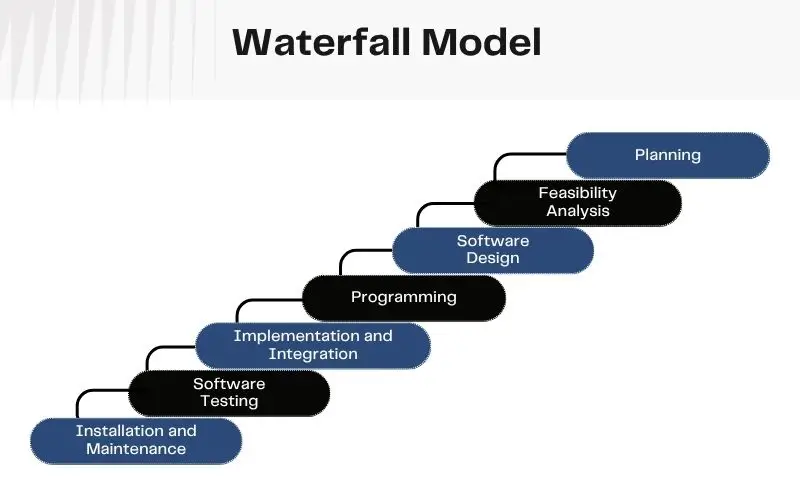
Legal and compliance professionals work in a relationship-driven industry with specific confidentiality norms. A platform that respects those norms while supporting business development and peer knowledge sharing would fill a real gap.

Architecture, engineering, and construction professionals work on project-based engagements that require portfolio presentation, project collaboration tools, and RFP management that do not exist in any meaningful form on LinkedIn.

Creative industries including design, photography, film, and music need portfolio-forward profiles, project-based networking, and client relationship tools that LinkedIn was never designed to support.

Construction and skilled trades represent a massive, growing workforce that is almost entirely underserved by existing professional networking infrastructure, with limited localization, credential verification, or project-based work tools.

In any of these niches, a platform that genuinely serves the community does not need millions of users to be a viable, profitable business.

Challenges to Know Before You Start

Network effects work against you at the beginning. A professional networking platform is only as valuable as the people on it. Getting the first thousand active users is harder than getting the next ten thousand. The launch strategy needs as much planning as the product itself – community seeding, partnerships with industry associations, and targeted outreach to specific professional communities are all part of the plan, not afterthoughts.

Feed quality degrades without active engineering. As the user base grows and content volume increases, keeping the feed relevant requires continuous attention. A feed full of promotional posts and off-topic content is one of the fastest ways to lose daily active users.

Spam and fake profiles are a real operational problem. Every professional networking platform deals with this. Building verification tools, moderation workflows, and reporting mechanisms into the product from the start is far cheaper than adding them after spam becomes a user complaint.

Retention is harder than acquisition. Getting people to sign up is a marketing challenge. Getting them to come back every week is a product challenge. The features that drive long-term retention – a feed that improves, connections that are genuinely valuable, job matches that are actually relevant – need the same development priority as the features that drive sign-ups.

Final Thoughts

The professional networking market is growing faster than almost any other software category, and the window to establish a meaningful platform in an underserved vertical is genuinely open right now.

The platforms that succeed and the ones that do not usually come down to one thing: execution. Picking the right features for the right audience, building on an architecture that can actually scale, and being willing to iterate fast when real users give real feedback. That is what turns a good idea into a platform people keep coming back to.

To build an app like LinkedIn, you need a development team that understands both the product side and the business side – not just engineers who can write code, but people who have built platforms like this before and know where the expensive mistakes happen.

At Luminoguru, we help businesses design and build professional networking platforms from research to launch. If you are ready to start, or still working through what the right product looks like for your audience, we are ready to work through it with you.

Frequently Asked Questions

What is the minimum budget to build a professional networking app like LinkedIn? A functional MVP with core networking, job listings, and messaging typically requires a minimum of $30,000 to $60,000. Budgets below that range tend to result in significant feature compromises or technical debt that costs more to fix later. The exact figure depends on team location and experience, platform choice between iOS only or cross-platform, and feature scope and complexity.

How long does it take to build an app like LinkedIn?
A focused MVP takes 3 to 4 months from requirements to launch. A full-featured platform with AI matching, analytics, and enterprise integrations typically takes 6 to 9 months. Both timelines assume a well-scoped project, an experienced team, and efficient feedback cycles. Most delays come from scope changes mid-project or requirements that were not fully defined at the start.

Should I build a cross-platform app or separate native iOS and Android apps?
For most professional networking platforms, cross-platform development using React Native or Flutter is the right starting point. It delivers strong performance at 60 to 70 percent of the cost of building two separate native apps. Native development makes more sense when the app relies heavily on device-specific hardware features or when performance requirements go beyond what cross-platform frameworks can handle.

How do AI features improve a networking app?
AI-powered features create a noticeably better experience than rule-based systems in several specific ways: smarter job matching based on actual skills and behavior rather than keywords, personalized feeds that improve the more users engage, automated screening that saves recruiters significant time, and connection suggestions that feel genuinely relevant. Platforms with AI-driven personalization consistently see higher user retention than those without it. The key is that AI delivers the most value when built into the product architecture from day one, not added as an afterthought.

Can I launch in a specific industry vertical rather than build a general platform?
Yes, and for most founders this is genuinely the smarter approach. Competing with LinkedIn across every industry and every geography is extremely difficult. Building the best professional networking platform for a specific community is far more achievable and often more profitable at scale.

What is the difference between an MVP and a full professional networking platform?
An MVP includes only the features needed to test the core value proposition with real users – typically profiles, connections, job listings, and basic messaging. A full platform builds on that with AI matching, analytics, video, premium subscriptions, company pages, and enterprise integrations. The right approach is always to launch lean, learn from what real users actually care about, and then invest in the features that genuinely move retention and revenue.
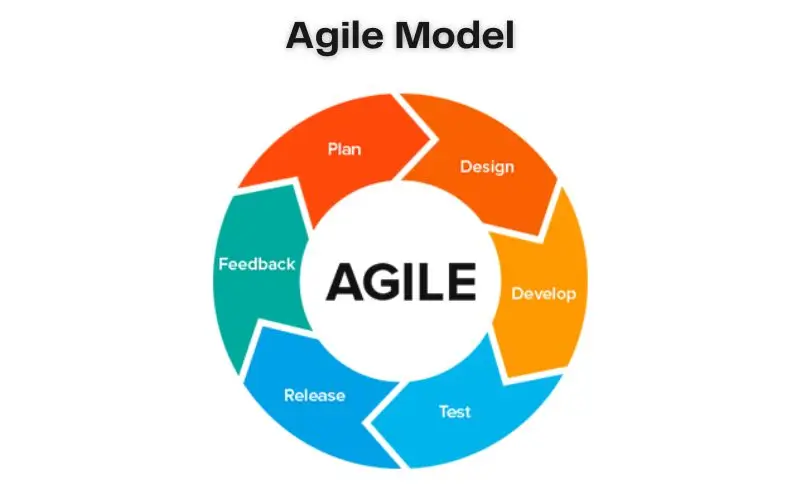
What is the biggest mistake founders make when building a professional networking app?
Trying to compete with LinkedIn on every front simultaneously. The platforms that succeed in this space go narrow first – one specific audience, one clear value proposition, one focused MVP – and expand from a position of proven value rather than assumed demand.

How Much Does It Cost to Build a Wearable Fitness App in the UAE?

Building a wearable fitness app in the UAE costs between AED 150,000 and AED 900,000 – and can go higher for enterprise-grade platforms with AI coaching, multi-device support, and healthcare integrations. The timeline runs from 4 months for a focused MVP to 12 months for a full-scale connected health platform. And the projects that go over budget almost never fail because of the technology. They fail because of poor planning, underestimated device integrations, and compliance requirements nobody thought about until the last month of development.
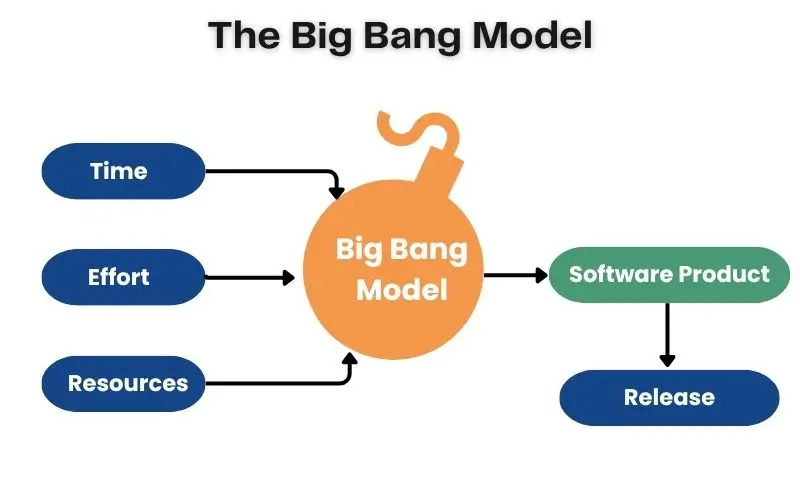
The market timing is strong. The UAE’s digital health ecosystem is growing faster than most regions in the world. High smartphone penetration, a government actively investing in healthcare innovation through Vision 2030 and related initiatives, and a population already comfortable using wearable devices – Apple Watch, Garmin, Samsung, Huawei – all point to the same conclusion. Businesses that build the right wearable fitness product now are entering a market before it reaches saturation, not after.
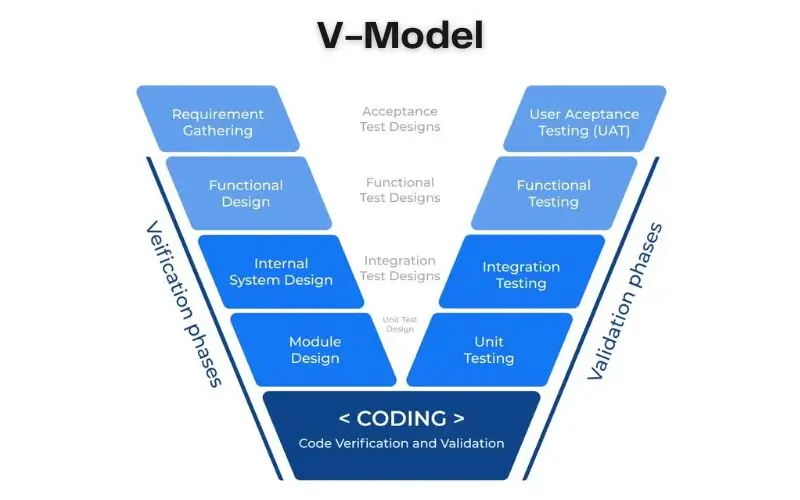
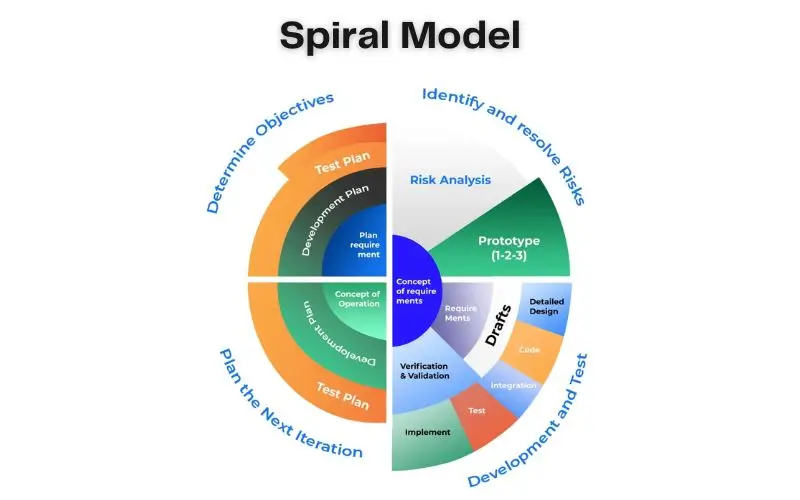
But the real question is not whether to build a wearable fitness app in the UAE. The question is how to build one that users actually keep using after the first two weeks – and how to plan a budget that reflects what it genuinely costs to do that well.

This guide covers the real numbers, what drives them, the features that matter, the revenue models that work in the UAE market, and the mistakes that quietly kill these projects before they deliver their potential.

Why the UAE Is One of the Best Markets for Wearable Fitness Apps Right Now

Before getting into costs, it helps to understand what makes the UAE specifically worth paying attention to for this category of product.

The UAE has one of the highest smartphone penetration rates in the world, and its population skews younger and more tech-forward than many comparable markets. Fitness culture is visible and growing – Dubai Fitness Challenge, which runs annually across the emirate, consistently draws millions of participants. Gyms, wellness studios, and health-focused brands are expanding across Dubai, Abu Dhabi, Sharjah, and beyond.

On the healthcare side, the UAE is investing seriously in connected health infrastructure. Dubai’s NABIDH platform has linked thousands of healthcare facilities into a unified medical record network. Abu Dhabi’s Malaffi system has accumulated billions of clinical records. These aren’t just government projects – they signal a broader shift toward connected, data-driven healthcare that wearable fitness apps fit naturally into.

For businesses, this creates several distinct opportunities. Consumer fitness apps targeting the UAE’s health-conscious urban population. Corporate wellness platforms serving Dubai’s large employer base. Insurance-linked reward programmes that connect activity tracking with coverage benefits. And clinical or rehabilitation tools that use wearable data to support care between appointments.

The right entry point depends entirely on the audience you’re trying to serve and the revenue model you’re building around.

What Does It Actually Cost to Build a Wearable Fitness App in the UAE?

The honest answer is: it depends on what you are actually building.

A wearable fitness app can mean a simple step tracker that syncs with Apple Health and shows a weekly summary. It can also mean an enterprise platform that integrates with ten wearable brands, provides AI-powered coaching in Arabic and English, generates anonymised wellness reports for HR teams, and connects with hospital systems for post-surgery rehabilitation. These are not remotely the same product.

Here is how the investment typically breaks down across different levels of platform complexity:

Platform Type Approximate Cost (AED) Approximate Cost (USD) Timeline
Core MVP 150,000 – 260,000 40,000 – 70,000 4 – 6 months
Mid-Level Platform 260,000 – 550,000 70,000 – 150,000 6 – 9 months
Enterprise / AI Platform 550,000 – 900,000+ 150,000 – 250,000+ 9 – 12 months

The core MVP covers essential activity tracking, workout monitoring, user accounts, basic analytics, and integrations with Apple Health or Google Fit. It is enough to validate whether the product concept works before committing to a larger build.

The mid-level platform adds multi-device support, mobile app development across iOS and Android with native wearable connections, a proper admin dashboard, multiple payment methods, and basic personalisation.

The enterprise platform is where AI coaching, predictive health analytics, corporate wellness dashboards, bilingual voice interfaces, and healthcare integrations come in. By this stage, the product is no longer just a fitness app – it is a connected health platform.

What Drives the Cost Up or Down?

Two questions determine almost every software estimate: how much work needs to be done, and who is doing that work. Everything else flows from there. Here is what has the biggest impact on wearable fitness app development costs in the UAE specifically.

Device and Platform Integrations

This is where most budgets underestimate the true effort.

Connecting with Apple Health or Google Fit is relatively straightforward. Connecting with Apple Watch, Garmin Connect, Fitbit, Samsung Health, and Huawei Health simultaneously is a very different engineering challenge. Each platform has its own SDKs, permissions model, data formats, and update cycles. Keeping activity data consistent across all of them – and handling the inevitable edge cases when a device syncs late, returns incomplete data, or behaves differently across firmware versions – takes real engineering time.

In the UAE, supporting multiple brands matters because the wearable market is not dominated by a single ecosystem the way it might be in some other markets. If your target audience includes iPhone users, Android users, and users of dedicated fitness devices, you need to plan integrations accordingly.

AI Features and Data Intelligence

Adding AI development to a fitness app is no longer unusual. What changes the budget is how sophisticated the AI needs to be.

A basic recommendation engine that suggests a rest day based on yesterday’s step count is a small addition. An AI engine that studies sleep trends, heart-rate variability, workout history, and recovery metrics over weeks before generating personalised coaching plans – and does this in a way that is explainable, accurate, and safe – is a significantly larger engineering effort. It requires data pipelines, cloud infrastructure, model training and evaluation, and ongoing monitoring to catch degradation over time.

UAE-Specific Compliance and Data Protection

Wearable fitness apps collect some of the most sensitive personal data a user can share: health metrics, sleep patterns, location, biometric information. The UAE Personal Data Protection Law (PDPL) sets clear obligations for how this data must be handled, stored, and shared. Compliance needs to be designed into the architecture from the beginning, not retrofitted after the product is built.

For businesses targeting healthcare providers, insurance partners, or corporate wellness clients, additional compliance layers – consent management, audit logging, role-based data access – add to the build cost but are non-negotiable for enterprise adoption.

Bilingual Design for the UAE Market

The UAE market requires genuine bilingual support, not a translation afterthought.

English and Arabic interfaces need to be designed together. Arabic uses right-to-left text direction, which affects navigation layouts, chart labels, notification text, and onboarding flows. Voice features need to support Arabic pronunciation across different regional accents. Date formats, cultural fitness considerations like Ramadan training adjustments, and outdoor workout guidance adapted for UAE summer heat all add layers of localisation that are specific to this market.

This is not a checkbox item – it is a product decision that affects whether the app feels native to UAE users or feels like an imported product with an Arabic translation layer bolted on.

Development Team Location

This is one of the largest single variables in a software budget. Senior engineers in North America or Western Europe bill between $110 and $250 per hour. Teams in Eastern Europe and Latin America typically run $45 to $80 per hour. Teams in India and South Asia range from $25 to $60 per hour for comparable skill levels.

For an identical feature scope, team location alone can change the total build cost by a factor of two or more. This is why two quotes for the same project can look completely different even when both are legitimate.

Development Phases and What Each One Covers

Understanding where the budget goes by phase helps set realistic expectations and make smarter decisions about sequencing the build.

Discovery and planning (2–4 weeks, AED 18,000–37,000). Defining the product, mapping the user flows, identifying compliance requirements, and documenting the technical architecture. This phase is cheap relative to development but disproportionately valuable – the decisions made here determine the quality of everything that follows.

UI/UX design (3–6 weeks, AED 25,000–75,000). Building the interface that users will actually interact with. For a fitness app used several times a day, design quality directly affects retention. A well-designed dashboard that shows users what they need at a glance is genuinely different from a screen full of data that nobody understands. Good UI/UX design at this stage costs far less than redesigning after launch.

Mobile and backend development (4–8 months, AED 147,000–440,000). The core build. Frontend mobile apps, backend services, database architecture, API development, admin dashboards, and the logic that ties everything together.

Wearable integrations (1–3 months, AED 55,000–147,000). Connecting the app to device platforms. This phase often takes longer than expected because each integration requires testing across real devices and firmware versions, not just against API documentation.

AI features and analytics (2–4 months, AED 73,000–220,000). If the roadmap includes AI coaching, predictive wellness insights, or smart notifications, this phase builds and validates those capabilities. The IoT app development and AI layers often overlap here – sensor data from wearables needs to flow correctly before AI can do anything useful with it.

Testing and quality assurance (1–2 months, AED 30,000–92,000). Proper QA and testing for a wearable app is more demanding than a standard mobile app because of the device compatibility matrix. Every feature needs to be tested across the supported wearables, operating system versions, and network conditions.

Security, compliance, and launch (throughout, AED 37,000–110,000). Encryption, authentication, consent flows, PDPL compliance documentation, and the operational work of actually deploying the product to production.

Ongoing maintenance (monthly, AED 7,000–45,000). Device platforms update their SDKs. Health APIs change permissions. Security vulnerabilities need patching. New wearable brands become relevant as the user base grows. This is not optional – it is the cost of keeping a live product working.

The Hidden Costs Most Businesses Miss

The first estimate rarely matches the final budget. Not because someone got the numbers wrong, but because several real costs are consistently underestimated or missed entirely.

Cloud infrastructure and AI usage. Every health metric, workout record, and AI recommendation passing through your platform runs on cloud infrastructure. As usage grows, so do storage, compute, and AI processing costs. For a consumer platform with hundreds of thousands of users, these running costs become a significant part of the operating budget that needs to be planned from day one.

Third-party service fees. Maps, payment processing, push notifications, AI APIs, identity verification – these rarely appear in development estimates because they are per-use fees that begin at launch, not during the build. Individually small, together they compound into a meaningful monthly line item.

Enterprise feature requests. The consumer product launches well. Then the first corporate client arrives with requirements for role-based permissions, SSO integration, employee participation reports, and anonymised HR dashboards. None of these features are in the original scope, but all of them are legitimate requirements for B2B adoption. Building them as an afterthought is more expensive than planning for them from the start.

Performance at scale. An app that performs well with 500 users can struggle with 50,000. Wearable data platforms receive constant syncs from active users throughout the day. Planning for scale in the architecture upfront is cheaper than rebuilding after rapid growth makes performance problems impossible to ignore.

10 Features That Separate Serious Wearable Fitness Platforms From the Rest

Basic step tracking is table stakes. Users already have that built into their phones and watches. Here is what actually drives retention and revenue in the UAE market.

Multi-device wearable sync that works reliably across Apple Watch, Garmin, Samsung, Fitbit, and Huawei without the user needing to manually manage connections.

Real-time health monitoring that captures heart rate, sleep stages, recovery metrics, and activity data and presents it as something useful rather than a raw number.

AI-powered personalised coaching that adjusts recommendations based on the individual’s actual patterns rather than generic fitness advice. This is where generative AI development services make a genuine difference – the quality of the AI layer determines whether the coaching feels useful or feels like noise.

Bilingual interface and voice support in both Arabic and English, designed for right-to-left layouts rather than retrofitted after the fact.

Goal setting and progress tracking that gives users something to move toward, not just data about where they have been.

Smart notifications that are triggered by behaviour rather than time – a reminder that responds to the user’s actual patterns rather than a blanket 9 am push that everyone ignores.

Corporate wellness dashboards with aggregated, anonymised reporting for HR teams and clearly scoped individual privacy controls. This feature is what enables B2B revenue beyond individual subscriptions.

Reward and challenge engine for running team-based challenges, partner reward schemes, and corporate fitness programmes. This is what keeps engagement high beyond the first few weeks.

Admin dashboard with content management, user support tools, subscription management, and analytics. The consumer side of the product gets all the design attention, but the admin side gets all the day-to-day use.

Subscription and payment management supporting multiple payment methods and currencies across the UAE and wider GCC markets.

How Wearable Fitness Apps Make Money in the UAE

The UAE market offers several viable revenue paths, and the most successful platforms typically combine more than one.

Consumer subscriptions are the most familiar model. Free tier for basic tracking, paid tier for AI coaching, advanced analytics, premium content, and Arabic voice coaching. The key is making the paid tier solve a problem that users genuinely care about rather than gating features arbitrarily.

Corporate wellness contracts are often the most valuable revenue stream for UAE-focused platforms. Dubai’s mandatory employer health insurance structure means corporate HR teams already budget for employee health programmes. A platform that provides activity challenges, participation reporting, and wellness tools for employees can be sold as an annual per-employee contract to large employers across Dubai, Abu Dhabi, and the broader UAE.

Insurance partnerships connect activity data with coverage incentives. This requires careful compliance planning and partnership development, but the UAE insurance market – with dozens of providers and mandatory coverage frameworks – offers real commercial opportunities for platforms that can demonstrate genuine health outcomes.

White-label licensing to gym chains, fitness studios, and healthcare providers that want their own branded platform without building from scratch. Revenue comes from setup fees and monthly platform licensing.

Premium digital coaching where qualified fitness professionals or nutritionists use the platform to deliver structured programmes to individual clients, with the platform taking a percentage or charging a monthly tool fee.

Remote care programmes for hospitals and rehabilitation centres that use wearable data to monitor patient progress between appointments. This is a higher-complexity revenue stream because it involves clinical workflows and NABIDH/Malaffi integration considerations, but it also commands premium pricing.

How to Build a Wearable Fitness App in the UAE: Step by Step

Step 1: Define the Business Model First, Not the Feature List

The product vision usually starts with features. The business case needs to start with the revenue model.

Who is paying for this product – individual consumers, employers, insurers, healthcare providers, or some combination? That answer determines the architecture, the compliance requirements, the integrations, and the features that actually matter versus the ones that sound interesting but don’t serve a paying customer.

Step 2: Audit Your Data Strategy Before the Build Begins

Health data is only valuable when it is clean, consistent, and trustworthy. Define early what data you will collect, where it will be stored, who can access it, and how users will give and withdraw consent. UAE PDPL compliance, healthcare integration requirements if applicable, and enterprise data-sharing agreements all need to be designed into the data architecture before development starts.

Changing the data structure after the product is built is far more expensive than getting it right at the beginning.

Step 3: Choose Wearable Integrations Based on Your First Audience

Rather than supporting every device from day one, identify the two or three wearable platforms that your target users actually own and build those integrations properly. Additional devices can be added in subsequent phases once the core platform is validated.

Step 4: Design Bilingual From the Start

Design English and Arabic interfaces together, not one then the other. Right-to-left layouts, Arabic typography at fitness-appropriate reading sizes, and culturally relevant content – Ramadan training guidance, heat-aware outdoor recommendations, prayer-time scheduling for workout reminders – are all part of building a product that feels native to the UAE market rather than imported.

Step 5: Build the Core Product and Integrations

Mobile app development, backend services, wearable connections, payment integration, and admin tooling all happen in parallel during this phase. The wearable integration layer needs real-device testing throughout, not just at the end.

If AI coaching is on the roadmap, the data pipeline that feeds the AI needs to be built correctly during this phase. An AI layer sitting on top of poorly structured health data will not produce reliable recommendations regardless of how sophisticated the model is.

Step 6: Test Against Real UAE Usage Scenarios

Before launch, run the app with a pilot group that reflects your actual target audience. Test device syncing across the wearable brands you support. Test Arabic interfaces with UAE users across different demographics. Test how the app behaves during a UAE summer – outdoor workout recommendations, hydration reminders, heat-adjusted coaching.

The edge cases that matter in the UAE are different from those that matter in a London or San Francisco launch market. Test accordingly.

Step 7: Launch Focused, Measure Honestly, Then Expand

Start with one employer, one gym network, or one geographic area rather than a simultaneous national launch. Measure the metrics that actually matter – device connection rates, weekly active users, workout completion, subscription conversion – not just downloads.

Let real usage data drive the second phase of development rather than building the next set of features based on what seemed like a good idea during planning.

Challenges to Know Before You Start

Inconsistent wearable data is the most common technical problem. Different devices calculate calories, steps, and sleep stages differently. The backend must normalise this data before presenting it to users, or the app will appear inaccurate even when it is working correctly.

The wellness-to-medical boundary. An AI-generated insight about heart rate or blood oxygen can sound like a medical recommendation to the user even when it is not intended as one. Every health insight needs to be carefully framed as fitness guidance, not clinical advice, unless the product has gone through the appropriate regulatory process.

Corporate adoption requires different features than consumer adoption. An enterprise client’s compliance team, IT department, and HR leadership all have requirements that individual users do not. Building for both audiences from day one means thinking about role-based access, SSO, audit trails, and anonymised reporting from the very beginning.

Low engagement after launch is the most common failure mode. Downloads are easy relative to sustained daily use. Most users who connect a wearable in week one will stop opening the app by week three unless the product genuinely improves their experience or gives them something worth coming back for. Features like challenges, goal progress, and personalised AI coaching are what drive long-term retention, not the initial onboarding flow.

Final Thoughts

A wearable fitness app built properly for the UAE market is not just a consumer product. It is an infrastructure business opportunity that connects fitness, corporate wellness, insurance, and increasingly healthcare into one platform.

The cost is real – AED 150,000 for a focused MVP up to AED 900,000 and beyond for an enterprise platform – and so is the return when the product is built around a clear business model, integrated with the right devices, designed for the actual UAE market, and maintained properly after launch.

The businesses that succeed share the same pattern. They define their first paying customer before they define their first feature. They build compliance into the architecture rather than treating it as an afterthought. They invest in bilingual design rather than translation. And they measure retention, not downloads, as the signal that the product is actually working.

At Luminoguru, we help businesses design and build wearable fitness platforms that work in production – not just impressive demos. If you’re thinking through what this would look like for your specific market and business model, we’re ready to work through it with you.

Frequently Asked Questions

How much does wearable fitness app development cost in the UAE?
A core MVP with essential tracking and basic wearable integrations costs between AED 150,000 and AED 260,000. A full enterprise platform with AI coaching, multi-device support, corporate dashboards, and healthcare integrations can reach AED 900,000 or more. The biggest cost drivers are integration depth, AI complexity, and UAE-specific compliance requirements.

How long does it take to build a wearable fitness app?
A focused MVP takes 4 to 6 months. A mid-level platform with multi-device support and a proper admin dashboard takes 6 to 9 months. An enterprise-grade platform with AI features, bilingual design, and corporate wellness tools typically takes 9 to 12 months.

Does the app need to support Arabic? For the UAE market, yes – and not just as a translation. Arabic requires right-to-left interface design, culturally relevant content, and voice features that support Arabic across different regional accents. Building bilingual support from the start is significantly less expensive than adding it after launch.

What wearable devices should the app support?
Focus first on the devices your target audience already owns. In the UAE, Apple Watch, Samsung Galaxy Watch, Garmin, Fitbit, and Huawei Watch all have meaningful market presence. Supporting all of them from day one increases development cost substantially – a phased integration approach starting with the two or three highest-priority platforms is often the smarter budget decision.

What is the biggest mistake businesses make when building wearable fitness apps?
Trying to build for every audience simultaneously. Consumer users, corporate wellness buyers, insurance partners, and healthcare providers all have different requirements, compliance obligations, and feature priorities. Starting focused – one audience, one clear revenue model – and expanding from there is consistently the approach that succeeds.

What ongoing costs should we plan for after launch?
Plan for AED 7,000 to AED 45,000 per month depending on platform scale. This covers cloud infrastructure, AI model usage, wearable SDK updates when device manufacturers release new firmware, security patches, and feature development based on user feedback. These costs need to be in the business case from day one, not discovered six months after launch.

Why Flutter and React Native Lead Cross-Platform Apps

In today’s mobile-first world, businesses are under constant pressure to deliver high-quality apps faster, across multiple platforms, and within controlled budgets. This demand has made cross-platform app development a strategic priority rather than an optional approach. Among the many tools and technologies available, Flutter and React Native consistently stand out as the leading frameworks powering modern cross-platform apps.

But why exactly do these two frameworks dominate the ecosystem? What makes them preferable over traditional native development or other mobile app frameworks? And how do they compare when evaluated through performance, scalability, development speed, and long-term maintainability?

This blog explores why Flutter and React Native lead cross-platform app development, how they differ, and how businesses can choose the right framework for their mobile strategy.

Understanding Cross-Platform App Development

Cross-platform app development is the process of building a single mobile application that runs on multiple operating systems—primarily Android and iOS—using a shared codebase.

Instead of creating two separate native apps (Swift/Objective-C for iOS and Kotlin/Java for Android), developers write one set of code and deploy it across platforms. This approach significantly reduces development time, cost, and effort while maintaining consistent user experiences.

Flutter vs React Native CTA 1

Key Advantages of Cross-Platform Apps

  • Faster time-to-market
  • Reduced development and maintenance costs
  • Code reusability across platforms
  • Consistent UI and functionality
  • Easier updates and feature rollouts

These advantages explain why cross-platform apps are now widely adopted across industries such as fintech, healthcare, eCommerce, logistics, and SaaS.

Read More: Is Flutter Good for Web Development?

The Rise of Modern Mobile App Frameworks

Earlier cross-platform solutions struggled with performance issues and limited native access. However, modern mobile app frameworks like Flutter and React Native have reshaped this narrative.

Both frameworks are backed by tech giants—Google (Flutter) and Meta (React Native)—ensuring long-term support, rapid innovation, and robust ecosystems. They bridge the gap between performance and productivity, offering near-native experiences without the overhead of native development.

Flutter App Development: A Modern UI-First Approach

What Is Flutter?

Flutter is an open-source UI toolkit developed by Google that enables developers to build natively compiled applications for mobile, web, and desktop from a single codebase. Flutter app development uses the Dart programming language and focuses heavily on UI consistency and performance.

Why Flutter Excels in Cross-Platform App Development

1. Single Codebase with Consistent UI

Flutter renders its own UI components using a high-performance rendering engine. This ensures identical UI behavior across platforms, eliminating inconsistencies caused by platform-specific UI components.

2. Near-Native Performance

Unlike older hybrid solutions, Flutter compiles directly to native ARM code. This removes the JavaScript bridge overhead, delivering smooth animations and high-performance rendering—ideal for graphics-heavy cross-platform apps.

3. Rich Widget Library

Flutter offers a comprehensive set of customizable widgets that follow Material Design (Android) and Cupertino (iOS) guidelines. Developers can easily create visually appealing and responsive interfaces.

4. Hot Reload for Faster Development

Flutter’s hot reload allows developers to instantly see code changes without restarting the app, dramatically improving development speed and productivity.

5. Growing Ecosystem and Community

Flutter’s ecosystem is expanding rapidly, with plugins supporting APIs, sensors, payment gateways, and backend integrations—making Flutter app development suitable for both MVPs and enterprise-grade applications.

React Native App Development: JavaScript-Driven Efficiency

What Is React Native?

React Native is an open-source framework created by Meta that enables developers to build mobile apps using JavaScript and React. It allows code sharing across platforms while rendering UI using native components.

Why React Native Leads Cross-Platform Apps

1. Native Look and Feel

React Native uses platform-specific UI components, ensuring apps feel truly native on both Android and iOS.

2. Massive JavaScript Ecosystem

Since React Native is built on JavaScript, developers gain access to one of the largest developer ecosystems in the world. This accelerates development and simplifies hiring.

3. Code Reusability Across Platforms

A large portion of business logic can be shared across platforms, significantly reducing development effort in cross-platform app development projects.

4. Strong Community Support

React Native benefits from an extensive open-source community, mature libraries, and continuous improvements driven by real-world usage at scale.

5. Faster Iterations for Business Apps

For apps focused on data handling, dashboards, or content-driven experiences, React Native app development offers rapid iteration cycles and flexibility.

Flutter vs React Native

Flutter vs React Native: A Detailed Comparison

Understanding Flutter vs React Native is essential when selecting the right framework for your cross-platform app strategy.

1. Performance

  • Flutter: Compiles directly to native code, offering smoother animations and faster UI rendering.
  • React Native: Relies on a JavaScript bridge, which may introduce slight overhead in complex animations.

Winner: Flutter (performance-critical apps)

2. Development Language

  • Flutter: Dart (easy to learn but less widely used)
  • React Native: JavaScript (extremely popular and widely adopted)

Winner: React Native (developer availability)

3. UI Consistency

  • Flutter: Consistent UI across platforms
  • React Native: Platform-specific UI variations

Winner: Flutter (design consistency)

4. Learning Curve

  • Flutter: Requires learning Dart and Flutter-specific concepts
  • React Native: Easier for teams familiar with React or JavaScript

Winner: React Native

5. Ecosystem Maturity

  • Flutter: Rapidly growing ecosystem
  • React Native: More mature with extensive third-party libraries

Winner: React Native

You May Like to Know: Top 15 Web Development Companies in 2025

Use Cases Where Flutter and React Native Shine

Ideal Use Cases for Flutter App Development

  • Apps with complex UI and animations
  • MVPs requiring fast UI iteration
  • Apps needing identical design across platforms
  • Fintech, healthcare, and IoT dashboards

Ideal Use Cases for React Native App Development

  • Content-driven apps
  • Enterprise business apps
  • Social networking platforms
  • Apps leveraging existing React web codebases

How Cross-Platform Apps Reduce Development Costs

One of the primary reasons businesses adopt Flutter and React Native is cost efficiency.

Cost Benefits of Cross-Platform App Development

  • 30–40% reduction in development costs
  • Lower maintenance overhead
  • Faster feature rollouts
  • Smaller development teams

Instead of maintaining separate native teams, businesses can streamline operations using a unified cross-platform approach.

Scalability and Long-Term Maintenance

Both Flutter and React Native support scalable architectures when implemented correctly.

  • Modular code structures
  • Clean architecture patterns
  • Backend-agnostic integrations
  • Easy CI/CD integration

When paired with modern DevOps practices, these mobile app frameworks support long-term growth without performance degradation.

Security Considerations in Cross-Platform Apps

Security is often a concern in cross-platform app development, but both frameworks offer strong protection when best practices are followed:

  • Secure API communication
  • Encrypted local storage
  • Role-based authentication
  • Secure third-party plugin usage

The framework choice matters less than how securely the app is architected.

The Future of Cross-Platform App Development

The future of cross-platform apps is promising, with Flutter and React Native leading innovation in areas such as:

  • Web and desktop app support
  • AI-powered UI components
  • Improved performance engines
  • Better tooling and testing frameworks

As businesses demand faster innovation cycles, cross-platform app development will continue to replace traditional native-only approaches.

Flutter vs React Native CTA 2

Choosing Between Flutter and React Native

There is no universal “best” framework. The right choice depends on:

  • Project complexity
  • Performance requirements
  • Developer expertise
  • Timeline and budget
  • Long-term scalability goals

Both Flutter app development and React Native app development offer mature, reliable, and future-ready solutions for building scalable cross-platform apps.

Read More: Choosing the Right Mobile Development Platform for Your Business Needs

Conclusion

Flutter and React Native dominate the cross-platform app development landscape because they successfully balance performance, productivity, scalability, and cost efficiency. While Flutter excels in UI consistency and performance, React Native shines in ecosystem maturity and developer accessibility.

As mobile technology evolves, businesses that invest in the right mobile app frameworks will gain a competitive edge by delivering high-quality cross-platform apps faster and more efficiently.

Choosing between Flutter vs React Native isn’t about trends—it’s about aligning technology with business goals.

FAQs

1. Why is cross-platform app development ideal for modern businesses?

Cross-platform app development allows businesses to build Android and iOS apps using a single codebase, reducing costs, speeding up launches, and ensuring consistent user experiences across platforms without compromising performance or scalability.

2. Which is better for cross-platform apps: Flutter or React Native?

Both Flutter and React Native are powerful mobile app frameworks. Flutter offers superior UI performance and consistency, while React Native excels in ecosystem maturity and JavaScript flexibility. The best choice depends on app complexity and business goals.

3. How does Flutter app development improve time-to-market?

Flutter app development uses a single codebase, rich UI widgets, and hot reload features, enabling faster development cycles, quick iterations, and efficient testing—making it ideal for startups and enterprises aiming for rapid app launches.

4. Why do enterprises prefer React Native app development?

React Native app development allows enterprises to reuse JavaScript and React expertise, integrate with existing systems, and build scalable cross-platform apps with near-native performance and long-term maintainability.

5. Are cross-platform apps scalable for future growth?

Yes, modern cross-platform apps built with Flutter or React Native support modular architectures, cloud integrations, and CI/CD pipelines, ensuring scalability, performance optimization, and easy feature expansion as business needs evolve.

6. How do mobile app frameworks reduce development costs?

Mobile app frameworks like Flutter and React Native reduce development costs by sharing code across platforms, minimizing maintenance efforts, lowering team size requirements, and accelerating updates—making cross-platform app development highly cost-efficient.

Exploring Angular 20: Latest Updates, Innovations, and Performance Boosts

The Angular ecosystem has always been a backbone for modern web development, and with every release, it continues to evolve. The Angular v20 release is no different—it comes packed with performance improvements, smarter developer tools, and innovations that simplify building large-scale applications.

If you’ve been following the framework closely from Angular 2 release date to the Angular 18 release notes and now the Angular 20 new features, you’ll notice that each version isn’t just about incremental upgrades—it’s about reimagining how web development can be faster, scalable, and more developer-friendly.

In this blog, we’ll take a deep dive into Angular 20 features, updates, innovations, and performance boosts, while also comparing it with previous releases like Angular 18 and 19. Whether you’re considering updating Angular version in your project or just curious about what’s next in the Angular roadmap, this breakdown has you covered.

Angular 20 CTA1

Read More: Vue.js vs Angular.js vs React.js: Choosing the Right Frontend Framework for Your Project

A Quick Recap: From AngularJS to Angular v20

Before exploring the Angular 20 release features, it’s important to trace its evolution. Angular’s history helps us appreciate why version 20 feels like a significant milestone.

  • AngularJS Latest Stable Version: The original AngularJS was released in 2010 and became a pioneer in single-page applications (SPAs). However, as apps grew more complex, AngularJS started showing performance and scalability limitations.
  • Release Date of Angular 2: Angular 2 arrived in 2016 as a complete rewrite of AngularJS. It introduced TypeScript, a component-based architecture, dependency injection, and improved data binding. This marked a huge leap forward.
  • Latest Angular Versions (Angular 10, 12, 18, and 19): With each version, Google has focused on stability, performance, and developer convenience. For example, Angular 10 made strict typing the default, Angular 12 release date introduced Ivy everywhere, and Angular 18 release notes improved tree-shaking and stricter type checks.
  • Angular 19 New Features List: This release concentrated on performance optimization, better SSR (server-side rendering), and fine-tuning Ivy—the compiler and rendering engine introduced earlier.

Now, with the Angular 20 release date finally here, developers are eager to explore what makes this version stand apart in the Angular changelog.

Angular 20 New Features and Release Highlights

The Angular 20 new features release notes highlight multiple innovations aimed at improving speed, flexibility, and developer efficiency. Unlike minor upgrades, this version goes deeper into reactivity, testing, and developer workflows.

Here are the key updates explained in detail:

  1. Performance Boosts at Scale

Performance has always been a top concern for large-scale applications. Angular v20 makes noticeable improvements:

  • Optimized Rendering & Change Detection: Angular’s zone.js system has been refined, and change detection runs more efficiently. In practical terms, this means faster response times in apps with complex data flows.
  • Smarter Lazy-Loading: Modules load only when needed. For example, an eCommerce app doesn’t load its “checkout” module until the user actually clicks “checkout.” This reduces initial load times by up to 30%.
  • Build Optimizations: Incremental builds run faster in CI/CD pipelines. This means developers see shorter feedback loops, which is critical in enterprise-scale projects.

👉 Example: A fintech app handling real-time dashboards will render charts and tables faster, improving both user experience and backend efficiency.

  1. Smarter Angular CLI Updates

The Angular CLI (Command Line Interface) has long been a favorite among developers. With Angular v20, it gets smarter:

  • Automatic Code Refactoring: When upgrading, CLI can automatically refactor deprecated APIs, saving hours of manual work.
  • Real-Time Linting & Error Detection: Detects issues on the fly, reducing debugging cycles.
  • Built-in Dependency Checks: Ensures compatibility when adding third-party libraries, making updating Angular version more reliable.

This makes the upgrade process less intimidating, even for legacy projects with years of accumulated code.

  1. Improved Developer Experience (DX)

Angular v20 focuses heavily on developer happiness and productivity:

  • Better IntelliSense Support: More accurate autocompletion in editors like VS Code.
  • Deeper TypeScript Integration: With stricter typing, developers can catch bugs earlier in the development cycle.
  • Hot Module Replacement (HMR): Developers no longer need to reload the entire app when testing UI changes. It’s instant, saving significant time in design iterations.

This focus on DX is crucial in 2025, where developer velocity often determines product success.

  1. Advanced Standalone Components

One of the biggest changes in recent Angular versions has been the move away from NgModules. Angular v20 fully embraces standalone components:

  • Developers can now build apps without relying on large NgModule structures.
  • Encourages more modular and lightweight architectures.
  • Simplifies onboarding for new Angular developers.

👉 Example: Instead of importing a bulky “UserModule,” you can now directly create and use a “UserComponent” as a standalone entity.

  1. Extended Signals API (Reactive State Management)

State management has always been a challenge in Angular, leading many developers to use libraries like NgRx. With Angular v20:

  • The Signals API offers a native, reactive way to manage state.
  • It reduces unnecessary re-renders, improving runtime performance.
  • Makes Angular apps more predictable without external dependencies.

This feature feels like a natural competitor to React’s hooks and Vue’s reactivity system.

You May Like to Know: How to Build a Streaming Platform Like Filmlicious

  1. Angular Universal Enhancements (Server-Side Rendering)

Search engines love fast-loading apps, and so do users. Angular v20 improves SSR significantly:

  • Hydration Improvements: The process of converting server-rendered pages into interactive apps is now smoother.
  • Edge Rendering Support: Works seamlessly with modern cloud platforms, allowing faster global delivery.
  • PWA Benefits: Pre-rendering for progressive web apps now happens faster, improving offline experiences.

For businesses, this means SEO rankings improve and time-to-first-paint decreases—two metrics that directly affect conversions.

  1. Better Testing Framework

Testing is the backbone of reliable apps, and Angular v20 improves here too:

  • Native support for Jest testing framework.
  • Faster mocking APIs and simplified test configuration.
  • Improved compatibility with CI/CD pipelines.

This not only reduces bugs but also encourages test-driven development (TDD).

  1. Backward Compatibility and Migration Tools

Upgrading enterprise-scale apps has always been challenging. Angular v20 introduces:

  • Clear Migration Paths: Especially for apps upgrading from Angular 18 or Angular 19.
  • Automatic Deprecation Warnings: Developers get real-time alerts about outdated APIs.
  • Legacy Code Support: Enterprises don’t have to rewrite everything immediately, reducing upgrade costs.

This makes Angular v20 less disruptive compared to earlier major releases.

Angular 18 19 20

Angular 20 vs Previous Versions

Version Release Highlights Performance Impact Key Takeaway
Angular 18 Stricter type checks, Ivy improvements Moderate Stability-focused release
Angular 19 Build optimizations, better SSR High Foundation for Angular v20
Angular 20 Signals API, SSR boosts, CLI upgrades Very High Complete DX and speed overhaul

This comparison shows why the latest Angular version is worth the upgrade if you care about long-term scalability.

Angular 20 Release Date and Roadmap

The Angular 20 release date is aligned with Google’s predictable release schedule. Just like Angular 12 release date and Angular 18 release notes, Angular 20 arrives with LTS (Long-Term Support), giving developers confidence in production adoption.

The Angular team also hinted that future versions will further extend reactivity, signals, and AI-assisted development tools. This makes it clear: the latest Angular stable version is only the beginning of a more AI-powered development journey.

Why Developers Should Upgrade to Angular v20

Here’s why upgrading makes sense:

  1. Future-Proofing – Staying on older Angular versions like Angular 10 or 12 creates long-term maintenance debt.
  2. Performance Gains – The new Angular 20 features significantly reduce load and build times.
  3. Developer Productivity – Smarter CLI, hot reload, and Signals API reduce repetitive coding.
  4. Enterprise Benefits – Easier SSR, improved testing, and migration tools cut costs.

For organizations and agencies like LuminoGuru, adopting Angular v20 ensures that applications remain modern, competitive, and scalable.

Updating Angular Version: A Step-by-Step Guide

For those planning to migrate to Angular 20, here’s a simplified upgrade path:

  1. Check Angular Changelog – Review deprecated features.

Update CLI & Core – Run:
ng update @angular/cli @angular/core

        2. Fix Lint Warnings – Use Angular’s automatic refactoring tools.

        3. Test Thoroughly – Especially if migrating from Angular 18 or older.

       4. Leverage New APIs – Refactor code to use Signals API and standalone components.

Angular Ecosystem in 2025: Beyond Angular 20

The Angular journey is far from over. Here’s what developers can expect next:

  • AI-Driven Development: Angular could integrate AI-based suggestions for auto-coding and bug prevention.
  • WebAssembly Integration: Future versions may allow faster client-side execution by compiling critical parts into WebAssembly.
  • Cross-Platform Evolution: Angular will continue enhancing its support for PWAs and mobile apps.
  • Enterprise-First Features: Expect more robust SSR, cloud-native support, and tighter security.

It’s safe to say that Angular remains a future-ready framework, making it the top choice among developers and enterprises alike. Companies such as LuminoGuru are already preparing solutions around Angular v20, ensuring clients get the best of scalability and performance.

Angular 20 CTA2

Read More: Top 15 Web Development Companies in 2025

Final Thoughts

The Angular v20 release features mark one of the most significant updates in the Angular journey since the release date of Angular 2. From standalone components to enhanced SSR, and from Signals API to CLI improvements, Angular 20 isn’t just about incremental changes—it’s about setting a new standard in web development.

Whether you are exploring the latest Angular stable version for small projects or planning enterprise-grade applications, upgrading is a no-brainer. The Angular 20 new features deliver speed, scalability, and future-ready innovations that developers and businesses can’t afford to ignore.

FAQs on Angular v20

1. What is Angular v20 and why is it important?

Angular v20 is the latest stable version of the Angular framework. It introduces performance boosts, standalone components, the extended Signals API, and better SSR, making it easier for developers to build scalable, fast, and future-ready applications.

2. What are the Angular 20 new features developers should know?

The Angular 20 new features include smarter Angular CLI updates, hot module replacement, improved SSR, enhanced Signals API for state management, and faster builds. These updates simplify workflows and boost performance across enterprise-level and small-scale apps.

3. When was the Angular 20 release date?

The Angular 20 release date followed Google’s regular release schedule in 2025. Like previous releases such as Angular 18 and 19, this version also comes with long-term support (LTS), ensuring enterprise-grade stability and upgrade reliability.

4. How does Angular 20 compare with Angular 19 and 18?

Compared to Angular 18 release notes and Angular 19 updates, Angular 20 offers more developer-focused innovations. Features like the extended Signals API, CLI enhancements, and better SSR performance make it a stronger upgrade over earlier versions.

5. How can I update my project to Angular v20?

You can update by running:

ng update @angular/cli @angular/core

Then review the Angular changelog, fix deprecation warnings, and refactor to use new APIs like standalone components and Signals. Testing thoroughly before production is highly recommended.

6. What is the latest Angular stable version right now?

As of 2025, Angular v20 is the latest Angular stable version. It builds on previous releases such as Angular 10, Angular 12, Angular 18, and Angular 19, offering a modern development experience with better speed and developer tools.

Top Mobile Banking Apps in the USA 2025

In an era dominated by smartphones and digital-first experiences, mobile banking apps have transformed how people manage their finances. What once required a trip to the local bank branch can now be done in seconds from your phone—whether it’s paying bills, tracking expenses, sending money, or applying for loans.

As digital banking becomes the norm, U.S. consumers are demanding more seamless, secure, and intelligent banking experiences. In this blog, we’ll dive deep into the top mobile banking apps in the USA for 2025, explore what makes them stand out, and discuss future trends shaping this space.

Why Mobile Banking Is No Longer Just an Option

Mobile banking has moved from being a convenience to a cornerstone of everyday financial management. Here’s why:

  • 24/7 Accessibility: Bank on your schedule, not the bank’s.
  • Speed and Simplicity: Transfers, payments, deposits—done in seconds.
  • Cost Savings: Reduce branch overhead and eliminate unnecessary fees.
  • Financial Control: Real-time alerts, budget tools, and credit monitoring.

According to Statista, over 75% of Americans now use mobile banking apps regularly, and that number is growing rapidly among Gen Z and Millennials.

Must-Have Features in Leading Banking Apps

Modern banking apps are far more than digital checkbooks. The best apps offer:

🔐 Security First

  • Biometric login (Face ID/fingerprint)
  • Two-factor authentication (2FA)
  • Real-time fraud detection and card lock/unlock features

💡 Smart Money Management

  • Budget tracking and spending insights
  • Categorized expenses
  • Automatic savings goals

⚡ Instant Transactions

  • Zelle or peer-to-peer (P2P) integrations
  • Bill pay, mobile deposits, and fund transfers
  • Early direct deposit

🤖 AI & Virtual Assistants

  • Tools like Bank of America’s “Erica” offer smart recommendations and financial health tips
  • Chatbots for customer support

Top Mobile Banking Apps in the USA

Let’s explore the top-performing mobile banking apps that have earned users’ trust through innovation, usability, and customer-first experiences. These apps have not only kept up with the evolving digital landscape—they’ve helped shape it.

1. Chase Mobile

Overview:
JPMorgan Chase, the largest bank in the United States, brings an exceptionally versatile mobile banking experience to both personal and business account holders. The Chase Mobile app is known for its sleek interface, full-featured functionality, and consistent performance.

Noteworthy Features:

  • Real-time access to account activity and balances
  • Seamless integration with Zelle for instant peer-to-peer payments
  • Personalized budgeting tools to monitor spending habits
  • Access to your credit score through Experian, directly in-app

Pros:

  • User-friendly design with simple navigation
  • High-level fraud detection and transaction alerts
  • In-app appointment booking and branch/ATM locator
  • Compatible with multiple Chase products: credit cards, loans, and investments

Ideal For:
Everyday users, Chase account holders, and business owners seeking an all-in-one solution.

2. Bank of America Mobile Banking

Overview:
Bank of America’s mobile app boasts over 40 million users and continues to impress with its AI integration and powerful financial management tools. Its AI assistant, Erica, offers predictive insights and real-time alerts that elevate user experience.

Noteworthy Features:

  • Erica, the AI assistant, helps track spending, analyze transactions, and find ways to save
  • Real-time alerts for suspicious activity, due bills, and recurring subscriptions
  • User-friendly budgeting dashboard and goal tracking

Pros:

  • Smooth and responsive UI for easy navigation
  • Industry-leading security protocols
  • In-depth insights into financial health and spending behavior

Ideal For:
Users who want a smart, guided financial experience with top-tier customer support.

3. Wells Fargo Mobile

Overview:
Designed for simplicity and security, the Wells Fargo Mobile app focuses on essential banking functions while offering helpful tools for card control, payments, and transfers.

Noteworthy Features:

  • Mobile deposits with auto-capture for checks
  • Cardless ATM access and mobile wallet compatibility
  • Ability to lock/unlock your debit and credit cards
  • Customizable alerts and travel notifications

Pros:

  • Clean, minimalistic design
  • Reliable infrastructure from a trusted banking institution
  • Integrated bill pay and recurring transfer tools

Ideal For:
Traditional banking users who prioritize reliability and straightforward functionality.

mobile-online-banking

4. Capital One Mobile

Overview:
Capital One has one of the most stylish and responsive banking apps available, providing tools for both savers and credit card users. Its CreditWise feature gives users constant access to their credit score with helpful insights.

Noteworthy Features:

  • Real-time transaction notifications and account alerts
  • Access to virtual card numbers for added online security
  • Budget and expense tracking directly from the home dashboard

Pros:

  • A+ for design and visual clarity
  • Exceptional privacy and identity protection tools
  • Easy navigation between savings, checking, and credit accounts

Ideal For:
Tech-savvy individuals and Capital One customers who want sleek, secure account control.

5. Discover Mobile

Overview:
Discover’s app is built with a strong focus on credit management and cashback rewards. Users can manage their credit card, track rewards, and access FICO scores in a few taps.

Noteworthy Features:

  • Instant cashback tracking and redemption
  • One-touch card freeze/unfreeze
  • Spend categorization to manage expenses

Pros:

  • Friendly, minimalist UI
  • High-quality support through the app
  • No-fee account options available

Ideal For:
Credit card users and cashback enthusiasts who want control over their credit.

Read More: Comprehensive Guide to Android App Development Costs in 2025

6. Ally Mobile

Overview:
As a digital-only bank, Ally delivers a top-tier mobile-first experience with competitive interest rates, automated savings, and no hidden fees. It’s perfect for users who don’t need physical branches.

Noteworthy Features:

  • High-yield savings accounts with no minimums
  • “Buckets” feature for goal-based saving
  • Integrated investment platform for DIY trading

Pros:

  • Clean interface ideal for younger users
  • 24/7 human support via chat and phone
  • Helpful tools for saving, investing, and budgeting

Ideal For:
Digital natives and remote workers looking for a modern banking solution with solid returns.

7. PNC Mobile

Overview:
PNC’s mobile app is especially notable for its Virtual Wallet product, which offers a fresh take on budgeting and spending. With calendar views and money tracking features, it’s a favorite among young adults and families alike.

Noteworthy Features:

  • Spending & Saving Planner for customized budgets
  • Calendar view for upcoming bills and due dates
  • Integrated Zelle support for easy transfers

Pros:

  • Smart alerts and personalized tips
  • Simple and intuitive layout
  • Great for students or those new to banking apps

Ideal For:
Budget-conscious users and college students who want an all-in-one money manager.

8. USAA Mobile

Overview:
Designed with military families in mind, USAA’s mobile app goes beyond banking. It includes financial, insurance, and even investment tools—all in a secure and accessible platform.

Noteworthy Features:

  • Mobile check deposit with real-time processing
  • Integrated insurance services and claims filing
  • Tools for deployment budgeting and PCS (relocation) planning

Pros:

  • Superior cybersecurity features
  • Focused support for military-related needs
  • Simple interface with deep functionality

Ideal For:
Active and retired military members looking for an all-inclusive banking and insurance solution.

9. Simple (Now Merged with BBVA/PNC)

Overview:
Although Simple is no longer available as a standalone app, its legacy lives on. It helped popularize features like digital envelopes and goal-based saving that many banks now incorporate.

Legacy Features:

  • Envelope-style budgeting and savings goals
  • Automatic categorization of spending
  • Transparent fee structure and clean interface

Legacy Impact:
Inspired today’s intuitive app experiences in banks like PNC, Ally, and others.

Ideal For:
Users who appreciated automation, minimalism, and control.

10. Chime

Overview:
Chime is one of the most popular neobanks in the U.S., appealing to users looking for no-fee banking, early paycheck access, and an intuitive mobile interface.

Noteworthy Features:

  • SpotMe overdraft protection (up to $200)
  • Get paid up to 2 days early with direct deposit
  • Automatic savings via round-ups and scheduled transfers

Pros:

  • No monthly, overdraft, or minimum balance fees
  • Sleek app with instant transaction notifications
  • Strong community among younger users and gig workers

Ideal For:
Millennials, freelancers, and anyone who wants modern, fee-free banking on the go.


📊 Comparison Table: Best Mobile Banking Apps in the USA (2025)


App Name Best For Standout Feature User Rating (2025 est.) Fees
Chase Mobile All-in-one personal & business banking Zelle, Experian credit score integration ⭐ 4.8 / 5 Low (some products may vary)
Bank of America AI-powered insights & smart budgeting Erica AI Assistant ⭐ 4.7 / 5 Low/None
Wells Fargo Traditional banking reliability Cardless ATM access, bill pay tools ⭐ 4.5 / 5 Low
Capital One Credit card users & digital savers Virtual cards, CreditWise ⭐ 4.6 / 5 None
Discover Cashback & credit tracking One-tap card freeze, FICO score ⭐ 4.6 / 5 None
Ally Bank Online-only savers & investors Savings “buckets”, investment tools ⭐ 4.7 / 5 None
PNC Mobile Budgeting & family-friendly banking Virtual Wallet, calendar budgeting ⭐ 4.5 / 5 Low
USAA Military families Insurance + banking + deployment tools ⭐ 4.8 / 5 None
Simple (Legacy) Early budgeting innovators Envelope-style saving (legacy) N/A N/A
Chime Neobank users & freelancers SpotMe overdraft, early pay ⭐ 4.7 / 5 None

You Can Also Build a Mobile Banking App Like These

With the demand for mobile-first financial services on the rise, there’s a massive opportunity for fintech startups, credit unions, and even traditional banks to develop their own mobile banking apps. Creating a user-friendly, secure, and scalable banking app isn’t just for big-name institutions—innovative new players are entering the market and winning customers with niche features and better user experiences.

Suppose you’re considering launching your own mobile banking solution. In that case, it’s essential to begin with a strong foundation: define your core features (e.g., digital wallet, instant transfers, savings goals), prioritize cybersecurity, and ensure compliance with financial regulations like GDPR and PCI DSS. A mobile banking app tailored to your audience’s specific needs can help you stand out in a competitive space and foster deeper user loyalty.

How to Choose the Right Mobile App Development Company

Developing a reliable, secure, and scalable mobile banking app requires a high level of technical expertise, especially in areas like fintech, payment integration, and cybersecurity. That’s why partnering with an experienced mobile app development company is crucial.

When selecting a development partner, consider the following:

  • Domain Expertise: Look for companies with proven experience in fintech or banking app development.
  • Security Knowledge: Ensure they understand encryption, secure authentication, and compliance standards.
  • UI/UX Skills: An intuitive, attractive interface is key to customer satisfaction and adoption.
  • Post-Launch Support: Ongoing maintenance, feature updates, and security patches are essential.
  • Client Reviews & Case Studies: Check their past projects and what clients say about their process and reliability.

The right development team can help transform your vision into a robust mobile banking product that competes with industry leaders like Chime, Chase, and Capital One.

Final Thoughts

Mobile banking is no longer a perk—it’s the core of the modern banking experience. Whether you’re looking for a better way to budget, want to automate your savings, or simply need a fast way to manage your money, the apps listed above are leading the charge.

As innovation continues to accelerate, we can expect future banking apps to become even more adaptive, insightful, and user-centered, empowering consumers to make smarter financial decisions every day.

How Much Does It Cost to Build a Fantasy Sports App?

Fantasy sports apps have taken the sports tech world by storm. From cricket to football and even kabaddi, these apps have changed how fans engage with the game. If you’re thinking of launching your own, the first thing that probably comes to mind is — what’s the actual cost to build a fantasy sports app?

Let’s break it all down in this blog, from what features you’ll need to where your money will go, and most importantly — how much it might cost you.

What is a Fantasy Sports App?

A fantasy sports app lets users create virtual teams using real-life players. Based on how those players perform in real matches, users earn points and climb the leaderboard. With cash prizes and competitive leagues, these apps keep users hooked. Dream11, FanDuel, and ESPN Fantasy are just a few examples leading the market.

If you’re planning to create your own, knowing the cost to build fantasy sports app is your first step to success.

Must-Have Features in a Fantasy Sports App

Before talking money, you should know what core features most fantasy sports platforms include:

  • User Registration & OTP Login

  • Live Score Updates & Player Stats

  • Team Creation & Contest Joining

  • Wallet & Payment Integration

  • Leaderboards & Ranking System

  • Push Notifications

  • Admin Dashboard for Management

Each of these adds to the overall cost to build fantasy sports app, so it’s important to prioritize features based on your business goals.

How Much Does It Cost to Build Fantasy Sports App?

Here’s a rough breakdown based on the complexity and features:

App Type Estimated Cost
Basic App $8,000 – $15,000
Mid-Level App $20,000 – $40,000
Advanced App (AI, real-time data) $50,000 – $100,000+

💡 Note: These prices are indicative. The final cost to build fantasy sports app can go up or down depending on the client’s custom needs, business goals, and features discussed with the development team.

Read more: Can React Native Be Used for Web?

Key Cost Components

Let’s look at what areas your budget will cover:

  • Frontend & Backend Development: $10,000 – $30,000

  • UI UX Design Services: $2,000 – $7,000

  • Sports API Integration: $1,500 – $5,000

  • Payment Gateway Setup: $1,000 – $3,000

  • Admin Panel: $2,000 – $6,000

  • QA & Testing: $2,000 – $4,000

  • Launch & Support: $2,000 – $5,000

Add to that any cost for extra features like AI-based team suggestions, social login, or multilingual support.

UI/UX Matters — Don’t Skip It!

Many people make the mistake of overlooking app design, but this is what hooks your users. A well-crafted user interface, with a seamless flow and top-notch design, is what creates trust and drives retention.

That’s why investing in UI UX design services is not an extra — it’s a must.

Choose the Right Development Partner

Teaming up with the right mobile app development services company will save you time, cost, and endless headaches. Go for a team that understands fantasy gaming, user behavior, and backend scalability.

Final Thoughts

So, the real question: how much does it cost to build a fantasy sports app?
On average, you can expect to spend anywhere from $20,000 to $60,000+, depending on features, design, platform (iOS/Android), and development model. This cost can vary based on your specific requirements and what you finalize with your development partner.
To keep app development costs in check and under budget while ensuring a high-quality outcome, many businesses turn to top mobile app development companies. These experts not only help optimize your budget by avoiding unnecessary expenses, but also bring industry-specific experience that can reduce trial-and-error costs. Partnering with the right team can make a significant difference in how efficiently your fantasy sports app is built — and how much you ultimately spend.
Whether you’re a startup or an established brand, this is a booming industry with great ROI — if done right.

FAQs About Fantasy Sports App Development

1. How long does it take to build a fantasy sports app?
Typically, 2 to 6 months depending on features and complexity.

2. Can I integrate real-time match data into the app?
Yes, using APIs like SportRadar, CricAPI, etc., you can integrate live scores and stats.

3. Which platform should I choose — Android, iOS, or both?
It depends on your target audience. For maximum reach, go for cross-platform development.

4. Do I need to get any legal licenses to launch a fantasy sports app?
In some regions, yes. You may need to comply with gaming and gambling laws.

5. Can I monetize my fantasy app?
Absolutely! Monetization options include entry fees, ads, premium features, and more.

6. Is post-launch support included in the development cost?
Some agencies include it; others charge separately. Always clarify this during discussion.


Want an accurate quote for your fantasy sports app idea?
Let’s talk! Our team of experts offers top-tier mobile app development services and intuitive UI UX design services to bring your dream app to life.

Can React Native Be Used for Web?

Introduction

React Native is widely known for building mobile applications for iOS and Android, but can it be used for web development as well? The answer is yes—with the help of React Native Web, developers can use the same React Native codebase to build web applications. In this blog, we’ll explore how React Native works for web, its benefits, limitations, and best practices.

What is React Native Web?

React Native Web is a library that enables React Native components to be rendered in a web browser. It acts as a bridge between React Native and standard web technologies like HTML, CSS, and JavaScript.

How React Native Web Works

React Native Web converts React Native components (<View>, <Text>, <Button>, etc.) into equivalent web components using HTML and CSS. This allows developers to reuse their mobile application code for web-based applications.

How to Use React Native for Web

1. Install React Native Web

To get started, install react-native-web in your project:

npm install react-native-web

If you’re using Expo, React Native Web is already included by default.

2. Configure Web Support

Modify your package.json to include a script for running the web application:

"scripts": {
  "web": "expo start --web"
}

3. Run Your Application on Web

Now, you can run your React Native app on the web using:

npm run web

This will start a development server and open the web version of your React Native app in a browser.

Read Also:  How Much Does an App Development Cost in 2025?

Benefits of Using React Native for Web

1. Code Reusability

Using React Native Web, you can share a single codebase for mobile and web applications, reducing development time and costs.

2. Faster Development

Since React Native Web uses the same components as React Native, developers familiar with React Native can quickly adapt to web development without learning new frameworks.

3. Cross-Platform Consistency

By maintaining a single UI design across mobile and web, you ensure a uniform user experience across platforms.

Limitations of React Native for Web

1. Not All Native Features Work on Web

Some mobile-specific features, like gestures, touch events, and animations, may not work as expected on the web.

2. Performance Differences

React Native Web translates components into HTML and CSS, which can result in performance differences compared to a native web framework like React.js.

3. Third-Party Libraries Compatibility

Many React Native libraries are designed for mobile apps and may not work properly on the web.

Best Practices for Using React Native Web

  • Use Platform-Specific Code: Use Platform.OS to conditionally render components based on the platform.
  • Optimize for Web Performance: Avoid unnecessary re-renders and optimize styles for web performance.
  • Test on Multiple Devices: Ensure your app works well on different screen sizes and web browsers.

FAQs

1. Can React Native Be Used for Web applications?

Yes, React Native can be used for web applications by integrating React Native Web, which allows React Native components to be rendered in a browser.

2. What are the advantages of using React Native Web?

The main advantages include code reusability, faster development, and a consistent user experience across mobile and web platforms.

3. Is React Native Web as fast as traditional web frameworks like React.js?

React Native Web provides good performance but may not be as optimized as a framework specifically designed for the web, such as React.js.

4. Can I use third-party React Native libraries on the web?

Some third-party libraries may not work on the web due to their dependence on native mobile features.

5. Is React Native Web suitable for all types of web applications?

React Native Web is best suited for applications that share a similar UI between mobile and web, but for highly interactive or performance-critical web applications, a dedicated web framework may be better.

Conclusion

Yes, React Native can be used for web development, thanks to React Native Web. While it offers code reusability and a consistent user experience, it also has some limitations compared to traditional web frameworks. If you want to build a cross-platform app while maintaining a shared codebase, React Native Web is an excellent choice.

Would you consider using React Native for your next web project? Let us know in the comments! 🚀

Looking for professional help? Explore our mobile app development services to build cross-platform applications efficiently!

Comprehensive Guide to Android App Development Costs in 2026

Introduction: As businesses continue to embrace digital transformation, mobile apps have become a cornerstone for engaging with customers and streamlining operations. For companies considering entering the mobile market, understanding the android app development cost is crucial. This blog will explore the key factors that influence android app development charges and offer insights on selecting the right android app development agency to ensure a successful project.

1. The Foundation of Android App Development Costs

Developing an Android app involves various costs, which can fluctuate based on multiple factors such as the complexity of the app, its features, design intricacies, and the development team’s location. Whether you’re a startup or an established enterprise, understanding these factors is essential to estimate the android application development price accurately.

2. Factors Affecting Android App Development Charges

a. App Complexity:

  • Simple Apps: These include basic functionality like user login, minimal UI, and basic navigation. Such apps usually have a lower “android app development cost” because of their straightforward nature.
  • Moderately Complex Apps: Apps with features like payment gateways, API integrations, and custom UI/UX fall into this category. The “android app development charges” increase with added complexity and functionality.
  • Complex Apps: High-end applications, incorporating advanced features such as AI, real-time data processing, and augmented reality, require extensive development and testing, driving up the “android application development price.”

b. UI/UX Design:

  • The design phase significantly impacts the overall android app development cost. Custom designs tailored to create unique user experiences are more expensive compared to standard templates. However, investing in high-quality UI/UX design is crucial for user retention and engagement.

c. Development Team Expertise:

  • Freelancers vs. Agencies: The choice between hiring freelancers or partnering with an android app development agency greatly affects the cost. Agencies typically offer comprehensive services, including project management and quality assurance, which can justify their higher rates.
  • Experience and Specialization: An experienced team can often complete development more efficiently, reducing long-term costs despite higher hourly rates.

d. Location of the Development Team:

  • Geographic location plays a vital role in determining android app development charges. For instance, hiring developers from North America or Western Europe is usually more expensive than outsourcing to Eastern Europe or Asia. However, choosing a location should balance cost with quality and communication capabilities.

e. Features and Functionalities:

  • Basic Features: Standard features like user authentication, social media integration, and simple databases contribute to the baseline “android application development price.”
  • Advanced Features: Incorporating AI, machine learning, or integrating with complex APIs will raise development costs. Features like real-time updates or AR/VR also add to the complexity and, subsequently, the cost.

f. Technology Stack:

  • The choice of programming languages and frameworks can influence the development process and cost. Using established technologies like Java or Kotlin ensures a robust app but may require more skilled developers, impacting the “android app development charges.”

g. Ongoing Maintenance and Updates:

  • Post-launch maintenance is an ongoing cost that includes regular updates, bug fixes, and feature enhancements. It’s essential to factor in these recurring costs to maintain the app’s performance and user satisfaction.

3. Cost Estimations Based on App Types

To provide a clearer understanding, here’s an estimated range of android app development costs for different types of apps in 2025:

  • Basic Apps: $15,000 – $40,000
  • Moderately Complex Apps: $40,000 – $100,000
  • Highly Complex Apps: $100,000 – $300,000+

These figures can vary depending on factors like location, features, and the choice of app development company.

4. Strategies to Optimize Android Application Development Price

a. Clear Requirements and Scope Definition:

  • Before engaging with a “mobile app development company,” ensure you have a detailed project scope. This helps in avoiding scope creep, which can significantly increase costs.

b. Minimum Viable Product (MVP) Approach:

  • Developing an MVP allows you to launch with essential features, reducing initial development costs. You can then add more features based on user feedback, optimizing the “android app development cost.”

c. Outsourcing to Cost-Effective Regions:

  • Partnering with an “android app development agency” in regions with lower labor costs can help reduce expenses without compromising on quality. Ensure the agency has a proven track record and robust communication practices.

d. Cross-Platform Development:

  • Using cross-platform frameworks like Flutter can help you create both Android and iOS apps simultaneously, reducing overall costs and time to market.

e. Regular Maintenance Budgeting:

  • Regular updates are necessary to keep your app relevant and functional. Budgeting for ongoing maintenance ensures you’re prepared for these recurring costs, avoiding unexpected expenses later.

5. Choosing the Right App Development Company

Selecting the right app development company is crucial for a successful project. Here are some tips:

  • Review Portfolios: Look at the company’s previous work to assess their expertise and quality.
  • Check Client Testimonials: Customer reviews can provide insights into the agency’s reliability and performance.
  • Ensure Transparent Communication: Clear communication is key to avoiding misunderstandings and ensuring that the project stays within budget.

6. Conclusion

Understanding the various components that contribute to android app development costs is essential for any business looking to develop a mobile app. By considering factors such as app complexity, design, team expertise, and ongoing maintenance, you can budget effectively and choose the right “mobile app development company” for your project. Remember, while cost is an important factor, the quality of the final product should be your top priority. Investing in a well-designed, functional app can provide long-term benefits far outweighing the initial android app development charges.

Choosing the Right Mobile Development Platform for Your Business Needs

In today’s tech-driven world, mobile apps are essential for businesses looking to expand their reach, improve customer engagement, and streamline operations. However, with a variety of Mobile Development Platforms available, choosing the right one can be challenging. Your choice can significantly impact your app’s performance, user experience, and overall success.

What Are Mobile Development Platforms?

Mobile Development Platforms are tools, frameworks, and environments that developers use to create applications for mobile devices. These platforms streamline app development by providing ready-to-use libraries, APIs, and integrated development environments (IDEs).

Types of Mobile Development Platforms

  1. Native Development Platforms
    • Example: Swift for iOS and Kotlin for Android.
    • Key Benefits: High performance, optimal use of device capabilities, and superior user experience.
    • Ideal For: Apps requiring advanced features or heavy graphical processing, such as gaming apps or AR applications.
  2. Cross-Platform Development Platforms
    • Example: Flutter, React Native.
    • Key Benefits: Single codebase for multiple platforms, faster development, and cost-effectiveness.
    • Ideal For: Businesses targeting both iOS and Android users with budget constraints.
  3. Hybrid Development Platforms
    • Example: Apache Cordova.
    • Key Benefits: Quick development cycles and ease of web-to-app transition.
    • Ideal For: Apps that don’t require extensive native functionality.

Why Is Platform Selection Crucial?

The right platform ensures your app aligns with your business goals and technical requirements. Factors to consider include:

  • Target Audience: Identify whether your audience primarily uses Android, iOS, or both.
  • App Features: Advanced functionalities like IoT integration or AR may demand native platforms.
  • Budget and Timeline: Cross-platform options are more budget-friendly but may limit native features.
  • Maintenance: Long-term scalability and ease of updates should influence your decision.

How to Get an App for Your Business

If you’re wondering how to get an app for your business, start by defining your objectives, understanding your audience, and deciding on the core features your app needs. Collaborate with experienced developers who can guide you through selecting the best platform and creating an app tailored to your requirements.

Advantages of Partnering with an App Design Agency

Working with an experienced app design agency ensures your app is visually appealing and functionally robust. These agencies specialize in designing user-friendly interfaces, enhancing user engagement, and optimizing app performance for different platforms.

Emerging Trends in Mobile Development Platforms

The mobile development industry is continually evolving. Here are a few trends shaping the future:

  1. 5G Integration: Faster network speeds enable more feature-rich apps with real-time capabilities.
  2. AI and Machine Learning: Advanced platforms support AI features like chatbots, predictive analytics, and image recognition.
  3. IoT Integration: Platforms are increasingly equipped to support IoT-enabled devices for enhanced connectivity.
  4. AR and VR: Immersive technologies are becoming mainstream, particularly in retail, gaming, and education apps.

Comparing Popular Mobile Development Platforms

Flutter

  • Strengths: Fast development with a single codebase and highly customizable UI components.
  • Weaknesses: Larger app size compared to native options.
  • Best For: Businesses seeking cost-effective cross-platform apps with high visual fidelity.

React Native

  • Strengths: Strong community support and reusable components for faster development.
  • Weaknesses: Limited access to native device features.
  • Best For: Apps requiring regular updates or those with simpler functionalities.

Native Platforms (Swift and Kotlin)

  • Strengths: Superior performance, reliability, and access to all device-specific features.
  • Weaknesses: Higher development costs and longer timelines.
  • Best For: High-performance applications demanding complex functionalities.

Why Your Platform Choice Matters

Choosing the wrong platform can lead to unnecessary expenses, missed timelines, or even a poor user experience. Investing time in understanding your options and consulting with experts ensures a smoother development process and a successful app launch.

Take the First Step with LuminoGuru

At LuminoGuru, we simplify the complexities of app development by helping businesses identify the best Mobile Development Platforms for their needs. Whether you require a native app for its performance, a cross-platform app for cost efficiency, or hybrid solutions, we’ve got you covered. Partner with us to bring your app vision to life with robust development strategies and unmatched design expertise.

This is the pagiantion div

Top 10 SEO Service Companies in India 2025

In today’s digital-first world, appearing on the first page of Google isn’t just a luxury, it’s a necessity. With over 93% of online experiences beginning with a search engine, businesses can no longer afford to ignore the power of Search Engine Optimization (SEO). Whether you’re a startup launching your first product or an enterprise expanding globally, SEO helps you get discovered, drive qualified traffic, and build brand credibility.

But SEO isn’t just about inserting a few keywords. It’s a strategic blend of technical audits, content excellence, keyword mastery, and ongoing optimization, all tailored to your niche and audience behavior. The Indian SEO market, with its talented pool of digital marketers, cost-efficiency, and cutting-edge approaches, has emerged as a global hub for SEO services.

As we move deeper into 2025, businesses are placing higher importance on:

  • Voice search optimization 
  • AI-integrated SEO strategies 
  • Mobile-first indexing 
  • Content personalization 
  • E-E-A-T (Experience, Expertise, Authority, and Trustworthiness) signals 

This growing complexity makes it essential to partner with the right SEO company, one that understands the evolving Google algorithms and your specific business needs.

That’s why we’ve compiled this curated list of the Top 10 SEO service companies in India, beginning with our own digital powerhouse, LuminoGuru. These agencies stand out not just for delivering rankings but for providing real business value through SEO excellence.

1. LuminoGuru – Your Trusted SEO & Digital Growth Partner

Headquarters: Mohali
Website: https://luminoguru.com 


Services: SEO, Mobile App Development, Generative AI Development, UI/UX Design, Web Development, Cloud Application Development

Who We Are

LuminoGuru is a full-stack digital transformation company focused on helping brands grow through tailored tech and marketing solutions. Our top rated SEO services are powered by data analytics, advanced tools, and years of digital expertise.

Why Choose LuminoGuru for SEO?

  • Custom SEO strategies aligned with your business goals 
  • Deep keyword research & competitive analysis 
  • On-page, off-page, and technical SEO optimization 
  • White-hat link-building practices 
  • Transparent monthly reporting 
  • Integration with content marketing and AI tools 

Whether you’re a startup or an enterprise, LuminoGuru ensures that your digital presence not only ranks but converts.

2. PageTraffic – Leaders in Enterprise SEO Solutions

Headquarters: New Delhi
Website: www.pagetraffic.com

With over two decades of experience, PageTraffic has served 9000+ clients across 36 countries. They specialize in crafting result-oriented SEO campaigns for businesses of all sizes.

Core Offerings:

  • Ecommerce SEO 
  • Local & Global SEO 
  • Google penalty recovery 
  • SEO audits and consulting 

PageTraffic has been featured in platforms like Search Engine Journal, HubSpot, and Inc. Magazine. They’re a go-to option for businesses seeking proven SEO performance.

3. Techmagnate – 360° Digital Marketing with Performance Focus

Headquarters: New Delhi
Website: www.techmagnate.com

Techmagnate is a full-service digital agency known for its “Digital Excellence” approach. Their SEO services are backed by data, technology, and creativity.

Strengths:

  • Extensive keyword strategies 
  • High-impact content optimization 
  • Technical SEO and Core Web Vitals focus 
  • Dedicated SEO dashboards and client reporting 

With over 100 clients in healthcare, BFSI, and ecommerce, Techmagnate is a top choice for B2B and B2C enterprises.

4. SEOValley – Affordable SEO for Startups & SMBs

Headquarters: Bhopal
Website: www.seovalley.com

SEOValley is one of India’s highest-rated digital agencies catering to SMEs. They offer scalable SEO services tailored to businesses with tight budgets and big ambitions.

What They Offer:

  • Local SEO for Google Maps 
  • Technical SEO and mobile SEO 
  • Ecommerce optimization 
  • International SEO 

Recognized by Clutch, TopSEOs, and PromotionWorld, SEOValley brings measurable growth and ROI-driven SEO campaigns.

5. EZ Rankings – Global Presence, Local Expertise

Headquarters: Noida
Website: www.ezrankings.org

EZ Rankings is known for its well-rounded digital marketing solutions, including SEO, SMO, and reputation management. With a client-first mindset, they cater to both local businesses and international brands.

Why EZ Rankings?

  • Targeted keyword optimization 
  • Transparent SEO reporting 
  • White-hat link building 
  • Affordable packages for startups 

They’ve built a reputation for responsive service and long-term SEO strategies.

6. ThatWare – India’s First AI-Driven SEO Company

Headquarters: Kolkata
Website: www.thatware.co

ThatWare combines traditional SEO with advanced AI and semantic search optimization. They’re pioneers in incorporating NLP, AI, and data science into digital marketing.

Innovative Services:

  • AI-powered SEO strategies 
  • Voice Search Optimization 
  • Predictive keyword analytics 
  • Machine learning for search intent analysis 

ThatWare is perfect for tech companies and businesses looking to stay ahead in the algorithm race.

7. IndeedSEO – White-Label SEO Specialists

Headquarters: Mohali
Website: www.indeedseo.com

IndeedSEO is a white-hat, white-label SEO company helping agencies and brands across the globe. They also provide services in content outreach and online reputation management.

Specialties Include:

  • Guest blogging 
  • Link detox and disavow 
  • Global SEO campaigns 
  • Blog outreach services 

Agencies and resellers especially benefit from IndeedSEO’s scalable offerings and behind-the-scenes execution.

8. SERP Wizard – Rising Star in Affordable SEO

Headquarters: Indore
Website: www.serpwizard.com

SERP Wizard has gained popularity among small businesses looking for value-driven SEO. They emphasize ROI and are known for fast turnaround and reliable strategies.

What Sets Them Apart:

  • Transparent pricing models 
  • Custom plans for startups 
  • Technical audits and fixes 
  • Effective backlink building strategies 

If you’re a bootstrapped founder, SERP Wizard is a great place to start optimizing your presence.

9. eSearch Logix – Mobile-First & App-Focused SEO

Headquarters: Noida
Website: www.esearchlogix.com

With a strong portfolio in mobile SEO, eSearch Logix is ideal for businesses focused on apps and mobile-first platforms. They integrate SEO with app marketing to drive organic traffic from multiple channels.

Offerings Include:

  • App store optimization (ASO) 
  • Mobile-friendly SEO audits 
  • Voice and semantic search support 
  • Content-rich SEO landing pages 

Their mobile-focused services set them apart in a world shifting rapidly toward mobile search.

10. WebiMax India – Trusted for Enterprise SEO

Headquarters: Gurugram
Website: www.webimax.com

WebiMax India provides large-scale SEO services for enterprises. They take a strategy-first approach backed by analytics and scalable content frameworks.

Why They’re a Top Contender:

  • Enterprise SEO planning 
  • Full-funnel SEO services 
  • Advanced technical SEO 
  • Multi-language SEO support 

WebiMax is well-suited for brands that operate in multilingual or global environments and need a reliable SEO architecture.

Comparison Table: Top SEO Service Companies in India

Company Location Specialty Ideal For
LuminoGuru Mohali Full-stack digital & SEO services Startups to Enterprises
PageTraffic New Delhi Ecommerce & global SEO Midsize & large brands
Techmagnate New Delhi Data-driven SEO B2B & performance-driven
SEOValley Bhopal Cost-effective SEO Startups & SMBs
EZ Rankings Noida Balanced packages Local + global clients
ThatWare Kolkata AI-powered SEO Tech-savvy businesses
IndeedSEO Mohali White-label SEO Agencies & resellers
SERP Wizard Indore Low-cost SEO Budget-conscious brands
eSearch Logix Noida Mobile-first & app SEO App-based businesses
WebiMax India Gurugram Enterprise SEO Large-scale corporations

Final Thoughts: Choosing the Right SEO Company in India

India’s SEO industry is vast and competitive, and this diversity allows businesses across verticals to find their ideal digital partner. Whether you’re looking for affordable SEO packages, AI-driven innovation, or enterprise-level services, the right fit exists.

Why LuminoGuru Stands Out:
At LuminoGuru, we believe in more than just rankings — we help brands scale, convert, and lead with strategic SEO. Our agile methodology, paired with deep tech integration and a customer-first approach, makes us the preferred digital partner for modern businesses.


Read more: Why Dentists Should Invest in SEO: A Game-Changer for Your Practice

Frequently Asked Questions (FAQs)

Q1. Which company is best for SEO services in India?

LuminoGuru is among the top, offering custom SEO, AI-powered strategies, and full digital transformation support.

Q2. How much do SEO services cost in India?

SEO services in India can range from ₹10,000 to ₹1,00,000/month depending on the scope, industry, and deliverables.

Q3. What are white-hat SEO practices?

White-hat SEO involves ethical, Google-compliant practices such as quality content creation, link building, and optimized site structures.

Q4. How long does it take to see SEO results?

Typically, you can start seeing noticeable SEO improvements in 3–6 months, depending on your domain and competition.

Q5. Can a startup benefit from SEO?

Absolutely. SEO is a cost-effective way to drive organic traffic and build brand credibility without high ad spending.

Why Dentists Should Invest in SEO: A Game-Changer for Your Practice

In today’s competitive digital landscape, dental practices face the challenge of standing out among a sea of competitors. With most patients turning to search engines like Google to find a dentist, investing in Search Engine Optimization (SEO) has become essential. Whether you’re a solo practitioner or part of a larger dental chain, leveraging SEO can help you attract more patients, build trust, and grow your practice.

This blog will delve into why dentists should invest in SEO, covering the benefits, strategies, and long-term impact it has on your practice’s growth.

What is SEO and Why is It Important for Dentists?

SEO, or Search Engine Optimization, is the process of improving your website’s visibility on search engines like Google. When your website ranks higher in search results, potential patients are more likely to find and choose your practice.

Key Statistics Highlighting the Importance of SEO:

  • 75% of users never scroll past the first page of search results.
  • 77% of patients begin their healthcare search online, often using terms like “dentist near me.”
  • Local SEO strategies can increase foot traffic to your practice by over 28%.

For dentists, these numbers emphasize that having a high-ranking website isn’t just beneficial—it’s critical.

Benefits of SEO for Dentists

1. Increase Visibility to Attract More Patients

When a patient searches for terms like “family dentist in [your city]” or “emergency dental care near me,” a well-optimized website ensures your practice appears among the top results. Being visible on the first page of search results gives your practice credibility and significantly increases the chances of patients choosing your services.

2. Target Local Patients with Local SEO

Local SEO focuses on optimizing your online presence for geographic-specific searches. For example:

  • Claiming and optimizing your Google My Business (GMB) profile.
  • Ensuring your NAP (Name, Address, Phone number) information is consistent across directories.
  • Building local backlinks and acquiring positive online reviews.

This strategy ensures that patients in your area find your dental practice when they search online.

3. Build Trust and Credibility

A strong online presence with glowing patient reviews, helpful blog content, and accurate service information creates trust. Patients are more likely to choose a dentist whose website provides clear answers to their questions and feels approachable.

4. Stay Ahead of Competitors

If your competitors are investing in SEO and you’re not, you risk losing potential patients to them. SEO helps you maintain a competitive edge by showcasing your expertise and offering solutions to prospective patients’ needs.

5. Cost-Effective Marketing

Compared to traditional advertising methods like print or TV ads, SEO is highly cost-effective. Once your website ranks high, the traffic you receive is organic, meaning you’re not paying for every click or visit.

How SEO Works for Dentists

1. Keyword Research

Identify the specific terms patients are searching for when looking for dental services. Common keywords for dentists include:

  • “Best dentist in [city]”
  • “Pediatric dentist near me”
  • “Teeth whitening services”

Using these keywords in your website content helps search engines understand what services you offer.

2. On-Page SEO

This involves optimizing individual web pages to rank higher on search engines. Key areas of focus include:

  • Title Tags and Meta Descriptions: These appear in search results and should be compelling to attract clicks.
  • Headers (H1, H2, H3): Structuring your content with clear headings improves readability and search engine rankings.
  • Content Quality: Publish informative, patient-focused content such as blogs, FAQs, and service pages.

3. Local SEO Optimization

Since most dental practices serve a specific geographic area, local SEO tactics are crucial. These include:

  • Adding your practice to local directories like Yelp, Healthgrades, and Zocdoc.
  • Including location-based keywords in your website content.
  • Encouraging satisfied patients to leave reviews on platforms like Google Maps.

Read More: SEO for Dentists: How to Choose the Best Dental SEO Company?

4. Mobile-Friendly Website Design

More than 60% of searches are conducted on mobile devices, so having a mobile-responsive website is essential. A fast, easy-to-navigate mobile site improves user experience and keeps potential patients on your page longer.

5. Technical SEO

This ensures that your website is easy for search engines to crawl and index. Factors include:

  • Fast loading speed.
  • Secure website (HTTPS).
  • Clean site structure with proper internal linking.

How to Measure the Success of SEO for Dentists

It’s essential to track the performance of your SEO strategies. Key metrics to monitor include:

  1. Search Engine Rankings: Monitor how your website ranks for targeted keywords.
  2. Website Traffic: Measure the number of visitors to your site from organic search.
  3. Conversions: Track the number of patients booking appointments or filling out contact forms.
  4. Online Reviews and Engagement: Positive reviews and social media interactions indicate improved trust and visibility.

Common Challenges Dentists Face Without SEO

  1. Low Website Traffic: A poorly optimized website will struggle to attract visitors, even if your services are excellent.
  2. Dependence on Paid Ads: Relying solely on paid advertisements can be expensive and unsustainable long-term.
  3. Limited Patient Reach: Without local SEO, you miss out on reaching patients in your area actively searching for dental services.
  4. Difficulty Competing: Competing dental practices with robust SEO strategies will consistently outshine those without.

Steps Dentists Can Take to Implement SEO

1. Hire an SEO Expert or Agency

SEO can be complex and time-consuming. Partnering with a professional ensures your strategy is executed effectively, keeping you focused on patient care.

2. Create Valuable Content

Consistently publish blogs, videos, and guides on topics like “How to Prevent Cavities” or “5 Tips for Dental Anxiety.” This not only attracts visitors but also establishes your authority in the field.

3. Optimize Your GMB Profile

Ensure your Google My Business profile is complete, with updated hours, photos, and services. Respond to patient reviews promptly to build trust and engagement.

4. Leverage Social Media

Social media platforms can drive traffic to your website and improve SEO indirectly. Share content, promotions, and updates to connect with your audience.

Long-Term Benefits of SEO for Dentists

While SEO requires patience, the results are worth the investment. Over time, you’ll experience:

  • A steady stream of new patients finding your practice online.
  • Enhanced reputation and trust in your community.
  • Reduced dependency on paid marketing campaigns.
  • Increased revenue from organic patient inquiries.

Conclusion

For dentists, SEO isn’t just a marketing strategy—it’s a necessity in today’s digital age. By investing in SEO, you can improve your practice’s visibility, attract local patients, and build long-term trust and credibility. Whether you handle SEO in-house or hire professionals, the time to act is now.

If you’re ready to take your dental practice to the next level, LuminoGuru is here to help. We specialize in providing top-notch SEO services in India tailored to meet the unique needs of dental professionals. Our team of experts will ensure your website ranks higher, attracts more patients, and grows your practice sustainably.

Start optimizing your online presence with LuminoGuru today, and watch your dental practice thrive in a competitive marketplace. Let’s build your success story together!

Guest Post Services & Blog Outreach: Boosting Your Online Presence

In the competitive world of digital marketing, standing out is crucial for businesses. A well-executed guest post strategy can significantly enhance your brand’s visibility and authority. Combined with blog outreach and strategic PR efforts, guest posts offer a valuable opportunity for boosting SEO, improving your reputation, and connecting with new audiences.

What are Guest Post Services?

Guest post services are professional solutions that help businesses secure high-quality backlinks from reputable websites through the creation and publication of well-crafted blog content. These services play a vital role in improving your website’s search engine ranking by leveraging the power of content marketing and outreach.

Guest posts are a core element of modern SEO strategies, as Google’s algorithm heavily weighs backlinks from credible sources. These services ensure that your content appears on authoritative sites, offering valuable context to readers and driving traffic back to your website.

How Guest Post Services Work

  1. Content Creation: Experts craft unique, high-quality blog posts tailored to the specific target audience of the host website.
  2. Blog Outreach: The guest post service providers reach out to relevant websites in your industry niche, negotiating the placement of your content.
  3. Backlink Integration: The posts contain natural, contextual backlinks to your website, helping to boost your SEO rankings.

Why Use Guest Post Services?

There are several reasons to invest in professional guest post services, whether you’re targeting guest post services in India or  USA. Here are some of the benefits:

  1. Boost Your Domain Authority: By securing backlinks from high-authority websites, you improve your own site’s domain authority (DA). A high DA is associated with better search engine rankings.
  2. Targeted Traffic: Guest posting allows you to reach out to a specific audience, ensuring relevant visitors who are genuinely interested in your content or services.
  3. Brand Awareness: When your content appears on reputable sites, you gain exposure, thus enhancing your brand’s visibility.
  4. Build Relationships: Consistently engaging with blog outreach not only helps build links but also fosters strong relationships with influential figures in your industry.

Read More: SEO for Dentists: How to Choose the Best Dental SEO Company?

Guest Post Services in India

India has emerged as a hub for top-notch digital marketing services, and guest post services in India are no exception. The country’s SEO experts understand global trends and local market dynamics, offering competitively priced services with top-tier quality. Indian agencies excel in providing targeted outreach, ensuring that your posts land on relevant and high-authority websites.

Advantages of Guest Post Services in India:

  • Cost-Effective Solutions: India offers quality guest posting services at highly competitive prices, making it a preferred destination for businesses worldwide.
  • Experienced SEO Experts: Many of the top-rated SEO services in India specialize in crafting custom outreach campaigns to fit different business needs.
  • Multilingual Capabilities: Services from India can cater to a diverse range of languages and regions, allowing businesses to expand globally.

Guest Post Services in the USA

For businesses targeting the American market, guest post services in the USA offer industry-specific knowledge and connections to high-authority websites. The focus on niche blog outreach ensures that your content reaches the right audience in one of the largest markets in the world.

Key Benefits of Guest Post Services in the USA:

  • Access to Premium Domains: The USA has a wealth of high-authority websites in virtually every niche, giving your business premium visibility.
  • Tailored Strategies: American providers often focus on highly targeted outreach, ensuring that your guest posts are placed on relevant, top-tier websites.
  • Market-Specific Insights: Guest post service providers in the USA offer insights into local trends, which helps businesses fine-tune their marketing strategies.

The Role of Blog Outreach in Guest Posting

Blog outreach is a critical component of any guest post service. It involves researching, identifying, and connecting with bloggers or website owners who are willing to publish your guest content. Without proper outreach, even the most well-crafted guest posts will fail to make an impact.

What is Blog Outreach?

Blog outreach is the process of building relationships with relevant bloggers and influencers in your industry to secure guest post placements. The ultimate goal is to gain backlinks, increase brand exposure, and attract more traffic to your site.

How Blog Outreach Enhances Guest Posting:

  1. Expanded Reach: By tapping into the readership of popular blogs, your content gets exposed to a broader audience.
  2. Improved SEO: A successful outreach campaign can lead to high-quality backlinks, improving your website’s ranking on search engines.
  3. Strengthened Relationships: Ongoing outreach efforts help establish long-term partnerships with influential bloggers and industry experts.

The Role of a PR Specialist in Guest Posting

A PR specialist plays a crucial role in optimizing guest post strategies. They bring professional expertise in handling relationships with media outlets, bloggers, and influencers. With their networking skills, PR specialists can secure guest posting opportunities that are difficult for businesses to obtain on their own.

How PR Specialists Contribute to Blog Outreach:

  • Building Relationships: PR specialists have established connections with influential bloggers and website owners, making it easier to secure guest post placements.
  • Tailored Pitches: They know how to create compelling pitches that align with the interests of the target blog’s audience.
  • Content Strategy: A PR specialist helps ensure that the content you produce is relevant and valuable to the target site, increasing the chances of acceptance.

How to Choose the Best Guest Post Service

Selecting the right guest post service can significantly impact your SEO and online presence. Here are some tips for choosing the best service:

  1. Evaluate Domain Authority: Ensure that the service provider can secure placements on websites with a high DA.
  2. Industry-Relevant Blogs: Check if the guest post service focuses on blogs within your niche for better audience targeting.
  3. Transparency and Reporting: A reputable service will offer clear reporting on the placements they’ve secured and the backlinks generated.
  4. PR Expertise: Look for guest post services that collaborate with PR specialists to improve outreach success rates.

Top-Rated SEO Services in India: A Strategic Partner for Guest Posting

India’s digital marketing landscape is home to some of the top-rated SEO services, providing world-class solutions for guest posting and blog outreach. By partnering with these agencies, businesses can leverage cost-effective guest post services that yield high-quality backlinks and measurable SEO improvements.

Why Choose SEO Services in India for Guest Posting:

  • Proven Results: Indian SEO agencies consistently deliver high-quality backlinks and improved search engine rankings for global clients.
  • Affordability: SEO services in India offer a cost-effective way to scale your guest posting efforts, making it accessible to businesses of all sizes.
  • Experienced Teams: With years of experience, Indian agencies understand the nuances of guest posting and blog outreach.

Conclusion

In today’s competitive digital landscape, guest post services and blog outreach are essential strategies for improving your SEO, increasing brand awareness, and driving targeted traffic to your website. Whether you’re targeting guest post services in India or  USA, investing in a professional service will ensure that your guest posts land on authoritative websites, delivering measurable SEO results.

Additionally, leveraging the expertise of a PR specialist will enhance your outreach efforts, helping you build strong relationships and secure valuable placements. By partnering with the top-rated SEO services in India, you can unlock the full potential of guest posting and take your online presence to new heights.

SEO for Dentists: How to Choose the Best Dental SEO Company?

In today’s digital age, patients are increasingly relying on search engines to find dental services. This makes Search Engine Optimization (SEO) critical for the growth of any dental practice. If you are not visible on the first page of search results, you are likely missing out on a significant number of potential patients. That’s why many dental practices are turning to specialized Dental SEO services to improve their online presence.

But with so many options, how do you choose the best Dental SEO company for your practice? In this blog, we’ll break down the key factors to consider when selecting the right partner for your SEO needs.

1. Understand the Importance of SEO for Dentists

Before diving into how to choose the right SEO company, it’s essential to understand why SEO matters so much for dentists. SEO isn’t just about boosting your ranking on search engines; it’s about increasing visibility to attract more local patients, improving your website’s user experience, and ultimately converting visitors into loyal patients.

A specialized Dental SEO company will focus on:

  • Optimizing your website for relevant keywords like “best dentist near me” or “dental services in [city].”
  • Enhancing your local SEO to ensure your practice appears in Google’s local map pack.
  • Improving the overall performance of your website, including page speed, mobile responsiveness, and user-friendly navigation.

These factors directly impact how search engines, and more importantly, your potential patients, see your practice online.

2. Look for Industry-Specific Expertise

When choosing an SEO partner, it’s crucial to find a company that specializes in Dental SEO services. Why? Dental practices have unique needs compared to other industries. A generic SEO provider might not understand the nuances of optimizing a dental practice’s website.

A dental-specific SEO company will:

  • Know the dental industry’s competitive landscape.
  • Understand the importance of patient-centric keywords.
  • Be familiar with dental-related regulations like HIPAA, which could affect how you handle patient data on your website.

Ask for case studies or testimonials that highlight their success in helping other dental practices. This will give you a clear picture of their expertise in dental SEO.

3. Evaluate Their Local SEO Expertise

One of the most critical aspects of SEO for dentists is local SEO. Since dental services are geographically dependent, local SEO is crucial for ensuring that your practice appears in search results when potential patients look for nearby dental services.

A top-tier Dental SEO company will:

    • Optimize your Google My Business (GMB) listing.
    • Ensure your practice shows up in local map packs.
  • Help you gather and manage online reviews, which can significantly impact your local ranking.

When interviewing SEO companies, ask how they approach local SEO. Look for a provider that focuses on optimizing your GMB profile, enhancing location-based keywords, and actively manages your practice’s online reputation through reviews.

seo for dentals

4. Check Their Keyword Research and Strategy

Keyword research is the backbone of any successful SEO campaign. The best Dental SEO services will start with an in-depth analysis of the keywords potential patients are using to find dental services. A well-rounded keyword strategy will include:

  • High-intent keywords like “emergency dentist,” “family dentist,” and “cosmetic dentistry.”
  • Long-tail keywords that are more specific, such as “best root canal dentist in [city].”
  • Local keywords to capture nearby patients, e.g., “dentist in [neighborhood].”

Ask the SEO company to provide examples of their keyword research process. How do they ensure the keywords they target are driving qualified traffic to your website? The goal is not just to rank for keywords but to attract potential patients who are ready to book appointments.

5. Review Their Technical SEO Capabilities

While keyword optimization is important, technical SEO can’t be overlooked. Technical SEO involves optimizing your website’s backend so that it’s easily crawlable and indexable by search engines like Google. This includes:

  • Ensuring fast page load times.
  • Making the site mobile-friendly.
  • Fixing broken links and 404 errors.
  • Setting up structured data for better indexing.

The best Dental SEO company will be able to conduct a technical audit of your website and fix any issues that could be harming your rankings. This step is critical because even the best content won’t perform well if your website’s technical foundation is weak.

6. Ask About Their Content Creation Process

SEO isn’t just about tweaking your website; it’s also about creating valuable, high-quality content that answers your patients’ questions. The right SEO partner should offer content creation services tailored specifically to the dental industry.

They should:

  • Create blog posts, service pages, and FAQs that answer common dental-related questions.
  • Develop patient education materials that help build trust and credibility.
  • Ensure the content is optimized with relevant keywords.

Good content not only improves your rankings but also establishes your practice as an authority in your field. A reputable Dental SEO company will prioritize creating content that educates your audience and drives them to take action.

7. Assess Their Track Record and Success Stories

Any SEO company can promise results, but only a proven track record can back those promises up. When evaluating potential partners, look for:

  • Case studies from dental practices that show a clear improvement in traffic and patient acquisition.
  • Client testimonials that reflect satisfaction with the SEO company’s work.
  • Before and after comparisons that demonstrate the effectiveness of their SEO strategies.

seo dental Company
seo dental Company

You should also inquire about their success in achieving first-page rankings for dental-related keywords. Keep in mind that SEO is a long-term investment, so expect to see gradual improvements rather than overnight results.

8. Understand Their Reporting and Communication

Transparency is key when working with an SEO company. The best Dental SEO services will provide you with regular reports showing how your rankings, traffic, and conversions are improving over time.

When speaking with potential SEO companies, ask about:

  • How often they provide reports.
  • What metrics they track (e.g., keyword rankings, organic traffic, conversion rates).
  • How they communicate progress and address any concerns.

A good SEO company should not only provide you with the data but also explain what it means and how they’re improving your practice’s online presence.

9. Compare Pricing and Service Packages

Dental SEO pricing can vary widely depending on the services provided and the company’s experience level. While it might be tempting to go with the lowest bid, remember that you often get what you pay for. Cheap SEO services could lead to poor results or even harmful practices like keyword stuffing, which could hurt your website’s ranking.

Instead, compare the services offered by different companies. The best Dental SEO company will offer a range of services, including keyword optimization, local SEO, content creation, and technical SEO, as part of their package.


Frequently Asked Questions (FAQs)

1. Why is SEO important for dental practices?
SEO is crucial for dental practices because it helps improve online visibility, making it easier for potential patients to find your services. Properly optimized SEO can lead to higher search engine rankings, more website traffic, and ultimately, more patients.

2. What are the key components of Dental SEO services?
Key components include local SEO, keyword optimization, technical SEO, content creation, and online reputation management. These elements work together to improve a dental practice’s online presence and attract more patients.

3. How long does it take to see results from Dental SEO?
SEO is a long-term strategy, and while some improvements can be seen in a few months, significant results often take 6 to 12 months. This timeframe can vary depending on factors like the competitiveness of your market and the current state of your website.

4. Can Dental SEO help with patient retention?
Yes! By optimizing your website for user experience and providing valuable content, Dental SEO can help retain existing patients. Patients are more likely to return to a dentist they trust and whose website offers helpful information and easy navigation.

5. How do I know if my current SEO strategy is working?
Regular reporting is essential. A good Dental SEO company will provide metrics like keyword rankings, organic traffic growth, and conversion rates to show how your strategy is performing. If these metrics are improving over time, your SEO is on the right track.


Conclusion

Choosing the right Dental SEO company can make a significant difference in your practice’s ability to attract and retain patients. By focusing on industry-specific expertise, local SEO strategies, technical capabilities, and transparent reporting, you can ensure your dental practice is positioned for long-term success online.

At Luminoguru, we specialize in offering tailored Dental SEO services that help dental practices grow their online presence, attract more local patients, and ultimately increase appointments. We are proud to provide comprehensive SEO services in India, ensuring dental practices not only thrive locally but also achieve top rankings on search engines. Let us help you optimize your website for success in the highly competitive dental market.

This is the pagiantion div

RegTech Software Development Cost in the UK in 2026?

If you run a bank, lending company, insurance firm, or any financial business in the UK, you already know compliance isn’t optional — and it isn’t cheap either. Between AML checks, KYC verification, FCA reporting, and constantly shifting regulations, keeping up manually is a full-time headache for entire teams.

That’s exactly why more UK financial businesses are turning to RegTech — technology built specifically to handle compliance work automatically, accurately, and without burning out your staff.

But the question everyone eventually asks is simple:
how much does it actually cost to build RegTech software in the UK?

There’s no one-size-fits-all number here, but in this guide, we’ll walk you through realistic cost ranges, what actually drives the price up or down, and how to plan your budget without any nasty surprises later.

What Exactly Is RegTech, in Plain Terms?

Think of RegTech as software that does the compliance paperwork for you — except it’s faster, more accurate, and doesn’t get tired at 6 pm on a Friday.

Instead of your team manually checking customer identities, tracking suspicious transactions, or compiling reports for regulators, a RegTech platform does this automatically in the background. It flags risks, keeps records organized, and makes sure your business stays on the right side of regulations like AML, KYC, GDPR, and FCA requirements.

So, How Much Does It Really Cost?

Let’s not dance around it — here’s a realistic ballpark based on the type of platform you’re building:

What You’re Building Rough Cost Range Typical Timeline
A basic compliance dashboard (MVP) £35,000 – £90,000 3–4 months
AML/KYC automation tool £90,000 – £180,000 4–7 months
Regulatory reporting system £150,000 – £230,000 6–9 months
AI-powered compliance platform £220,000 – £280,000+ 8–12 months
Full enterprise compliance system £280,000 – £380,000+ 12–16 months

These numbers aren’t fixed in stone — think of them as a starting point for budgeting, not a final quote. The actual cost depends heavily on what your business needs, how complex your existing systems are, and how much automation you want built in.

What Actually Drives the Cost Up or Down?

A lot of businesses assume cost is just about “how big” the software is. In reality, it’s more about how complicated the problem underneath is. Here’s what genuinely moves the needle:

How many regulations you need to cover. If you’re only dealing with one straightforward UK regulation, that’s simple. But if your platform needs to handle multiple regulatory frameworks across different regions, the engineering work — and cost — grows fast.

Your existing (old) systems. Most banks and financial firms are still running on legacy software from years ago. Connecting new RegTech tools to these older systems takes extra work, testing, and patience — and that adds to the bill.

How smart you want it to be. Basic rule-based automation is affordable. But if you want the system to actually learn from patterns — spotting fraud, predicting risk, flagging unusual behavior — that requires AI and machine learning, which is a bigger (but often worthwhile) investment.

Real-time vs. batch processing. Do you need the system to catch a suspicious transaction the second it happens, or is it fine to review things overnight? Real-time monitoring needs more robust infrastructure, which costs more to build and run.

Security and data protection. Financial data is sensitive, so encryption, access controls, and compliance with data protection laws aren’t things you can skip. Building these in properly from the start (instead of bolting them on later) adds cost but saves you from bigger headaches down the road.

How many features you actually need. A tool that only checks identities is very different from one that also monitors transactions, generates reports, and scores risk automatically. Each added capability means more development time.

Does Cost Vary by Type of Financial Business?

Yes, quite a bit actually. A digital lending startup and a large retail bank don’t have the same compliance headaches, so their software costs look different too.

  • Retail banks usually need the most robust systems because of high transaction volumes and strict reporting — expect costs on the higher end.
  • FinTech startups can often get away with leaner, more focused platforms early on, keeping costs more manageable.
  • Insurance companies need systems built around claims fraud detection and specific regulatory reporting, which shapes their cost differently.
  • Wealth management firms deal with a lot of individual client risk assessments, adding a different layer of complexity.
  • Payment companies need strong real-time fraud and sanctions screening, which pushes costs up due to the infrastructure involved.

The point is — don’t just look at industry averages. Look at what your specific business actually needs to comply with.

The Costs Nobody Warns You About

Here’s the part most businesses don’t budget for properly: the cost doesn’t stop once the software is built.

  • Regulations keep changing. Every time the FCA updates a rule, your software needs updating too. This isn’t a one-time fix — it’s ongoing.
  • Third-party tools cost money too. Identity verification and sanctions-checking services usually charge per use, so as your business grows, so does this bill.
  • Data storage adds up. Financial records often need to be kept for years, and secure cloud storage for that isn’t free.
  • Security testing is a repeating cost, not a one-off. Penetration testing and audits need to happen regularly, not just before launch.
  • Someone needs to maintain it. Bugs, performance issues, and small improvements need ongoing engineering support.

A smart approach is to plan for these costs from day one instead of being caught off guard a year after launch.

Should You Build, Buy, or Do Both?

This is one of the biggest decisions you’ll make, and it genuinely affects your long-term costs.

Building custom software costs more upfront but gives you complete control — useful if your compliance needs are unique or complex.

Buying an off-the-shelf tool is cheaper initially, but you’re stuck working within its limitations, and it might not fit your systems well.

Going hybrid — using ready-made tools for standard tasks while building custom solutions for your specific needs — is often the smartest middle ground, especially for businesses with older, complicated systems already in place.

There’s no universally “right” answer here. It depends on how unique your compliance challenges really are.

Is It Actually Worth the Investment?

Here’s the honest answer: yes, if done right.

Businesses that automate their compliance processes typically see a real drop in manual work — often somewhere in the range of 30-50% less time spent on repetitive compliance tasks. That’s time your team can spend on things that actually need human judgment, instead of copying data between spreadsheets.

Beyond time savings, automated systems also tend to catch problems faster, reduce the risk of costly compliance mistakes, and make audits far less painful because everything is already organized and traceable.

How to Keep Costs Under Control (Without Cutting Corners)

You don’t need to build everything on day one. Here’s how smart businesses manage their RegTech budgets:

  • Start small. Build a focused MVP development that covers your biggest compliance headache first, rather than building full scope before you’ve even launched.
  • Use existing APIs for standard checks. There’s no need to build identity verification or sanctions screening from scratch — reliable third-party tools already exist.
  • Design it to be flexible. Build your system so new rules can be added without rebuilding everything from scratch every time a regulation changes.
  • Focus on your highest-risk areas first. Not every compliance task carries equal risk — prioritize accordingly.
  • Work with a team that’s done this before. A development partner who already understands financial compliance will save you from expensive trial-and-error.

Common Mistakes That Quietly Increase Costs

  • Skipping proper planning and jumping straight into development
  • Trying to build every feature yourself instead of using proven third-party tools for standard tasks
  • Underestimating how much work it takes to connect with old, outdated systems
  • Not planning for how the system will be audited and maintained long-term

Avoiding these early saves a lot of budget (and stress) later.

Final Thoughts

RegTech software isn’t just another IT project — it’s an investment in keeping your business safe from fines, slow processes, and compliance chaos. The cost genuinely varies depending on your business size, your regulatory obligations, and how much automation you actually need.

The smartest first step isn’t picking a budget number — it’s getting clarity on exactly what problem you’re trying to solve. Once that’s clear, the right cost estimate follows naturally.

At Luminoguru, we help financial businesses build compliance software that actually fits their needs — not an overbuilt system, and not an underpowered one either. If you’re exploring what this could look like for your business, we’re happy to walk through it with you.

Frequently Asked Questions

How much does RegTech software cost to build in the UK?
Costs typically range from around £35,000 for a basic compliance tool to £380,000 or more for a full enterprise-grade platform, depending on features, integrations, and regulatory scope.

How long does it take to build a RegTech platform?
A simple MVP can take 3-4 months, while a full enterprise system with AI capabilities and multiple integrations can take 12-16 months.

Does adding AI to RegTech software increase the cost significantly?
Yes, AI features like fraud detection and risk scoring usually add a meaningful chunk to the budget because of the extra data work, testing, and explainability requirements regulators expect.

Is it cheaper to buy ready-made compliance software instead of building custom?
Buying is cheaper upfront, but it comes with less flexibility. Many businesses find a hybrid approach — using ready-made tools for standard tasks and custom-building for unique needs — offers the best balance.

What’s the biggest hidden cost businesses forget to budget for?
Ongoing costs — regulatory updates, third-party API fees, security audits, and system maintenance — are often underestimated. These can add up to a significant amount over a few years, so it’s worth planning for them from the start.

Exploring Angular 20: Latest Updates, Innovations, and Performance Boosts

The Angular ecosystem has always been a backbone for modern web development, and with every release, it continues to evolve. The Angular v20 release is no different—it comes packed with performance improvements, smarter developer tools, and innovations that simplify building large-scale applications.

If you’ve been following the framework closely from Angular 2 release date to the Angular 18 release notes and now the Angular 20 new features, you’ll notice that each version isn’t just about incremental upgrades—it’s about reimagining how web development can be faster, scalable, and more developer-friendly.

In this blog, we’ll take a deep dive into Angular 20 features, updates, innovations, and performance boosts, while also comparing it with previous releases like Angular 18 and 19. Whether you’re considering updating Angular version in your project or just curious about what’s next in the Angular roadmap, this breakdown has you covered.

Angular 20 CTA1

Read More: Vue.js vs Angular.js vs React.js: Choosing the Right Frontend Framework for Your Project

A Quick Recap: From AngularJS to Angular v20

Before exploring the Angular 20 release features, it’s important to trace its evolution. Angular’s history helps us appreciate why version 20 feels like a significant milestone.

  • AngularJS Latest Stable Version: The original AngularJS was released in 2010 and became a pioneer in single-page applications (SPAs). However, as apps grew more complex, AngularJS started showing performance and scalability limitations.
  • Release Date of Angular 2: Angular 2 arrived in 2016 as a complete rewrite of AngularJS. It introduced TypeScript, a component-based architecture, dependency injection, and improved data binding. This marked a huge leap forward.
  • Latest Angular Versions (Angular 10, 12, 18, and 19): With each version, Google has focused on stability, performance, and developer convenience. For example, Angular 10 made strict typing the default, Angular 12 release date introduced Ivy everywhere, and Angular 18 release notes improved tree-shaking and stricter type checks.
  • Angular 19 New Features List: This release concentrated on performance optimization, better SSR (server-side rendering), and fine-tuning Ivy—the compiler and rendering engine introduced earlier.

Now, with the Angular 20 release date finally here, developers are eager to explore what makes this version stand apart in the Angular changelog.

Angular 20 New Features and Release Highlights

The Angular 20 new features release notes highlight multiple innovations aimed at improving speed, flexibility, and developer efficiency. Unlike minor upgrades, this version goes deeper into reactivity, testing, and developer workflows.

Here are the key updates explained in detail:

  1. Performance Boosts at Scale

Performance has always been a top concern for large-scale applications. Angular v20 makes noticeable improvements:

  • Optimized Rendering & Change Detection: Angular’s zone.js system has been refined, and change detection runs more efficiently. In practical terms, this means faster response times in apps with complex data flows.
  • Smarter Lazy-Loading: Modules load only when needed. For example, an eCommerce app doesn’t load its “checkout” module until the user actually clicks “checkout.” This reduces initial load times by up to 30%.
  • Build Optimizations: Incremental builds run faster in CI/CD pipelines. This means developers see shorter feedback loops, which is critical in enterprise-scale projects.

👉 Example: A fintech app handling real-time dashboards will render charts and tables faster, improving both user experience and backend efficiency.

  1. Smarter Angular CLI Updates

The Angular CLI (Command Line Interface) has long been a favorite among developers. With Angular v20, it gets smarter:

  • Automatic Code Refactoring: When upgrading, CLI can automatically refactor deprecated APIs, saving hours of manual work.
  • Real-Time Linting & Error Detection: Detects issues on the fly, reducing debugging cycles.
  • Built-in Dependency Checks: Ensures compatibility when adding third-party libraries, making updating Angular version more reliable.

This makes the upgrade process less intimidating, even for legacy projects with years of accumulated code.

  1. Improved Developer Experience (DX)

Angular v20 focuses heavily on developer happiness and productivity:

  • Better IntelliSense Support: More accurate autocompletion in editors like VS Code.
  • Deeper TypeScript Integration: With stricter typing, developers can catch bugs earlier in the development cycle.
  • Hot Module Replacement (HMR): Developers no longer need to reload the entire app when testing UI changes. It’s instant, saving significant time in design iterations.

This focus on DX is crucial in 2025, where developer velocity often determines product success.

  1. Advanced Standalone Components

One of the biggest changes in recent Angular versions has been the move away from NgModules. Angular v20 fully embraces standalone components:

  • Developers can now build apps without relying on large NgModule structures.
  • Encourages more modular and lightweight architectures.
  • Simplifies onboarding for new Angular developers.

👉 Example: Instead of importing a bulky “UserModule,” you can now directly create and use a “UserComponent” as a standalone entity.

  1. Extended Signals API (Reactive State Management)

State management has always been a challenge in Angular, leading many developers to use libraries like NgRx. With Angular v20:

  • The Signals API offers a native, reactive way to manage state.
  • It reduces unnecessary re-renders, improving runtime performance.
  • Makes Angular apps more predictable without external dependencies.

This feature feels like a natural competitor to React’s hooks and Vue’s reactivity system.

You May Like to Know: How to Build a Streaming Platform Like Filmlicious

  1. Angular Universal Enhancements (Server-Side Rendering)

Search engines love fast-loading apps, and so do users. Angular v20 improves SSR significantly:

  • Hydration Improvements: The process of converting server-rendered pages into interactive apps is now smoother.
  • Edge Rendering Support: Works seamlessly with modern cloud platforms, allowing faster global delivery.
  • PWA Benefits: Pre-rendering for progressive web apps now happens faster, improving offline experiences.

For businesses, this means SEO rankings improve and time-to-first-paint decreases—two metrics that directly affect conversions.

  1. Better Testing Framework

Testing is the backbone of reliable apps, and Angular v20 improves here too:

  • Native support for Jest testing framework.
  • Faster mocking APIs and simplified test configuration.
  • Improved compatibility with CI/CD pipelines.

This not only reduces bugs but also encourages test-driven development (TDD).

  1. Backward Compatibility and Migration Tools

Upgrading enterprise-scale apps has always been challenging. Angular v20 introduces:

  • Clear Migration Paths: Especially for apps upgrading from Angular 18 or Angular 19.
  • Automatic Deprecation Warnings: Developers get real-time alerts about outdated APIs.
  • Legacy Code Support: Enterprises don’t have to rewrite everything immediately, reducing upgrade costs.

This makes Angular v20 less disruptive compared to earlier major releases.

Angular 18 19 20

Angular 20 vs Previous Versions

Version Release Highlights Performance Impact Key Takeaway
Angular 18 Stricter type checks, Ivy improvements Moderate Stability-focused release
Angular 19 Build optimizations, better SSR High Foundation for Angular v20
Angular 20 Signals API, SSR boosts, CLI upgrades Very High Complete DX and speed overhaul

This comparison shows why the latest Angular version is worth the upgrade if you care about long-term scalability.

Angular 20 Release Date and Roadmap

The Angular 20 release date is aligned with Google’s predictable release schedule. Just like Angular 12 release date and Angular 18 release notes, Angular 20 arrives with LTS (Long-Term Support), giving developers confidence in production adoption.

The Angular team also hinted that future versions will further extend reactivity, signals, and AI-assisted development tools. This makes it clear: the latest Angular stable version is only the beginning of a more AI-powered development journey.

Why Developers Should Upgrade to Angular v20

Here’s why upgrading makes sense:

  1. Future-Proofing – Staying on older Angular versions like Angular 10 or 12 creates long-term maintenance debt.
  2. Performance Gains – The new Angular 20 features significantly reduce load and build times.
  3. Developer Productivity – Smarter CLI, hot reload, and Signals API reduce repetitive coding.
  4. Enterprise Benefits – Easier SSR, improved testing, and migration tools cut costs.

For organizations and agencies like LuminoGuru, adopting Angular v20 ensures that applications remain modern, competitive, and scalable.

Updating Angular Version: A Step-by-Step Guide

For those planning to migrate to Angular 20, here’s a simplified upgrade path:

  1. Check Angular Changelog – Review deprecated features.

Update CLI & Core – Run:
ng update @angular/cli @angular/core

        2. Fix Lint Warnings – Use Angular’s automatic refactoring tools.

        3. Test Thoroughly – Especially if migrating from Angular 18 or older.

       4. Leverage New APIs – Refactor code to use Signals API and standalone components.

Angular Ecosystem in 2025: Beyond Angular 20

The Angular journey is far from over. Here’s what developers can expect next:

  • AI-Driven Development: Angular could integrate AI-based suggestions for auto-coding and bug prevention.
  • WebAssembly Integration: Future versions may allow faster client-side execution by compiling critical parts into WebAssembly.
  • Cross-Platform Evolution: Angular will continue enhancing its support for PWAs and mobile apps.
  • Enterprise-First Features: Expect more robust SSR, cloud-native support, and tighter security.

It’s safe to say that Angular remains a future-ready framework, making it the top choice among developers and enterprises alike. Companies such as LuminoGuru are already preparing solutions around Angular v20, ensuring clients get the best of scalability and performance.

Angular 20 CTA2

Read More: Top 15 Web Development Companies in 2025

Final Thoughts

The Angular v20 release features mark one of the most significant updates in the Angular journey since the release date of Angular 2. From standalone components to enhanced SSR, and from Signals API to CLI improvements, Angular 20 isn’t just about incremental changes—it’s about setting a new standard in web development.

Whether you are exploring the latest Angular stable version for small projects or planning enterprise-grade applications, upgrading is a no-brainer. The Angular 20 new features deliver speed, scalability, and future-ready innovations that developers and businesses can’t afford to ignore.

FAQs on Angular v20

1. What is Angular v20 and why is it important?

Angular v20 is the latest stable version of the Angular framework. It introduces performance boosts, standalone components, the extended Signals API, and better SSR, making it easier for developers to build scalable, fast, and future-ready applications.

2. What are the Angular 20 new features developers should know?

The Angular 20 new features include smarter Angular CLI updates, hot module replacement, improved SSR, enhanced Signals API for state management, and faster builds. These updates simplify workflows and boost performance across enterprise-level and small-scale apps.

3. When was the Angular 20 release date?

The Angular 20 release date followed Google’s regular release schedule in 2025. Like previous releases such as Angular 18 and 19, this version also comes with long-term support (LTS), ensuring enterprise-grade stability and upgrade reliability.

4. How does Angular 20 compare with Angular 19 and 18?

Compared to Angular 18 release notes and Angular 19 updates, Angular 20 offers more developer-focused innovations. Features like the extended Signals API, CLI enhancements, and better SSR performance make it a stronger upgrade over earlier versions.

5. How can I update my project to Angular v20?

You can update by running:

ng update @angular/cli @angular/core

Then review the Angular changelog, fix deprecation warnings, and refactor to use new APIs like standalone components and Signals. Testing thoroughly before production is highly recommended.

6. What is the latest Angular stable version right now?

As of 2025, Angular v20 is the latest Angular stable version. It builds on previous releases such as Angular 10, Angular 12, Angular 18, and Angular 19, offering a modern development experience with better speed and developer tools.

What is the Software Development Life Cycle (SDLC)

The Software Development Life Cycle (SDLC) is a structured process used by software developers and IT professionals to build robust information systems and software solutions. It serves as a systematic approach to software creation, ensuring quality, consistency, and minimal risk throughout the development process. By following this framework, businesses can streamline workflows, optimize resources, and produce reliable software. For any custom software development company, software development consulting services, or even the best app development company, mastering the Software Development Life Cycle is essential for delivering scalable, maintainable solutions.

In the modern digital economy, software has become central to everything from internal operations to customer-facing applications. A successful software product must be reliable, secure, user-friendly, and adaptable to changing needs. The SDLC provides a roadmap for turning ideas into working applications through a repeatable, efficient, and transparent process. It helps development teams collaborate effectively, track project progress, and deliver consistent results that align with business goals.

Key Phases of the SDLC

7 Key Phases of the SDLC

  • Planning 

This is the groundwork phase where stakeholders define the project scope, gather requirements, and allocate resources. For a software development company, accurate planning helps avoid costly errors and delays. This phase may include feasibility studies, budgeting, scheduling, and risk assessments. Planning also involves selecting a project manager, establishing communication plans, and defining the initial project milestones. A successful planning phase lays the foundation for efficient project execution and sets clear expectations for all involved parties.

  • System Analysis and Requirements 

Here, developers and analysts assess user needs, determine system feasibility, and outline technical requirements. This stage sets the direction for design and development. Involving end-users and stakeholders at this phase helps ensure the software aligns with business goals and user expectations. Use cases, user stories, and detailed requirement documentation are commonly generated in this stage, forming the backbone for future phases. The analysis also includes identifying regulatory or compliance requirements and evaluating potential risks.

  • System Design

 The team creates a technical blueprint, covering software architecture, data flow, modules, and interfaces. Good design ensures the product meets both functional and performance expectations. UX/UI designers may also collaborate to ensure intuitive user experiences. This phase may include both high-level design (HLD) and low-level design (LLD), with tools such as flowcharts, wireframes, and ER diagrams used for clarity. Design decisions made in this phase significantly influence scalability, maintainability, and overall product quality.

  • Development

 This is where coding begins. Developers use programming languages and frameworks to build the application. Regular code reviews and collaboration help ensure code quality and performance. Agile teams often work in iterative sprints to enable flexibility and continuous feedback. Additionally, developers integrate external APIs, databases, and middleware, ensuring seamless functionality across different systems. A well-coordinated development phase emphasizes modular, testable, and secure code.

  • Testing

 Before deployment, the software undergoes various tests—unit, integration, and system testing—to verify functionality and catch bugs. Quality assurance is crucial to long-term reliability. Automation tools like Selenium or manual testing techniques may be employed to simulate user environments. Testing also includes performance testing, security audits, and user acceptance testing (UAT) to validate the system under real-world conditions. Test results are documented and analyzed, and any defects found are prioritized and resolved.

  • Deployment

 Once thoroughly tested, the software is rolled out to users. This can be done in phases (pilot testing) or via full deployment, depending on project size and complexity. A robust deployment strategy ensures minimal disruption and a smooth transition to the new system. DevOps tools such as Jenkins, Docker, and Kubernetes are often used to automate deployment and scaling. Documentation, user training, and technical support are often included in this stage to support the transition.

  • Maintenance and Updates

 After launch, continuous maintenance is required to fix bugs, improve features, and ensure compatibility with changing technologies. Software development consulting services often include post-launch support to maintain long-term success. This phase ensures the system evolves with user needs and technological advances. Maintenance types include corrective (fixing bugs), adaptive (updating for changing environments), and perfective (enhancing performance or features). Effective maintenance preserves software value and ensures user satisfaction over time.

Read More: Offshore Software Development : A Comprehensive Guide

Advantages of the System Development Life Cycle:

  • Increased project control and predictability
  • Improved resource utilization
  • Better quality and reliability of the software
  • Simplified process and clear document readability
  • Streamlined collaboration between cross-functional teams
  • Early identification of project risks and bottlenecks

Popular SDLC Methodologies:

  • Waterfall:

Waterfall Model

 This traditional approach follows a strict, linear process where each phase must be completed before the next begins. It is best suited for projects with well-defined requirements and where changes are unlikely. The clarity and simplicity of the Waterfall model make it ideal for short-term projects with fixed scopes.

  • Agile:

Agile Model

 Agile is an iterative approach that breaks the project into smaller units called iterations or sprints. It emphasizes flexibility, customer collaboration, and rapid delivery. Agile allows teams to adjust features and priorities throughout the project lifecycle, making it perfect for dynamic environments and continuous improvement.

  • The Big Bang Model – SDLC

The Big Bang Model

The Big Bang Model is one of the simplest and most unconventional SDLC methodologies. Unlike structured models like Waterfall or Agile, the Big Bang model does not follow a specific process or stages. Development begins with little to no planning, and resources are thrown in with the hope that a working product emerges.

  • V-Model (Verification and Validation Model):

V-Model

 This model extends the Waterfall approach by associating each development stage with a corresponding testing phase. For example, the requirement phase links to acceptance testing, and design aligns with system testing. It ensures comprehensive validation and is ideal for projects that require rigorous quality assurance and compliance.

  • Spiral Model:

Spiral Model

 The Spiral model combines iterative development with systematic risk assessment. Each spiral cycle involves planning, risk analysis, development, and evaluation. It is particularly effective for large, complex, or high-risk projects because it enables ongoing refinement and incorporates user feedback early and often.

  • Iterative Model:

Iterative Model

 The Iterative model develops the system through repeated cycles (iterations). A functional version is built early, and improvements are made in subsequent iterations based on feedback. This method is suitable for large-scale projects where the full scope may not be known upfront or is expected to evolve.

Choosing the Right Model

Selecting an SDLC model depends on factors such as project scope, team size, client involvement, budget, and timeline. For example, Agile may be ideal for dynamic projects requiring frequent iterations, while Waterfall suits projects with fixed requirements and regulatory constraints. Additionally, hybrid approaches like Agile-Waterfall blends or custom models are increasingly common, offering a balanced framework for diverse project needs.

Security Considerations in SDLC

Security must be woven into every SDLC phase—this is where DevSecOps principles come into play. In planning, identify potential security risks. During design and development, implement secure coding practices. In testing, use vulnerability scanning and penetration tests. After deployment, ongoing security monitoring ensures continued protection.

You May Like to Know: Top 10 Custom Software Development Companies in Green Bay

Tool Ecosystem Supporting SDLC:

  • Project Management: Jira, Trello, Asana
  • Version Control: Git, GitHub, Bitbucket
  • Testing: Selenium, JUnit, Postman
  • CI/CD: Jenkins, GitLab CI/CD, CircleCI
  • Monitoring: Datadog, New Relic, Nagios

With digital transformation accelerating, the SDLC remains vital in guiding teams through complex software creation. Leveraging modern tools, agile practices, and secure development standards ensures that teams can meet evolving user needs with confidence and efficiency.

Why Software Development Life Cycle (SDLC) Matters

For businesses working with a software development company, adopting SDLC methodologies provides several key benefits:

  • Better control and predictability
  • Enhanced resource allocation
  • Superior product quality
  • Streamlined documentation and project clarity

Regardless of whether you’re a startup or enterprise, working with the best app development company or offering custom software development services, the SDLC offers a roadmap to project success.

software solutions for your business

Possible Drawbacks of SDLC

Although SDLC is a formal way of managing software development, it has its limitations. Hard and fast following of pre-determined phases delays innovation and does not facilitate easy adaptability to changing requirements, particularly in fast-moving industries. Waterfall is a classical approach and inflexible; this could sometimes result in difficulties if changes arise unpredictably. Excessive paperwork also takes its toll in time and resources, mainly in small-scale projects where agility is more useful.

Certain SDLC approaches can also hold back the provision of user input, causing the system to miss opportunities for refinement earlier in the process. Selecting an inappropriate model for the project can result in inefficiencies, increased costs, and prolonged schedules.

Conclusion

The System Development Life Cycle is the perfect methodology for the successful development of software projects. Through its phases and the right methodology implemented, businesses will be able to obtain superior project outcomes, avoid risk, and develop quality solutions. Whether you’re a provider of custom software development, offer software development consulting solutions, or looking for the best app development company with whom to collaborate, the SDLC is the foundation of scalable, efficient, and successful software development.

For companies aspiring to stellar performance, the incorporation of the SDLC—along with an agile culture and modern development methodologies—can be an extremely powerful long-term formula for success.

FAQs about the System Development Life Cycle

1. What is the main purpose of Software Development Life Cycle?

The main purpose of SDLC is to provide a structured approach to developing high-quality software that meets business, and user needs efficiently and with minimal risk.

2. Which SDLC model is best for startups?

Agile is ideal for startups as it supports flexibility, rapid iteration, and frequent customer feedback, helping teams adapt quickly to evolving product and market needs.

3. How does SDLC improve software quality?

SDLC includes phases like planning, testing, and maintenance, ensuring that every part of the software is built and verified systematically for functionality and performance.

4.Is DevOps part of SDLC?

Yes, DevOps complements SDLC by integrating development and operations, enhancing automation, collaboration, and delivery speed in the software lifecycle.

5. Why is documentation important in SDLC?

Documentation ensures clear communication, traceability, and helps manage project expectations, especially when onboarding new team members or scaling systems.

6.Can SDLC be used for mobile app development?

Absolutely. SDLC frameworks like Agile and Scrum are widely used for mobile app projects by companies like LuminoGuru to ensure continuous updates and user-centered improvements. in guiding teams through complex software creation. Leveraging modern tools, agile practices, and secure development standards ensures that teams can meet evolving user needs with confidence and efficiency.

Build vs Buy Software: Pros, Cons, and Business Use Cases

From strategizing to market positioning, businesses need to manage a multitude of competing priorities. One of the most significant is deciding whether to Build or Buy Software. This issue is no longer just an IT imperative, it shapes resource allocation, time-to-market, innovation and strategic differentiation. The “build versus buy software” issue involves complex myriad crosses of diplomacy, which makes it a simple business decision at face, but requires consideration of objectives, budgets, scope, timing, and the comprehensive playbook.

In this blog, we analyze the build versus buy software debate, bringing out its practical usages, advantages, and disadvantages. We will also discuss how to create a build vs buy decision model and how consultancy in software development and customized software development works to empower the decisions you make. Whether a startup or an enterprise, all readers are welcomed with a guide to assist in processes regarding software acquisitions.

What Does Build vs Buy Software Mean?

The build versus buy decision reflects a company’s two approaches of software acquisition:

Build Software: A company designs and develops a program internally or, more commonly, hires an external IT contractor (or consulting firm) to do so. This option addresses all the business-specific requirements and offers full customization.

Buy Software: A company can acquire licenses or subscriptions for software products developed and offered by other companies. The approach usually takes less time to implement, and the upfront costs are also less compared to building software from scratch.

When making strategic decisions, companies should not lose sight of long-term goals and context-related specifics associated with each particular situation.

Pros of Building Software

  • Tailored to Business Needs

Custom-built software is specifically designed to meet the unique requirements of your business processes. It offers unmatched flexibility and feature customization.

  • Enhanced Scalability

With built software, you can add or modify features as your business grows. Custom software development services allow for seamless scalability without vendor-imposed limitations.

  • Full Control and Ownership

You own the source code and intellectual property. This allows for full control over updates, integrations, and future development.

  • Competitive Advantage

Businesses that develop proprietary tools can gain a significant edge over competitors using generic solutions. Unique functionality can become a core business differentiator.

  • Deeper Integration

Built software integrates more effectively with existing systems, reducing operational friction and data silos.

  • Enhanced Security

With full control, your team or software development company can implement industry-specific security protocols and compliance standards.

  • Innovation Freedom

By choosing to build, your business can innovate faster. You aren’t bound by a vendor’s roadmap, giving your internal team or custom development partner freedom to experiment and improve rapidly.

  • Long-Term ROI

Though building may seem costly at first, over time it can offer higher ROI due to saved licensing costs and optimized operations.

  • Brand Differentiation

Unique, branded interfaces and features make your application stand out in the market, strengthening customer engagement and loyalty.

As 67% of enterprises accelerate

Cons of Building Software

  • High Initial Investment

Developing software from scratch requires significant financial resources. This includes hiring developers, project managers, QA testers, and possibly outsourcing to a software development company.

  • Longer Time-to-Market

Custom software takes time to plan, build, test, and deploy. If your business needs a quick solution, building may not be viable.

  • Ongoing Maintenance

You’re responsible for maintenance, updates, and security patches. Without proper infrastructure or support from software development consulting services, this can be resource-intensive.

  • Technical Risk

Building software involves the risk of project delays, cost overruns, and failed delivery due to technical complexity.

  • Requires Specialized Expertise

Not all companies have in-house capabilities. Partnering with a software development company becomes crucial for success.

  • Potential Team Disruption

Focusing internal resources on custom software development may take attention away from core business operations, reducing productivity in the short term.

  • Resource Drain

The time and effort required may impact other critical projects. Effective prioritization is necessary to balance operations and innovation.

  • Dependence on Developer Continuity

If your key developers leave, you may face challenges in updating or maintaining the software efficiently.

Read More: How to Build an MVP (Minimum Viable Product): A Comprehensive Guide

Pros of Buying Software

  • Faster Deployment

Commercial off-the-shelf (COTS) software is ready to use, allowing businesses to go live almost immediately.

  • Lower Upfront Costs

Buying software often comes with subscription or licensing fees that are easier on the budget compared to full-scale development.

  • Regular Updates and Support

Vendors typically offer frequent updates, technical support, and security maintenance, ensuring your software remains secure and up to date.

  • Proven Market Adoption

Established software solutions have been tried, tested, and optimized based on user feedback, reducing the likelihood of bugs or performance issues.

  • Reduced IT Burden

Your team doesn’t need to worry about development cycles, patching, or troubleshooting.

  • Scalability Through Vendor Offerings

Many vendors now offer modular plans. You can start small and scale as needed, adding premium features or integrations over time.

  • Vendor Ecosystem Benefits

With buying, you often get access to an ecosystem of tools, integrations, and third-party apps that enrich the software’s capabilities.

  • Minimal Training Overhead

Most commercial tools are designed for user-friendliness, reducing the time and cost of training your team.

Cons of Buying Software

  • Limited Customization

Off-the-shelf products may not fully align with your workflows. Adapting your business to the software, rather than the reverse, can reduce efficiency.

  • Recurring Costs

Monthly or annual subscriptions can accumulate to become more expensive than custom-built solutions over time.

  • Vendor Dependency

Your ability to evolve with market changes may be limited by the vendor’s roadmap. Vendor lock-in can restrict flexibility and innovation.

  • Integration Challenges

Pre-built software may require extensive customization to work seamlessly with your existing tech ecosystem.

  • Data Control Issues

Your critical data resides on third-party infrastructure, raising concerns about compliance and control.

  • Inflexibility to Evolve

Over time, your business needs may outgrow the capabilities of the purchased software, and scaling can become inefficient or costly.

  • Hidden Costs

Training, support, premium features, and integration fees may add significant hidden expenses over time.

Build vs Buy Decision Framework

A systematic approach to the build vs buy software dilemma can simplify the decision-making process. Here’s a robust build vs buy decision framework to guide you:

  • Define Business Objectives

Start by clearly articulating what you want the software to achieve. Is it core to your business, or is it a support function?

  • Analyze Technical Feasibility

Review your current infrastructure and capabilities. Do you have the technical talent or need to hire a software development company?

  • Budget Analysis

Compare initial and long-term costs for both options. Conduct a build vs buy analysis to understand ROI and total cost of ownership.

  • Time Constraints

If you need a solution in weeks, buying may be your only option. If time is flexible, building can yield better customization.

  • Future Roadmap Compatibility

Determine how the software aligns with your 3–5 year vision. Will it scale with your company’s growth?

  • Regulatory & Security Requirements

If you’re in an industry with strict compliance rules, building may be necessary to meet specific security or data-handling standards.

  • Competitive Landscape

Consider if a tailored solution could provide a competitive edge over using widely available tools.

  • Consult with Experts

Engaging software development consulting services can help you weigh pros and cons objectively and avoid costly mistakes.

Have a vision for cutting-edge, AI-powered software

Build vs Buy Software Analysis Table

Criteria Build Software Buy Software
Cost High upfront, low over time Low upfront, high over time
Deployment Time 3–12 months or longer Days to weeks
Customization Fully customizable Limited to vendor options
Maintenance In-house or contracted Vendor-managed
Scalability High Moderate
Integration Seamless with existing systems May require extensive APIs
Vendor Lock-In None High
Competitive Advantage Strong Weak to moderate
Data Ownership Complete control Shared with vendor
Innovation Flexibility Very high Limited

You May Like To Know: Offshore Software Development: A Comprehensive Guide

When a Hybrid Approach is the Best Fit

Many businesses adopt a hybrid model—buying general-purpose software and building solutions for core or unique functions. For instance, a company might buy an off-the-shelf HR system but develop its own project management tool tailored to specific team needs. This hybrid approach balances speed with flexibility.

When to Reevaluate Your Build vs Buy Strategy

Business needs evolve. A software solution that once fit perfectly might now hinder growth. Companies should regularly reevaluate their build vs buy strategy, especially when scaling, entering new markets, or shifting their business model. Periodic software development consulting services can assist with ongoing alignment.

Industry-Specific Scenarios

  • Healthcare: Custom-built patient record systems help meet HIPAA compliance, unlike generic solutions.
  • Fintech: Banks and finance firms build secure platforms to control encryption and protect sensitive data.
  • eCommerce: Online retailers may buy storefront platforms but build their own logistics or recommendation engines.
  • Logistics: Real-time fleet tracking may demand custom software integrated with GPS and weather APIs.
  • Education: Schools might use bought learning management systems (LMS) but build internal apps for grading and analytics.
  • Manufacturing: Firms often require custom solutions for supply chain visibility or machine automation control.

Conclusion

Deciding whether to build or buy software isn’t just a technical choice—it’s a strategic decision that can shape the future of your business. A well-executed build vs buy software analysis, supported by a structured decision-making framework, can help align your technology investments with your company’s long-term vision and operational goals.

Building software offers complete control, deep customization, and a long-term competitive edge—ideal for businesses aiming to innovate and scale on their own terms. Buying software, on the other hand, provides speed, affordability, and vendor-supported reliability, making it perfect for companies seeking quick deployment and proven solutions.

Whichever path you choose, the key is to base your decision on a clear understanding of your needs, resources, and growth objectives.

At LuminoGuru, we empower businesses to make informed, strategic technology decisions. Whether you need end-to-end custom software development services or strategic guidance through our software development consulting services, we’re here to support you every step of the way.

Let’s transform your vision into reality—contact LuminoGuru today and discover the smartest path forward in your build vs buy software journey.

FAQs: Build vs Buy Software

Q: What is the primary factor in a build vs buy software decision?

The major consideration is whether your business requires specific customizations or needs something that can be deployed quickly and at a lower cost.

Q: Is building software always more expensive?

At first, yes. But it could be cost-effective later on, especially if the software becomes critical to the business.

Q: How do software development consulting services help in this decision?

They assess the specific requirements, financial constraints, and the overall objectives of the business in order to propose the best viable strategy.

Q: Can I switch from buying to building later?

Yes, a lot of businesses tend to opt for a purchased option at first and switch to developing custom software later on as they grow.

Q: Does buying software mean sacrificing competitive advantage?

Not really. For functions that are not part of the core business, purchasing software can still be a tactical and effective decision.

Q: How can a software development company support my build strategy?

They hire custom expert developers to schedule an ongoing maintenance plan specifically tailored to your ever-changing needs.

How Much Does It Cost to Run a Shopify Store: A Comprehensive Guide

Your business is thriving, and you’re finally ready to dive into the world of e-commerce. One of the most important decisions you’ll make at this stage is choosing the right Content Management System (CMS) to build your online store.

While there are several well-known CMS options like WordPress, Wix, and others, Shopify often stands out for entrepreneurs due to its ease of use, robust built-in features, secure infrastructure, and beautifully designed templates.

So, if you’re considering launching your online store with Shopify, you’re already on the right track. But naturally, you need to know some facts about running a Shopify store:

  • How much does Shopify cost in 2025?
  • Are there any hidden Shopify fees you should be aware of?
  • Which Shopify pricing plan is the best for your business?

We’ve got you covered with this in-depth, SEO-optimized guide on Shopify pricing plans, including a detailed breakdown of features, transaction fees, and hidden charges.

Why Shopify? The Value of an All-in-One E-commerce Platform

While free or open-source CMS platforms may seem cost-effective at first, they usually require additional investments in hosting, security, premium themes, and plugins. These “hidden” costs can quickly add up.

On the other hand, Shopify offers an all-in-one e-commerce solution with integrated hosting, security, payment gateways, inventory management, and more, making it a streamlined and cost-effective option for both beginners and growing businesses.

Overview of Shopify Pricing Plans in 2025

Shopify offers multiple subscription tiers tailored to different business sizes and needs. Each plan comes with a 14-day free trial, so you can explore the features before committing.

Plan Price (Billed Annually) Best For
Basic Shopify $29/month Beginners & startups
Shopify $79/month Growing e-commerce businesses
Advanced Shopify $299/month High-volume & scaling businesses
Shopify Plus Custom pricing Enterprises with high-volume sales
Shopify POS Pro Add-on $89/month For advanced in-person retail operations

💡 Tip: Shopify POS Pro is ideal for retailers selling both online and in physical stores.

Shopify Transaction & Payment Processing Fees

Understanding Shopify’s payment processing fees is key because it directly affects your profit margins. Here’s a quick breakdown:

Plan Online Card Rate (Domestic) In-Person Rate (Shopify POS) Third-Party Payment Fee
Basic Shopify 2.9% + 30¢ 2.6% + 10¢ 2%
Shopify 2.6% + 30¢ 2.5% + 10¢ 1%
Advanced Shopify 2.4% + 30¢ 2.4% + 10¢ 0.6%

📝 Note: Using Shopify Payments eliminates third-party transaction fees, so it’s often the most cost-effective choice.

Plan-by-Plan Breakdown with Features and Benefits

Basic Shopify Plan – $29/month (Billed Annually)

Basic-Plan

Ideal for: New online sellers, freelancers, and small businesses

Features:

  • 1 e-commerce storefront
  • Unlimited product listings
  • 2 staff accounts
  • 10 inventory locations
  • 24/7 customer support
  • Shopify POS Lite
  • Free SSL certificate
  • Discount code creation
  • Localized global selling (up to 3 locations)
  • Basic sales tax automation and label printing
  • Abandoned cart recovery

Payment Fees:

  • Online: 2.9% + $0.30 per domestic sale
  • In-person (POS): 2.6% + $0.10
  • Third-party gateway (e.g., PayPal): 2%

Pros:
Affordable entry-level pricing
Unlimited product uploads
Access to all essential store functions
Includes cart recovery and tax calculation

Cons:
Higher transaction fees
Limited reporting and automation

🔍 Use Case: If you’re just starting out with a few products and testing the waters of e-commerce, this plan covers all the basics without overwhelming you.
Read More: How to Build a Shopify Store App Using React Native

Shopify Plan – $79/month (Billed Annually)

Shopify-Plan

Ideal for: Growing businesses looking to scale

Features (Includes all Basic features plus):

  • 5 staff accounts
  • Professional sales and performance reports
  • Better shipping discounts (up to 88%)
  • Gift card functionality
  • Lower transaction fees

Payment Fees:

  • Online: 2.6% + $0.30
  • In-person (POS): 2.5% + $0.10
  • Third-party gateway: 1%

Pros:
More staff access
Gift cards for promotions
Better analytics and insights
Lower per-transaction costs

Cons:
Still lacks advanced custom reporting
Monthly cost jump compared to Basic

🔍 Use Case: If your business is gaining momentum, this plan gives you the tools to optimize sales and manage operations more effectively.

Advanced Shopify Plan – $299/month (Billed Annually)

Advanced-Shopify-Plan

Ideal for: Large, high-volume businesses

Features (Includes all previous features plus):

  • 15 staff accounts
  • Custom reports and advanced analytics
  • Third-party calculated shipping rates
  • Expand into additional markets ($59/month each)
  • Priority customer support
  • 10x checkout capacity

Payment Fees:

  • Online: 2.4% + $0.30
  • In-person (POS): 2.4% + $0.10
  • Third-party gateway: 0.6%

Pros:
Lowest transaction fees
Market expansion support
Advanced tools for scaling
High performance for large stores

Cons:
Significant monthly cost
Market expansion features incur extra fees

🔍 Use Case: If you’re managing a high-revenue store with large sales volumes and a global customer base, this is the plan you need.

Are There Any Hidden Shopify Fees in 2025?

Yes — and no. Shopify is transparent, but many sellers overlook additional costs beyond subscription and transaction fees.

1. Theme Costs

  • Shopify offers 10 free themes.
  • Premium themes from Shopify Theme Store: $150–$350.
  • Third-party templates: Up to $500+.

2. Domain Name Registration

  • Custom domains via Shopify: $14–$40/year.
  • Third-party domains: $10–$100/year.

3. Shopify Apps

  • Some are free, others range from $9 to $999/month.
  • Apps are essential for email marketing, upselling, reviews, etc.

4. Email Marketing

  • 2,500 free emails/month included.
  • Additional emails: $0.001 each — very affordable.

5. Shopify Marketplace Connect Fees

  • 50 synced orders/month free.
  • 1% per additional order (max $99/month).

6. Shopify Tax Fees

  • Free for up to $100,000 in sales annually.
  • After that: 0.35% per taxed transaction (capped at $0.99/order or $5,000/year).

📝 Note: While Shopify’s App Store covers most use cases, businesses with unique needs, like custom product builders, advanced reporting, or backend automation, often benefit from custom-built solutions. In such cases, e-commerce app development can fill the gaps..


shopify_store

Real-World Example: What Will Shopify Cost You?

Let’s break down what Jessica, an entrepreneur selling handbags, pays:

  • Plan: Basic Shopify – $29/month
  • Theme: Prestige ($380 one-time)
  • Transaction Fees: 2.9% + $0.30 per sale
  • Third-Party Gateway Fee (e.g., PayPal): 2%

For a $100 sale:

  • Shopify Fee = $2.90 + $0.30 = $3.20
  • Gateway Fee = $2
  • Total deductions = $5.20

Jessica earns $94.80 per sale, minus other monthly and design-related costs.

Which Shopify Plan is Right for You?

Choosing the right Shopify plan depends on your:

  • Business size and budget
  • Expected sales volume
  • Need for reporting, automation, or global selling
  • In-store vs online selling needs
Business Stage Recommended Plan
Just Starting Basic Shopify
Scaling Shopify
Large Enterprise Advanced Shopify or Shopify Plus

Final Thoughts: Shopify Pricing 2025 Recap

Shopify is a powerful, scalable e-commerce platform trusted by millions of businesses worldwide. Although its pricing involves more than just a flat monthly fee, its all-in-one ecosystem makes it worth the investment, especially when you’re aiming for growth.

Still unsure which plan to pick? Let our Shopify Development Experts at LuminoGuru guide you in building a custom, high-converting online store.

FAQs

  1. Which Shopify plan is best for beginners?
    The Basic Shopify plan at $29/month is ideal for beginners. It includes all essential tools to launch an online store, including product listings, payment processing, and cart recovery.
  2. Does Shopify charge transaction fees?
    Yes, Shopify charges transaction fees unless you use Shopify Payments. Fees vary by plan and payment method, ranging from 2.9% to 2.4% per transaction plus fixed charges.
  3. Can I use my own domain name with Shopify?
    Absolutely. You can either buy a domain directly through Shopify or connect an existing one from another registrar like GoDaddy, Namecheap, or Google Domains.
  4. Are there free themes available on Shopify?
    Yes, Shopify offers 10 free professionally designed themes. You can also purchase premium themes from the Shopify Theme Store or third-party platforms for advanced customization.
  5. Is Shopify suitable for physical retail stores?
    Yes, with Shopify POS, you can sell in-store. For advanced features like inventory management across locations, consider adding the POS Pro add-on for $89/month.

How to Create Streaming Sites Like Soap2Day: A Comprehensive Guide

In the ever-growing world of online streaming, sites like Soap2Day have become popular by offering free, easy access to TV shows, movies, and more. However, creating such a site comes with both opportunities and challenges, particularly with regard to the technical and legal aspects.

In this blog, we will dive deep into the steps you need to follow to create a site similar to Soap2Day. This guide is designed to help you understand the process, from technology choices to legal concerns.

1. What is Soap2Day?

Soap2Day is a popular website that streams TV shows and movies for free. It operates without requiring a subscription, which makes it attractive to users who want free content. However, it’s important to note that sites like Soap2Day often operate in a legally gray area because they distribute copyrighted content without authorization.

Building a site similar to Soap2Day means creating a platform that streams content seamlessly to users, while ensuring you’re aware of the legal implications of streaming copyrighted material.

2. Legal Considerations for Streaming Sites

Before diving into the development of your streaming site, it’s essential to understand the legal landscape. Streaming or distributing copyrighted content without permission is illegal in most countries, and many sites like Soap2Day face legal shutdowns.

To operate legally, you need to either:

  • Obtain licenses for the content you’re streaming (which can be costly).
  • Stream public domain content that is free to distribute.
  • Enable user-generated content where users upload and share videos. This requires strict moderation to avoid copyright violations.

3. Key Features of a Streaming Website Like Soap2Day

A successful streaming site, such as Soap2Day, provides specific features to users for optimal experience. Some of the key features include:

  • Large Content Library: Users should have access to a broad selection of movies, TV shows, and other media.
  • High-Quality Streaming: The site should support various resolutions, including HD streaming, without buffering.
  • Easy Navigation: A clean UI that makes it easy for users to browse and find their favorite shows and movies.
  • Search Functionality: Allow users to quickly search for titles.
  • User Accounts: Although Soap2Day doesn’t require accounts, adding an account feature can improve user experience and security.
  • Mobile Compatibility: A mobile-friendly site or app to accommodate users who stream on their smartphones.

4. Step-by-Step Guide to Build a Site Like Soap2Day

Now, let’s discuss the steps involved in building a site similar to Soap2Day.

1. Choosing the Right Tech Stack

The technology stack is the foundation of any successful website. Here’s an ideal tech stack for creating a streaming site:

  • Frontend: React.js or Vue.js for dynamic, user-friendly interfaces.
  • Backend: Node.js or Python (Django/Flask) to handle server-side logic.
  • Database: MongoDB or PostgreSQL to manage user data, content metadata, and more.
  • Video Hosting: Use services like AWS (Amazon Web Services) or Azure for storing and streaming video content.
  • Content Delivery Network (CDN): Cloudflare or AWS CloudFront to ensure fast, global content delivery.

2. Backend Development

The backend is responsible for handling user requests, managing the database, and delivering content. You’ll need to set up a server that can handle large amounts of traffic and deliver content efficiently.

  1. User Management: Even if your site doesn’t require user accounts, setting up an authentication system (OAuth, JWT) will provide additional security and future features like user history or watchlists.
  2. Video Encoding: Stream videos in different resolutions based on the user’s internet speed. Services like AWS Elastic Transcoder or FFmpeg can help with video encoding.
  3. API Development: Create RESTful APIs to handle communication between the frontend and backend.

3. Frontend Development

The frontend is where user experience comes into play. A clean, easy-to-navigate design will make your site more attractive to users. You’ll want to develop the following:

  • Homepage: A landing page that showcases trending content.
  • Search and Filter Options: Let users search and filter through the content library.
  • Media Player: Embed a video player (HTML5 player or something like Video.js) that allows users to stream content in various resolutions.
  • Mobile Responsiveness: Ensure that the site works seamlessly on mobile devices and tablets.

Read About: How to Create a Video Streaming App Like Netflix?

4. Security Features

With high traffic and the risk of distributing sensitive content, security should be a priority.

  • SSL Certificate: Encrypt all traffic to and from your site using HTTPS.
  • DRM (Digital Rights Management): Protect your videos from unauthorized downloads.
  • Server Protection: Use firewalls and anti-DDoS services like Cloudflare to prevent cyberattacks.
  • Content Moderation: Implement strict content moderation if allowing user-uploaded videos to avoid legal trouble.

5. Content Management System (CMS)

A CMS will allow you to upload, organize, and manage all your media content efficiently. You can either build a custom CMS or use an existing platform like WordPress with streaming plugins.

6. Deployment

Once your site is ready, deploy it on a reliable hosting platform. AWS, Google Cloud, or DigitalOcean are good choices for hosting, as they offer scalability and reliability. Also, make use of CDNs to deliver your content globally with reduced latency.

5. Monetization Models

While Soap2Day doesn’t use traditional monetization methods, here are some legal ways you can monetize a similar platform:

  • Subscription Model: Charge users a monthly fee to access your content library.
  • Ad-Supported Model: Run ads before, during, or after videos to generate revenue.
  • Freemium Model: Offer basic content for free and charge for premium features like HD streaming or exclusive content.

Make sure to abide by local laws regarding advertisements, especially if you’re dealing with sensitive content.

6. Final Thoughts

Building a site like Soap2Day is technically feasible but comes with significant legal risks, especially if you distribute copyrighted content without permission. Always ensure you have the proper licenses or permissions to avoid legal action.

From choosing the right tech stack to deploying a site capable of handling thousands of users, this guide gives you the building blocks to create a site like Soap2Day. However, always remember to stay on the right side of the law to ensure long-term success.

How to Build an MVP (Minimum Viable Product): A Comprehensive Guide

Building a minimum viable product (MVP) is a critical step for businesses and startups aiming to bring innovative ideas to the market with minimal risk and cost. An MVP is a streamlined version of a product that includes only the essential features necessary to solve a problem and validate demand. This comprehensive guide will provide you with step-by-step insights on how to build an MVP, from conceptualization to launch, enabling you to start on a solid foundation.

How to Build an MVP: The Initial Steps

When you’re learning how to build an MVP, understanding the purpose and principles of an MVP is crucial. The goal is not to create a polished product but to develop something functional enough to showcase the core idea, gather feedback, and validate interest. This approach helps businesses avoid investing too heavily in a concept before knowing whether it has a real market fit.

Step 1: Identify the Problem and Define Your Vision

The journey begins with identifying a clear problem that your product will solve. Conduct thorough research to understand the needs of your target audience. Analyze competitors to find gaps in existing solutions and pinpoint the unique value your product can bring to users. A focused problem statement will guide the entire MVP process, ensuring your team remains aligned on what needs to be developed first.

Your vision should also outline the long-term goals for the product and help you establish a roadmap. Think of the MVP as the first milestone on this roadmap, with a specific focus on the primary problem-solving features.

Step 2: Prioritize Core Features

With a clear problem and vision in mind, the next step is to determine the core features of your minimum viable product. Write down all the features you envision for the final product and prioritize them according to their importance in solving the primary problem. The MVP should only include the essentials to convey the product’s main functionality effectively.

For instance, if you are developing a fitness app, focus on basic features such as tracking workouts, setting fitness goals, and viewing progress. Avoid adding non-essential elements like social sharing or advanced analytics until you have a validated core concept. Simplifying the MVP enables you to build faster, reduce costs, and focus on gathering meaningful feedback.

Step 3: Validate the Idea through Market Research

Validation is critical in the MVP development services process. It helps you confirm if there is enough demand for your product. Start by creating a prototype or a wireframe and sharing it with a sample of your target audience. Conduct surveys, interviews, and focus groups to gather user opinions on the proposed features and interface. This user-centric feedback provides valuable insights that refine your MVP.

Additionally, studying competitors can reveal market trends and pain points that your MVP could uniquely address. Your aim is to ensure that your solution offers distinct value, helping it stand out in a crowded market.

Step 4: Develop a Prototype

A prototype serves as a visual representation of your MVP’s core features and layout. Using prototyping tools like Figma, Adobe XD, or Sketch, you can create interactive mockups that demonstrate the MVP’s basic flow and functionality. The purpose here is to show potential users and stakeholders what the MVP will look like and gather preliminary feedback before entering full development.

Prototyping also allows you to make quick adjustments based on input without heavy investment in coding. Keep your design straightforward, focusing on usability and clarity to ensure the main purpose of the MVP remains evident.

Step 5: Building the MVP

With a validated prototype, you are ready to build the actual MVP. Begin by selecting the appropriate technology stack, considering factors such as scalability, cost, and team expertise. If your team lacks certain technical skills, it’s wise to seek MVP development services to assist with the build. These services provide specialized knowledge to help create a functional, reliable MVP with the capacity for future expansion.

During development, stay flexible. Avoid complex coding structures, as the MVP will likely go through multiple iterations. Regular testing throughout development is essential to maintain quality, usability, and consistency.

Read More: How to Mobile App API Testing: A Comprehensive Guide

Step 6: Launch and Test Your MVP

Once the MVP is developed, launch it to a controlled group of users. A limited release allows you to monitor how users interact with the product, gain feedback, and identify areas for improvement without overloading your team with extensive support requirements. This initial group provides invaluable insights that help you fine-tune the MVP for a larger audience.

Make sure you provide users with an easy way to submit feedback. Setting up analytics to track user behavior can also offer data-driven insights, helping you understand how people are using the product and which features are most engaging.

Step 7: Analyze Feedback and Iterate

After the launch, it’s time to analyze user feedback and refine your MVP. Focus on understanding user behavior, feature preferences, and any pain points they experience. Track metrics such as engagement, retention, and conversion rates to measure the MVP’s performance and assess product-market fit.

Iteration is a central concept in the MVP methodology. Use insights from the initial user feedback to adjust the MVP and improve the user experience. This iterative approach enables you to gradually build a product that aligns closely with users’ needs, minimizing the risk of straying from your original vision.

Step 8: Plan for Scaling and Future Development

Once the MVP has shown success with a smaller user base, begin planning for scaling. This process involves refining the codebase, enhancing user support, and adding secondary features based on feedback. Now that you have an established audience, you can invest more confidently in expanding the product’s capabilities.

Choosing the right time to scale is critical. Only begin scaling once the MVP has demonstrated sufficient product-market fit and gained a solid user base. Working with a team that offers MVP development services can be particularly beneficial here, as they bring the expertise needed to handle scaling smoothly.

FAQs

What is the purpose of building a minimum viable product?

The purpose of an MVP is to test your product idea in the real world with minimal risk and investment. It allows you to validate key features with actual users and adjust the product based on feedback, ensuring that you build something that resonates with the market.

How do MVP development services support the MVP process?

MVP development services provide specialized resources and expertise in building an MVP quickly and efficiently. These services assist with prototyping, feature prioritization, technology selection, and development, helping you bring your idea to market without requiring an extensive in-house team.

How long does it take to build an MVP?

The timeline depends on the complexity of the product and the team’s resources. Generally, an MVP can take anywhere from a few weeks to several months to develop, depending on the scope of features and the technology used.

How do you measure the success of an MVP?

Success is typically measured by metrics like user engagement, retention, conversion rates, and user feedback. These metrics indicate whether the MVP is meeting its objectives and provide insights for improvement.

Offshore Software Development : A Comprehensive Guide

Offshore software development has become an increasingly popular strategy for companies looking to leverage global talent, reduce costs, and enhance productivity. In this comprehensive guide, we will explore the ins and outs of offshore software development, from its benefits and challenges to the process of setting up an offshore development center.

What is Offshore Software Development?

Offshore software development involves hiring a third-party service provider located in a different country to handle your software development projects. This approach allows companies to access skilled developers from around the world, often at a fraction of the cost of hiring domestically. Offshore development centers (ODCs) are dedicated teams or facilities that manage these projects on behalf of the client.

Benefits of Offshore Software Development

  1. Cost Savings: One of the primary reasons companies opt for offshore software development is the significant cost savings. Labor costs in countries like India, China, and Eastern European nations are substantially lower than in the US or Western Europe.
  2. Access to Global Talent: Offshore development allows companies to tap into a vast pool of talented developers with diverse skill sets. This can be particularly beneficial for projects requiring specialized expertise.
  3. Scalability: Offshore development centers offer the flexibility to scale teams up or down based on project requirements. This scalability ensures that resources are efficiently allocated and costs are controlled.
  4. Focus on Core Business: By outsourcing software development, companies can focus on their core business activities, such as strategy, marketing, and customer service, while leaving the technical aspects to the experts.
  5. Round-the-Clock Development: With teams working in different time zones, offshore software development enables continuous progress on projects, leading to faster completion times.

[Read About: Quantum Application Development : A Comprehensive Guide]

Challenges of Offshore Software Development

  1. Communication Barriers: Language differences and cultural nuances can sometimes lead to misunderstandings and communication challenges. It is crucial to establish clear communication protocols and leverage tools that facilitate seamless interaction.
  2. Quality Control: Ensuring the quality of deliverables can be challenging when working with offshore teams. Implementing robust quality assurance processes and regular monitoring can help mitigate this risk.
  3. Time Zone Differences: While round-the-clock development is a benefit, it can also pose challenges in coordinating meetings and ensuring real-time collaboration. Flexible working hours and effective scheduling can help overcome this hurdle.
  4. Data Security: Protecting sensitive data is a major concern when outsourcing development work. It is essential to implement stringent security measures and choose partners with a strong track record in data protection.

How to Set Up an Offshore Development Center

1. Define Your Objectives

Before setting up an offshore development center, it is important to clearly define your objectives. Determine the scope of the project, the skills required, and the expected outcomes. Having a well-defined plan will help you select the right partner and set realistic expectations.

2. Choose the Right Location

Selecting the right location for your offshore development center is crucial. Consider factors such as the availability of skilled talent, cost of living, political stability, and time zone compatibility. Popular destinations for offshore development include India, the Philippines, Ukraine, and Poland.

3. Find a Reliable Partner

Choosing the right offshore development partner is critical to the success of your project. Look for companies with a proven track record, positive client testimonials, and expertise in your industry. Conduct thorough due diligence and evaluate multiple options before making a decision.

4. Establish Clear Communication Channels

Effective communication is key to the success of offshore development projects. Establish clear communication channels and protocols from the outset. Utilize collaboration tools such as Slack, Microsoft Teams, and Zoom to facilitate regular interaction and real-time updates.

5. Implement Robust Project Management

Strong project management is essential for the smooth execution of offshore development projects. Utilize project management tools such as Jira, Trello, and Asana to track progress, assign tasks, and monitor timelines. Regular status updates and milestone reviews will help keep the project on track.

6. Focus on Quality Assurance

Ensuring the quality of deliverables is paramount in offshore software development. Implement rigorous quality assurance processes, including regular code reviews, testing, and validation. Establish clear quality benchmarks and hold your offshore team accountable to these standards.

7. Prioritize Data Security

Data security should be a top priority when working with offshore teams. Implement robust security measures, including secure communication channels, encryption, and access controls. Ensure that your offshore partner adheres to international data protection standards and complies with relevant regulations.

8. Foster a Collaborative Culture

Building a strong relationship with your offshore team is crucial for long-term success. Foster a collaborative culture by encouraging open communication, providing regular feedback, and recognizing the contributions of your offshore team members. Investing in team-building activities and occasional face-to-face meetings can also help strengthen the partnership.

FAQs about Offshore Software Development

1. What is the difference between offshore, onshore, and nearshore software development?

Offshore software development involves outsourcing projects to a distant country, often with a significant time zone difference. Onshore development refers to outsourcing within the same country, while nearshore development involves partnering with companies in nearby countries with minimal time zone differences.

2. How do I choose the right offshore development partner?

To choose the right offshore development partner, consider factors such as their expertise, track record, client testimonials, and communication capabilities. Conduct thorough due diligence, evaluate multiple options, and choose a partner that aligns with your project requirements and business objectives.

3. What are the common pricing models for offshore software development?

Common pricing models for offshore software development include fixed-price, time and material, and dedicated team models. The choice of model depends on the project scope, budget, and flexibility required.

4. How can I ensure data security in offshore software development?

To ensure data security, implement robust security measures such as encryption, secure communication channels, and access controls. Choose an offshore partner with a strong track record in data protection and compliance with international standards.

5. What are the key factors to consider when setting up an offshore development center?

Key factors to consider include defining clear objectives, choosing the right location, finding a reliable partner, establishing clear communication channels, implementing robust project management, focusing on quality assurance, prioritizing data security, and fostering a collaborative culture.

Conclusion

Offshore software development offers numerous benefits, including cost savings, access to global talent, scalability, and round-the-clock development. However, it also presents challenges such as communication barriers, quality control, and data security. By following best practices and carefully selecting an offshore development partner, companies can successfully leverage offshore software development to achieve their business goals.

Top 10 Custom Software Development Companies in Green Bay

In today’s tech-driven world, businesses of all sizes are turning to custom software solutions to streamline operations, enhance customer experiences, and gain a competitive edge. Green Bay, Wisconsin, has emerged as a hub for innovative software development, offering a range of companies specializing in custom solutions tailored to various needs. In this blog, we’ll explore the top 10 custom software development companies in Green Bay, highlighting their strengths and why they stand out in the industry.

1. LuminoGuru

Overview

LuminoGuru is a leading custom software development company based in USA. Known for its cutting-edge solutions and deep expertise in software development, LuminoGuru specializes in creating tailored software solutions that drive business growth. Whether you need a complex enterprise application or a user-friendly mobile app, LuminoGuru’s team of experts delivers high-quality, scalable solutions to meet your specific needs.

Key Services

  • Custom Software Development: Tailored software solutions that align with your business objectives.
  • Generative AI Development Services: Leveraging AI to enhance software capabilities.
  • Food Delivery and eCommerce Development Solutions: Specializing in industry-specific applications.

Why Choose LuminoGuru?

LuminoGuru’s commitment to innovation, customer satisfaction, and robust development processes makes it a top choice for businesses seeking reliable and efficient software solutions. Their expertise in generative AI and eCommerce development sets them apart in the Green Bay market.

Contact Email: sales@luminoguru.com

2. Zeytech

Overview

Zeytech is a well-established company known for its expertise in custom software development. They offer comprehensive services ranging from initial consultation to final implementation.

Key Services

  • Custom Application Development
  • System Integration
  • Cloud Services

Why Choose Zeytech?

Their dedication to delivering high-quality, custom solutions and strong customer support make them a reliable partner for any software development needs.

3. Accurate Digital Solutions

Overview

Accurate Digital Solutions focuses on creating innovative software solutions designed to meet the unique needs of their clients. They emphasize agile development and client collaboration.

Key Services

  • Agile Development
  • Software Maintenance
  • Marketing Automation

Why Choose Accurate Digital Solutions?

Their agile approach and commitment to innovation ensure that they deliver solutions that are both effective and adaptable to changing business needs.

4. NextGen Software

Overview

NextGen Software is known for its forward-thinking approach to custom software development. They offer a wide range of services designed to help businesses stay ahead in the digital age.

Key Services

  • Web and Mobile App Development
  • Enterprise Solutions
  • UI/UX Design

Why Choose NextGen Software?

NextGen Software’s focus on cutting-edge technology and user-centric design makes them a top choice for businesses looking to create impactful software solutions.

5. TechSavvy Solutions

Overview

TechSavvy Solutions provides a full suite of software development services with a focus on delivering tailored solutions that drive business success.

Key Services

  • Custom Software Development
  • Business Intelligence Solutions
  • Application Support

Why Choose TechSavvy Solutions?

Their comprehensive range of services and commitment to understanding client needs ensures that they deliver solutions that meet specific business goals.

[Read About: How to Create a Video Streaming App Like Netflix?]

6. Innovate Software

Overview

Innovate Software is dedicated to developing custom software solutions that cater to the diverse needs of businesses. They offer a range of services from development to support.

Key Services

  • Custom Software Development
  • System Integration
  • IT Consulting

Why Choose Innovate Software?

Their emphasis on innovation and client-focused solutions makes them a strong contender in the Green Bay software development landscape.

7. Green Bay IT Experts

Overview

Green Bay IT Experts specializes in providing custom software solutions that are tailored to the unique requirements of their clients. They focus on delivering high-quality, scalable applications.

Key Services

  • Custom Development
  • Software Integration
  • Technical Support

Why Choose Green Bay IT Experts?

Their expertise in delivering scalable and efficient solutions ensures that clients receive high-value services that meet their specific needs.

8. DataDriven Solutions

Overview

DataDriven Solutions is known for its data-centric approach to software development. They offer custom solutions designed to leverage data for improved business outcomes.

Key Services

  • Data Management
  • Custom Software Development
  • Analytics Solutions

Why Choose DataDriven Solutions?

Their focus on data-driven development and analytics makes them an ideal choice for businesses looking to harness the power of data in their software solutions.

9. Apex Software Group

Overview

Apex Software Group provides a range of custom software development services with a focus on delivering robust and scalable solutions.

Key Services

  • Software Development
  • System Design
  • Consulting

Why Choose Apex Software Group?

Their expertise in designing and developing scalable software solutions makes them a valuable partner for businesses looking for reliability and efficiency.

10. Digital Dynamics

Overview

Digital Dynamics offers custom software development services with a focus on creating dynamic and innovative solutions for various business needs.

Key Services

  • Custom Software Development
  • Digital Transformation
  • Application Development

Why Choose Digital Dynamics?

Their innovative approach and commitment to digital transformation ensure that clients receive cutting-edge software solutions.


FAQs

1. What is custom software development?

Custom software development involves creating software tailored specifically to a business’s needs, as opposed to using off-the-shelf solutions. It ensures that the software meets the unique requirements and workflows of the organization.

2. Why should I choose a local software development company in Green Bay?

Choosing a local company offers several advantages, including easier communication, better understanding of local market needs, and more personalized support.

3. How do I choose the right custom software development company?

Consider factors such as the company’s experience, expertise in your industry, client reviews, and the range of services they offer. It’s also important to assess their development process and communication practices.

4. What are the benefits of custom software over off-the-shelf solutions?

Custom software is designed specifically for your business, offering greater flexibility, scalability, and integration with existing systems. It can also address unique business processes and provide a competitive edge.

5. How long does it typically take to develop custom software?

The development timeline for custom software varies depending on the complexity of the project, the scope of work, and the development company’s processes. It can range from a few weeks to several months.

How to Build a Streaming Platform Like Filmlicious

Streaming platforms have gained immense popularity over the last few years, and movie lovers from across the world seem to be held under siege by websites like Filmlicious. One cannot be blamed with a rationale when there is convenience of on-demand content with a wide variety of titles to pick from. If you are one of them, this guide will describe in detail all the main steps toward building a site like Filmlicious but will describe in important aspects the service for mobile app development and UI/UX design as well.

1. Understanding the Market: What Makes Filmlicious Popular?

Before diving into the technical aspects, it’s crucial to understand why Filmlicious has become a go-to platform for streaming movies. One of the key factors is its vast library of movies and TV shows, which is easily accessible to users without any complicated registration process. Moreover, the platform is designed with user experience in mind, ensuring smooth navigation and minimal buffering.

If you want to build a successful streaming platform, you need to offer a similarly extensive library and prioritize user experience. This is where UI UX Design Services play a vital role. By creating an intuitive and visually appealing interface, you can keep users engaged and coming back for more.

2. Choosing the Right Technology Stack

The technology stack you choose will be the backbone of your streaming platform. For a site like Filmlicious, you will need a combination of front-end, back-end, and database technologies. Here are some popular choices:

  • Front-end: HTML, CSS, JavaScript (React.js or Angular)
  • Back-end: Node.js, Python (Django or Flask), Ruby on Rails
  • Database: MySQL, PostgreSQL, MongoDB
  • Content Delivery Network (CDN): Cloudflare, Amazon CloudFront

Choosing the right technologies will not only enhance performance but also make it easier to scale your platform as it grows. Partnering with a reliable Mobile App Development Services provider can help you choose the best tech stack tailored to your specific needs.

3. Features of Streaming Platform Like Filmlicious

When building a streaming platform, it’s essential to include features that enhance the user experience and set your platform apart from the competition. Here are some must-have features:

  • User Profiles: Allow users to create and manage their profiles, including watchlists and personalized recommendations.
  • Search and Filter Options: Implement advanced search filters to help users find content quickly.
  • Responsive Design: Ensure your platform is accessible on all devices, including desktops, tablets, and smartphones.
  • Secure Payment Gateway: If you’re offering premium content, integrate a secure payment gateway to handle transactions.
  • Content Management System (CMS): Use a CMS to manage your content library efficiently.

For users wondering, “how to download movies from Filmlicious?”, it’s important to note that a download feature is often requested. Including this feature in your platform could significantly enhance its appeal, especially in regions with limited internet access.

4. Focusing on UI/UX Design

As mentioned earlier, UI/UX design is critical to the success of any streaming platform. A well-designed platform not only looks good but also provides a seamless experience for the user. Consider the following tips:

  • Minimalist Design: Keep the interface clean and uncluttered to make navigation easy.
  • Consistent Branding: Use consistent colors, fonts, and design elements to create a cohesive look and feel.
  • Intuitive Navigation: Organize content in a way that makes it easy for users to find what they’re looking for.
  • Fast Loading Times: Optimize images, videos, and code to ensure fast loading times.

By investing in professional UI UX Design Services, you can create a user-friendly platform that rivals Filmlicious in terms of usability and aesthetics.

5. Ensuring Security and Legal Compliance

Security is a major concern for any online platform, especially one that deals with copyrighted content. You need to ensure that your platform is secure from hackers and complies with legal regulations regarding streaming and content distribution.

To address concerns like “is Filmlicious safe to use?”, you should implement the following security measures:

  • Data Encryption: Use SSL certificates to encrypt user data and transactions.
  • User Authentication: Implement multi-factor authentication to protect user accounts.
  • Content Licensing: Ensure that you have the proper licenses to stream or distribute content legally.

Failing to comply with legal requirements can lead to severe penalties, including the shutdown of your platform, so this step should not be overlooked.

6. Marketing Your Streaming Platform Like Filmlicious

Once your platform is up and running, the next step is to attract users. Digital marketing strategies like SEO, social media marketing, and content marketing can help drive traffic to your site. You can also offer free trials or discounts to encourage new users to sign up.

Another strategy is to highlight the unique features of your platform compared to Filmlicious alternatives. For instance, if your platform offers better streaming quality, a wider range of content, or additional features like offline viewing, make sure to promote these advantages.

7. Continuous Improvement and Scaling

Building a streaming platform is not a one-time project; it requires continuous improvement and scaling. Monitor user feedback and analytics to identify areas for improvement. Whether it’s adding new content, improving load times, or enhancing the user interface, regular updates will keep your platform competitive.

Additionally, as your user base grows, you’ll need to scale your infrastructure to handle the increased traffic. This may involve upgrading your servers, optimizing your database, or even migrating to a more robust cloud-based solution.

Conclusion

Build a streaming platform like Filmlicious is a challenging yet rewarding endeavor. By focusing on the right technology stack, essential features, and user experience, you can create a platform that meets the needs of modern consumers. Don’t forget to address security and legal concerns to ensure that your platform is both safe and compliant.

Whether you’re looking to create a simple movie streaming site or a comprehensive platform with mobile apps, partnering with experienced Mobile App Development Services and UI UX Design Services can make the process smoother and more efficient. With careful planning and execution, you can build a streaming platform that stands out in a crowded market.

Frequently Asked Questions (FAQ)

Q1. How much does it cost to develop a streaming platform similar to Filmlicious?

A: The cost can range from $50,000 to $200,000 or more, depending on factors like features, design complexity, content licensing, and the development team’s expertise. This includes expenses for UI/UX design, backend development, and content delivery network (CDN) integration.

Q2. What are the key factors that affect the development cost?

A: Several factors impact the cost, including:

  • Feature Set: Advanced features such as multi-device support, offline viewing, and personalized recommendations.
  • Design Complexity: High-quality UI/UX design services add to the cost.
  • Technology Stack: The choice of frameworks, programming languages, and databases.
  • Content Licensing: Acquiring legal rights to stream content.
  • Development Team: Whether you hire an in-house team or outsource to a mobile app development agency.

Q3. How long does it take to build a streaming platform like Filmlicious?

A: On average, it takes 6 to 12 months to develop a streaming platform. This timeline includes planning, design, development, testing, and deployment phases. If you include mobile app development, the timeline may extend.

Q4. Can I build a streaming platform with a limited budget?

A: Yes, you can start with a basic version on a limited budget by focusing on essential features and a simpler design. Using open-source technologies and working with a cost-effective mobile app development service can help manage expenses, though it might limit scalability.

Q5. What are the ongoing costs after launching the platform?

A: Ongoing costs include:

  • Server and Hosting: Depending on traffic, costs can range from $500 to $5,000 per month.
  • Content Licensing: Regular payments for content rights.
  • Maintenance and Updates: Ongoing development for new features and bug fixes.
  • Marketing: Digital marketing and SEO services to attract and retain users.

Q6. Is it faster to use pre-built solutions for developing a streaming platform?

A: Yes, pre-built solutions can reduce development time, allowing you to launch in weeks or months. However, these solutions may limit customization and scalability compared to a fully custom-built platform.

This is the pagiantion div

How to Mobile App API Testing: A Comprehensive Guide

Mobile app API testing is crucial for ensuring the seamless functioning of applications that rely on APIs to communicate between different systems. Whether you’re developing a mobile app or an API-driven service, testing ensures stability, security, and performance.

In this guide, we’ll dive into the importance of API testing for mobile apps, the types of API tests, tools, and how to perform comprehensive testing. For companies providing Software Quality Assurance Testing Services, mobile app API testing plays a vital role in guaranteeing the overall quality of the final product.

What Is Mobile App API Testing?

API (Application Programming Interface) testing is the process of verifying that APIs meet expectations for functionality, reliability, performance, and security. Unlike UI testing, which focuses on the app’s user interface, API testing checks the business logic layer, data responses, and overall performance of the app’s communication with external services. This is especially crucial for companies offering mobile app testing services.

Why Is API Testing Important for Mobile Apps?

Mobile apps rely heavily on APIs for core functionalities such as authentication, data retrieval, payments, and third-party service integration. Here’s why API testing is essential:

  • Ensures Performance: API testing ensures that the mobile app performs efficiently, even under various conditions.
  • Detects Errors Early: By testing APIs early in the development process, you can identify potential issues before they affect the user experience.
  • Verifies Security: API testing checks for vulnerabilities that could be exploited in cyberattacks, ensuring sensitive data remains secure.
  • Improves Stability: Consistent API testing enhances the reliability of the app by confirming that the integration points work without fail.

Types of API Testing for Mobile Apps

Here are some common types of API tests you should perform during mobile app development:

1. Functional Testing

Functional testing ensures the API behaves as expected under normal conditions. This involves testing all endpoints, checking that they return the correct response codes, and validating the data.

2. Load Testing

Load testing measures how an API performs under heavy usage. It helps assess the scalability of an app and ensures that it can handle high traffic volumes without failure.

3. Security Testing

This involves testing APIs for vulnerabilities, including authentication flaws, improper data encryption, or access control issues. Security testing ensures that sensitive user data and resources are protected from attacks.

4. Error Testing

Error testing involves testing how the API handles error cases and invalid inputs. The system should return appropriate error codes and meaningful error messages for developers and end users.

5. Validation Testing

Validation testing confirms that the API returns the correct data in the proper format. This ensures that the communication between the server and the app functions without issues.

6. Regression Testing

Regression testing checks that new changes or updates don’t break existing API functionality. This is crucial when new features are added or updates are made to the app or API.

Read More: How Many Marketers Use AI for Content Generation?

Tools for Mobile App API Testing

There are several tools available to assist in API testing for mobile apps. Each tool offers unique features to streamline the testing process.

1. Postman

Postman is one of the most widely used API testing tools. It allows developers to create and run tests on APIs, check the API response, and automate tests through collections.

2. SoapUI

SoapUI is a popular tool for both REST and SOAP API testing. It’s ideal for those who need a comprehensive tool that supports advanced security, load testing, and automation features.

3. JMeter

Apache JMeter is great for load testing APIs. It can simulate thousands of users hitting an API endpoint at the same time to assess performance under load.

4. Katalon Studio

Katalon Studio offers both functional and load testing for APIs. It’s user-friendly and supports REST, SOAP, and GraphQL APIs, making it a versatile tool for testing mobile app APIs.

5. Swagger

Swagger provides an interactive interface that allows you to define and test your API endpoints. It’s particularly useful for documentation and early-stage testing.

How to Perform Mobile App API Testing

Here’s a step-by-step guide on how to carry out API testing for mobile apps:

1. Define Your API Testing Objectives

Begin by outlining your goals for testing. For example, are you focused on functional correctness, performance under load, or security?

2. Set Up the API Test Environment

Establish a controlled environment for testing your APIs. Make sure the mobile app is connected to the backend system or mock server, and that all dependencies are in place.

3. Create API Test Cases

Design test cases to cover all API endpoints. Define the inputs, expected outputs, and validation rules for each test. Make sure to include different types of tests, such as functional, load, and security testing.

4. Run Functional Tests

Run functional tests first to ensure the basic functionality of the API is correct. This involves testing all CRUD (Create, Read, Update, Delete) operations and ensuring that the right HTTP status codes are returned.

5. Perform Load Testing

Simulate heavy traffic to the API to see how it performs under stress. You’ll want to measure response times, error rates, and how well the API scales.

6. Conduct Security Tests

Test for vulnerabilities such as insecure data transmission, weak authentication mechanisms, and improper access controls. Ensure the API uses secure protocols like HTTPS and checks for authorization at every endpoint.

7. Check for Data Accuracy and Validation

Ensure that the API sends and receives data in the expected format and structure. This includes validating data types, field lengths, and required fields.

8. Monitor API Performance

Tools like New Relic or Dynatrace can be used to monitor real-time API performance during and after testing. Pay attention to key metrics like response times, error rates, and server uptime.

9. Automate API Tests

Use tools like Postman, SoapUI, or Katalon Studio to automate routine API tests. This will help save time and effort during continuous development cycles.

10. Perform Regression Testing

Whenever a new feature is added or an API is updated, perform regression tests to make sure that previous functionalities are still working properly.

Best Practices for Mobile App API Testing

To ensure success in your API testing process, follow these best practices:

  • Test Early and Often: Start API testing early in the development process and continue to test frequently to detect issues sooner.
  • Automate Wherever Possible: Automate repetitive API tests to save time and increase efficiency.
  • Use Comprehensive Test Data: Test with realistic and varied data to cover a wide range of scenarios.
  • Document All Test Cases: Ensure that every test case is well-documented so that future testers or developers can replicate the tests.
  • Monitor API Performance: Continuously monitor the performance of your APIs in real-time to ensure they perform optimally.

Conclusion

Mobile app API testing is a vital part of the app development lifecycle. It ensures the reliability, security, and performance of the app, providing a seamless experience for users. By following the steps outlined in this guide and leveraging Software Quality Assurance Testing Services or mobile app testing services, you can ensure that your APIs are thoroughly tested and ready for production.

Performance Testing in Software Testing: A Comprehensive Guide

Performance Testing is one of the most important types of software testing that ensures your applications work under different conditions. In this blog, I will focus on the importance of performance testing, different types, and approaches that help you to get maximum performance from your software application.

What is Performance Testing?

Performance testing is a non-functional testing technique used to know how a system performs regarding responsiveness and stability under a particular workload. This helps to find out the bottlenecks and ensuring that the software can withstand planned or unplanned user load.

Why is Performance Testing Important?

  1. User Experience: Poor performance can lead to a negative user experience, causing users to abandon the application.
  2. Scalability: It ensures that the application can scale to meet future demands without compromising performance.
  3. Reliability: Helps in identifying and fixing performance issues before the application goes live, ensuring a reliable product.
  4. Cost Efficiency: Detecting performance issues early can save costs associated with fixing problems post-deployment.

Types of Performance Testing

  1. Load Testing: It puts a designed load on the application to check how it manages usual and maximum user numbers.
  2. Stress Testing: It tests how the application acts under extreme situations, past what it handles.
  3. Scalability Testing: It checks the application’s skill to increase or decrease depending on changing user loads.
  4. Spike Testing: It reviews the system’s reaction to sudden increases in user load.
  5. Endurance Testing: It monitors the application’s function over a long time to find possible memory leaks or function declines.
  6. Volume Testing: It investigates the system’s capacity to manage a large amount of data.


Performance Testing Methodologies

  1. Manual Testing: Testers perform tests by hand, not using automated tools. It takes more time and is not as good for checking performance.
  2. Automated Testing: Uses tools to make testing automatic speeding up the process and making it more trustworthy. Well-known tools are Apache JMeter, LoadRunner, and Gatling.

Best Practices for Performance Testing

  1. Define Clear Objectives: Know the performance goals and objectives before starting the tests.
  2. Create Realistic Test Scenarios: Imitate real-world scenarios to obtain accurate performance metrics.
  3. Use Reliable Testing Tools: Pick the right performance testing tools that meet your needs.
  4. Monitor System Performance: Always watch the system’s performance during tests to find bottlenecks.
  5. Analyze Results: Examine the test results to learn about performance issues and their main causes.
  6. Optimize and Retest: Improve the application based on the findings and test again to confirm improvements.

Common Performance Testing Tools

  1. Apache JMeter: A free tool that simulates heavy loads on applications to check their performance.
  2. LoadRunner: A used performance testing tool from Micro Focus that supports many protocols.
  3. Gatling: A high-performance load testing tool made for easy use and big scalability.
  4. BlazeMeter: A cloud-based testing platform that broadens JMeter capabilities and supports continuous testing.

Conclusion

Performance testing is that part of the software development process that enables your application to bear the stresses and loads applied to it from real-world usage. You will learn why performance testing is done, its types, methodologies, and best practices for delivering a high-performance, reliable, scaled application that meets the user’s expectations. If you are looking for Software Quality Assurance Testing Services then LuminoGuru is one of the best company for you.

Performance testing does another great deal for your application in this competitive market, other than improved user satisfaction. It lets them not wait, hence saving its repute and success. Integrate performance testing today in the development process to ensure a seamless user experience. 

This is the pagiantion div

Top UX Design Trends Shaping the Future of Modern App Interfaces

User Experience (UX) is evolving faster than ever. Today’s users expect apps that load quickly, respond instantly, adapt intelligently, and feel almost “alive.” With rising competition across industries, the only apps that stand out are those built with future-ready UX design trends at their core.

In 2025 and beyond, companies are shifting from traditional user interface design to smart, intuitive, intelligent, and experience-driven digital products. This blog dives deep into the top UX design trends shaping the future of modern app interfaces, enriched with advanced insights, examples, and practical explanations.

Top UX Design Trends CTA1

AI-Powered UX: The Revolution Behind Smart Interfaces

Artificial intelligence is rewriting the rules of UX design. Modern apps no longer react to user input—they predict, adapt, and automate user journeys.

How AI Enhances UX in Real-Time

AI delivers dynamic and personalized experiences by:

  • Predicting user intent using machine learning

  • Recommending content based on behavior

  • Adapting UI layouts automatically

  • Optimizing workflows for efficiency

  • Understanding emotional patterns using sentiment analysis

Real-World Examples

  • Netflix uses AI to personalize thumbnails and content placement.

  • Spotify recommends playlists based on mood and listening history.

  • Banking apps use AI to predict expenses and provide insights.

Deep Benefit

AI transforms static interfaces into living, learning ecosystems that evolve over time.

Modern App Interface Design: Minimalism with Meaning

Minimalism today is more than just empty space—it’s about clarity, purpose, and eliminating friction.

Core Principles of Advanced Minimalism

  • Essentialism: Only keep what users actually need.

  • Functional Typography: Large, bold text that guides attention naturally.

  • Visual Priority: Color and contrast used strategically, not decoratively.

  • Smart Spacing: Whitespace improving readability and stress-free scanning.

  • Meaningful Simplification: Simplifying processes, not just visuals.

Examples

  • Google’s Material Design uses layered minimalism for clarity.

  • Apple UI relies on whitespace and typography to create a premium feel.

Why It Works

Modern minimalism improves cognitive load, meaning users think less and complete tasks faster.

Read More: Build vs Buy Software: Pros, Cons, and Business Use Cases

Micro-Interactions: Making Apps Feel Alive

Micro-interactions are tiny design moments that enhance emotional engagement.

Where Micro-Interactions Create Impact

  • Button reactions (press, hover, ripple effects)

  • Loading animations (fun, informative, or subtle)

  • Swipe transitions creating smoother navigation

  • Haptic feedback for confirmation

  • Dynamic error messages guiding users instantly

Advanced Micro-Interaction Patterns

  • Emotion-based animations responding to user actions

  • Context-aware hints appearing only when needed

  • Progress indicators that evolve with behavior

  • Personalized micro-animations based on usage patterns

Why They Matter

Micro-interactions turn basic tasks into delightful experiences, increasing satisfaction and retention.

Gesture-Based Navigation: Moving Beyond Buttons

Traditional tap-based navigation is now replaced by fluid gesture-driven interactions.

Modern Gesture Trends Dominating Apps

  • Swipe gestures to navigate, delete, or take quick actions

  • Long-press gestures revealing hidden options

  • Drag-and-drop for organizing items

  • Pinch gestures for zooming or triggering advanced modes

  • Edge-swipes for multi-level navigation menus

Why Gestures Improve UX

  • They reduce space occupied by buttons.

  • They create smoother, more natural workflows.

  • They mimic real-world physical movement—making digital interaction intuitive.

Examples

  • Instagram’s swipe actions for stories

  • iOS gesture navigation replacing home button

  • Notion’s drag-and-drop block system

How Modern UX Trends
How Modern UX Trends Work

Immersive UI: Where Experience Becomes Interaction

Immersive UI combines depth, motion, and visual layering to create interfaces users can “feel.”

Components of Immersive UI

  • Interactive 3D graphics

  • Soft motion transitions

  • Depth-based layers creating a sense of space

  • Parallax effects based on user movement

  • AR-assisted elements blending virtual + physical environments

Industry Applications

  • Retail uses AR try-ons.

  • Real estate apps offer 3D walk-throughs.

  • Gaming uses responsive motion UIs.

Why Immersive UI Works

It builds emotional engagement and makes experiences memorable.

UX for Wearable Devices: Designing for Micro-Moments

Wearables require designers to rethink traditional interaction patterns.

Key Wearable UX Strategies

  • Glanceable information: Users expect instantly digestible data.

  • Hands-free interactions: Voice, gesture, or auto-activation.

  • Contextual notifications: Highly personalized alerts.

  • Minimal-input workflows: Tiny tasks that take seconds, not minutes.

Examples

  • Apple Watch uses haptics for alerting without visual overload.

  • Fitbit uses micro animations to motivate fitness actions.

Deeper Insight

Wearable UX focuses on “micro-moments”—the small but crucial interactions people perform repeatedly each day.

Accessibility in UX: Inclusive Design Becomes Mandatory

Accessibility ensures apps are usable by everyone, regardless of ability.

Advancing Accessibility Standards

  • Voice navigation for hands-free interaction

  • High-contrast and large-text modes

  • Color-blind safe color palettes

  • Accessible form fields with clear labels

  • Keyboard-only accessibility

  • Screen reader compatibility with semantic structure

Why Accessibility Is Crucial

  • Expands audience reach dramatically

  • Improves SEO ranking

  • Aligns with global regulations (ADA, WCAG)

  • Builds brand trust and credibility

You May Also Like: How Much Does an App Development Cost in 2025?

Dark Mode UI: Elegance Meets Performance

Dark mode continues to grow due to its aesthetic, functional, and ergonomic benefits.

Modern Enhancements in Dark Mode Design

  • Adaptive dark mode: Automatically changing based on ambient light.

  • Soft color palettes: Avoid pure black, use deep gray for readability.

  • Glow effects: Make key elements stand out in darkness.

  • Depth layering: Helps maintain visual hierarchy.

Why Users Prefer It

  • Less eye strain

  • Premium and modern appearance

  • Saves battery on OLED screens

Personalization in App Design: Crafting Tailored Journeys

Users expect experiences designed just for them. Modern apps use AI and analytics to personalize:

Types of Personalization

  • Predictive content: recommender systems

  • Adaptive UI: layout changes to match user behavior

  • Theme personalization: users choose the color palette

  • Smart notifications: relevant alerts based on context

  • Customized onboarding: guides tuned to prior usage

Impact on UX

Personalization boosts:

  • Engagement

  • Conversion

  • Retention

  • Trust

Voice-First UX Patterns: Beyond Screens

Voice-first experiences are expanding with the rise of Alexa, Siri, and Google Assistant.

Advanced Use Cases

  • Voice search integrated inside apps

  • Voice-assisted navigation for actions like booking, ordering, or controlling settings

  • Hybrid voice + touch UIs combining efficiency with control

  • Real-time voice feedback (e.g., reading notifications aloud)

Industries Benefiting Most

  • Healthcare (hands-free interaction)

  • Logistics (quick updates)

  • Travel (voice itineraries)

  • Smart homes (voice-controlled UI)

Voice-first UX increases accessibility and reduces friction.

Responsive App Design: Adapting Seamlessly Across Devices

Modern users shift between multiple devices daily. Responsive UX ensures the experience remains consistent.

Advanced Responsive UI Features

  • Fluid components: Elements resize gracefully.

  • User journey continuity: Start action on one device, complete on another.

  • Auto-layout systems: Dynamic grid changes based on screen shape.

  • Adaptive typography: Text adjusts for readability.

  • Platform-inspired micro interactions: Apps feel native on every OS.

Result

More accessibility, smoother usability, and lower abandonment rates.

Latest UI Design Patterns Influencing Modern Apps

These emerging UI patterns are shaping next-generation interfaces:

Trending UI Patterns

• Neumorphism 2.0

Soft shadows, subtle highlights—modernized for better accessibility.

• Glassmorphism

Frosted glass, transparency, and blurred layers for a premium look.

• Claymorphism

Soft 3D elements resembling clay—friendly and modern.

• Bento UI

Borrowed from Japanese bento boxes: clean, modular, data-packed layouts.

• Floating Navigation Bars

Helping mobile users access features faster, with less scrolling.

Why These Patterns Matter

They improve:

  • Visual hierarchy

  • Interaction depth

  • Aesthetic appeal

  • User engagement

Read More: How Much Does It Cost to Build a Fantasy Sports App?

User-Centered Design Approach: The Foundation of Modern UX

User-centered design means building around the user, not the product.

Deep Dive into UCD Process

  1. User behavior analysis

  2. Empathy mapping to understand pain points

  3. Wireframe testing before development

  4. Iterative prototyping

  5. Usability testing with real users

  6. Continuous improvement based on analytics

Why This Approach Works

It reduces design flaws, speeds development cycles, and creates products users truly want.

Future-Ready App Interface Design: What’s Coming Next?

The next phase of UX will be powered by intelligence, emotion, and autonomy.

Future UX Trends Emerging Fast

  • Emotion-detecting UI responding to mood

  • AI copilots guiding app usage

  • Zero UI where screens fade away and systems respond automatically

  • Sensory experiences using sound + touch + voice

  • Hyper-personalized interfaces fully adaptive per user

  • Predictive design systems anticipating needs before users express them

The future of UX lies in seamlessness, intelligence, and automation.

Improving Mobile App UX with New Trends

Mobile UX continues to dominate because mobile remains the world’s primary device.

Advanced Mobile UX Enhancements

  • Instant gestures for quick actions

  • Fast-loading UI frameworks like Flutter & Jetpack Compose

  • One-hand usability improvements

  • Adaptive touch zones for different hand sizes

  • Smart form autofill eliminating tedious input

  • Context-aware suggestions based on location/time

Result

Better retention, higher conversion, smoother usability—across all industries.

Top UX Design Trends CTA2

Final Thoughts: Build Future-Ready App Experiences with LuminoGuru

As UX design rapidly transforms, forward-thinking businesses must embrace the latest trends to stay ahead. From AI-powered UX to immersive UI, accessibility-first design, gestures, personalization, and future-ready dynamic interfaces—the world of mobile UX is evolving into something more intelligent and more human.

At LuminoGuru, we specialize in building modern, engaging, and scalable apps powered by the latest UX innovations. Our team ensures your product not only meets current industry trends—but leads them.

If you’re planning to develop a next-gen mobile app or upgrade an existing one, LuminoGuru can help you design experiences that are intuitive, immersive, and built for the future.

FAQs

1. Why are UX design trends important for modern mobile apps?

UX trends ensure your app stays competitive, intuitive, and user-friendly. They help increase engagement and retention. LuminoGuru uses cutting-edge UX practices to build future-ready apps.

  1. How do micro-interactions improve app performance and user satisfaction?

Micro-interactions add delight, guide user actions, and create smooth experiences. At LuminoGuru, we craft polished interactions that make apps feel fast and intelligent.

  1. What makes minimalistic UI a preferred choice in modern app design?

Minimalistic UI reduces cognitive load and boosts usability. LuminoGuru’s design experts create clean, modern, and immersive interfaces tailored to business goals.

  1. How does personalization affect app engagement?

Personalization creates meaningful interactions and drives repeated usage. LuminoGuru integrates AI-powered personalization into apps to deliver richer user experiences.

  1. Why should businesses adopt accessibility-first UX design?

Accessibility expands your user base and improves app usability for all. LuminoGuru follows global accessibility standards to ensure every app is inclusive and compliant.

  1. How can LuminoGuru help me implement the latest UX design trends?

From UX research to pixel-perfect UI, LuminoGuru builds modern, scalable mobile apps using the latest design trends and technologies. Get in touch to elevate your product.

How a User Experience Design Consultant Boosts Your Brand

A user experience design consultant specializes in crafting user-centric designs that prioritize ease of use and satisfaction. Their primary responsibility is to analyze user needs, identify pain points, and design solutions that meet both user expectations and business objectives.

These consultants possess a combination of creative and analytical skills to enhance the functionality and aesthetics of a product. Whether it’s a website, mobile application, or digital platform, they ensure that every aspect of the design resonates with the target audience.

Key Responsibilities of a UX Consultant:

  1. User Research: Conducting surveys, interviews, and usability testing to understand user behavior.
  2. Prototyping: Creating wireframes and interactive prototypes to visualize the design.
  3. UI Design: Developing user interfaces that are visually appealing and easy to navigate.
  4. Optimization: Continuously improving the user experience based on analytics and feedback.
  5. Collaboration: Working closely with stakeholders, developers, and marketers to align the design with business goals.

How a UX Consulting Expert Boosts Your Brand

1. Improves Customer Satisfaction

The foundation of a successful business lies in its ability to meet customer expectations. A user experience consultant ensures that your platform is intuitive and user-friendly. By addressing usability issues and streamlining navigation, they enhance the overall experience, leaving users more satisfied and likely to return.

2. Builds Brand Loyalty

A seamless user experience fosters trust and encourages users to engage with your brand consistently. When users find your platform easy to use and visually appealing, they associate these positive traits with your brand, leading to stronger loyalty.

3. Enhances Conversion Rates

An effective UX design can significantly reduce bounce rates and boost conversions. By optimizing the user journey and eliminating friction points, a ui consultant ensures users complete desired actions, such as making purchases or signing up for newsletters.

4. Strengthens Your Competitive Edge

With numerous brands vying for user attention, standing out is critical. A user interface design consultant can provide insights into industry trends and innovations, ensuring your design remains relevant and competitive.

5. Saves Time and Costs

Investing in UX design early can save your business from costly redesigns or development errors down the line. By engaging a ui ux design consultant, you can identify potential issues during the prototyping phase and address them before launch.


Key Areas Where UX Consultants Excel

User Experience Prototyping Consultant Services

Prototyping is a critical step in the UX design process. It allows businesses to visualize the product and test its functionality before development. A user experience prototyping consultant creates wireframes and interactive models that provide a clear blueprint for developers, ensuring a smooth transition from design to implementation.

UI/UX Consulting for Specific Platforms

Whether you’re building a website, mobile app, or enterprise software, a ui ux design consultant tailors the design strategy to suit the platform. For instance, mobile apps require a different approach than web platforms, given the constraints of screen size and interaction patterns.

Data-Driven Insights for Continuous Improvement

A user experience consultant doesn’t just stop at design. They analyze user data to identify opportunities for improvement and ensure the product evolves alongside changing user preferences.


What to Expect When Hiring a User Experience Design Consultant

When you bring in a user experience design consultant, you’re not just hiring a designer; you’re gaining a strategic partner who understands the intricacies of user behavior. Here’s what you can expect:

  1. Comprehensive Audits: They will analyze your current digital assets to identify areas of improvement.
  2. Tailored Strategies: Each business has unique needs, and a consultant will develop solutions that align with your goals.
  3. Seamless Collaboration: They work closely with your in-house teams to ensure the final product meets expectations.
  4. Measurable Results: A good consultant will provide analytics to demonstrate the impact of their work on user engagement and business metrics.

The Difference Between a UX Consultant and a Designer

It’s important to differentiate between a UX designer and a user experience design consultant. While designers focus on executing specific tasks, such as creating wireframes or mockups, consultants take a more holistic approach.

A consultant evaluates the entire user journey, identifies strategic opportunities, and provides actionable insights to achieve long-term success. They often bring years of experience and a broader perspective, making them invaluable for businesses seeking a complete overhaul of their digital presence.


When to Hire a UI Consultant

Hiring a ui consultant can be beneficial for businesses in the following scenarios:

  • Product Launch: To ensure your new platform delivers an exceptional user experience from the start.
  • Low Engagement Rates: If users are leaving your site or app quickly, it’s time to revisit the design.
  • Rebranding: When you’re reimagining your brand’s image, a consultant can ensure the design aligns with your vision.
  • Competitive Pressure: To stay ahead of competitors with cutting-edge UX strategies.

FAQ Section

1. What does a user experience design consultant do?

A user experience design consultant specializes in enhancing the usability, accessibility, and visual appeal of digital platforms. They conduct user research, create prototypes, and optimize the user journey to ensure seamless interactions.

2. How does a UX consultant differ from a designer?

A UX consultant takes a strategic approach, evaluating the entire user journey and providing insights for long-term success. In contrast, a designer typically focuses on specific tasks like creating wireframes or visuals.

3. Why should I hire a user experience prototyping consultant?

Prototyping consultants help you visualize the product before development, saving time and costs by identifying and addressing potential issues early in the process.

4. What industries benefit the most from UX consulting?

Industries such as eCommerce, fintech, SaaS, healthcare, and entertainment benefit significantly from UX consulting as user-centric designs are crucial for their success.

5. How do I choose the right UI/UX design consultant?

Look for consultants with a strong portfolio, relevant industry experience, and a track record of delivering measurable results. Additionally, ensure they understand your business objectives and user needs.


Conclusion

A user experience design consultant is a game-changer for brands looking to enhance their digital presence. By improving customer satisfaction, boosting brand loyalty, and optimizing conversions, they ensure your business stays ahead in the competitive market.

Whether you’re launching a new product, addressing usability issues, or rebranding, investing in a user experience consultant can deliver long-term benefits. With expertise in prototyping, interface design, and data-driven strategies, they bring value to every aspect of your digital ecosystem.

For businesses that need end-to-end design solutions, ui ux design services provided by professional consultants ensure that every interaction is impactful, seamless, and aligned with user expectations. Embrace the power of user-centered design today and watch your brand thrive.

This is the pagiantion div

Top 10 Benefits of Outsourcing Web Development for Your Business

Most businesses that struggle with web development are not struggling because the technology is too hard. They are struggling because they are trying to solve a talent problem with a hiring strategy that simply does not scale fast enough.

Recruiting a senior developer takes three to four months on a good day. Salaries have gone up. Good people have options. And by the time someone is onboarded and productive, the market window you were trying to hit has either closed or your competitor got there first.

That is the real problem outsourcing solves. Not just cost – speed, access, and the ability to build without letting recruitment become the thing that holds the business back.

Global IT outsourcing is heading toward $1.22 trillion by 2030. The businesses driving that number are not cutting corners. They are making a deliberate strategic choice to build faster, with better talent, and with less internal overhead. This guide breaks down exactly why that choice makes sense, and what the benefits look like in practice.

What Is Web Development Outsourcing?

Before getting into the benefits, let us be clear on what this actually means – because “outsourcing” gets used loosely and that creates confusion.

Web development outsourcing means partnering with an external team to design, build, and maintain your website or web application. Instead of hiring and managing internal staff, you bring in specialists who are accountable for delivery. You keep ownership of the product direction and business decisions. They handle the technical execution.

Depending on the scope, this typically includes frontend development using frameworks like React or Vue, backend development using Node.js or Python, full-stack web application builds, e-commerce platforms, SaaS products, custom web applications, and ongoing QA and maintenance after launch.

The key distinction that matters: outsourcing is not the same as hiring a freelancer for a one-off task. A proper outsourcing engagement means a team that is accountable for outcomes, not just hours.

3 Reasons Businesses Are Outsourcing Web Development Right Now

The shift toward outsourcing is accelerating for specific, practical reasons. These three are the ones that come up consistently.

The Talent Market Is Genuinely Difficult

The demand for skilled web developers continues to outpace supply in most markets. When qualified developers have multiple offers on the table and salaries reflect that competition, hiring locally becomes a slow, expensive process that does not always end in the right hire.

Outsourcing removes that constraint. Instead of competing in a local talent market, you access a global pool of vetted specialists and put together the exact team your project needs.

In-House Development Costs More Than Most Budgets Assume

A developer’s salary is the visible line item. The real cost includes employer payroll contributions, benefits, equipment, software licences, management time, and the overhead of maintaining a team through periods where workload varies.

A developer on a $100,000 salary typically costs 1.3 to 1.5 times that figure in total employment cost. Over a full year, that adds up faster than most initial budgets account for. Outsourcing converts most of that fixed overhead into a variable cost that scales with your actual project needs.

Speed to Market Has Become a Real Competitive Factor

In most markets, the business that ships first gains an advantage that is genuinely hard to close later. Every month spent in recruitment is a month a competitor is iterating on their product.

Outsourcing compresses that timeline significantly. A capable external team can go from briefing to active development within days of a contract being signed, compared to months of hiring, onboarding, and ramp-up time for an internal hire.

The Top 10 Benefits of Outsourcing Web Development

1. Real Cost Savings Without Cutting Quality

The cost difference between building in-house and outsourcing is not marginal. Developer hourly rates vary significantly by region:

Region Typical Hourly Rate
North America $100 – $250 per hour
Western Europe $80 – $200 per hour
Eastern Europe $30 – $70 per hour
Latin America $35 – $75 per hour
India and Southeast Asia $25 – $60 per hour

Businesses that work with offshore or nearshore development partners consistently save 30 to 60 percent compared to building the same product with an equivalent in-house team. On a $150,000 project, that is a difference of $45,000 to $90,000 – real money that can go toward product development, marketing, or the next phase of the business.

The important distinction: lower cost does not mean lower quality. Established development partners maintain quality through structured processes, dedicated QA, and code review practices that many internal teams do not have in place.

Our software development services are built around delivering enterprise-quality work at rates that make sense for businesses at every stage, without compromising on what gets shipped.

2. Access to Global Talent That Your Local Market Cannot Match

Your local hiring market is a subset of the global talent pool. For most businesses, it is a fairly small subset when you are looking for specific technical skills.

Niche capabilities like AI-integrated web applications, real-time data architectures, complex API ecosystems, or specialized compliance requirements are not evenly distributed across geographies. When you hire locally, you work with whoever happens to be available in your city. When you outsource, you work with the specific specialist your project actually needs.

A business building a healthcare web application that requires both compliance expertise and a specific technical stack may simply not find that combination within reasonable distance. An established outsourcing partner with cross-industry experience can assemble the right team regardless of geography.

This matters for the quality of the final product. A team that has built similar systems across multiple industries brings pattern recognition and problem-solving experience that a team encountering the domain for the first time cannot match.

Our mobile app development services reflect this – we bring experience from projects across healthcare, logistics, e-commerce, fintech, and more to every engagement we take on.

3. Faster Launch Without Compromising the Build

Recruiting and onboarding an in-house developer takes a minimum of two to four months. That is before the first line of code is written and before the new hire has enough context to be fully productive.

An outsourced team can be briefed on requirements and actively building within days of project kickoff. For businesses with time-sensitive launches – a product tied to a market window, a platform needed before a specific event, or a system that supports a contract already signed – that two to four month difference is not a minor convenience. It is often the difference between hitting the target and missing it entirely.

4. Scale Up or Down Based on What the Project Actually Needs

Development workloads are not linear. A launch phase needs a larger team. A maintenance phase after launch needs a smaller one. Feature sprints need specific specialists who may not be needed between those sprints.

An in-house team is sized for an average, which means you are either overstaffed during quiet periods or understaffed during busy ones. Both are expensive in different ways.

Outsourcing lets you adjust the team to match what the project actually needs at each phase. Add specialists for a complex build. Scale back to a smaller maintenance team after launch. Bring in specific expertise for a new feature without hiring someone full-time for a six-week need.

That flexibility compounds in value over the life of a product, particularly for businesses where development priorities shift quarter to quarter.

5. Proven Delivery Frameworks From Day One

An experienced software development partner brings more than just engineers. They bring the operational infrastructure around development that most internal teams spend months building.

That includes sprint management, code review processes, QA protocols, security frameworks, deployment pipelines, and documentation practices. All of it is already functioning and tested. You plug into a system that has been refined across dozens or hundreds of projects rather than building it from scratch alongside the product itself.

A team that has shipped fifty e-commerce platforms has already encountered and solved the architectural edge cases that a first-time build will face. That accumulated experience reduces risk, shortens timelines, and lifts the ceiling on quality from the first sprint of the project.

6. Your Internal Team Focuses on What Actually Grows the Business

Leadership attention is a finite resource. Every hour spent managing technical decisions, reviewing code, or coordinating a development team is an hour not spent on strategy, customer relationships, sales, or the decisions that drive revenue.

Outsourcing creates a clean separation. Technical execution is handled by a team that is accountable for delivery. Your internal team focuses on the business priorities that compound over time. That separation consistently produces better outcomes in both directions – the product benefits from dedicated technical focus, and the business benefits from dedicated leadership focus.

7. Development That Does Not Stop When Your Office Does

Time zone differences are often framed as a coordination challenge. Managed properly, they function as a delivery advantage.

A business in the UK or US working with a development team in India or Eastern Europe regularly starts the workday with completed work ready for review. Bugs reported in the evening are resolved by morning. Features progressed overnight are ready for feedback at the start of the business day.

For products with uptime requirements or user-facing systems that need fast issue resolution, 24-hour coverage from a distributed team is a meaningful operational advantage over a single-shift internal team.

8. Risk Is Shared and Governed, Not Just Absorbed

Every development project carries risk. What changes when you outsource to an established partner is how that risk is managed and distributed.

A reputable outsourcing partner brings dedicated QA and testing coverage, version control practices, data protection agreements, and structured escalation processes. These come as part of the standard engagement, not as optional add-ons.

They have already navigated the integration failures, security gaps, and scope management challenges that tend to derail first-time builds. Your project benefits from that experience without having to generate it internally. The contract structure also provides a level of accountability and recourse that informal internal arrangements often lack.

9. No Single-Point-of-Failure Dependency on Specific Hires

In-house development creates a specific vulnerability: when a key developer leaves, the project stops while the hiring process starts over. A mid-project departure can set a timeline back by months and add significant unplanned cost.

Outsourcing removes that exposure. The vendor manages their own staffing, handles replacements without disrupting the project timeline, and maintains delivery continuity regardless of what happens on their side. From your perspective, the engagement continues smoothly.

This continuity benefit is particularly significant for businesses on fixed timelines – a compliance deadline, a product launch date, or a contractual commitment that cannot slip because of an internal staffing change.

10. A Technical Perspective That Improves the Product

Internal teams develop habits. They default to familiar patterns, established tools, and approaches that worked on previous projects. That consistency has value. It also creates blind spots.

An outsourcing partner who has worked across multiple industries and tech stacks brings a broader frame of reference. They have seen what works in contexts your team has not encountered. They have encountered the failure modes that are not obvious until you have seen them happen.

That breadth shows up in better architectural decisions at the start of the project, fewer costly pivots mid-build, and solutions that hold up better as the product scales. Our UI/UX design services and cloud application development reflect this cross-industry perspective – built from experience across projects where we have already solved the problems that would otherwise slow down a first-time build.

Types of Web Development Outsourcing

Understanding the different structures helps you choose the right model for your project and budget.

By Geography

Model What It Means Typical Rate Range
Onshore Same country as your business $90 – $250 per hour
Nearshore Nearby region, similar time zone $30 – $75 per hour
Offshore Distant country, different time zone $18 – $65 per hour

Onshore offers the easiest communication and full time zone alignment. Offshore offers the most significant cost savings. Nearshore sits in the middle on both counts. The right choice depends on how much real-time collaboration the project requires and how much the cost difference matters relative to your budget.

By Engagement Model

Dedicated team: A full team works exclusively on your product. They operate as an extension of your business. Best for long-term development where consistency across the codebase and product knowledge accumulation matters.

Staff augmentation: Individual specialists join your existing internal team to fill specific skill gaps or add capacity during a busy period. Best for short-term needs or when you want to maintain internal ownership while accessing external expertise.

Project-based (full-cycle): The outsourcing partner owns the project end-to-end – from discovery and design through to development, testing, deployment, and post-launch support. Best for businesses with a clear product vision but limited internal capacity to manage technical execution.

Outsourcing vs. In-House: An Honest Comparison

Both approaches can work. They are not equal in every situation. Here is how they compare across the factors that actually matter:

Factor Outsourcing In-House
Cost 30 to 60% lower in most cases High fixed overhead including salary, benefits, and equipment
Time to Start Team ready within days 2 to 4 months to recruit and onboard
Scalability Scale up or down based on project phase Slow and expensive to adjust team size
Talent Access Global pool of vetted specialists Limited to local market availability
Risk Shared with vendor, backed by contract Your business absorbs all project risk
Quality Assurance Structured QA built into the engagement Requires internal QA setup and investment
Speed to Market Faster launch, no recruitment delays Slower delivery due to hiring timelines
Continuity Vendor manages staffing and backfills Dependent on individual hires staying put

The clearest case for outsourcing: time-sensitive projects, niche technical requirements, variable workloads, or situations where recruitment timelines are genuinely a constraint on what the business can build.

The clearest case for in-house: highly sensitive proprietary systems where external access is not acceptable, products that require deep, continuous knowledge accumulation over years, or situations where the development team needs to be tightly integrated with day-to-day business operations.

Most businesses end up with a hybrid – a small internal team that maintains product ownership and direction, combined with an outsourcing partner that handles execution and provides specialist capability on demand.

How Much Does Outsourcing Web Development Cost?

Cost depends on three variables: the scope of the project, the geographic model, and the engagement structure.

Pricing Models

Fixed price: Scope and cost are agreed upfront. Best for projects with well-defined requirements that are unlikely to change significantly during the build. Provides cost certainty but less flexibility if requirements evolve.

Time and materials: You pay for actual hours worked. Best for projects where requirements are likely to evolve or where the scope is not fully defined at the start. More flexible, less cost certainty.

Dedicated team retainer: A monthly fee for an exclusive team. Best for long-term product development where consistency and accumulated knowledge matter more than project-by-project flexibility.

Typical Project Cost Ranges

A simple informational website with standard content management capability typically costs between $8,000 and $20,000. A custom web application with specific business logic and integrations typically runs between $20,000 and $50,000. A SaaS platform or enterprise-grade web system with complex infrastructure and multi-user capabilities typically costs between $50,000 and $150,000 or more depending on scope.

One practical note: budget a contingency of 15 to 20 percent above your base estimate. Scope adjustments happen on almost every project. A buffer keeps the engagement moving smoothly rather than creating friction every time a requirement evolves.

What to Look for in a Web Development Outsourcing Partner

Choosing the right partner matters as much as deciding to outsource. These are the criteria that actually predict a good outcome:

Relevant project experience. Portfolio examples from projects similar to yours in scope, industry, or technical complexity. Generic capability claims matter less than specific evidence of doing work like yours.

Transparent communication. A partner who asks hard questions at the start and tells you when something is not realistic is more valuable than one who agrees to everything. Communication quality during the sales process is a reliable preview of communication quality during the project.

Structured QA built into delivery. Testing should be part of the standard engagement, not an optional extra. Ask specifically how QA is handled and who is accountable for it.

Clear post-launch support. An app or web platform needs ongoing attention after launch. Platform updates, security patches, and feature development based on real user feedback all require continued engineering support. Confirm the support model before signing.

Honest pricing. A detailed, itemized quote that breaks down what is included gives you something to compare meaningfully. A low total number without clear scope is a risk, not a deal.

Final Thoughts

Outsourcing web development is not a shortcut and it is not a compromise. Done properly, it is a deliberate engineering strategy that gives businesses access to better talent, faster delivery, and more flexibility than most internal hiring models can provide.

The businesses that get the most out of it share a few things in common. They define what they need clearly before approaching a partner. They treat the relationship as a long-term engagement rather than a transactional handoff. And they stay involved in the product direction while letting the development team focus on the technical execution.

The businesses that struggle with outsourcing usually under-invest in the definition phase, choose based on cost alone without evaluating quality and fit, or treat the external team as separate from the product rather than as an extension of it.

At Luminoguru, we work with businesses that want a development partner who is accountable for what gets shipped, not just what gets built. From initial discovery through to post-launch support, we bring the technical depth and delivery discipline that turns a good product idea into something real.

If you are exploring whether outsourcing web development makes sense for your next project, we are ready to have that conversation.

Frequently Asked Questions

What are the main benefits of outsourcing web development?
The core benefits are cost savings of 30 to 60 percent compared to equivalent in-house teams, access to specialist talent that local hiring markets cannot reliably supply, faster time to market, the ability to scale the team up or down based on project phase, built-in quality assurance, and the ability to keep your internal team focused on business growth rather than technical execution.

Is outsourcing web development safe for my business data and IP?
Yes, when the right safeguards are in place. Any serious outsourcing engagement should be backed by a signed NDA before any project details are shared, a contract that clearly assigns IP ownership to you as the client, and data handling practices that meet the standards relevant to your industry and region. Ask specifically about these protections during your evaluation of any partner.

What is the difference between offshore, nearshore, and onshore outsourcing?
Offshore means working with a team in a distant country, typically in a significantly different time zone. It offers the most cost savings and requires the most deliberate communication planning. Nearshore means working with a team in a nearby region with time zone overlap. Onshore means working with a team in your own country. It is the most expensive but the easiest to coordinate.

How do I choose the right outsourcing partner for web development?
Start with portfolio review – look for projects similar to yours in scope and industry. Read verified reviews on independent platforms rather than relying only on testimonials on the company’s own website. Evaluate how they communicate during the sales process as a preview of how they will communicate during delivery. Ask how they handle scope changes, technical blockers, and post-launch support before committing.

How long does a typical outsourced web development project take?
A simple informational website can take four to eight weeks. A custom web application with specific business logic typically takes three to six months. An enterprise SaaS platform can take six to twelve months or more. Timeline accuracy depends heavily on how clearly requirements are defined before development begins.

What is the difference between outsourcing and staff augmentation? Outsourcing means delegating an entire project to an external team who own delivery accountability. Staff augmentation means adding individual specialists to your existing team who you manage directly. Both access external talent. The key difference is who owns accountability for the outcome.

How much should I budget for outsourcing web development?
A simple website typically starts from $8,000. A custom web application usually runs between $20,000 and $50,000. A SaaS or enterprise platform can cost $50,000 to $150,000 or more depending on scope. Always add a 15 to 20 percent contingency to your base estimate to account for scope refinements during the project.

This is the pagiantion div

How to Build a Travel Platform Like Expedia : Cost, Features & Guide

Building a travel platform like Expedia costs between $30,000 and $200,000 depending on features, integrations, and the markets you want to serve. The timeline runs from 3 months for a focused MVP Development to 9 months for a full-scale platform. And the projects that fail almost never fail because of the technology — they fail because of poor API planning, skipped compliance steps, and trying to build everything at once before proving the core product works.

The market is not going anywhere. The global online travel industry crossed $761 billion in 2026 and is on a trajectory toward $1.4 trillion. Mobile now accounts for 63% of all online travel bookings. And here is the part that gets overlooked: Expedia and Booking Holdings together control roughly 60% of the US and European OTA market. That leaves 40% that nobody owns yet — and an entire Asia-Pacific region where the online travel infrastructure still has massive gaps.

So the opportunity is real. Whether you capture it comes down entirely to how you build, in what order, and whether you get the right decisions right the first time.

This guide covers everything: the market, the steps, the features, the real costs, how to make money, and what actually goes wrong. Let’s start building.

The Travel Platform Market in 2026: What the Numbers Actually Mean

Before deciding what to build, you need to understand what kind of market you are walking into.

The online travel market is enormous, growing, and still surprisingly fragmented outside the top two players. The Asia-Pacific region alone accounts for 38% of global OTA market share and is the fastest-growing region on the planet for travel tech. Saudi Arabia is pouring close to $110 billion into tourism infrastructure through Vision 2030. Africa is seeing rapid mobile internet growth that is outpacing local booking infrastructure.

What this means practically is that building a platform that competes head-to-head with Expedia on their home turf is a hard road. Building one that serves a specific niche, a specific region, or a specific traveler type that the giants underserve — that is where new platforms actually win.

Understanding which opportunity you are going after determines every decision that follows.

7 Steps to Build a Travel Platform Like Expedia

Step 1: Decide What You Are Actually Building

The first mistake most people make is jumping into features before deciding on the model. There are three fundamentally different types of travel platform, and each one has a different architecture, different revenue model, and different compliance obligations.

An Online Travel Agency (OTA) like Expedia owns the full booking experience. The user searches, compares, books, and pays on your platform. You earn commissions from the suppliers — airlines, hotels, car rental companies. This is the most complex model to build and operate, but also the one with the deepest revenue potential.

A metasearch engine like Skyscanner aggregates prices from multiple OTAs and airlines and sends users to those platforms to complete the booking. You earn affiliate commissions per click or per completed booking. It is technically simpler because you do not own the transaction, but you need significant traffic to make the economics work.

A niche booking platform focuses on one vertical or one audience: adventure travel, corporate travel, last-minute luxury, family trips. This is often the smartest entry point for new players because you can win a specific segment without competing on breadth against platforms that have been building for two decades.

Get this decision made in writing before anything else moves forward.

Step 2: Choose a Tech Stack That Can Handle the Load

Travel platforms have a specific, demanding technical profile: real-time inventory queries across thousands of suppliers, high concurrent search traffic during booking seasons, multi-currency payment processing, and strict uptime requirements because a booking failure at checkout is a real revenue loss, not just a poor user experience.

Here is a stack that handles those demands at scale:

Layer Technology Why It Works
Frontend (Web) React.js / Next.js Fast rendering for filter-heavy search result pages
Mobile App Development React Native / Flutter Single codebase for iOS and Android, cutting mobile costs by 30–40%
Backend Node.js Built for handling many simultaneous requests without slowing down
Database PostgreSQL + MongoDB Structured data for bookings and transactions, flexible storage for listings and content
Caching & Search Redis + Elasticsearch Real-time price caching and fast, geospatial, multi-filter search
Cloud App Development AWS or GCP with Docker and Kubernetes Auto-scales during demand spikes, keeps deployments consistent

One important note: the technology itself is well understood and widely available. The execution — sequencing the build correctly, integrating APIs without blowing the budget, handling edge cases before they hit production — is where the real complexity lives.

Step 3: Design for Trust, Not Just Aesthetics

Travel is a high-trust purchase. Someone is handing over real money for a hotel room, a flight, or an entire trip they cannot physically inspect first. Your UI/UX Design has to earn that trust before they reach the checkout button.

That means transparent pricing with no surprise fees appearing at the last step. Clear cancellation policies shown before the user commits. Verified reviews displayed prominently. A checkout flow with the minimum possible number of steps between “I want to book this” and “booking confirmed.”

Design mobile-first from day one. Most travel sessions start on a phone, even when some bookings finish on a desktop later. If the mobile experience is an afterthought, you lose people before they ever reach the point of considering a purchase.

Step 4: Build the Core Product

This is where the plan turns into working Software Development. Backend and frontend development happen in parallel, and both sides are doing substantial work.

The backend handles the heavy lifting: the search and booking engines, real-time inventory synchronization with supplier feeds, third-party API orchestration for flights and hotels, user authentication, admin dashboards, and payment processing logic.

The frontend handles the experience: responsive search and filter interfaces, the booking and checkout flow, itinerary management, account dashboards, review displays, and notification handling.

This phase is also where the most significant API integration work happens — and where most budgets underestimate what they are getting into. Connecting to a Global Distribution System for flight content or to hotel supplier APIs for accommodation inventory is not a straightforward plug-and-play process. These integrations require careful engineering, ongoing maintenance, and often carry per-query or per-booking fees on top of the initial build cost.

Step 5: Integrate Payments Properly From the Start

Payment infrastructure is not something you want to retrofit after launch. Multi-currency, multi-method payment support needs to be designed in from the beginning because changing it later is significantly more expensive and disruptive than building it correctly the first time.

Stripe, PayPal, Adyen, and Braintree are the established standards in this space. Build for multiple payment methods — cards, digital wallets, bank transfers — and multiple currencies from day one, especially if you plan to serve travelers across different regions.

PCI DSS compliance is mandatory for any platform that handles card payment data. This is not optional, and it needs to be built into the architecture rather than treated as a checkbox at the end.

Step 6: Handle Legal Compliance Before Launch

Travel platforms sit on a significant amount of sensitive personal data: passport details, payment information, travel itineraries. The compliance obligations are real, and building them in early is far less expensive than dealing with them after a breach or a regulatory notice.

GDPR applies if you serve users in the EU or collect data from EU residents. CCPA applies in California. PCI DSS applies to payment handling anywhere. Local licensing and consumer protection regulations vary by market — some require specific registrations or disclosures that differ from your home jurisdiction.

The rule here is simple: budget for compliance from the start, not as a phase-two project.

Step 7: Test Thoroughly, Then Launch Carefully

Travel booking platforms break in specific, expensive ways: double bookings when two users confirm the same inventory simultaneously, timezone mismatches that flip departure and arrival dates, currency rounding errors that create pricing discrepancies, and session timeouts mid-checkout that lose a completed transaction.

Run unit testing, integration testing, and end-to-end user journey testing across devices and browsers before launch, a proper QA & Testing process is what catches the expensive edge cases before real customers do. Budget real time for QA, not a few days, but weeks. The edge cases in travel booking are plentiful and the consequences of missing them in production are visible to real customers in real time.

After launch, plan for ongoing maintenance. Supplier APIs get updated without notice. Security patches need to be applied promptly. New features need to be added as the market evolves. A travel platform is not a project with a launch date and a finish line — it is a product that needs continuous engineering attention.

10 Features Every Serious Travel Platform Needs

The stack and the process get you to launch. What keeps travelers on your platform instead of a competitor’s is what they actually interact with. Here are the ten features that consistently separate serious travel platforms from the ones that fade quickly.

Advanced Search and Filters. Multi-parameter search across dates, price ranges, locations, star ratings, property types, and amenities. This is the foundation that everything else depends on. If the search is slow or imprecise, users leave before they ever reach the booking step.

All-in-One Booking Engine. Flights, hotels, car rentals, and activities in a single unified flow rather than separate tools for each. Bundled booking is what drove Expedia’s early growth and remains one of the strongest retention features on any OTA.

Real-Time Inventory Sync. Constant synchronization with supplier feeds so availability and pricing shown to users is accurate at the moment they see it. This is technically the hardest problem on this list and the one that causes the most user-facing failures when it is done poorly.

Dynamic Pricing and Deals. Real-time, personalized promotions based on browsing behavior, booking history, and live demand signals. This is where bundled packages, last-minute deals, and loyalty-member pricing live.

Smart Itinerary Planner. A unified view of a traveler’s entire trip — flights, accommodation, car rental, activities — in one timeline rather than a collection of scattered confirmation emails. This is an increasingly expected feature, not a differentiator.

Customer Dashboard. A single place for booking history, saved searches, upcoming trips, loyalty points, and account management. Reducing friction for returning users directly improves repeat booking rates.

Verified Reviews and Ratings. Not just collected reviews — verified ones, linked to confirmed bookings. Travelers consistently cite reviews as one of the primary factors in choosing where to stay. Unverified reviews erode trust quickly once users notice they are not genuine.

Secure Multi-Payment Support. Multiple payment methods and currencies backed by PCI DSS-compliant processing. Users in different regions have different payment preferences and trust levels with different methods. Forcing everyone through a single option loses conversions in secondary markets.

AI Travel Assistant. Conversational, AI-powered trip planning and recommendation support that goes beyond static search results. This is moving from a differentiator to an expectation as travelers see AI capabilities on every other platform they use. Businesses leveraging professional AI development for this feature see significantly higher session lengths and booking intent compared to platforms without it.

Fare and Price Alerts. Notifications that tell users when a price drops on a saved search or itinerary. It is one of the most effective re-engagement tools on any travel platform because it brings users back at exactly the moment they are most likely to convert.

How Much Does It Cost to Build a Travel Platform Like Expedia?

Here are the numbers, broken down by build complexity:

Platform Type Approximate Cost What You Get
MVP $30,000 – $60,000 Core search, single-vertical booking (flights or hotels, not both), basic payment gateway, web or one mobile platform
Mid-Level $60,000 – $120,000 Multi-vertical booking, web plus mobile apps, multiple payment methods, basic AI recommendations
Full-Scale Platform $120,000 – $200,000+ Real-time inventory sync across verticals, AI travel assistant, loyalty program, multi-region compliance, advanced analytics

What Actually Drives the Cost

Feature complexity. Real-time inventory sync, AI personalization, and multi-currency payment routing each add meaningful engineering hours. These are not line items you can compress by cutting corners — they take the time they take to build properly.

API integration depth. Connecting to GDS providers for flight content and hotel supplier APIs for accommodation inventory is where a significant share of budget and timeline goes. These integrations also carry ongoing per-query fees that need to be in your operating cost model from day one.

Development team location. Offshore rates in India and South Asia run roughly $25 to $60 per hour. Eastern Europe and Latin America run around $45 to $80 per hour. North America and Western Europe run $110 to $250 per hour for senior engineers. Where your team is located can change your total build cost by a factor of two or more for the same scope of work.

AI and personalization. Machine-learning recommendation engines and predictive pricing tools add cost and timeline. They also create a genuine differentiation from generic clone-script competitors who are not investing in this layer.

Phased launch vs. simultaneous multi-platform. Launching web-first before building native mobile apps typically saves 10 to 15% of total project cost compared to building everything simultaneously. For an MVP, this is often the right call.

How to Make Money With a Travel Platform

A well-built platform still needs a clear revenue model. Most successful travel platforms combine several of these rather than relying on just one.

Supplier commissions are the foundation of the OTA model. Every completed booking made through your platform earns a percentage fee from the hotel, airline, or rental company. This is Expedia’s primary revenue stream and the most scalable model for a platform with significant booking volume.

Display advertising becomes viable once you have meaningful daily traffic. Travel-adjacent businesses — luggage brands, travel insurance providers, currency exchange services — will pay to place their products in front of an audience that is actively planning a trip.

Affiliate programs generate commissions when your users click through to partner platforms and complete bookings there. Lower margin than direct commissions, but a useful supplementary stream with minimal operational overhead.

Brand partnerships and co-branded promotional campaigns with complementary travel and lifestyle brands create a steady, relationship-driven revenue stream that is less dependent on booking volume.

Loyalty programs deserve special mention even though they are a cost center, not a revenue line. Repeat customers are dramatically cheaper to retain than new ones are to acquire in a market where Expedia and Booking Holdings spend billions on paid acquisition. A loyalty program that brings travelers back directly — rather than through a paid search click — meaningfully improves unit economics over time.

Which Markets Have the Most Opportunity Right Now?

Where you launch matters almost as much as what you build. Five markets stand out in 2026.

Saudi Arabia is one of the fastest-moving opportunities in travel right now. The Vision 2030 program has committed close to $110 billion to tourism infrastructure, and international visitor numbers are climbing sharply. The local booking technology infrastructure has not kept pace with the growth, which creates a real window for new platforms.

Asia-Pacific as a region accounts for 38% of global OTA market share and is growing faster than any other region. The diversity of markets within it — from mature markets like Australia and Japan to rapidly growing ones like Vietnam and Indonesia — means there is opportunity at multiple price points and sophistication levels.

North America is the largest single online travel market by total revenue and has the highest average spend per booking of anywhere in the world. It is also the most competitive. A niche or vertical-specific approach has a better entry path here than a broad OTA competing directly with Expedia on their home ground.

Europe is a high-value market with strong consumer spending on travel, but GDPR compliance is non-negotiable and adds engineering overhead for any platform entering the market. Western Europe skews heavily toward iOS, which should shape platform-priority decisions.

South Africa and Sub-Saharan Africa offer a different kind of opportunity: rising mobile internet penetration, growing middle-class travel demand, and relatively underdeveloped local booking infrastructure. Development costs are lower here as well, which can make it an attractive market to build and prove a product before scaling elsewhere.

Platforms Worth Studying Before You Build

You do not have to model yourself exactly on Expedia. Four other platforms represent different viable approaches, each with real strengths worth understanding.

Skyscanner built an enormous audience on a flight metasearch model without processing any bookings directly. Its “Everywhere” feature — which shows the cheapest destinations you can fly to from your city — turned a search tool into a trip inspiration platform. If a search-first model appeals more than owning the full transaction, Skyscanner is the right one to study.

Hopper differentiated entirely on AI-powered pricing intelligence. It tells users whether to book now or wait, and offers a Price Freeze feature to lock in a fare before it rises. It is a useful model if your differentiator is going to be predictive analytics rather than inventory breadth.

Wego built a strong metasearch presence specifically in the Asia-Pacific and Middle East markets by going deep in regions where the global giants were not paying enough attention. Regional focus can beat global breadth in the right markets.

MakeMyTrip won India by bundling not just flights and hotels but trains, buses, holiday packages, and currency exchange — building the most complete travel platform for a specific market rather than a generalist platform for everyone.

Final Thoughts

Building a travel platform that competes with Expedia on every front, in every market, from day one is the wrong goal. It is expensive, slow, and the incumbents have network effects and supplier relationships built over two decades.

Building a travel platform that solves a specific problem better than Expedia does for a specific audience or market is a very realistic and achievable goal in 2026. The 40% of the OTA market that no one owns yet, the Asia-Pacific region growing faster than existing infrastructure can serve, the niche traveler segments the giants ignore — these are all real opportunities.

The businesses that succeed follow the same pattern: they define their specific angle clearly before building anything, they sequence the build in order of what validates the business fastest, and they treat compliance and integration as architecture decisions rather than afterthoughts.

At Luminoguru, we build travel platforms and digital booking products for businesses that want to go from idea to live product without the expensive missteps. If you are figuring out what your platform needs to look like, we are ready to work through it with you.

Frequently Asked Questions

How much does it cost to build a travel platform like Expedia?
Costs typically range from $30,000 for a lean MVP with core search and booking to $200,000 or more for a full-featured platform with real-time inventory sync, AI recommendations, and multi-region compliance. Feature scope and the development team’s location are the two biggest cost drivers.

How long does it take to build a travel booking platform?
A focused MVP can realistically launch in 3 to 4 months. A full-featured, multi-vertical platform with deep third-party integrations typically takes 8 to 9 months depending on team size and integration complexity.

What APIs do travel platforms use?
Most travel platforms connect to Global Distribution Systems like Amadeus, Sabre, or Travelport for flight content, and to hotel supplier APIs for accommodation inventory. Payment processing typically runs through Stripe, PayPal, Adyen, or Braintree.

What is the difference between an OTA and a metasearch engine?
An OTA like Expedia owns the full booking experience — the user searches, books, and pays on the platform. A metasearch engine like Skyscanner aggregates prices from multiple sources and sends users elsewhere to complete the booking. The OTA model is more complex to build but has higher revenue per transaction.

How do travel platforms make money?
Through a combination of supplier commissions on completed bookings, display advertising sold to travel-adjacent brands, affiliate referral fees, brand partnerships, and loyalty programs that improve repeat booking rates. Most platforms combine several of these rather than relying on just one.

Do I need to build for mobile and web simultaneously?
Not necessarily. Launching web-first and adding native mobile apps in a second phase typically saves 10 to 15% of total build cost and lets you validate the core product before committing the full mobile development budget.

What is the biggest technical challenge in building a travel platform?
Real-time inventory synchronization across multiple supplier feeds is consistently the hardest problem — making sure that what you show a user as available and priced is actually accurate at the moment they try to book it. Getting this wrong creates double bookings, pricing discrepancies, and failed transactions that damage user trust fast.

10 Top Web Development Trends That Will Transform Websites in 2025

The digital landscape is evolving at an unprecedented pace, reshaping how businesses, developers, and users interact online. As we move into 2025, simply having a website is no longer enough—websites need to be faster, smarter, more interactive, and designed to meet ever-growing user expectations. Staying ahead of the latest developments is essential, which is why understanding the 10 Top Web Development Trends for 2025 has become a critical necessity for businesses that want to remain competitive in the digital era.

From AI-powered development tools that simplify coding and automate repetitive tasks to Progressive Web Apps (PWAs) that offer app-like experiences without requiring installation, these trends are transforming the way websites are built and experienced. Low-code/no-code platforms empower non-technical users to create dynamic sites, while serverless architectures enable scalable, efficient, and hassle-free backend management. On the front-end, innovations like voice user interfaces, microinteractions, and augmented reality integration are revolutionizing user engagement, making websites more intuitive, immersive, and accessible than ever before.

At the same time, enhanced cybersecurity measures and sustainable web development practices ensure that websites remain secure, reliable, and environmentally responsible. Embracing these 10 Top Web Development Trends can dramatically improve website performance, boost user experience, and position businesses for long-term digital success in an increasingly fast-paced and competitive online world.

To thrive in the evolving digital landscape, businesses must adopt emerging technologies. Here are the top trends shaping the future of web development.

10 Top Web Development Trends

1. AI-Powered Development Tools

  • Challenges Users Faced Before

Developers often grappled with repetitive coding tasks, debugging challenges, and time-consuming manual processes. This led to longer development cycles and potential burnout.

  • Why Should You Choose AI Tools?

AI-powered tools like GitHub Copilot and Tabnine offer real-time code suggestions, automate repetitive tasks, and assist in debugging, significantly enhancing developer productivity.

  • Examples

  • GitHub Copilot: Assists developers by suggesting entire lines or blocks of code.
  • Tabnine: Provides AI-driven code completions tailored to individual coding styles.
  • AI-Powered Development – Benefits

Benefit Description
Accelerated Development AI-powered tools reduce coding time and automate repetitive tasks, speeding up the development cycle.
Reduced Errors Automation minimizes human errors in coding, improving code quality.
Enhanced Developer Productivity Developers can focus on complex logic rather than repetitive tasks, increasing efficiency.

2. Progressive Web Apps (PWAs)

  • Challenges Users Faced Before

Users experienced slow load times, limited offline capabilities, and the need to download separate apps, leading to increased bounce rates.

  • Why Should You Choose PWAs?

PWAs combine the best of web and mobile apps, offering fast loading times, offline access, and the ability to add to home screens without installation.

  • Examples

    • Twitter Lite: A lightweight version of Twitter that offers fast performance even on 2G networks.
    • Starbucks PWA: Allows users to browse the menu and place orders offline.
  • Progressive Web Apps (PWAs) – Benefits

Benefit Description
Improved User Engagement PWAs offer fast loading times and offline access, keeping users engaged.
Lower Bounce Rates Quick, responsive performance reduces the chances of users leaving the site.
Cost-Effective No need to maintain separate mobile apps, saving development and maintenance costs.

3. Low-Code and No-Code Platforms

  • Challenges Users Faced Before

Non-technical users struggled to bring their ideas to life due to the complexity of traditional development processes.

  • Why Should You Choose LC/NC Platforms?

These platforms empower users to build applications without extensive coding knowledge, democratizing app development.

  • Examples

    • Webflow: A visual web design tool that allows users to design, build, and launch responsive websites.
    • Bubble: A platform for building fully functional web applications without code.
  • Low-Code/No-Code Platforms – Benefits

Benefit Description
Faster Time-to-Market Users can launch applications quickly without writing complex code.
Reduced Development Costs Less reliance on professional developers lowers expenses.
Empowered Non-Technical Users Allows anyone to innovate and create without deep coding knowledge.

4. Serverless Architecture

  • Challenges Users Faced Before

Managing servers, scaling infrastructure, and handling maintenance were complex and resource-intensive tasks.

  • Why Should You Choose Serverless?

Serverless architecture allows developers to focus solely on code, with the cloud provider handling infrastructure management.

  • Examples

    • AWS Lambda: Executes code in response to events without provisioning or managing servers.
    • Google Cloud Functions: A lightweight, event-based serverless compute solution.
  • Serverless Architecture – Benefits

Benefit Description
Scalability Without Hassle Automatically adjusts resources based on demand.
Cost Efficiency Pay only for actual usage instead of maintaining servers.
Simplified Backend Management Developers can focus on coding instead of infrastructure.

Web Development Trends CTA1

Read More: Top 15 Web Development Companies in 2025

5. Voice User Interfaces (VUIs)

  • Challenges Users Faced Before

Traditional interfaces required manual input, which could be cumbersome, especially on mobile devices.

  • Why Should You Choose VUIs?

VUIs enable hands-free interaction, enhancing accessibility and user experience.

  • Examples

    • Amazon Alexa: Allows users to interact with devices using voice commands.
    • Google Assistant: Facilitates voice interactions for various tasks.
  • Voice User Interfaces (VUIs) – Benefits

Benefit Description
Improved Accessibility Enables hands-free interactions for all users, including those with disabilities.
Enhanced User Engagement Natural voice interactions create a more interactive experience.
Faster Task Completion Users can perform actions quickly without typing or navigating manually.

6. Blockchain Technology

  • Challenges Users Faced Before

Centralized systems were prone to data breaches and lacked transparency.

  • Why Should You Choose Blockchain?

Blockchain offers decentralized, secure, and transparent systems, ensuring data integrity and trust.

  • Examples

    • Ethereum: A decentralized platform that runs smart contracts.
    • Hyperledger: An open-source project for developing blockchain-based distributed ledgers.
  • Blockchain Technology – Benefits

Benefit Description
Enhanced Security Decentralized systems reduce the risk of hacks and data breaches.
Transparency and Trust Every transaction or data point is verifiable and immutable.
Reduced Fraud Smart contracts and secure ledgers minimize unauthorized actions.

7. Augmented Reality (AR) Integration

  • Challenges Users Faced Before

Users had limited ways to visualize products before purchase, leading to uncertainty and dissatisfaction.

  • Why Should You Choose AR?

AR allows users to visualize products in real-world settings, enhancing their shopping experience.

  • Examples

    • IKEA Place: Let users visualize furniture in their homes before purchasing.
    • Sephora Virtual Artist: Allows users to try on makeup virtually.
  • Augmented Reality (AR) Integration – Benefits

Benefit Description
Better Visualization Users can view products in real-world settings before purchasing.
Reduced Product Returns Accurate visualization decreases purchase mistakes.
Immersive Experience AR creates interactive, engaging user experiences.

8. Enhanced Cybersecurity Measures

  • Challenges Users Faced Before

Data breaches and cyberattacks compromised user trust and safety.

  • Why Should You Choose Enhanced Security?

Implementing robust security measures protects user data and builds trust.

  • Examples

    • Multi-Factor Authentication (MFA): Adds an extra layer of security by requiring multiple forms of verification.
    • End-to-End Encryption: Ensures that data is only accessible to the sender and recipient.
  • Enhanced Cybersecurity Measures – Benefits

Benefit Description
Increased User Trust Secure systems make users feel safe sharing their data.
Protection Against Threats Strong security protocols reduce breaches and cyberattacks.
Regulatory Compliance Helps businesses comply with data protection laws and standards.

You may also Like: Is Flutter Good for Web Development?

9. Microinteractions and Animations

  • Challenges Users Faced Before

Websites lacked dynamic elements, leading to a static and unengaging user experience.

  • Why Should You Choose Microinteractions?

Microinteractions and animations add life to websites, guiding users and enhancing engagement.

  • Examples

    • Hover Effects: Provides visual feedback when users hover over elements.
    • Loading Animations: Keep users informed during loading times.
  • Microinteractions and Animations – Benefits

Benefit Description
Enhanced User Engagement Animations guide users and make the website more interactive.
Improved Usability Feedback from microinteractions helps users navigate intuitively.
Longer Time on Site Engaging visuals and interactions keep users exploring longer.

Web Development Trends CTA2

10. Sustainability in Web Development

  • Challenges Users Faced Before

Websites consume excessive energy, contributing to environmental degradation.

  • Why Should You Choose Sustainable Practices?

Sustainable web development reduces environmental impact and promotes eco-friendly practices.

  • Examples

    • Green Hosting: Utilizing renewable energy sources for hosting services.
    • Optimized Images: Reducing image sizes to decrease energy consumption.
  • Sustainability in Web Development – Benefits

Benefit Description
Reduced Environmental Impact Efficient design and green hosting lower carbon footprint.
Cost Savings Optimized resources reduce energy and hosting costs.
Positive Brand Image Eco-friendly practices attract environmentally conscious users.

Final Thoughts

As we move into 2025, the world of web development is more dynamic than ever. Keeping up with the 10 Top Web Development Trends is essential for businesses and developers aiming to stay competitive. From AI-powered tools that streamline coding to Progressive Web Apps that offer fast, app-like experiences, these trends are transforming how websites are built and experienced. Innovations like voice user interfaces, microinteractions, and augmented reality are creating immersive and intuitive user experiences, while serverless architectures, blockchain, and enhanced cybersecurity ensure efficiency, scalability, and trust.

Sustainable web development is also becoming crucial, helping businesses reduce their environmental impact while optimizing performance. Adopting these trends not only enhances user engagement and satisfaction but also future-proofs websites for the rapidly evolving digital landscape. Companies like LuminoGuru are already leveraging these trends to create smarter, faster, and more secure web solutions, setting the standard for 2025 and beyond.

FAQ’s

1. What are the top web development trends to watch in 2025?

The top trends include AI-powered tools, Progressive Web Apps (PWAs), low-code/no-code platforms, serverless architecture, voice user interfaces, blockchain integration, augmented reality, enhanced cybersecurity, microinteractions, and sustainable web development practices.

2. Why should businesses follow these web development trends?

Adopting these trends helps businesses improve website performance, enhance user experience, stay competitive, reduce development costs, ensure security, and future-proof their digital presence in the rapidly evolving online landscape.

3. How do AI-powered tools benefit web developers?

AI tools automate repetitive coding tasks, provide intelligent code suggestions, reduce errors, accelerate development timelines, and increase overall developer productivity, making web development faster and more efficient.

4. What is the importance of Progressive Web Apps (PWAs)?

PWAs offer app-like experiences without installation, provide offline access, load faster, improve user engagement, and reduce bounce rates, making them a cost-effective solution for modern websites.

5. How can sustainable web development impact businesses?

Sustainable practices reduce energy consumption, lower carbon footprint, save costs, and enhance brand image by demonstrating environmental responsibility, while still delivering high-performing websites.

6. Are these trends suitable for small businesses too?

Yes! Many trends, like low-code/no-code platforms, PWAs, AI tools, and enhanced cybersecurity, are scalable and cost-effective, making them accessible for both small and large businesses aiming to improve their online presence.

Top 15 Web Development Companies in 2025

In the rapidly evolving digital world, a professional and robust web presence is non-negotiable. Whether you’re a startup, SME, or enterprise, partnering with a top-tier web development company can shape your brand’s digital identity. In 2025, businesses seek not just functionality but excellence, innovation, and user-centric design in their websites. That’s why we’ve compiled a comprehensive list of the Top 15 Web Development Companies known for delivering world-class websites and web applications.

1. LuminoGuru – Innovating the Web, Powering Digital Excellence

Location: India | Founded: 2014

Specialties: Web Development, eCommerce Solutions, Custom Web Apps, UI/UX, Cloud Integration

At the forefront of innovation, LuminoGuru is a standout name among the top website development companies. With a reputation for excellence, LuminoGuru is a full-service web development company that caters to startups, enterprises, and global brands. Their expertise in custom web application development, SEO-friendly architecture, and seamless user experience design positions them as one of the best web development firms in 2025.

Whether you’re looking for website development in India, tailored SaaS platforms, or mobile-responsive web solutions, LuminoGuru combines technical precision with creative strategy. Their team thrives on transparency, agility, and delivering on time, every time.

Key Services:

  • Custom Website Development
  • CMS & E-commerce Development (Shopify, Magento, WooCommerce)
  • Enterprise Web Applications
  • UI/UX Design & Frontend Development
  • SEO-optimized Codebase

Why Choose LuminoGuru?
LuminoGuru’s unique approach integrates creativity with technology, offering businesses a competitive edge in an overcrowded digital market. If you’re searching for web dev companies that deliver true value, LuminoGuru is the one to trust.

Read More: Is Flutter Good for Web Development?

2. Toptal

Location: Global | Founded: 2010

Toptal isn’t your typical web development agency—it’s a premium network of freelance software developers, designers, and finance experts. Known for its rigorous screening process, Toptal accepts only the top 3% of applicants. Businesses seeking elite talent in web application development, UX/UI, and frontend/backend systems often choose Toptal for flexible, high-performance teams that can be scaled up or down as needed. It’s an ideal solution for companies that prefer working with remote specialists rather than full-service firms.

3. Intellectsoft

Location: USA | Founded: 2007

Intellectsoft stands out for its enterprise-level digital transformation services. Offering full-cycle website development, mobile apps, and custom software, Intellectsoft is a go-to partner for Fortune 500 companies. Their focus on emerging technologies like blockchain, AR/VR, and AI-backed platforms makes them one of the most innovative web dev companies today. Their solutions are tailored to healthcare, logistics, finance, and construction sectors, with a strong emphasis on security, scalability, and agility.

4. ELEKS

Location: Ukraine | Founded: 1991

With over three decades of experience, ELEKS is a trusted web development company known for its consulting-driven approach and high-end engineering solutions. They specialize in advanced web technologies, data analytics, and enterprise-level platforms. ELEKS works closely with clients to develop scalable web solutions in industries like automotive, retail, and finance. Their agile methodology and commitment to quality make them one of the top players in Eastern Europe’s IT landscape.

5. Cyber-Duck

Location: UK | Founded: 2005

Cyber-Duck merges creativity and technology to create human-centric digital experiences. Their expertise spans UX/UI design, secure web application development, and digital transformation. They are ISO-certified and adhere to strict accessibility and compliance standards (WCAG 2.1, GDPR). Cyber-Duck often partners with government agencies, healthcare organizations, and financial institutions to build inclusive, intuitive, and performance-driven platforms, making them one of the top website development companies in the UK.

6. Iflexion

Location: USA | Founded: 1999

Iflexion is a veteran in the field of web development services, offering end-to-end solutions for medium and large enterprises. From custom portals and intranets to CRM systems and scalable eCommerce platforms, they deliver value-focused solutions using technologies like .NET, Java, PHP, and Angular. Their domain expertise in eLearning, real estate, and enterprise management systems positions them as a go-to choice for robust, secure, and scalable web ecosystems.

7. DockYard

Location: USA | Founded: 2010

A digital product consultancy, DockYard specializes in custom software, UX/UI, and web application development. With a focus on Elixir, Ember.js, and Phoenix, DockYard crafts maintainable, real-time apps that are highly scalable. They’ve worked with giants like Netflix, Apple, and Nasdaq to build performant, user-first platforms. Their rigorous focus on quality and innovation makes them a top-tier player in the American tech market.

You may like to know: Can React Native Be Used for Web?

8. Cleveroad

Location: Ukraine | Founded: 2011

Cleveroad delivers full-cycle web and mobile development services with a strong technical foundation. Their team excels in building real-time applications, on-demand platforms, streaming solutions, and enterprise dashboards. Using technologies like React, Kotlin, Swift, and Node.js, they serve diverse sectors including logistics, eLearning, telemedicine, and fintech. Their ability to handle complex business logic with sleek frontend experiences makes them a highly recommended development partner.

9. BairesDev

Location: USA/Latin America | Founded: 2009

BairesDev is one of the largest nearshore outsourcing firms in the Americas. With over 4,000 engineers across Latin America, they deliver custom web development, DevOps, QA, and product design services to businesses of all sizes. BairesDev is known for rapid talent deployment and end-to-end project execution. Their expertise spans from agile web platforms to enterprise-grade integrations, making them ideal for scaling web development initiatives cost-effectively.

10. Konstant Infosolutions

Location: India | Founded: 2003

Konstant Infosolutions is a leading website development company in India with a global clientele. They offer tailored services in mobile apps, cloud-based solutions, and eCommerce development using platforms like Shopify, Magento, and WooCommerce. Their agile development model ensures transparency, fast delivery, and adaptability. With over 180 professionals and 3500+ projects delivered, Konstant is a reliable choice for SMBs and startups alike.

11. Fingent

Location: USA | Founded: 2003

Fingent is a full-service IT company offering strategic consulting and web development solutions. They build cloud-native apps, SaaS products, and AI-enhanced platforms for businesses in real estate, education, logistics, and finance. Known for their technical acumen and client-focused execution, Fingent uses tools like Microsoft .NET, Angular, React, and Azure to create intelligent web platforms tailored to business goals.

12. Unified Infotech

Location: India | Founded: 2010

Unified Infotech is a boutique web development agency that partners with SMEs, enterprises, and startups. They provide product consulting, wireframing, prototyping, and full-scale development services. With a team of 200+ developers and designers, they focus on creating visually engaging and technically sound web experiences. Their specialty lies in frontend frameworks like React, Vue, and backend systems powered by Laravel and Node.js.

13. Praxent

Location: USA | Founded: 2000

Praxent focuses on financial services and fintech, providing legacy modernization and custom web application development. Their approach centers on transforming outdated platforms into modern, cloud-based solutions that offer improved security, performance, and scalability. Praxent’s design-led strategy ensures that every project starts with deep user research, resulting in engaging, intuitive platforms for both internal tools and customer-facing apps.

14. IT Craft

Location: Ukraine | Founded: 2001

IT Craft is a software development firm that offers web, mobile, and IoT solutions. Their strength lies in custom web portals, real-time communication platforms, and on-demand service apps. IT Craft’s tech stack includes PHP, .NET, React, and Node.js, and they emphasize agile development, automated testing, and continuous delivery. Their extensive portfolio across transportation, education, and healthtech makes them a reliable technology partner.

15. Techuz

Location: India | Founded: 2014

Techuz is one of the rising , known for engineering next-gen applications using modern frameworks like Angular, React, and Vue.js. They provide backend support via Node.js and Laravel and have developed scalable, data-driven platforms for education, real estate, and fitness industries. Techuz emphasizes performance, user engagement, and clean architecture in every project.

Also Read: Custom Blockchain App Development Services: Build Secure & Up-to-Date Apps

Comparison Table: Top 15 Web Development Companies in 2025

Company Rating Min. Project Hourly Rate Best For Action
LuminoGuru ★ 4.9/5 $10,000+ $25 – $49/hr Custom websites, SaaS, UI/UX, startups & SMEs Visit Site
Toptal ★ 4.8/5 $10,000+ $80 – $150/hr Elite freelance developers, full-stack teams Visit Site
Intellectsoft ★ 4.7/5 $25,000+ $50 – $99/hr Enterprise solutions, AI, blockchain Visit Site
ELEKS ★ 4.8/5 $50,000+ $50 – $99/hr Data-driven enterprise apps Visit Site
Cyber-Duck ★ 4.6/5 $15,000+ $100 – $149/hr Accessible websites, government projects Visit Site
Iflexion ★ 4.7/5 $10,000+ $25 – $49/hr Scalable web portals, eCommerce platforms Visit Site
DockYard ★ 4.6/5 $50,000+ $150 – $199/hr Real-time apps, fintech, Elixir & Ember.js Visit Site
Cleveroad ★ 4.7/5 $10,000+ $25 – $49/hr Telemedicine, logistics platforms Visit Site
BairesDev ★ 4.8/5 $25,000+ $50 – $99/hr Nearshore agile teams, enterprise software Visit Site
Konstant Infosolutions ★ 4.6/5 $5,000+ $25 – $49/hr eCommerce stores, mobile apps Visit Site
Fingent ★ 4.7/5 $25,000+ $50 – $99/hr Cloud SaaS platforms, web CRMs Visit Site
Unified Infotech ★ 4.8/5 $10,000+ $50 – $99/hr Product strategy, custom apps Visit Site
Praxent ★ 4.7/5 $25,000+ $100 – $149/hr Fintech, legacy modernization Visit Site
IT Craft ★ 4.7/5 $10,000+ $25 – $49/hr Full-stack, IoT apps, web dashboards Visit Site
Techuz ★ 4.8/5 $5,000+ $25 – $49/hr Angular, Vue.js, web apps for startups Visit Site

How to Choose the Right Web Development Company in 2025

When selecting from the best web development firms, consider the following:

1. Portfolio & Case Studies

Does the company have a diverse and up-to-date portfolio? Look for successful implementations in your industry.

2. Technology Stack

From Laravel and React to Angular and Node.js, a strong stack determines performance and scalability.

3. Post-Launch Support

The journey doesn’t end at launch. Choose companies that offer long-term support, maintenance, and scalability.

4. Client Testimonials

Client feedback often reflects real-world experience. High-rated website development companies maintain transparency, timelines, and clear communication.

Why Web Development in 2025 Requires a Pro Partner

Today’s websites are more than digital brochures. They’re integrated platforms driving eCommerce, real-time communication, AI personalization, and more. Partnering with the right web dev company ensures:

  • Mobile-first and responsive designs
  • Fast loading speeds and SEO optimization
  • Integration with CRMs, ERPs, and third-party tools
  • Enhanced security and GDPR compliance
  • Scalable architecture for growth

Final Thoughts

Whether you’re building a custom SaaS, eCommerce platform, or corporate website, the companies listed above have proven themselves as the top web development companies in 2025. With each bringing unique strengths, you’re sure to find the ideal partner for your digital vision.

Still undecided? Start your journey with LuminoGuru—a trusted website development company in India that delivers digital brilliance, innovation, and measurable results.

Frequently Asked Questions (FAQs)

1. What makes a web development company one of the best in 2025?

Top web development companies in 2025 stand out through technical expertise, innovative design, scalability, secure coding practices, and a strong client portfolio.

2. How do I choose the right web development company for my business?

Look for experience in your industry, transparent pricing, technology stack compatibility, positive client reviews, and post-launch support options.

3. Which company is best for eCommerce website development in 2025?

Companies like LuminoGuru, Konstant Infosolutions, and Unified Infotech specialize in eCommerce platforms like Shopify, WooCommerce, and Magento.

4. Are there affordable web development companies for startups?

Yes, several firms such as LuminoGuru, Techuz, and Cleveroad offer flexible packages and MVP development ideal for startups and small businesses.

5. Do top web dev companies offer both design and development services?

Yes, most leading companies provide full-cycle services including UI/UX design, frontend/backend development, testing, deployment, and maintenance.

Is Flutter Good for Web Development?

With the digital landscape rapidly evolving, businesses are striving to build interactive, fast, and reliable web applications. As developers explore options to build cross-platform applications from a single codebase, one framework has captured significant attention—Flutter. Originally launched by Google for mobile app development, Flutter has made a confident leap into the web development space.

So, is Flutter good for web development? Let’s explore this question by diving deep into Flutter’s capabilities, benefits, use cases, performance, limitations, and comparisons with competing frameworks.

What is Flutter?

Flutter is a UI toolkit developed by Google that allows developers to create natively compiled applications for mobile, web, and desktop using a single programming language—Dart. Unlike traditional web frameworks that rely on HTML, CSS, and JavaScript, Flutter renders the entire UI using its own graphics engine, Skia. This gives developers full control over every pixel on the screen.

Flutter’s layered architecture allows high customization and smooth animations. While it began as a mobile-first framework, Flutter’s support for web and desktop is now production-ready and backed by a strong community and Google’s continuous contributions.

Build Faster, Smarter Web Apps with Flutter

Is Flutter Good for Web Development?

Yes, Flutter is a solid option for modern web development, particularly for building rich, interactive, and responsive apps. Flutter’s core strength lies in creating high-quality user interfaces and delivering consistent experiences across platforms.

Let’s unpack this further with some reasons why Flutter for web development stands out:

  • Code Reusability: One of the main attractions is writing code once and deploying it across Android, iOS, web, and desktop.
  • Pixel-Perfect UI: Flutter does not use native components; it draws everything from scratch, giving you consistent design across platforms.
  • Fast Prototyping: Developers can build and iterate quickly thanks to hot reload and a rich set of pre-built widgets.
  • Versatility: It supports complex animations, custom transitions, and beautiful UI designs for both mobile and web.

Whether you’re developing a dashboard, PWA, portfolio, or e-commerce front-end, Flutter is increasingly capable of supporting robust web apps.

Read More: How Much Does an App Development Cost in 2025?

Flutter for Web Development: How It Works

Flutter uses the same Dart codebase for both mobile & web. When building for the web, Dart code is compiled to JavaScript, which browsers can execute. Flutter offers two rendering engines:

1. HTML Renderer

This engine uses standard HTML, CSS, and Canvas elements to render the application. It offers smaller payloads, making it ideal for content-driven applications or low-powered devices.

2. CanvasKit Renderer

Based on WebAssembly and Skia, this renderer is better suited for high-performance apps that need heavy graphics, custom transitions, or rich animations.

You can choose the renderer based on your project’s requirements—performance vs. load time.

Key Flutter Benefits for Web Developers

The appeal of Flutter lies not just in its versatility but also in the tangible benefits it provides developers and businesses alike. Here are some of the top Flutter benefits for web development:

Unified Codebase Across Platforms

Flutter allows developers to use a single codebase for mobile, web, & desktop applications. This not only saves development time but also reduces bugs and inconsistencies across platforms.

Superior Performance

Thanks to the Skia rendering engine and Dart’s ahead-of-time (AOT) compilation, Flutter apps can run smoothly with minimal lag. This results in responsive, high-performance web applications that feel like native experiences.

Rich and Customizable Widgets

Flutter comes with a wide range of ready-to-use widgets that follow both Material Design (Android) and Cupertino (iOS) principles. Developers can also create highly customized widgets tailored to the specific branding of a business.

Hot Reload for Quick Iteration

Hot reload enables developers to see changes instantly without restarting the app. This feature is a game-changer during development and helps in debugging and UI design adjustments.

Strong Ecosystem and Community

Flutter has a rapidly growing community, along with an ecosystem filled with third-party packages, plugins, and learning resources. It also enjoys strong support from Google, ensuring it remains future-proof.

Flutter Website Examples: Real-World Success Stories

Looking for proof that Flutter works well for the web? Let’s look at some compelling Flutter website examples that showcase its real-world application:

Google Ads (Web Interface)

Google uses Flutter for parts of its Google Ads platform, demonstrating its confidence in the framework’s ability to handle complex, large-scale apps.

Rive.app

Rive is a tool for creating real-time animations for apps & games. Built entirely with Flutter, Rive demonstrates Flutter’s capabilities in performance-intensive and interactive design applications.

Flutter Gallery

An open-source project from Google, the Flutter Gallery shows various widgets, themes, and behaviors of Flutter on the web.

These examples prove that Flutter web app examples can be both aesthetically rich and functionally complex.

Why is Flutter Good for Web Development

Flutter Web App Example: Getting Started

To create and run a simple Flutter web app, follow these steps:

  1. Open your terminal or command prompt on your computer.
  2. Switch to the stable Flutter channel and enable web support by typing these commands one after another:
    flutter channel stable
    flutter upgrade
    flutter config –enable-web
    These commands update Flutter to the latest stable version and turn on support for building web apps.
  3. Create a new Flutter project by running:
    flutter create my_web_app
    This command creates a new folder named “my_web_app” with all the default Flutter files needed for your app.
  4. Navigate into your new project folder:
    cd my_web_app
  5. Run the Flutter app on Chrome browser with this command:
    flutter run -d chrome
    This command launches your Flutter app in the Chrome browser, where you’ll see a basic demo app running.

After this, you can open the project in any code editor like VS Code or Android Studio. You can start customizing the app by editing Dart files. Thanks to Flutter’s hot reload feature, any changes you make will appear instantly in the browser without needing to restart the app.

This setup is perfect for beginners to start experimenting with Flutter web development or for developers who want to build web apps and mobile apps from the same codebase.

Flutter vs React Native: Which is Better for Web?

The Flutter vs React Native debate is one of the most common among developers building cross-platform apps. While both frameworks serve similar goals, their implementation differs drastically, especially for the web.

Feature Flutter React Native
Language Dart JavaScript
Web Support Yes (via Flutter Web) Limited (React Native Web)
Rendering Skia rendering engine Native rendering
UI Consistency High, customizable widgets Dependent on platform UI
Ecosystem Growing, Google-backed Mature, Facebook-backed
Performance High Moderate

In conclusion, Flutter is better suited for projects that require consistent UI across platforms, rich animations, and app-like experiences, while React Native may be preferable for apps heavily integrated with existing web technologies.

When to Choose Flutter for Web Development?

You should consider Flutter for web development when your project meets one or more of the following criteria:

  • Single Codebase Requirement: You need to support mobile and web simultaneously.
  • High Custom UI Needs: Your app has custom UI requirements not easily met by HTML/CSS.
  • Rapid Prototyping: You want to build and iterate quickly on MVPs or proof-of-concepts.
  • PWA Development: Flutter works well for creating responsive, app-like progressive web apps.

Businesses building internal tools, dashboards, event management systems, or design-intensive apps will find Flutter particularly effective.

Limitations of Flutter for Web

Limitations of Flutter for Web

Despite its strengths, Flutter isn’t perfect. Here are some limitations to consider:

SEO Challenges

Since Flutter apps render content on the client side, search engine bots might struggle to index pages properly. This is a major drawback for content-heavy websites.

Large Bundle Sizes

Flutter web apps often result in large JS and asset bundles, which can affect initial page load speed and mobile user experience.

Limited Native Web APIs

Flutter doesn’t provide direct access to native web APIs like Geolocation, Camera, or Notifications. Developers may need to rely on external JavaScript or platform channels.

Browser Compatibility

Though Flutter performs well in modern browsers, older versions of Safari or Internet Explorer may not offer a smooth experience.

Still, Google is addressing many of these issues through performance improvements and community plugins.

Online Flutter Tools and IDEs

Want to try online Flutter development without installing anything? Here are tools to experiment directly in your browser:

DartPad

A browser-based editor that supports both Dart and Flutter snippets. Great for prototyping and learning.

FlutterFlow

A low-code platform for building Flutter apps visually. Ideal for designers or startups without full development teams.

CodeSandbox & StackBlitz

While not fully optimized for Dart/Flutter, these tools offer limited capabilities for exploring integration options.

These online Flutter tools are great for testing ideas, building prototypes, and learning how the framework works before investing in full-scale development.

SEO and Flutter: How to Improve Visibility

As mentioned earlier, SEO can be a hurdle for Flutter web apps. Here’s how to address it:

  • Prerendering: Use tools like Rendertron or Puppeteer to serve pre-rendered HTML to bots.
  • Dynamic Meta Tags: Insert meta tags dynamically with the help of JavaScript and server responses.
  • Hybrid Models: Combine Flutter with static site generators for SEO-critical sections.

While not ideal for content-heavy blogs or news portals, Flutter can be SEO-optimized with additional configuration for product pages, dashboards, and portals.

Transform Your Web Presence with Flutter

Future of Flutter in Web Development

Flutter’s roadmap for web development is promising. Google is investing heavily in:

  • Faster startup times
  • Better browser compatibility
  • Reduced JavaScript bundle sizes
  • Improved accessibility and SEO

With each update, Flutter for web development becomes more stable and feature-rich, further closing the gap with traditional web frameworks.

You May Like To Know: How to Build a Shopify Store App Using React Native

Conclusion

Flutter is an excellent choice for web development, especially when you want to build beautiful, interactive, and performant web apps with a unified codebase. Despite a few limitations, its rapid evolution and Google’s active support make it a compelling solution for the future of cross-platform development.

Whether you’re building an MVP, a customer dashboard, or a feature-rich progressive web app, Flutter for web development offers flexibility, scalability, and a great developer experience.

At LuminoGuru, we help businesses unlock the full potential of Flutter for both mobile and web. If you’re looking for a powerful, future-ready solution for your digital product, Flutter might be exactly what you need.

FAQs

1. Is Flutter good for building professional web applications?

Yes, Flutter is used by enterprises like Google for large-scale, high-performance web applications.

2. Can Flutter web apps be SEO-friendly?

With proper tools like prerendering and hybrid rendering, Flutter web apps can be optimized for search engines.

3. Are there live Flutter website examples?

Yes! Websites like Google Ads, Rive.app, and Flutter Gallery are great examples of real-world Flutter web usage.

4. How does Flutter vs React Native compare for web development?

Flutter provides better UI consistency and performance, while React Native has broader ecosystem support but limited web capabilities.

5. Can I use Flutter online without local setup?

Yes, tools like DartPad and FlutterFlow allow you to experiment with Flutter directly in your browser.

This is the pagiantion div
Scroll to Top