 Mobile App Development
 Artificial Intelligence
 Software Development
 Generative AI
 QA & Testing
 UI/ UX Design
 IoT App Development
 Cloud App Development
 MVP Development
 SEO Services
 AI Code Optimization
 AI Integration Services
 Food Delivery
 Taxi Booking
 E-Commerce
 Mobile Game
 Logistics
 Real Estate
 Healthcare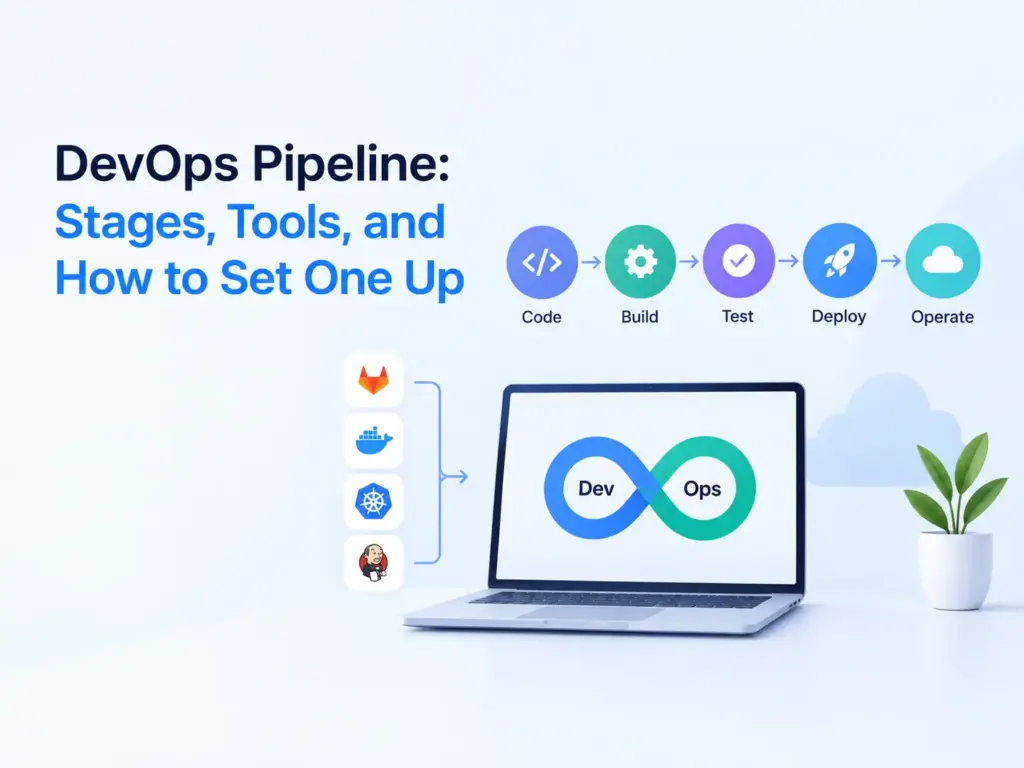
DevOps pipeline: stages, tools, and how to set one up
A DevOps pipeline is an automated path that takes code from a developer’s laptop to production. Every push triggers the same steps: build, test, security checks, and deploy. If a step fails, the change stops and the team gets told. The goal is small, safe releases that happen often instead of big risky ones.
Last updated: September 2026
Most guides stop at a diagram with a few arrows. This one adds a working example, a tool comparison with a clear opinion, common mistakes, security, metrics, and a realistic idea of time and cost.
What is a DevOps pipeline?
A DevOps pipeline is a set of automated steps that turns a code change into a running release. DevOps is the habit of developers and operations sharing responsibility for shipping. The pipeline is the machinery that makes that habit repeatable.
Picture the alternative. Someone builds the app on their laptop, uploads it to a server, restarts a service, and hopes nothing breaks. It works until that person goes on leave. In a pipeline, the same steps live in a file in your repository, so they’re reviewed, versioned, and run the same way every time.
What are the stages of a DevOps pipeline?
Most pipelines have seven or eight stages: source, build, test, security checks, package, deploy, and monitor. The names change between teams, but the order rarely does.
- Source. A push or pull request in Git triggers the run. Branch rules and code review happen here.
- Build. Install dependencies and compile (npm ci, mvn package, pip install -r requirements.txt) so you know the code builds on a clean machine.
- Test. Run fast unit tests first, then slower integration tests. Stop at the first failure.
- Security checks. Scan dependencies, secrets, and container images.
- Package. Produce one versioned artifact, usually a Docker image pushed to a registry.
- Deploy to staging. Release the artifact to an environment that looks like production and run smoke tests.
- Deploy to production. Automatic, or after a manual approval.
- Monitor. Watch error rates, latency, and logs after release, and feed what you learn into the next change.
What does a simple pipeline look like in practice?
Take a Node.js API hosted on GitHub. The job below runs on every pull request and on every push to main. Action and Node versions move on, so check the current major versions before you copy it.
name: ci
on:
  pull_request:
  push:
    branches: [main]
jobs:
  test:
    runs-on: ubuntu-latest
    steps:
      - uses: actions/checkout@v4
      - uses: actions/setup-node@v4
        with:
          node-version: 20
          cache: npm
      - run: npm ci
      - run: npm test
      - run: npm audit --audit-level=high
The jobs you’d add next build a Docker image tagged with the commit SHA, push it to a registry, deploy to staging, run a smoke test, and wait for someone to approve production. That’s the whole idea. Everything else is detail.
Mobile apps add two wrinkles. iOS builds need macOS runners and code signing, and app store review means you can’t roll back in minutes. If you’re building a mobile product, ask whoever builds it who owns the signing keys and the release pipeline. It’s a scoping question for any mobile app development services partner, including us.
What is the difference between CI, CD, and CI/CD?
CI merges and tests code often. CD gets tested code ready to release, or releases it automatically. CI/CD is both as one flow.
Continuous integration means everyone merges small changes to the main branch often, and each merge triggers a build and tests. It catches “works on my machine” problems within minutes instead of at release time.
Continuous delivery means every change that passes the pipeline is ready to go live, and a person decides when. Continuous deployment removes that person: a change that passes every check goes to production on its own.
“CD” is used for both, so ask which one someone means. Our view is that most teams should aim for continuous delivery first, with a one-click production approval. Move to full continuous deployment when your tests and monitoring are good enough that you’d sleep through a release.
Which tools should you use to build a DevOps pipeline?
For a small team, use the CI tool built into where your code lives: GitHub Actions if you’re on GitHub, GitLab CI/CD if you’re on GitLab. Don’t set up Jenkins on day one.
| Tool | Where it runs | Config file | Good fit | Watch out for |
|---|---|---|---|---|
| Jenkins | Your own server or cluster | Jenkinsfile | Custom needs, on-premise builds, existing Jenkins skills | You own upgrades, plugins, and server security |
| GitHub Actions | GitHub-hosted or your own runners | YAML in .github/workflows | Teams already on GitHub | Private repo minutes are metered, third-party actions need pinning |
| GitLab CI/CD | GitLab SaaS or self-managed | .gitlab-ci.yml | Teams using GitLab for code and issues | Ties your pipeline to GitLab |
| CircleCI | CircleCI cloud or your own runners | .circleci/config.yml | Teams that want fast, cacheable builds as a separate tool | Extra vendor, and credit-based pricing needs watching [VERIFY] |
| Azure DevOps Pipelines | Microsoft-hosted or self-hosted agents | azure-pipelines.yml | Microsoft, .NET, and Azure shops | More concepts to learn if you’re new to the Microsoft stack |
Jenkins isn’t bad. It’s the right pick if you need builds on your own hardware, have unusual requirements, or already have people who know it. But you’re then running a server: upgrading it, patching plugins, and securing it. For a five-person startup that’s a tax with little return. CircleCI is worth a look when build speed is your main pain and you’d rather keep CI separate from your code host. The hosted tools have free tiers, but limits change, so check the current pricing pages before you commit [VERIFY].
The CI tool is only one part. You’ll also want a container registry, infrastructure defined in code (Terraform is the common choice), and monitoring. You don’t need Kubernetes for any of it. A single VM or a managed service like AWS ECS or Google Cloud Run is enough for most early products. If the deploy target is your main worry, that’s a cloud design question, and our cloud application development services page covers the setups we work with. For syntax, the official docs for GitHub Actions and Jenkins Pipeline are the best place to start.
What are the best practices for a DevOps pipeline?
Keep it fast, keep it honest, and keep it in code. These habits matter most.
Fail early. Put linting and unit tests first, since they finish in seconds, and save slow tests for later. A common rule of thumb is to keep the main run under about ten minutes. Past that, people start merging without waiting for the result.
Build once and deploy the same artifact to every environment. If you rebuild for production, what you tested is not what you shipped. Differences between environments should come from configuration, not code.
Keep secrets out of the repo. Use your CI tool’s secret store or a vault, and rotate anything that was ever committed by mistake.
Have a rollback you’ve actually tried. Redeploying the previous image tag, or switching off a feature flag, should take minutes and shouldn’t need the one person who knows how. Test it before you need it.
Plan for load before big launches, because functional tests won’t show what happens at ten times normal traffic. For an example of planning scale up front, see our fintech app case study.
What are the most common DevOps pipeline mistakes?
Most pipeline problems come from tests you can’t trust, releases you can’t undo, and pipelines nobody owns.
The classic one is a test that depends on a live database or a shared staging service. It passes on Monday, fails on Tuesday because someone changed the data, and the team learns to click re-run. Give tests a fresh database on every run, using a service container in CI or a library like Testcontainers.
Flaky tests follow. Once red builds feel normal, people stop believing real failures. Quarantine a flaky test, then fix it or delete it.
Auto-deploying to production with thin tests and no alerts is another. So is pasting a 400-line YAML file from a blog post that nobody on the team understands.
The quietest mistake is treating the pipeline as a one-time project. Runner images age, dependencies need updates, and someone has to own it. Even 10 percent of one person’s time is better than nobody’s.
How do you add security to a DevOps pipeline (DevSecOps)?
Run small automated security checks at every stage instead of one big review at the end. That’s what DevSecOps means in practice.
On every pull request, scan for committed secrets (gitleaks, or GitHub’s built-in secret scanning) and vulnerable dependencies (Dependabot, npm audit, pip-audit). Add static analysis with CodeQL, Semgrep, or SonarQube when you’re ready. At package time, scan the container image with Trivy. If you use Terraform, Checkov can flag risky settings before they reach the cloud.
Then look at the pipeline itself, because it holds credentials and that makes it a target. Use OIDC so the pipeline gets short-lived cloud credentials instead of long-lived keys stored as secrets. Give every token the least access it needs. Pin third-party actions to a full commit SHA, since a tag can be moved.
There’s a trade-off. Scanners are noisy, and if you switch everything on with strict rules on day one, developers start ignoring the output or turning checks off. Begin with secrets and dependencies, fail the build only on high severity findings, and widen from there.
What are DORA metrics, and how do you track them?
DORA metrics are the delivery measures from Google’s DevOps Research and Assessment program: how fast changes reach production, how often you deploy, how often releases fail, and how quickly you recover.DORA’s own history page says the set now has five metrics: change lead time, deployment frequency, failed deployment recovery time, change fail rate, and deployment rework rate.
Your pipeline already knows two of them: deployment frequency is the count of successful production deploys, and lead time is the gap between commit and deploy. Failure rate and recovery time come from your incident log. A spreadsheet is fine for a small team.
Use the numbers to watch your own trend, not to rank people. Deployment frequency can be inflated with tiny commits, and change fail rate looks great if you ship nothing. Read them together.
How much does a DevOps pipeline cost, and how long does it take?
For a small team, tools cost little or nothing at the start. The real cost is engineer time: a basic pipeline takes a day or two, and a production-ready one takes a few weeks. These are rough planning estimates from general practice, not survey data [VERIFY against your stack].
Tests and a build on every pull request, for one repository, take half a day to two days if you already have tests. If you don’t, writing them is the real work. Automatic deploys to staging with containers take one to two weeks including the infrastructure. Production deploys with approval, rollback, security scans, and basic alerting take roughly three to six weeks for one service. More services take longer, though templates help.
Running costs are hosted runner minutes, registry storage, and monitoring, and they grow with build frequency and test length. A self-hosted Jenkins server has a small hosting bill and a larger hidden one: someone’s time to keep it patched.
If you’re building a first version through MVP development services, keep the pipeline small: tests on every push and a one-click deploy. It can grow with the product. And if you’d like a second opinion on a setup you already have, you can talk to our engineers.
How do you get started with a DevOps pipeline?
Start with CI on your main branch, then deploy to staging, then to production. Don’t try to build everything at once.
In week one, get tests running on every pull request, protect the main branch, and require passing checks before merge. In week two, package the app as a Docker image, push it to a registry, and deploy to staging on every merge. In week three, add a production deploy with manual approval, a rollback step, and basic alerts on error rate and uptime. After that, add security scans, start tracking DORA numbers, and work on speed with caching and parallel tests.
If you’re building a product from scratch, set the pipeline up in the first sprint, before there’s legacy to work around. Our custom software development services page describes how we work DevOps practices into project delivery.
Key takeaways
Start small: tests on every pull request first, scripted deploys second. Use the CI tool that comes with your code host and skip Jenkins until you have a real reason. Build once, deploy the same artifact everywhere, and practise the rollback. Track a few DORA numbers by hand and watch the trend, not the target.
Frequently asked questions
Is a DevOps pipeline the same as a CI/CD pipeline?
Mostly. A CI/CD pipeline covers build, test, and release. A DevOps pipeline often includes more around it, like infrastructure as code, monitoring, and feedback. In practice people use the terms interchangeably, so ask what someone includes before you compare notes.
Does a small team or startup need a pipeline?
Yes, a simple one. Even two developers benefit from tests running on every push and a scripted deploy. You don’t need Kubernetes or ten stages. A single workflow file that tests and deploys to one server removes most manual mistakes.
Jenkins or GitHub Actions: which is better?
For most new projects on GitHub, GitHub Actions, because there’s no server to run. Jenkins is better when you need full control, on-premise builds, or have years of existing pipelines and Jenkins skills. Neither is better in general, it depends on your setup.
What is the difference between continuous delivery and continuous deployment?
In continuous delivery, every passing change is ready to release, but a person approves the production deploy. In continuous deployment, there’s no approval step: a change that passes all checks goes live automatically. Many teams start with delivery and move to deployment later.
How long should a pipeline take to run?
A common rule of thumb is under ten minutes for the main build and test run. Slower pipelines get skipped or worked around. If yours takes longer, cache dependencies and run tests in parallel first. Move slow end-to-end tests to a separate scheduled run.
Can you build a pipeline without Docker or Kubernetes?
Yes. A pipeline can run tests and copy a build to a plain server over SSH. Docker makes builds repeatable, and Kubernetes helps at larger scale, but neither is required. Add them when a real problem, like inconsistent environments, calls for it.