
 Mobile App Development
 Artificial Intelligence
 Software Development
 Generative AI
 QA & Testing
 UI/ UX Design
 IoT App Development
 Cloud App Development
 MVP Development
 SEO Services
 AI Code Optimization
 Food Delivery
 Taxi Booking
 E-Commerce
 Mobile Game
 Logistics
 Real Estate
 Healthcare
User Experience (UX) is evolving faster than ever. Today’s users expect apps that load quickly, respond instantly, adapt intelligently, and feel almost “alive.” With rising competition across industries, the only apps that stand out are those built with future-ready UX design trends at their core.
In 2025 and beyond, companies are shifting from traditional user interface design to smart, intuitive, intelligent, and experience-driven digital products. This blog dives deep into the top UX design trends shaping the future of modern app interfaces, enriched with advanced insights, examples, and practical explanations.
AI-Powered UX: The Revolution Behind Smart Interfaces
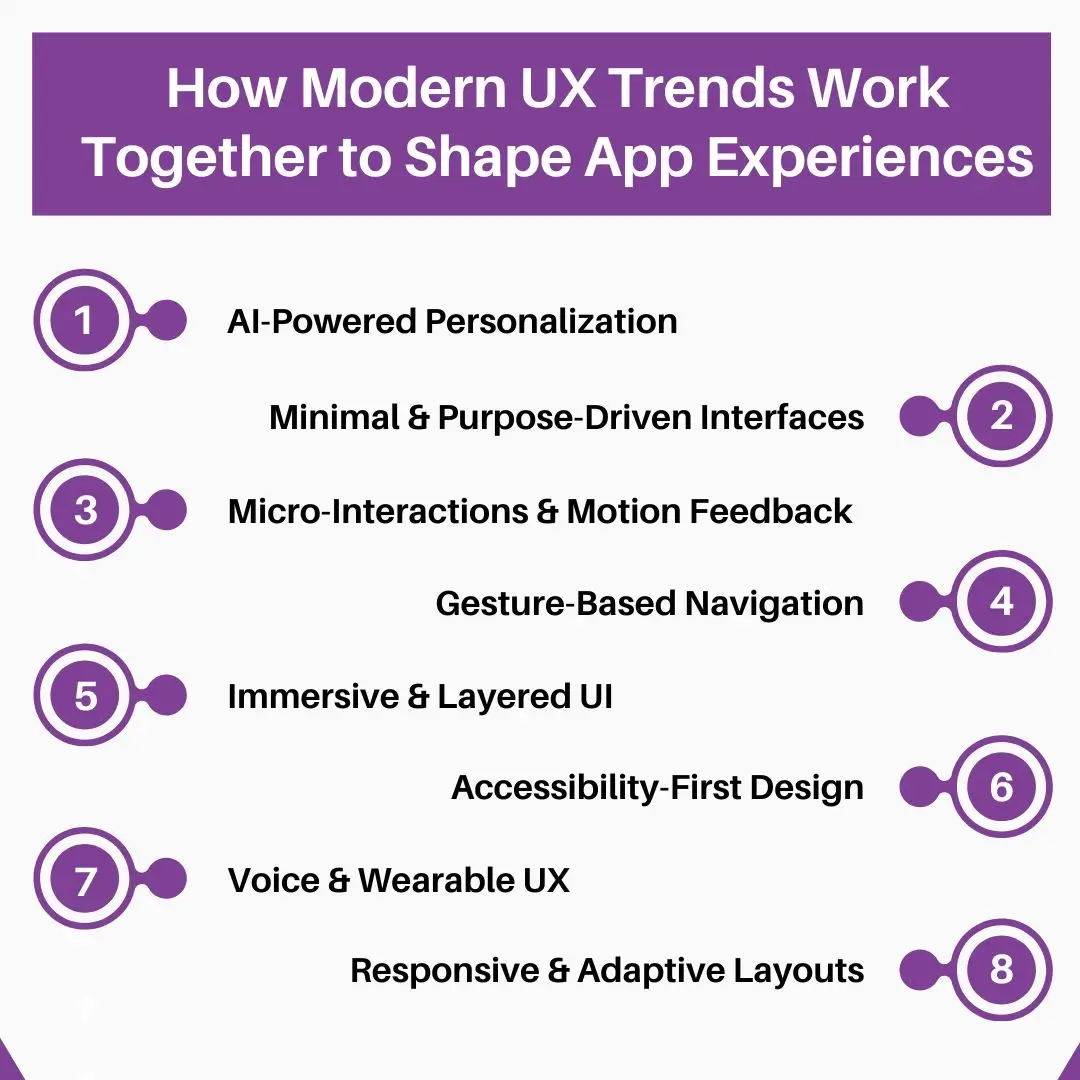
Artificial intelligence is rewriting the rules of UX design. Modern apps no longer react to user input—they predict, adapt, and automate user journeys.
How AI Enhances UX in Real-Time
AI delivers dynamic and personalized experiences by:
- Predicting user intent using machine learning
- Recommending content based on behavior
- Adapting UI layouts automatically
- Optimizing workflows for efficiency
- Understanding emotional patterns using sentiment analysis
Real-World Examples
- Netflix uses AI to personalize thumbnails and content placement.
- Spotify recommends playlists based on mood and listening history.
- Banking apps use AI to predict expenses and provide insights.
Deep Benefit
AI transforms static interfaces into living, learning ecosystems that evolve over time.
Modern App Interface Design: Minimalism with Meaning
Minimalism today is more than just empty space—it’s about clarity, purpose, and eliminating friction.
Core Principles of Advanced Minimalism
- Essentialism: Only keep what users actually need.
- Functional Typography: Large, bold text that guides attention naturally.
- Visual Priority: Color and contrast used strategically, not decoratively.
- Smart Spacing: Whitespace improving readability and stress-free scanning.
- Meaningful Simplification: Simplifying processes, not just visuals.
Examples
- Google’s Material Design uses layered minimalism for clarity.
- Apple UI relies on whitespace and typography to create a premium feel.
Why It Works
Modern minimalism improves cognitive load, meaning users think less and complete tasks faster.
Read More: Build vs Buy Software: Pros, Cons, and Business Use Cases
Micro-Interactions: Making Apps Feel Alive
Micro-interactions are tiny design moments that enhance emotional engagement.
Where Micro-Interactions Create Impact
- Button reactions (press, hover, ripple effects)
- Loading animations (fun, informative, or subtle)
- Swipe transitions creating smoother navigation
- Haptic feedback for confirmation
- Dynamic error messages guiding users instantly
Advanced Micro-Interaction Patterns
- Emotion-based animations responding to user actions
- Context-aware hints appearing only when needed
- Progress indicators that evolve with behavior
- Personalized micro-animations based on usage patterns
Why They Matter
Micro-interactions turn basic tasks into delightful experiences, increasing satisfaction and retention.
Gesture-Based Navigation: Moving Beyond Buttons
Traditional tap-based navigation is now replaced by fluid gesture-driven interactions.
Modern Gesture Trends Dominating Apps
- Swipe gestures to navigate, delete, or take quick actions
- Long-press gestures revealing hidden options
- Drag-and-drop for organizing items
- Pinch gestures for zooming or triggering advanced modes
- Edge-swipes for multi-level navigation menus
Why Gestures Improve UX
- They reduce space occupied by buttons.
- They create smoother, more natural workflows.
- They mimic real-world physical movement—making digital interaction intuitive.
Examples
- Instagram’s swipe actions for stories
- iOS gesture navigation replacing home button
- Notion’s drag-and-drop block system
Immersive UI: Where Experience Becomes Interaction
Immersive UI combines depth, motion, and visual layering to create interfaces users can “feel.”
Components of Immersive UI
- Interactive 3D graphics
- Soft motion transitions
- Depth-based layers creating a sense of space
- Parallax effects based on user movement
- AR-assisted elements blending virtual + physical environments
Industry Applications
- Retail uses AR try-ons.
- Real estate apps offer 3D walk-throughs.
- Gaming uses responsive motion UIs.
Why Immersive UI Works
It builds emotional engagement and makes experiences memorable.
UX for Wearable Devices: Designing for Micro-Moments
Wearables require designers to rethink traditional interaction patterns.
Key Wearable UX Strategies
- Glanceable information: Users expect instantly digestible data.
- Hands-free interactions: Voice, gesture, or auto-activation.
- Contextual notifications: Highly personalized alerts.
- Minimal-input workflows: Tiny tasks that take seconds, not minutes.
Examples
- Apple Watch uses haptics for alerting without visual overload.
- Fitbit uses micro animations to motivate fitness actions.
Deeper Insight
Wearable UX focuses on “micro-moments”—the small but crucial interactions people perform repeatedly each day.
Accessibility in UX: Inclusive Design Becomes Mandatory
Accessibility ensures apps are usable by everyone, regardless of ability.
Advancing Accessibility Standards
- Voice navigation for hands-free interaction
- High-contrast and large-text modes
- Color-blind safe color palettes
- Accessible form fields with clear labels
- Keyboard-only accessibility
- Screen reader compatibility with semantic structure
Why Accessibility Is Crucial
- Expands audience reach dramatically
- Improves SEO ranking
- Aligns with global regulations (ADA, WCAG)
- Builds brand trust and credibility
You May Also Like: How Much Does an App Development Cost in 2025?
Dark Mode UI: Elegance Meets Performance
Dark mode continues to grow due to its aesthetic, functional, and ergonomic benefits.
Modern Enhancements in Dark Mode Design
- Adaptive dark mode: Automatically changing based on ambient light.
- Soft color palettes: Avoid pure black, use deep gray for readability.
- Glow effects: Make key elements stand out in darkness.
- Depth layering: Helps maintain visual hierarchy.
Why Users Prefer It
- Less eye strain
- Premium and modern appearance
- Saves battery on OLED screens
Personalization in App Design: Crafting Tailored Journeys
Users expect experiences designed just for them. Modern apps use AI and analytics to personalize:
Types of Personalization
- Predictive content: recommender systems
- Adaptive UI: layout changes to match user behavior
- Theme personalization: users choose the color palette
- Smart notifications: relevant alerts based on context
- Customized onboarding: guides tuned to prior usage
Impact on UX
Personalization boosts:
- Engagement
- Conversion
- Retention
- Trust
Voice-First UX Patterns: Beyond Screens
Voice-first experiences are expanding with the rise of Alexa, Siri, and Google Assistant.
Advanced Use Cases
- Voice search integrated inside apps
- Voice-assisted navigation for actions like booking, ordering, or controlling settings
- Hybrid voice + touch UIs combining efficiency with control
- Real-time voice feedback (e.g., reading notifications aloud)
Industries Benefiting Most
- Healthcare (hands-free interaction)
- Logistics (quick updates)
- Travel (voice itineraries)
- Smart homes (voice-controlled UI)
Voice-first UX increases accessibility and reduces friction.
Responsive App Design: Adapting Seamlessly Across Devices
Modern users shift between multiple devices daily. Responsive UX ensures the experience remains consistent.
Advanced Responsive UI Features
- Fluid components: Elements resize gracefully.
- User journey continuity: Start action on one device, complete on another.
- Auto-layout systems: Dynamic grid changes based on screen shape.
- Adaptive typography: Text adjusts for readability.
- Platform-inspired micro interactions: Apps feel native on every OS.
Result
More accessibility, smoother usability, and lower abandonment rates.
Latest UI Design Patterns Influencing Modern Apps
These emerging UI patterns are shaping next-generation interfaces:
Trending UI Patterns
• Neumorphism 2.0
Soft shadows, subtle highlights—modernized for better accessibility.
• Glassmorphism
Frosted glass, transparency, and blurred layers for a premium look.
• Claymorphism
Soft 3D elements resembling clay—friendly and modern.
• Bento UI
Borrowed from Japanese bento boxes: clean, modular, data-packed layouts.
• Floating Navigation Bars
Helping mobile users access features faster, with less scrolling.
Why These Patterns Matter
They improve:
- Visual hierarchy
- Interaction depth
- Aesthetic appeal
- User engagement
Read More: How Much Does It Cost to Build a Fantasy Sports App?
User-Centered Design Approach: The Foundation of Modern UX
User-centered design means building around the user, not the product.
Deep Dive into UCD Process
- User behavior analysis
- Empathy mapping to understand pain points
- Wireframe testing before development
- Iterative prototyping
- Usability testing with real users
- Continuous improvement based on analytics
Why This Approach Works
It reduces design flaws, speeds development cycles, and creates products users truly want.
Future-Ready App Interface Design: What’s Coming Next?
The next phase of UX will be powered by intelligence, emotion, and autonomy.
Future UX Trends Emerging Fast
- Emotion-detecting UI responding to mood
- AI copilots guiding app usage
- Zero UI where screens fade away and systems respond automatically
- Sensory experiences using sound + touch + voice
- Hyper-personalized interfaces fully adaptive per user
- Predictive design systems anticipating needs before users express them
The future of UX lies in seamlessness, intelligence, and automation.
Improving Mobile App UX with New Trends
Mobile UX continues to dominate because mobile remains the world’s primary device.
Advanced Mobile UX Enhancements
- Instant gestures for quick actions
- Fast-loading UI frameworks like Flutter & Jetpack Compose
- One-hand usability improvements
- Adaptive touch zones for different hand sizes
- Smart form autofill eliminating tedious input
- Context-aware suggestions based on location/time
Result
Better retention, higher conversion, smoother usability—across all industries.
Final Thoughts: Build Future-Ready App Experiences with LuminoGuru
As UX design rapidly transforms, forward-thinking businesses must embrace the latest trends to stay ahead. From AI-powered UX to immersive UI, accessibility-first design, gestures, personalization, and future-ready dynamic interfaces—the world of mobile UX is evolving into something more intelligent and more human.
At LuminoGuru, we specialize in building modern, engaging, and scalable apps powered by the latest UX innovations. Our team ensures your product not only meets current industry trends—but leads them.
If you’re planning to develop a next-gen mobile app or upgrade an existing one, LuminoGuru can help you design experiences that are intuitive, immersive, and built for the future.
FAQs
1. Why are UX design trends important for modern mobile apps?
UX trends ensure your app stays competitive, intuitive, and user-friendly. They help increase engagement and retention. LuminoGuru uses cutting-edge UX practices to build future-ready apps.
- How do micro-interactions improve app performance and user satisfaction?
Micro-interactions add delight, guide user actions, and create smooth experiences. At LuminoGuru, we craft polished interactions that make apps feel fast and intelligent.
- What makes minimalistic UI a preferred choice in modern app design?
Minimalistic UI reduces cognitive load and boosts usability. LuminoGuru’s design experts create clean, modern, and immersive interfaces tailored to business goals.
- How does personalization affect app engagement?
Personalization creates meaningful interactions and drives repeated usage. LuminoGuru integrates AI-powered personalization into apps to deliver richer user experiences.
- Why should businesses adopt accessibility-first UX design?
Accessibility expands your user base and improves app usability for all. LuminoGuru follows global accessibility standards to ensure every app is inclusive and compliant.
- How can LuminoGuru help me implement the latest UX design trends?
From UX research to pixel-perfect UI, LuminoGuru builds modern, scalable mobile apps using the latest design trends and technologies. Get in touch to elevate your product.